Skip to the content
PCBKitNew board
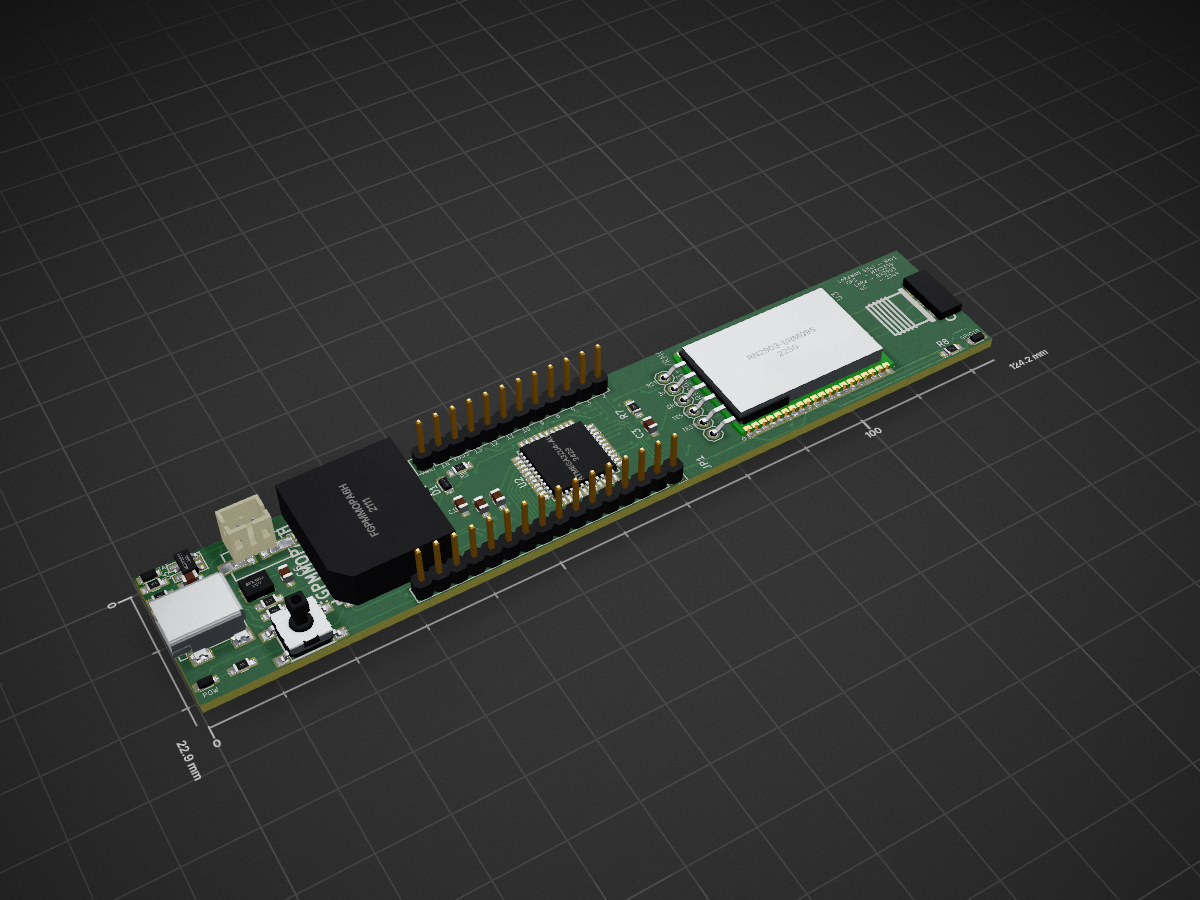
2 layers124.2 × 22.9 mmLoraWAN Stick LoraWAN Stick, the printed circuit board in 3D

LoraWAN Stick LoraWAN Stick

PCBench/PCBench21

resolution = [0.5, 0.5] pcbfolder = '../PCBs/' pcbnames = ["1Bitsy1bitsy"] iters = 30 env = PCBRoutingEnv(resolution=resolution, pcbfolder=pcbfolder, pcbnames=pcbnames) obs, info = env.reset() for in range(iters): act =…

Size
124.2 × 22.9 mm
Copper layers
2
Thickness
1.6 mm
Parts
31
Nets
83
Pads
217
Tracks, vias
631, 81
Routed
Yes
KiCad
KiCad 5 (file 20171130)
Created
28 Mar 2023
Updated
18 Jan 2024

Overview

LoraWAN Stick LoraWAN Stick is an open-source printed circuit board by PCBench, from the PCBench/PCBench repository on GitHub, published under the MIT licence. It is a 2-layer board of 124.2 × 22.9 mm with 31 parts on 83 nets, routed with 631 tracks and 81 vias.

It is built around the ATMEGA32U4-AU, MCP73831 and SPX3819S. Its parts include 9 resistors, 6 capacitors, 5 ICs, 4 diodes and 2 connectors. It belongs with the radio and wireless boards and the AVR (ATmega, ATtiny) boards of this library.

Main components

3

README

README.md

PCBench: A Dataset for Printed Circuit Board Routing

PCBench is a dataset for PCB routing task, it includes a dataset consisting of 164 printed circuit boards (PCB), a data augmentation script to expand the dataset for supervised learning (SL) tasks, and a reinforcement learning (RL) environment.

Dataset

Folder Structure

All the PCB designs in our dataset are stored in the folder PCBs, where each PCB design is stored in a subfolder named {author/org}_{PCB_name}_{design_version(optional)}. Below is the folder structure of the dataset.

text
├── PCBs
│   ├── master_metadata.json
│   ├── subfolder1
│   │   ├── raw.kicad_pcb
│   │   ├── processed.kicad_pcb
│   │   ├── final.json
│   │   ├── metadata.json
│   │   ├── visual.png
│   ├── subfolder2
│   │   ├── raw.kicad_pcb
│   │   ├── processed.kicad_pcb
│   │   ├── final.json
│   │   ├── metadata.json
│   │   ├── visual.png
│   ├── ...

The raw.kicad_pcb is the raw PCB design file, process.kicad_pcb is the file after cleaning up, final.json stores only routing-related information used for ML tasks. metadata.json stores the meta information for each single PCB design. visual.png is a visualization of each single PCB design. master_meta.json contains metadata of all PCBs and global-level information.

PCB Routing Description Language (PCB-RDL)

We propose a JSON specification (final.json for each PCB design) called the PCB Routing Description Language (PCB-RDL) that expresses a PCB routing problem and its solutions intuitively using basic concepts in order to facilitate research into automated PCB routing using ML. Following figure shows is an example of PCB with marked components in PCB-RDL (Left) and it corrsponding PCB-RDL (Right).

PCB example

Data Augmentation

Run

The augmentation data can be generated with the script Scripts/Data_augmentation/augmentation.py. To generate 3 samples by randomly extracting 50% nets from the PCB 1Bitsy_1bitsy, please run the following command

text
cd Scripts/Data_augmentation/
python augmentation.py --num_samples 3 --net_ratio 0.5 --pcb_name 1Bitsy_1bitsy

Output

All the generated PCBs will be stored in the folder named augmented_data under Scripts/Data_augmentation/. In augmented_data, all the generated samples will be stored in a subfolder with the name of selected PCB. Each generated sample has the name sample_index.json. For example, the above command will generate the following file under Scripts/Data_augmentation/

text
├── augmented_data
│   ├── 1Bitsy_1bitsy
│   │   ├── 1.json
│   │   ├── 2.json
│   │   ├── 3.json

RL environment

Installation

The RL environment requires Python >= 3.7. You can simply install the environment with the following commands:

text
git clone https://github.com/PCBench/PCBench.git
cd PCBench
python setup.py install

After installation, open a Python console and type

text
from RLEnv.EnvLayer.PCBRoutingEnv import PCBRoutingEnv

If no error occurs, you have successfully installed the PCB routing environment.

API Usage

The following content shows an example of API usage of PCBRoutingEnv.

text
from RLEnv.EnvLayer.PCBRoutingEnv import PCBRoutingEnv
import random

resolution = [0.5, 0.5]
pcb_folder = '../PCBs/'
pcb_names = ["1Bitsy_1bitsy"]
iters = 30
env = PCBRoutingEnv(resolution=resolution, pcb_folder=pcb_folder, pcb_names=pcb_names)
obs, info = env.reset()
for _ in range(iters):
    act = random.randint(0,5)
    obs, rew, terminal, _, info = env.step(act)
    if terminal:
        env.reset()

You can find more examples of customizing functions of reward and state observation from RLEnv/examples.ipynb.

Parts

31
QtyValueFootprintReferences
410uFCapacitors_SMD:C_0603_HandSolderingC1, C2, C5, C6
3100kResistors_SMD:R_0603_HandSolderingR3, R6, R7
31kResistors_SMD:R_0603_HandSolderingR4, R8, R9
21uFCapacitors_SMD:C_0603_HandSolderingC3, C4
222Resistors_SMD:R_0603_HandSolderingR1, R2
110kResistors_SMD:R_0603_HandSolderingR5
1ATmega32U4-AUHousings_QFP:TQFP-44_10x10mm_Pitch0.8mmU2
1CON-SMAmisc:CON-SMA-EDGEANT1
1CONN_01X16Pin_Headers:Pin_Header_Straight_1x16JP1
1DIODESCHDiodes_SMD:D_0805D1
1FGPMMOPA6HFGPMMOPA6H:FGPMMOPA6HU1
1JST_2PIN-SMTadafruit:adafruit-JST-PH-2-SMTCN1
1LED-BATDiodes_SMD:D_0805D2
1LED-POWDiodes_SMD:D_0805D4
1LED-REDDiodes_SMD:D_0805D3
1MCP73831misc:MCP73831U5
1PINHD-1X12Pin_Headers:Pin_Header_Straight_1x12JP3
1PINHD-1X6adafruit:adafruit-1X06JP2
1RN2903-I/RM095RN2903-I_RM095:XCVR_RN2903-I%2fRM095U3
1SPSTopen-project:SW_PUSH_SMDSW1
1SPX3819misc:SPX3819U4
1USB_OTGConnect:USB_Mini-BP1

Questions

How big is the LoraWAN Stick LoraWAN Stick PCB?

It measures 124.2 × 22.9 mm and has 2 copper layers, 1.6 mm thick.

What parts does the LoraWAN Stick LoraWAN Stick use?

31 parts, built around the ATMEGA32U4-AU, MCP73831 and SPX3819S. The full list of its parts is on this page, with links to each part's symbol and footprint where PCBKit's library has them.

Where can I download the LoraWAN Stick LoraWAN Stick KiCad files?

From the PCBench/PCBench repository on GitHub, at the commit this page was made from: the board is PCBs/LoraWAN-Stick_LoraWAN-Stick/processed.kicad_pcb. PCBKit opens the board in the browser, with nothing to install.

Can I use the LoraWAN Stick LoraWAN Stick design in my own project?

Its repository publishes it under the MIT licence: you may reuse it on that licence's terms (keep the author's notice, and for a copyleft licence share your changes alike).
More from PCBench/PCBench

12
  • 2 layers398.2 × 398.2 mmLargeWordClock LargeKickstarter, the printed circuit board in 3D

    LargeWordClock LargeKickstarter

    PCBench/PCBench

    resolution = [0.5, 0.5] pcbfolder = '../PCBs/' pcbnames = ["1Bitsy1bitsy"] iters = 30 env = PCBRoutingEnv(resolution=resolution, pcbfolder=pcbfolder, pcbnames=pcbnames) obs, info = env.reset() for in range(iters): act =…

    1,591 parts21MIT
  • 4 layers95 × 95 mmRaw, the printed circuit board in 3D

    Raw

    PCBench/PCBench

    resolution = [0.5, 0.5] pcbfolder = '../PCBs/' pcbnames = ["1Bitsy1bitsy"] iters = 30 env = PCBRoutingEnv(resolution=resolution, pcbfolder=pcbfolder, pcbnames=pcbnames) obs, info = env.reset() for in range(iters): act =…

    455 parts21MIT
  • 2 layers90 × 90 mmMod12003 mod12003, the printed circuit board in 3D

    Mod12003 mod12003

    PCBench/PCBench

    resolution = [0.5, 0.5] pcbfolder = '../PCBs/' pcbnames = ["1Bitsy1bitsy"] iters = 30 env = PCBRoutingEnv(resolution=resolution, pcbfolder=pcbfolder, pcbnames=pcbnames) obs, info = env.reset() for in range(iters): act =…

    452 parts21MIT
  • 2 layers88.9 × 114.3 mmRaw, the printed circuit board in 3D

    Raw

    PCBench/PCBench

    resolution = [0.5, 0.5] pcbfolder = '../PCBs/' pcbnames = ["1Bitsy1bitsy"] iters = 30 env = PCBRoutingEnv(resolution=resolution, pcbfolder=pcbfolder, pcbnames=pcbnames) obs, info = env.reset() for in range(iters): act =…

    190 parts21MIT
  • 2 layers100 × 100 mmMod1base mod1base, the printed circuit board in 3D

    Mod1base mod1base

    PCBench/PCBench

    resolution = [0.5, 0.5] pcbfolder = '../PCBs/' pcbnames = ["1Bitsy1bitsy"] iters = 30 env = PCBRoutingEnv(resolution=resolution, pcbfolder=pcbfolder, pcbnames=pcbnames) obs, info = env.reset() for in range(iters): act =…

    187 parts21MIT
  • 6 layers117 × 55 mmKiwiSDR PCB kiwi, the printed circuit board in 3D

    KiwiSDR PCB kiwi

    PCBench/PCBench

    resolution = [0.5, 0.5] pcbfolder = '../PCBs/' pcbnames = ["1Bitsy1bitsy"] iters = 30 env = PCBRoutingEnv(resolution=resolution, pcbfolder=pcbfolder, pcbnames=pcbnames) obs, info = env.reset() for in range(iters): act =…

    173 parts21MIT
  • 4 layers143 × 74 mmKitspace lpa96, the printed circuit board in 3D

    Kitspace lpa96

    PCBench/PCBench

    resolution = [0.5, 0.5] pcbfolder = '../PCBs/' pcbnames = ["1Bitsy1bitsy"] iters = 30 env = PCBRoutingEnv(resolution=resolution, pcbfolder=pcbfolder, pcbnames=pcbnames) obs, info = env.reset() for in range(iters): act =…

    161 parts21MIT
  • 2 layers101.6 × 99.7 mmRaw, the printed circuit board in 3D

    Raw

    PCBench/PCBench

    resolution = [0.5, 0.5] pcbfolder = '../PCBs/' pcbnames = ["1Bitsy1bitsy"] iters = 30 env = PCBRoutingEnv(resolution=resolution, pcbfolder=pcbfolder, pcbnames=pcbnames) obs, info = env.reset() for in range(iters): act =…

    158 parts21MIT
  • 4 layers36.1 × 32.7 mmKitspace tri panel 4up r0.1, the printed circuit board in 3D

    Kitspace tri panel 4up r0.1

    PCBench/PCBench

    resolution = [0.5, 0.5] pcbfolder = '../PCBs/' pcbnames = ["1Bitsy1bitsy"] iters = 30 env = PCBRoutingEnv(resolution=resolution, pcbfolder=pcbfolder, pcbnames=pcbnames) obs, info = env.reset() for in range(iters): act =…

    157 parts21MIT
  • 2 layers101.6 × 99.7 mmKarabas nano karabas nano revB, the printed circuit board in 3D

    Karabas nano karabas nano revB

    PCBench/PCBench

    resolution = [0.5, 0.5] pcbfolder = '../PCBs/' pcbnames = ["1Bitsy1bitsy"] iters = 30 env = PCBRoutingEnv(resolution=resolution, pcbfolder=pcbfolder, pcbnames=pcbnames) obs, info = env.reset() for in range(iters): act =…

    147 parts21MIT
  • 4 layers65 × 60 mmReworkctf reworkctf, the printed circuit board in 3D

    Reworkctf reworkctf

    PCBench/PCBench

    resolution = [0.5, 0.5] pcbfolder = '../PCBs/' pcbnames = ["1Bitsy1bitsy"] iters = 30 env = PCBRoutingEnv(resolution=resolution, pcbfolder=pcbfolder, pcbnames=pcbnames) obs, info = env.reset() for in range(iters): act =…

    143 parts21MIT
  • 2 layers99.1 × 99.1 mmRaw, the printed circuit board in 3D

    Raw

    PCBench/PCBench

    resolution = [0.5, 0.5] pcbfolder = '../PCBs/' pcbnames = ["1Bitsy1bitsy"] iters = 30 env = PCBRoutingEnv(resolution=resolution, pcbfolder=pcbfolder, pcbnames=pcbnames) obs, info = env.reset() for in range(iters): act =…

    77 parts21MIT

Similar boards

  • 2 layers124.1 × 22.9 mmLoraWAN Stick, the printed circuit board in 3D

    LoraWAN Stick

    lostangles/LoraWAN-Stick

    Microcontroller + GPS Receiver + LoRaWAN radio

    37 parts4
  • 2 layers76.2 × 76.2 mmJotter RevC, the printed circuit board in 3D

    Jotter RevC

    SpatialExperienceGroup/jotter

    47 partsMIT
  • 2 layers196 × 104 mmHack fft, the printed circuit board in 3D

    Hack fft

    hack-apollo/hack_spectrum

    a music spectrum use esp32-pico-d4 and ws2812b.

    611 parts28GPL-3.0
  • 2 layers50 × 50 mmBreakout, the printed circuit board in 3D

    Breakout

    skorokithakis/A6-ESP8266-breakout

    A breakout board that includes an ESP8266 and an A6 GSM module, for easily making GSM-enabled applications (mirror)

    38 parts9BSD-2-Clause
  • 2 layers42 × 42 mmMotor, the printed circuit board in 3D

    Motor

    ErnestWang31/CLND1

    Custom Closed-Loop Driver for Stepper Motors

    52 parts2MIT
  • 2 layers24 × 36 mmLoRaModem, the printed circuit board in 3D

    LoRaModem

    wangyeee/OpenHardware

    Collections of hardware design related to my drone project.

    48 parts10BSD-3-Clause
  • 2 layers97.1 × 97.1 mmESP32 IMU Module V1.1, the printed circuit board in 3D

    ESP32 IMU Module V1.1

    shaun-lloyd/dev-ardupilot-obal

    ArduPi is an open hardware Raspberry Pi hat to run Ardupilot.

    87 parts2CC0-1.0
  • 2 layersCopycat, the printed circuit board in 3D

    Copycat

    FE3C61AD329B/RGT6

    A minimal system runs MicroPython using STM32F405RGT6

    37 parts