2 layers99.5 × 99.5 mm
SchematicKiCadProyect
dduarteCE/Robot-vacuum
Embedded Linux robotic vacuum system built with Yocto on Raspberry Pi 4, featuring autonomous navigation, audio playback, and remote control through a web interface.
42 parts1MIT

 c-lydia/ESP-ROS22
A tiny robot with IMU (MPU5060) and an ultrasonic sensor (HC-SR04), running on micro-ROS, communicating over UDP.
Wall e is an open-source printed circuit board by c-lydia, from the c-lydia/ESP-ROS2 repository on GitHub, published under the Apache-2.0 licence. It is a 2-layer board of 111.5 × 102 mm with 12 parts on 65 nets, routed with 337 tracks and 0 vias.
It is built around the ESP32-WROOM-32, HC-SR04 and MPU-6050. Its parts include 7 ICs and 4 connectors. It belongs with the robots and motor control and sensors and measurement boards and the ESP32 boards of this library.

























micro-ROS workspace for ESP32 (FreeRTOS + ESP-IDF) with ROS 2 Humble, including both the Wall-E control stack and the Gassify gas-robot stack.
For a user-focused setup and operation guide, see user_manual.md.
This repository includes:
firmware/custom/esp32_controllerfirmware/mcu_wssrc, build, installgas_robot_ws/srcgassify_model.mddocs/source/index.rstThe Gassify part of this repository focuses on gas-robot modeling and robot description assets alongside the existing Wall-E stack.
gas_robot_ws/srcgas_robot_ws/src/gas_robot_descriptiongas_sensor_link) in:
gas_robot_ws/src/gas_robot_description/gas_robot_description/src/description/gas_robot.urdf.xacrogassify_model.mdThe Sphinx site includes the same high-level concepts and firmware details in a published format.
/dev/ttyUSB0)Optional for CUDA/GPU workflows:
nvidia-container-toolkit)From the repository root:
docker compose up -dGPU/CUDA-enabled start (keeps default pipeline unchanged when not used):
docker compose -f docker-compose.yaml -f docker-compose.gpu.yaml up --build -dGPU image includes an object-detection-ready Python stack in this mode:
torch, torchvision, torchaudio)ultralytics (YOLO)opencv-python-headlessonnx and onnxruntime-gpu==1.18.1 (pinned)pycocotoolstensorrt==8.6.1 (pinned)To override TensorRT version, change TENSORRT_PIP_SPEC in docker/docker-compose.gpu.yaml.
To override ONNX Runtime GPU version, change ONNXRUNTIME_GPU_PIP_SPEC in docker/docker-compose.gpu.yaml.
Quick GPU check inside container:
docker exec -it micro_ros_workspace bash -lc "nvidia-smi"Quick Python GPU/object-detection check:
docker exec -it micro_ros_workspace bash -lc "python3 -c 'import torch, ultralytics, cv2; print(torch.__version__); print(torch.cuda.is_available()); print(ultralytics.__version__); print(cv2.__version__)'"Quick TensorRT check:
docker exec -it micro_ros_workspace bash -lc "python3 -c 'import tensorrt as trt; print(trt.__version__)'"docker exec -it micro_ros_workspace bashcd /micro_ros_ws
colcon buildsource /opt/ros/humble/setup.bash
source /micro_ros_ws/install/setup.bashIf you launch RViz or Gazebo GUI from the container and see Authorization required, but no authorization protocol specified, run xhost +si:localuser:root on the host before starting the container. This workspace uses X11 forwarding, and the container runs as root by default.
wall_e.launch.py now generates robot_description using the Python xacro API (xacro.process_file(...).toxml()) instead of shelling out to the xacro executable.gazebo_ros remains optional at launch time. If unavailable, launch continues with a clear log message.joint_state_publisher is disabled:
use_joint_state_publisher:=trueDockerfile (ros-humble-xacro, ros-humble-rviz2, ros-humble-gazebo-ros-pkgs, ros-humble-joint-state-publisher).If your currently running container was created before these package updates, rebuild it:
docker compose up --build -dKiCad is available in the workspace container and the PCB project is mounted at:
/micro_ros_ws/pcb/wall_e_pcb_v1.0docker exec micro_ros_workspace kicad-cli versiondocker exec micro_ros_workspace kicad-cli pcb drc /micro_ros_ws/pcb/wall_e_pcb_v1.0/wall_e.kicad_pcbdocker exec micro_ros_workspace kicad-cli pcb export gerbers /micro_ros_ws/pcb/wall_e_pcb_v1.0/wall_e.kicad_pcb --output /micro_ros_ws/pcb/wall_e_pcb_v1.0/gerbersxhost +si:localuser:root
docker exec -it micro_ros_workspace kicadInside the workspace container:
ros2 run micro_ros_setup configure_firmware.sh esp32_controller -t udp -i 192.168.1.2 -p 8888ros2 run micro_ros_setup build_firmware.shfirmware/freertos_apps/microros_esp32_extensions/build/esp32_controller.bin
firmware/freertos_apps/microros_esp32_extensions/build/esp32_controller.elfInside the workspace container (requires serial device access):
ros2 run micro_ros_setup flash_firmware.shIf your board is not /dev/ttyUSB0, update docker-compose.yaml device mapping or run a custom docker command with the correct --device mapping.
Inside the workspace container:
cd /micro_ros_ws/firmware/freertos_apps/microros_esp32_extensions
source /micro_ros_ws/firmware/toolchain/esp-idf/export.sh
idf.py -p /dev/ttyUSB0 monitor
You can also build then monitor:
idf.py build
idf.py -p /dev/ttyUSB0 monitorWokwi does not use /dev/ttyUSB0. It loads your firmware .bin/.elf directly.
wokwi.toml points to the generated firmware files:[wokwi]
version = 1
firmware = "firmware/freertos_apps/microros_esp32_extensions/build/esp32_controller.bin"
elf = "firmware/freertos_apps/microros_esp32_extensions/build/esp32_controller.elf"docker exec micro_ros_workspace bash -lc "cd /micro_ros_ws/firmware/freertos_apps/microros_esp32_extensions && source /micro_ros_ws/firmware/toolchain/esp-idf/export.sh && idf.py build"Start Wokwi from VS Code command palette: Wokwi: Start Simulator.
Read logs in VS Code Output panel, Wokwi channel (or Wokwi Terminal, depending on extension version).
If logs still do not appear, stop simulation, reload VS Code window, and start simulator again.
Both ESP32 controller apps (motor-enabled and sensor-only) include a browser-based WiFi provisioning system for easy credential setup without source code editing.
First Boot (No Credentials)
ESP32-Setup (open, no password)http://192.168.4.1/User Setup
ESP32-Setup networkhttp://192.168.4.1/Subsequent Boots
"wifi_creds"CONFIG_ESP_WIFI_SSID / CONFIG_ESP_WIFI_PASSWORD (for build-time defaults)The provisioning system includes:
nvs_read_wifi_creds(): Load SSID/password from flashnvs_write_wifi_creds(): Save credentials after form submissionfirmware/custom/esp32_controller/: Motor + sensor controller with full provisioningfirmware/freertos_apps/apps/esp32_controller/: Sensor-only reference variant (provisioning included)The compose service starts this automatically:
microros/micro-ros-agent:humble udp4 --port 9999You can check logs with:
docker logs -f micro_ros_agentThe firmware publishes raw sensor topics:
/imu/data (sensor_msgs/msg/Imu)/range/data (sensor_msgs/msg/Range)Host-side ROS 2 nodes can process these into cleaner and fused signals:
wall_e_ws/src/feedback/feedback/imu_filter.py
/imu/data/imu/filterwall_e_ws/src/feedback/feedback/ultrasonic_filter.py
/range/data/range/filterwall_e_ws/src/feedback/feedback/sensor_fusion.py
/imu/filter, /range/filter/fusion/height, /fusion/vertical_velocity, /fusion/debugThe board design lives in pcb/wall_e_pcb_v1.0.
The current schematic includes the ESP32 module, motor driver stages, the MPU6050, the HC-SR04 range sensor, and paired hall-effect sensors for wheel-speed or rotation feedback.
Use the KiCad project as the source of truth for connector pinouts, board placement, and DRC/GERBER work before changing firmware wiring assumptions.
This keeps firmware responsibilities focused on sensor I/O and control while allowing filter tuning on the host.
Current host-side runtime flow:
control/gamepad_node
/gamepadcontrol/robot_control_node
/gamepad, /range/filter, /imu/filter, /odom/cmd_vel, /servo_cmd/servo_cmd (std_msgs/msg/Float32, angle in degrees)localization/odometry_node
/cmd_vel, /imu/filter, /range/filter, /fusion/height, /fusion/vertical_velocity/odomlocalization/inverse_kinematic_node
/cmd_vel/motor_cmd (4-wheel command array)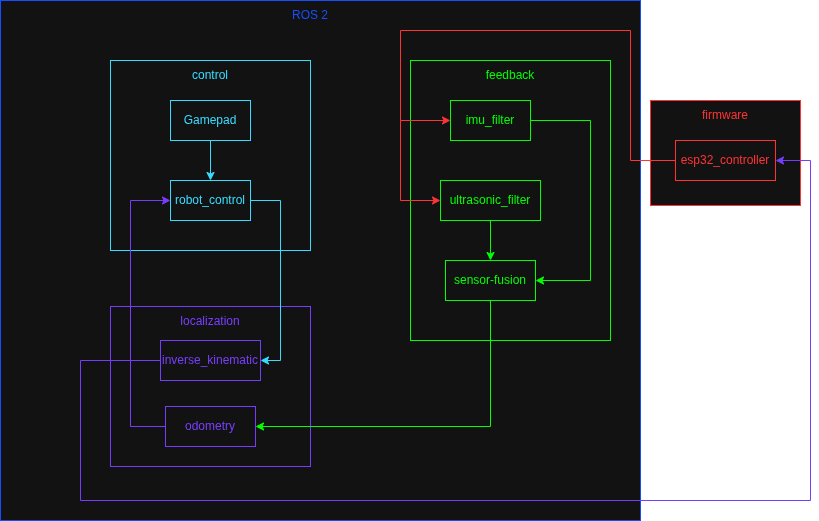
Flow summary:
esp32_controller publishes raw IMU and range data to ROS 2.imu_filter and ultrasonic_filter produce cleaner feedback streams.sensor_fusion combines filtered streams for downstream state estimation.odometry_node estimates vehicle state and publishes /odom.robot_control_node generates /cmd_vel using gamepad + safety + PI hold.robot_control_node also publishes /servo_cmd from gamepad axis input (with configurable limits/default).inverse_kinematic_node converts /cmd_vel into /motor_cmd for firmware actuation.docker exec -it micro_ros_workspace bash -lc "cd /micro_ros_ws && colcon build"docker exec -it micro_ros_workspace bash -lc "source /opt/ros/humble/setup.bash && source /micro_ros_ws/install/setup.bash && ros2 run micro_ros_setup build_firmware.sh"Confirmed firmware path in use is firmware/custom/esp32_controller.
MPU startup now includes gyro bias calibration (200 samples). Keep robot still at boot for best drift reduction.
Ultrasonic timeout message Ultrasonic timeout(wait high) means no rising edge was seen on ECHO.
After wiring/level correction, ultrasonic produced valid pulse widths around 344-401 us (~0.059-0.069 m in test setup).
Reboot right after Starting ROS node setup... was traced to watchdog interaction in startup; the firmware now logs watchdog delete/add status around ROS init.
NVS open for read failed: 0x1102 is expected when WiFi credentials are not yet stored in namespace wifi_creds.
Stop everything
docker compose downmicro_ros_setup not found
Source both setup files:source /opt/ros/humble/setup.bash
source /micro_ros_ws/install/setup.bashfile not found: [Errno 2] No such file or directory: 'xacro'
Install xacro in the running container (or rebuild image after pulling latest Dockerfile updates):apt-get update && apt-get install -y ros-humble-xacroPackage not found for rviz2 or gazebo_ros
Your container is missing GUI/simulation runtime packages. Rebuild with the updated image:docker compose up --build -dRViz RobotModel shows No transform from rear_left_wheel or rear_right_wheel
This is now handled in the launch file by publishing rear-wheel static transforms when joint_state_publisher is off.
If you still see it, restart launch and verify you are using the updated wall_e.launch.py.
Docker compose fails on /dev/ttyUSB0
Your host may expose a different serial device. Adjust docker-compose.yaml accordingly.
Build fails with Git safe.directory for esp-idf Run in container:
git config --global --add safe.directory /micro_ros_ws/firmware/toolchain/esp-idfDevice or resource busy: '/dev/ttyUSB0'
Another process is already using the serial port. Close any existing screen, idf.py monitor, or other serial tool and retry.
To find the owner:fuser -v /dev/ttyUSB0
lsof /dev/ttyUSB0make menuconfig fails with python: No such file or directory
Install Python alias in the container:apt-get update && apt-get install -y python-is-python3pkg_resources, setuptools)
For ESP-IDF v4.1, pin setuptools in the IDF virtualenv:VENV=/root/.espressif/python_env/idf4.1_py3.10_env
$VENV/bin/python -m pip install --upgrade pip
$VENV/bin/python -m pip install "setuptools<81" wheelRuntime crash: assertion "netif" failed in esp_netif_create_default_wifi_sta
Cause: duplicate default STA netif creation.
Fix applied in:
firmware/freertos_apps/apps/esp32_controller/app.cfirmware/custom/esp32_controller/app.cIf this reappears after syncing app sources, ensure Wi-Fi init runs once and esp_netif_create_default_wifi_sta() is not called multiple times.
Wi-Fi behavior on mobile hotspots If connection is unstable, force hotspot to 2.4 GHz WPA2 and disable battery-saving/idle sleep on the phone.
Wokwi simulator starts but no logs are visible
Usually caused by stale build artifacts or viewing the wrong panel.
Rebuild firmware, restart simulation, and check VS Code Output -> Wokwi.
src: ROS 2 packagesfirmware/custom/esp32_controller: app sourcefirmware/freertos_apps/microros_esp32_extensions: generated ESP-IDF projectfirmware/mcu_ws: micro-ROS cross-compiled workspacedocs: Sphinx documentation| Qty | Value | Footprint | References |
|---|---|---|---|
| 4 | Screw_Terminal_01x02 | TerminalBlock_Phoenix:TerminalBlock_Phoenix_MKDS-1,5-2-5.08_1x02_P5.08mm_Horizontal | J1, J2, J5, J6 |
| 2 | TB6612FNG | Package_SO:SSOP-24_5.3x8.2mm_P0.65mm | U2, U3 |
| 2 | ~ | Connector_PinHeader_2.54mm:PinHeader_1x03_P2.54mm_Vertical | U6, U8 |
| 1 | ESP32-WROOM-32 | RF_Module:ESP32-WROOM-32 | U1 |
| 1 | HC-SR04 | Connector_PinHeader_2.54mm:PinHeader_1x04_P2.54mm_Vertical | U4 |
| 1 | MPU-6050 | Sensor_Motion:InvenSense_QFN-24_4x4mm_P0.5mm | U5 |
| 1 | Motor_Servo | Connector_PinHeader_2.54mm:PinHeader_1x03_P2.54mm_Vertical | M1 |
It measures 111.5 × 102 mm and has 2 copper layers, 1.6 mm thick.
12 parts, built around the ESP32-WROOM-32, HC-SR04 and MPU-6050. The full list of its parts is on this page, with links to each part's symbol and footprint where PCBKit's library has them.
From the c-lydia/ESP-ROS2 repository on GitHub, at the commit this page was made from: the board is pcb/wall_e_pcb_v1.0/wall_e.kicad_pcb and its schematic pcb/wall_e_pcb_v1.0/wall_e.kicad_sch. PCBKit opens the board in the browser, with nothing to install.
Its repository publishes it under the Apache-2.0 licence: you may reuse it on that licence's terms (keep the author's notice, and for a copyleft licence share your changes alike).
dduarteCE/Robot-vacuum
Embedded Linux robotic vacuum system built with Yocto on Raspberry Pi 4, featuring autonomous navigation, audio playback, and remote control through a web interface.

dvmbnks/SAM-ROBOT-CONTROLLER
This versatile printed circuit board is designed to seamlessly integrate and control various robot parts, providing a centralized hub for efficient and precise robotics operation.

takeyamayuki/RCJ_Kanto_Soccer2017_Board
Board data of Team NTK that participated in the RoboCup Junior 2017 Kanto Tournament

CITROMOSEPER/4-zone-irrigation-system-2026-TDK-Project
Négyzónás, ESP32-alapú adatvezérelt öntözőrendszer: érzékelők és időjárás-előrejelzés alapján dönt a vízadagról, három üzemmóddal, telefonos webes felülettel és biztonsági réteggel. TDK-projekt, Óbudai Egyetem, 2026.

Faizul6/sensor-fusion-module
A miniaturized multi-sensor module that combines distance, motion, vibration, and light sensing into a single environment-awareness output — designed and documented like a real inspection-robot sensor module…


yagiz-bas/ESP32-Smart-Target-Detection-System
A compact ESP32-based target detection and alarm system using an HC-SR04 ultrasonic sensor, an SG90 servo, an SSD1306 OLED display, a buzzer, and a red LED.
