2 layers58.5 × 51 mm
Camera modules pcb
Capstone4-33Enjoyers/RobotControl
The robot can have three control configurations
10 parts1
 Capstone4-33Enjoyers/RobotControl1
The robot can have three control configurations
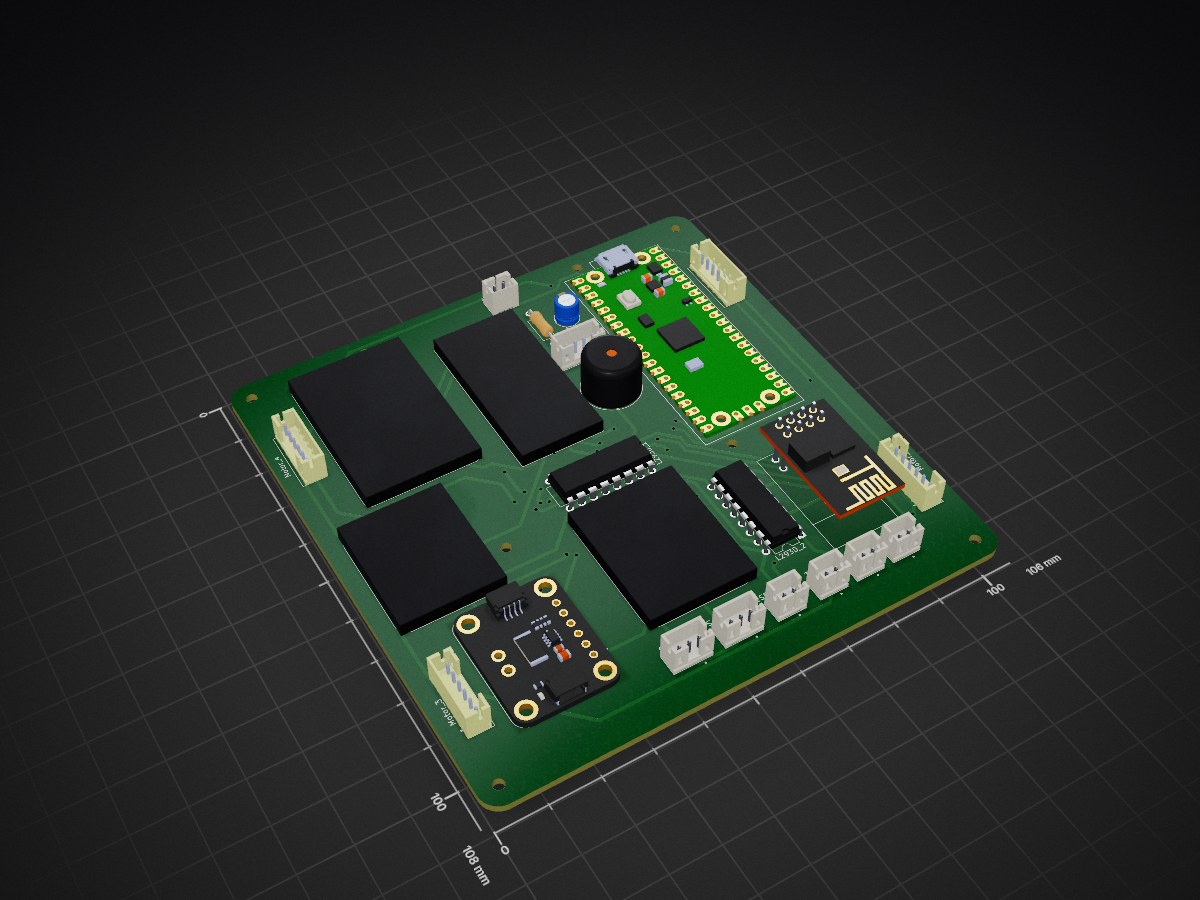
RobotControl is an open-source printed circuit board by Capstone4-33Enjoyers, from the Capstone4-33Enjoyers/RobotControl repository on GitHub. It is a 2-layer board of 106 × 108 mm with 42 parts on 111 nets, routed with 441 tracks and 45 vias.
It is built around the ESP-01, L293D and BMP390, with the INA219AID among its other parts. Its parts include 2 inductors, 1 capacitor and 1 resistor. It belongs with the ESP8266 and RP2040 boards of this library.


Remote Control Robot that is connected to the internet and can be controlled using a remote control, a web app or a mobile app It also has a ML model to detect landmines Note: this is a rough Idea
The robot can have three control configurations
Robot ↔ Server ↔ webpage/mobile app
Robot is controlled using the application, can be autonomous or manually controlled Protocols:
Robot ↔ Server ↔ webpage/mobile app ↔ Controller
Robot is controlled using the controller which is connected to the application, it is manually controlled Protocols:
Robot → Server → webpage/mobile app ↑ Controller
Robot is controlled using the controller which is connected directly to it, It sends sensor data to the server It is manually controlled
Protocols:
Databases can be used to store locations where mines have been found
MongoDb: Pros: - Easy to implement and deploy - Non-relational database - No SQL - in JSON Format (goated) Cons: - TBD (idk im biased towards mongodb)
SQL: Pros: - TBD (idk im biased towards mongodb) Cons: - Annoying to deploy - Relational database - SQL so queries need to be manually made using string concatenation
We can deploy this in different ways
We can use a PaaS Pros: - "Easier" to implement Cons: - can get expensive as FUCK - can run into a shit ton of dependency issues - Needs Docker (i think)
Make our own server using a raspberry pi Pros: - Very cool and fun to implement - relatively easy to implement Cons: - Raspberry pis can be expensive (around $150)
I am leaning more towards the raspberry pi option because it is so cool and one wrong click will not kill our bank account
Buy it from amazon or something Pros:
Make it in the CanSat office Pros:
| Qty | Value | Footprint | References |
|---|---|---|---|
| 10 | M20_9990246:GPSPA1616S | charizard, fish_symbol, future_trunks, gohan, goku_symbol, liverpool, one_piece, pikachu, sigature, spiderman_batman | |
| 2 | L293D | Package_DIP:DIP-16_W7.62mm | L293D_1, L293D_2 |
| 2 | ~ | B2B-PH-K-S:JST_B2B-PH-K-S | 3.3V1, 12V1 |
| 1 | 5V | B2B-PH-K-S:JST_B2B-PH-K-S | 5V1 |
| 1 | BMP390 | M20_9990246:BMP390 | BMP390 |
| 1 | Buzzer | Buzzer_Beeper:Buzzer_12x9.5RM7.6 | Buzzer1 |
| 1 | C_Polarized | Capacitor_THT:CP_Radial_D5.0mm_P2.00mm | C1 |
| 1 | Coil | B2B-PH-K-S:JST_B2B-PH-K-S | Coil1 |
| 1 | ESP CAM Power | B2B-PH-K-S:JST_B2B-PH-K-S | ESPCAMV1 |
| 1 | ESP-01 | ESP8266-01_ESP-01:XCVR_ESP8266-01_ESP-01 | ESPo1 |
| 1 | GPSPA1616S | M20_9990246:GPSPA1616S | GPS1 |
| 1 | INA219 | ina219:MODULE_904 | INA219 |
| 1 | LCD | B4B-PH-K-S_LF__SN_:JST_B4B-PH-K-S_LF__SN_ | LCD1 |
| 1 | Motor 2 | B6B-PH-K:JST_B6B-PH-K | Motor_2 |
| 1 | Motor 3 | B6B-PH-K:JST_B6B-PH-K | Motor_3 |
| 1 | Motor 4 | B6B-PH-K:JST_B6B-PH-K | Motor_4 |
| 1 | R | Resistor_THT:R_Axial_DIN0207_L6.3mm_D2.5mm_P10.16mm_Horizontal | R1 |
| 1 | RASPBERRY_PI_PICO | RASPBERRY_PI_PICO:RASPBERRY_PI_PICO | raspberrypi1 |
| 1 | Servo2 | B3B-PH-K-R_LF__SN_:JST_B3B-PH-K-R_LF__SN_ | Servo_2 |
| 1 | Teensy 4.0 | DEV-15583:MODULE_DEV-15583 | Teensy4.0 |
| 1 | ~ | B6B-PH-K:JST_B6B-PH-K | Motor_1 |
| 1 | ~ | B3B-PH-K-R_LF__SN_:JST_B3B-PH-K-R_LF__SN_ | Servo_1 |
| 1 | ~ | M20_9990246:ESP8266 | ESP8266 |
The 34 most common of 42 parts.
Capstone4-33Enjoyers/RobotControl
The robot can have three control configurations

UzixLS/mist1010-board
10x10cm PCB variant of MIST FPGA project for G738/G706 enclosure

michar71/DMX_CTRL
DMX512 Controller for light installations based on Bluepill STM32F103 Board


Rangarig/MK312WIFI
A replacement for the MK312's bluetooth adapter that allows to connect to it via wifi ... or comport

slemanz/chronolog
STM32-based temperature data logger with RTC, NOR flash storage, LCD and Wi-Fi. Hardware and firmware.

beckdac/uArm-MicroView-esp8266
uArm control PCB with MicroView (Arduino w/ OLED) and esp8266 WiFi/UART bridge


ArtoLabs/Sensi-pot
Collection of modules for indoor/outdoor gardening automation and environmental control
It measures 106 × 108 mm and has 2 copper layers, 1.6 mm thick.
42 parts, built around the ESP-01, L293D, BMP390 and INA219AID. The full list of its parts is on this page, with links to each part's symbol and footprint where PCBKit's library has them.
From the Capstone4-33Enjoyers/RobotControl repository on GitHub, at the commit this page was made from: the board is Hardware/PCB/PCB.kicad_pcb and its schematic Hardware/PCB/PCB.kicad_sch. PCBKit opens the board in the browser, with nothing to install.
Its repository states no licence, so its author keeps all rights: ask Capstone4-33Enjoyers before reusing the design.