4 layers209.5 × 108.5 mm
 sittner/tinyfs3
TinyFS is a minimalist filesystem designed for extremely constrained embedded systems. The initial reason to create this project was the attempt to build a filesystem that can run on a ZX81 without any additional…
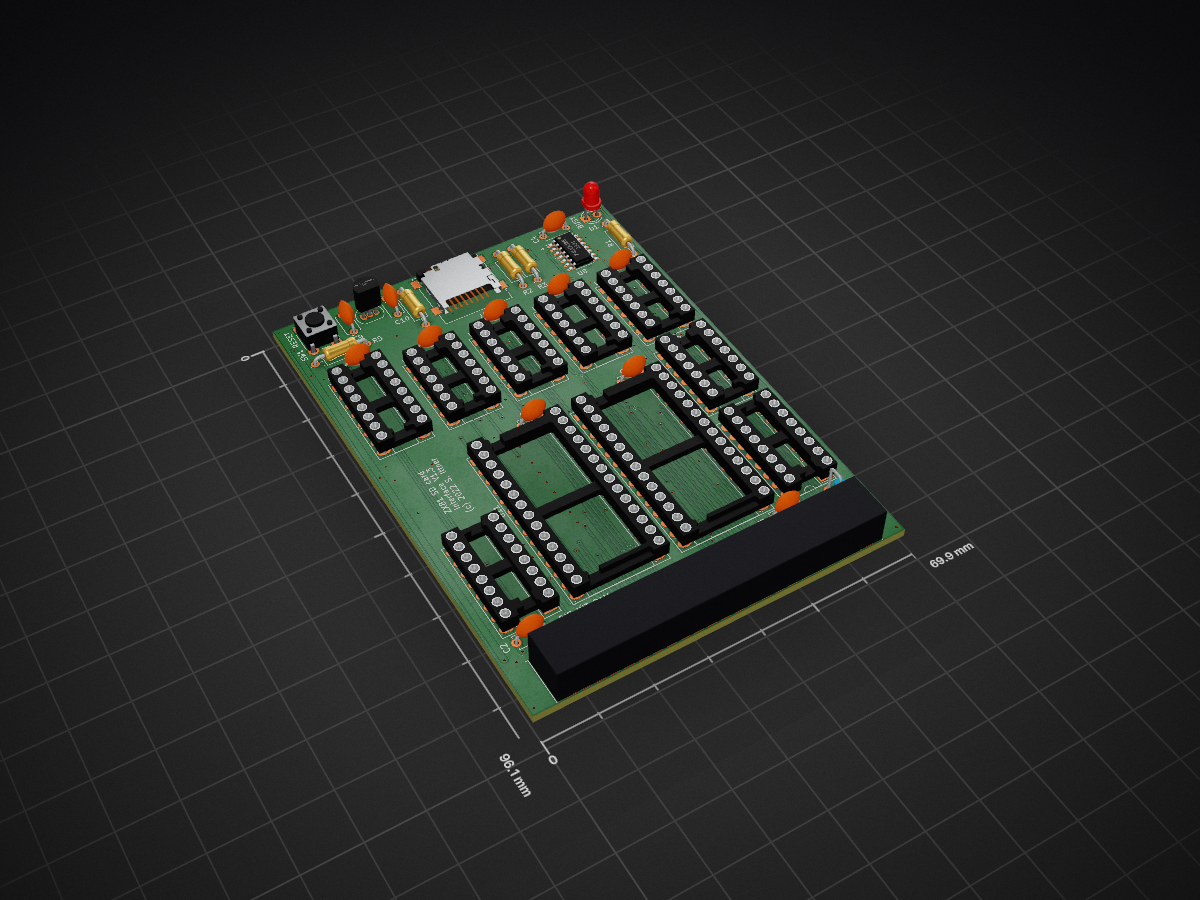
Zxsd is an open-source printed circuit board by sittner, from the sittner/tinyfs repository on GitHub, published under the GPL-3.0 licence. It is a 2-layer board of 69.9 × 96.1 mm with 37 parts on 87 nets, routed with 716 tracks and 234 vias.
It is built around the 74LVX125M, 27C256-17/J and 74HCT32D, with the 74HCT00D, 74HCT04D and 74HCT08D among its other parts. Its parts include 12 capacitors, 12 ICs, 5 resistors, 2 diodes and 2 connectors.


TinyFS is a minimalist filesystem designed for extremely constrained embedded systems. The initial reason to create this project was the attempt to build a filesystem that can run on a ZX81 without any additional processors (e.g. an ATMEGA for FAT32 support).

In fact, this was a little bit challenging, because I wanted to use 32k RAM and 32k ROM and due to the architecture of the ZX video system only the lower 16k of ROM is useable for executable code. 8k of that is already used by the original OS, so the code for the FS has to fit into the remaining 8k block. Fortunately the upper 16k is useable to store constant data, so all stuff like that (i.e. strings and initializer data) is stored in that area.
#include "filesys.h"

int main(void) {
    // Initialize the filesystem
    tfs_init();
    if (tfs_last_error != TFS_ERR_OK) {
        printf("Failed to initialize filesystem\n");
        return 1;
    }

    // Write a file
    const char *data = "Hello, TinyFS!";
    tfs_write_file("hello.txt", (uint8_t*)data, strlen(data), 1);

    // Read it back
    uint8_t buffer[256];
    uint32_t bytes = tfs_read_file("hello.txt", buffer, sizeof(buffer));
    buffer[bytes] = '\0';
    printf("Read: %s\n", buffer);

    return 0;
}
See docs/USAGE_EXAMPLES.md for more examples.
TinyFS is designed for extreme simplicity and minimal resource usage, making deliberate trade-offs between features and footprint.
To achieve minimal resource usage, the following features are intentionally omitted:
These trade-offs make TinyFS ideal for extremely constrained systems where FAT32, ext2, or other filesystems won't fit.
The hardware is a ZX81 expansion board consisting of 32kB RAM and ROM as well as an SD card interface. It was important to me to only use hardware (apart from the SD card itself) that would also have been available in the era of the ZX81. That's why I deliberately did not use FPGA, CPLD or coprocessors.
The board contains a memory expansion, because we need some RAM for variables and buffers and obviously ROM to store the file system code.
The Memory map looks as this:
| Address area | Mapped device | Usage |
|---|---|---|
| 0x0000 - 0x3FFF | ROM (lower 16kB) | 0x0000 - 0x1FFF: Original ROM code (patched with TinyFS hooks) |
| 0x2000 - 0x3FFF: TinyFS code | ||
| 0x4000 - 0x7FFF | RAM (lower 16kB) | Normal ZX81 RAM (available to the user) |
| 0x8000 - 0xBFFF | ROM (upper 16kB) | Constant data for TinyFS |
| 0xC000 - 0xFFFF | RAM (upper 16kB) | 0xC000 - 0xF7FF: Unused (could be used as DFILE e.g. for HRG) |
| 0xF800 - 0xFFFF: TinyFS variables and buffers |
Unfortunately, I've found no easy way to allow RAM in the 0x2000 - 0x3FFF area, which means that the board will not work with WRX16. The NOP logic of the ZX81 requires that the TinyFS code resides in the lower 32kB area to be executable, and I've preferred to provide 16kB of RAM.
Other hires systems like WRX1K, Kevin Baker's HIRES16K or HRG-ms seems to work.
Many thanks to Siggi who helped me much in streamlining the memory encoder stuff.
TinyFS has been ported to multiple platforms and can be adapted to any system with block storage.
ZX81 - Z80 with SD card via custom hardware SPI
AVR (ATmega328P) - 8-bit AVR with SD card via hardware SPI
Linux (FUSE) - Full-featured desktop implementation
TinyFS can be ported to any platform that provides:
See docs/PORTING_GUIDE.md for porting instructions.
Comprehensive documentation is available in the docs/ directory:
ARCHITECTURE.md - Filesystem design and internal structures
API_REFERENCE.md - Complete API documentation
CONFIGURATION.md - Configuration options guide
USAGE_EXAMPLES.md - Practical code examples
PORTING_GUIDE.md - How to port to new platforms
INTERNAL_DESIGN.md - Implementation details
All SD card access is done by LOAD and SAVE commands prefixed by a ':' as file name:
| Command | Description |
|---|---|
| LOAD ":?" | show drive info |
| LOAD ":*" | show drive info with used blocks (could be very time-consuming) |
| LOAD ":" | show current dir |
| LOAD ":/" | change to root dir |
| LOAD ":<" | change to parent dir |
| LOAD ":>[DIRNAME]" | change to DIRNAME |
| LOAD ":[FILENAME]" | load file FILENAME |
| SAVE ":$" | format disk |
| SAVE ":>[DIRNAME]" | create dir DIRNAME |
| SAVE ":=[OLD]:[NEW]" | rename file [OLD] to [NEW] |
| SAVE ":-[FILENAME]" | delete file [FILENAME] |
| SAVE ":[FILENAME]" | save file FILENAME |
Without prefix, LOAD/SAVE acts as normal tape operation.
To build the hex file for the ROM you will need SDCC version 4.5.0.
To allow easy access to the file system on the SD card from outside the ZX81 world there is a Linux FUSE port as well. This could easily be build via the included Makefile. As dependency, only libfuse is required.
You can format a SD card, for example:
sudo ./mktfs /dev/mmcblk0To mount the SD card, you could use:
sudo ./tfs -f -o uid=1000,gid=1000,allow_other /dev/mmcblk0 /mntDon't forget to umount after work is done:
sudo umount /mntThis port currently runs on a ATMEGA328P. It provides a simple CLI accessible via UART @9600 Baud. The main intention of this port was to start developing the FS code before the actual zx81 hardware was finished, so it is currently not tested very well.
Only three types of disk blocks exists:
Bitmap blocks are used to track allocated/free blocks. There is stored no meta data information inside these block, just a plain bit array for 8 x 512 = 4096 bits. If a block is in use, a '1' on the corresponding location is indicating this.
The bitmap block itself is always marked as used, so the first bit of the bitmap block is always set to '1'. The following 2023 Blocks can be uses as directory or data blocks.
Offset calculation is very simple, since the first bitmap block is located on the beginning of the storage device (block offset 0) and the subsequent bitmap blocks will be following every 4096 blocks. So the position of the corresponding bitmap block for a given data/directory block can be calculated by logical shift/and operations.
The last used bitmap block with free block available is cached in memory to speed up allocation for data/directory blocks. The bitmap block is needed to read only once and every following allocation of further blocks just require an write operation to keep the mapping data on disk up to date.
Directory block are the most complex structures of this file system. They are used to organize files and subdirectories and store the names of these items.
To allow a virtually unlimited count of items per directory layer and simplify the process of allocation/freeing directory blocks, they are built as double linked list. The member parent always pointed to the corresponding parent directory block. A value of '0' is indicating that we are on a root directory block. The first root directory block on disk could be found on block offset 1.
typedef struct {
  uint32_t prev;
  uint32_t next;
  uint32_t parent;
  TFS_DIR_ITEM items[];
} _PACKED TFS_DIR_BLK;
There are 20 items per directory block. An item could be one of the type free, dir or file. The member blk pointed to either the corresponding sub directory block or to the first data block of the corresponding file. The member size holds the size of the entire file (in case of a subdirectory item it is set to '0').
#define TFS_NAME_LEN 16

typedef struct {
  uint32_t blk;
  uint32_t size;
  uint8_t type;
  char name[TFS_NAME_LEN];
} _PACKED TFS_DIR_ITEM;

#define TFS_DIR_ITEM_FREE 0
#define TFS_DIR_ITEM_DIR  1
#define TFS_DIR_ITEM_FILE 2These blocks contain the actual file data. They are chained as double linked list and holding 504 bytes of user data each.
typedef struct {
  uint32_t prev;
  uint32_t next;
  uint8_t data[];
} _PACKED TFS_DATA_BLK;| Qty | Value | Footprint | References |
|---|---|---|---|
| 11 | 100n | Capacitor_THT:C_Disc_D5.0mm_W2.5mm_P5.00mm | C1, C2, C3, C4, C6, C7, C8, C9, C11, C12, C13 |
| 3 | 10k | Resistor_THT:R_Axial_DIN0207_L6.3mm_D2.5mm_P10.16mm_Horizontal | R2, R3, R4 |
| 2 | 74HCT32 | Package_DIP:DIP-14_W7.62mm_Socket_LongPads | U1, U2 |
| 2 | SEL_28C256 | Jumper:SolderJumper-3_P1.3mm_Bridged12_RoundedPad1.0x1.5mm_NumberLabels | JP1, JP2 |
| 1 | 100R | Resistor_THT:R_Axial_DIN0207_L6.3mm_D2.5mm_P10.16mm_Horizontal | R5 |
| 1 | 1k8 | Resistor_THT:R_Axial_DIN0207_L6.3mm_D2.5mm_P10.16mm_Horizontal | R1 |
| 1 | 1u | Capacitor_THT:C_Disc_D5.0mm_W2.5mm_P5.00mm | C10 |
| 1 | 27C256 | Package_DIP:DIP-28_W15.24mm_Socket_LongPads | U10 |
| 1 | 74HCT00 | Package_DIP:DIP-14_W7.62mm_Socket_LongPads | U3 |
| 1 | 74HCT04 | Package_DIP:DIP-14_W7.62mm_Socket_LongPads | U4 |
| 1 | 74HCT08 | Package_DIP:DIP-14_W7.62mm_Socket_LongPads | U12 |
| 1 | 74HCT163 | Package_DIP:DIP-16_W7.62mm_Socket_LongPads | U5 |
| 1 | 74HCT165 | Package_DIP:DIP-16_W7.62mm_Socket_LongPads | U6 |
| 1 | 74HCT595 | Package_DIP:DIP-16_W7.62mm_Socket_LongPads | U7 |
| 1 | 74LVX125 | Package_SO:SO-14_3.9x8.65mm_P1.27mm | U8 |
| 1 | BAT43 | Diode_THT:D_DO-35_SOD27_P2.54mm_Vertical_AnodeUp | D2 |
| 1 | DIS_INT_RAM | Jumper:SolderJumper-2_P1.3mm_Bridged_RoundedPad1.0x1.5mm | JP3 |
| 1 | KM62256CLP | Package_DIP:DIP-28_W15.24mm_Socket_LongPads | U11 |
| 1 | MCP1700-3302E_TO92 | Package_TO_SOT_THT:TO-92_Inline | U9 |
| 1 | Micro_SD_Card | Connector_Card:microSD_HC_Wuerth_693072010801 | J1 |
| 1 | RESET | Button_Switch_THT:SW_PUSH_6mm | SW1 |
| 1 | ZX81_EXP | modusoft:ZX81_EXP_EXT | J2 |
| 1 | red lc | LED_THT:LED_D3.0mm | D1 |
It measures 69.9 × 96.1 mm and has 2 copper layers, 1.6 mm thick.
37 parts, built around the 74LVX125M, 27C256-17/J, 74HCT32D and 74HCT00D. The full list of its parts is on this page, with links to each part's symbol and footprint where PCBKit's library has them.
From the sittner/tinyfs repository on GitHub, at the commit this page was made from: the board is zx81/hardware/zxsd.kicad_pcb and its schematic zx81/hardware/zxsd.kicad_sch. PCBKit opens the board in the browser, with nothing to install.
Its repository publishes it under the GPL-3.0 licence: you may reuse it on that licence's terms (keep the author's notice, and for a copyleft licence share your changes alike).


tebl/RC6502-Apple-1-Replica
An expandable SBC-version of the Apple 1 computer, easy to get started with and lot of cool stuff that can be added to it!

roberto314/EVA-1_Reproduction
Recreation of the very rare K-K Systems EVA-1 Display Adapter for the Epson HX-20 Computer


