4 layers100 × 50 mm

 hnz1102/EEW-display
ESP32-S3 firmware for a small earthquake-information display. It shows recent earthquakes and emergency earthquake warnings (緊急地震速報, EEW) from [P2P地震情報](https://www.p2pquake.net/), draws the epicenters on a Google map, and serves the same data (plus configuration) over Wi-Fi to a browser.
EEW display is an open-source printed circuit board by hnz1102, from the hnz1102/EEW-display repository on GitHub. It is a 2-layer board of 139 × 64 mm with 47 parts on 63 nets, routed with 398 tracks and 256 vias.
It is built around the ESP32-S3-WROOM-1-N16R8, MCP73831T-2ATI/OT-HXY and SPX3819M5-L, with the B2B-PH-K-S, CUS10F30-TP and MH2029-601Y among its other parts. Its parts include 13 resistors, 11 capacitors, 5 ICs, 5 switches and 3 diodes. It belongs with the lEDs and displays and radio and wireless boards and the ESP32 boards of this library.


EEW Display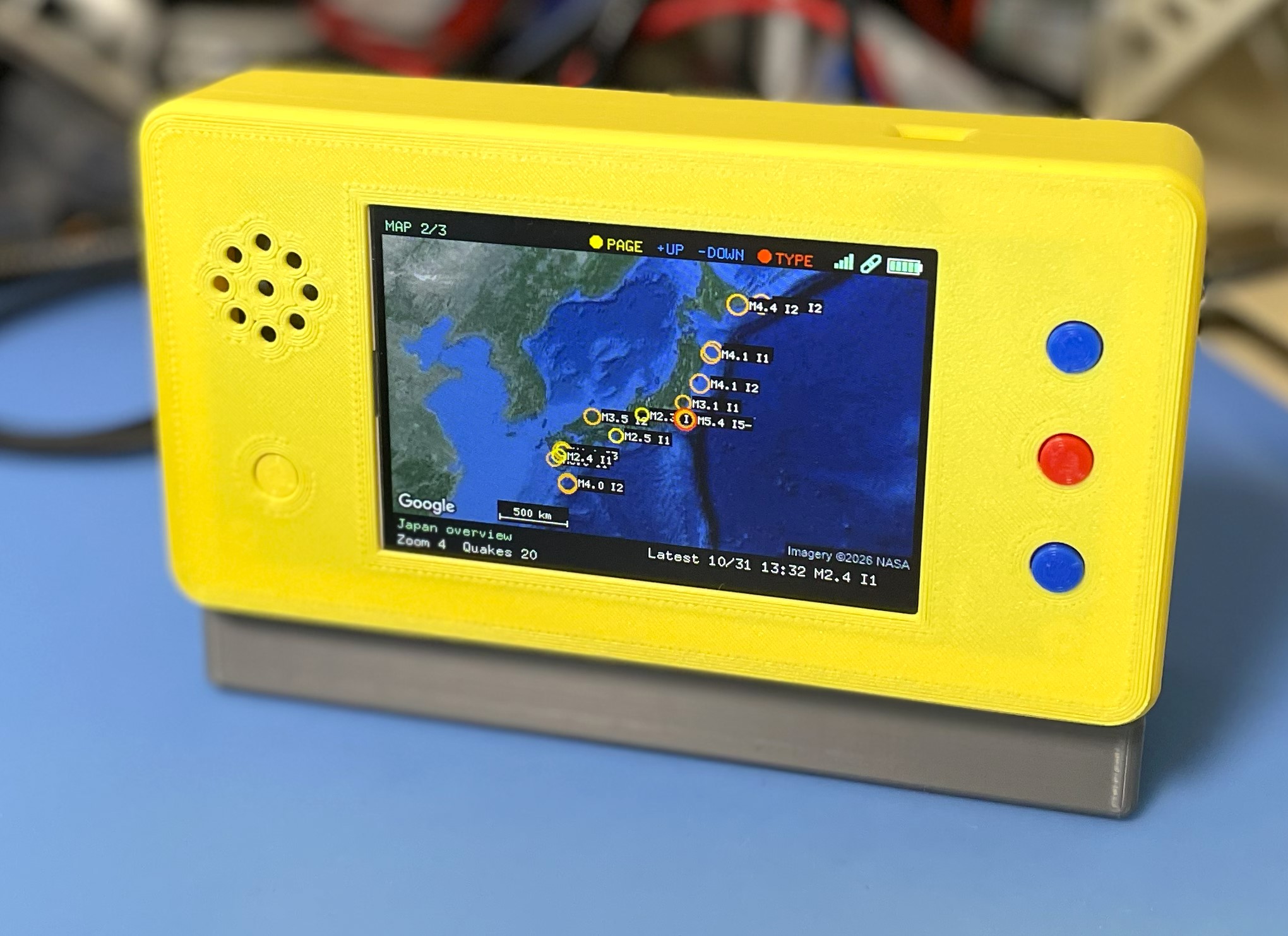
ESP32-S3 firmware for a small earthquake-information display. It shows recent
earthquakes and emergency earthquake warnings (緊急地震速報, EEW) from
P2P地震情報, draws the epicenters on a Google map,
and serves the same data (plus configuration) over Wi-Fi to a browser. The
display is a 480×320 ILI9488 SPI TFT in landscape orientation; a MAX98357A
amplifier with an on-board speaker speaks EEWs and new earthquakes in Japanese.
Written in Rust (esp-idf-hal / esp-idf-svc). The KiCad design of the board is in
hw/ and a 3D-printable enclosure in STL/ (see
Hardware).
| Feature | Description |
|---|---|
| Earthquake list | The 20 most recent events (8 rows visible, the list scrolls with the highlight): time (JST), magnitude, maximum intensity, depth, epicenter coordinates and tsunami flag |
| Map | Google Maps Static API tile (satellite or roadmap) filling the screen, with the recent epicenters drawn on it, sized by magnitude and coloured by intensity; Japan overview by default, or centred on the quake picked in the list. The nearest well-known place, with distance and direction, is shown for the selected / new / EEW epicenter |
| EEW alert | On a warning the TFT switches to the map by itself, marks the forecast epicenter with a red X and shows magnitude, maximum forecast intensity and depth; the Web UI shows a red banner |
| Voice | Chime + Japanese spoken announcement of every EEW and every newly received earthquake through the on-board MAX98357A amplifier and speaker; each can be switched off, and the volume set, in the Web UI (see Spoken announcements) |
| Screen saver / idle clock | After a configurable idle time the backlight goes off, or a full-screen analog clock (JST) is shown; a button press or an EEW / new earthquake returns to the pages (see Screen saver and idle clock) |
| Time sync | NTP (up to 4 servers) |
| Web UI | Browser-based configuration, earthquake list, map, audio controls |
| WPS | Wi-Fi Protected Setup (PBC mode), started at boot when no SSID is set |
| Syslog | Optional UDP syslog (RFC 5424) |
The unit is a single 2-layer PCB, EEW DISPLAY Rev.2 (139 × 64 mm), with the 3.5" TFT module plugged onto it, in a 3D-printed enclosure.
| Part | On the board |
|---|---|
| MCU | ESP32-S3-WROOM-1-N16R8 (16 MB flash, 8 MB octal PSRAM) |
| Display | ILI9488 480×320 SPI TFT module (4-wire SPI, 18-bit colour), landscape. The module's touch controller and SD-card slot are wired to the ESP32 but not used by the firmware |
| USB | USB-C (USB4105-GF-A): power, charging, and flashing / serial log through the ESP32-S3's native USB (5.1 kΩ CC pull-downs) |
| Battery | LiPo on a JST PH 2-pin connector, charged by an MCP73831 (500 mA); red LED = charging, green = charged. A P-MOSFET power path runs the unit from USB when plugged in. The supply voltage is read on GPIO11 through a 20 k / 20 k divider (see adc_conversion_factor) |
| Power switch | Slide switch (IS-1235-G) in front of the regulator |
| Regulator | SPX3819 LDO, 3.3 V |
| RTC | 32.768 kHz crystal on GPIO15/16 (the firmware falls back to the internal oscillator if absent) |
| Audio | MAX98357A I2S amplifier (48 kHz, 16-bit; SD_MODE high = on) driving an on-board speaker (UM1515IA). The gain is set by the R12 / R13 option. See Spoken announcements |
| Buttons | Four 6 mm tactile switches: PAGE/BOOT (GPIO0), ZOOM-IN (GPIO38), ZOOM-OUT (GPIO39), MODE (GPIO40) |
hw/)| File | Content |
|---|---|
schematic.pdf | Schematic |
EEW-display.kicad_sch / .kicad_pcb / .kicad_pro | KiCad project |
Library.pretty/ | Project footprints (ESP32-S3 module, TFT module, USB-C, slide switch, speaker, MAX98357A TQFN) |
BOM.csv | Bill of materials with Digi-Key / Akizuki part numbers |
production/ | Fabrication output: Gerbers (EEW-display.zip), assembly BOM, pick-and-place (positions.csv), designators, IPC-D-356 netlist |
The hardware design is licensed under CC-BY-SA 4.0 (see the schematic title block).
STL/)| File | Part | Size (mm, bounding box) |
|---|---|---|
cover-v4.stl | Cover | 161.8 × 86.8 × 31.5 |
body-v4.stl | Body | 149.4 × 75.4 × 30.5 |
base-v4.stl | Base | 158.5 × 89.2 × 44.3 |
button.stl | Button cap (print four, one per tactile switch) | 9.0 × 9.0 × 5.5 |
eew-display.f3d | Fusion 360 source of all parts | — |
| Function | GPIO |
|---|---|
| TFT CS | 10 |
| TFT RST | 9 |
| TFT D/C | 46 |
| TFT SDI (MOSI) | 3 |
| TFT SCK | 8 |
| TFT BL (backlight, active high) | 18 |
| TFT SDO (MISO) | 17 — wired but not used (the panel is write-only here) |
| Battery voltage (ADC) | 11 |
| MAX98357A DIN / BCLK / LRCLK (WS) / SD_MODE | 7 / 6 / 5 / 4 |
| Buttons | 0 (PAGE/BOOT), 38 (ZOOM-IN, +), 39 (ZOOM-OUT, −), 40 (MODE, action) — all active-low with internal pull-ups |
| TFT touch: T_CLK / T_CS / T_DIN / T_DO / PEN | 47 / 48 / 45 / 41 / 42 — wired, not used |
| TFT SD card: CS / SDI / SDO / CLK | 12 / 13 / 14 / 21 — wired, not used |
The ILI9488 only accepts 18-bit colour over SPI, so the firmware keeps a
RGB565 framebuffer in PSRAM and sends the changed rectangle as 3 bytes per
pixel. The SPI clock is 27 MHz. If the picture is mirrored, red/blue are
swapped or the colours look negated on your module, adjust MADCTL / INVERT
(and SPI_HZ if there is noise) at the top of src/display.rs.
The unit starts on the MAP page; a short press of BOOT cycles the pages.
| # | Page | Content |
|---|---|---|
| 1 | EARTHQUAKE | Recent earthquakes (list + details of the highlighted one) |
| 2 | MAP | Full-screen Google map (480×266) between a one-line top bar (title, button legend, status icons, battery) and a two-column text band: the Japan overview, the quake picked in the list, or the EEW epicenter, with epicenters, scale bar and — for a selected / new / EEW quake — magnitude, intensity, depth, coordinates, nearest place and time |
| 3 | SYSTEM INFO | Network, power, memory, earthquake feed state, display and firmware version |
| Button | EARTHQUAKE page | MAP page | SYSTEM INFO |
|---|---|---|---|
| PAGE/BOOT (GPIO0), short | next page | next page (returns the map to the Japan overview) | next page |
| PAGE/BOOT (GPIO0), ≥ 10 s | factory reset (NVS erased, cfg.toml defaults restored) | same | same |
| ZOOM-IN + (GPIO38) | highlight up | zoom in | zoom in |
| ZOOM-OUT − (GPIO39) | highlight down | zoom out | zoom out |
| MODE (GPIO40) | show the highlighted epicenter on the MAP | toggle satellite / roadmap | toggle satellite / roadmap |
While an EEW or a newly received earthquake is shown, BOOT (EXIT) returns to the normal view. Buttons auto-repeat after 400 ms. While the display is idle (backlight off or clock; see below) the first press only wakes it — its action is not performed.
On every page, left of the battery in the title bar: a Wi-Fi icon — four
signal bars (green = strong, yellow = fair, orange = weak; dim with a red slash =
not connected / no IP address) — and a WebSocket icon, a chain link: green =
connected to the earthquake feed, orange with a red slash = down and
reconnecting, grey = the feed is switched off (quake_enable). The chain is a
16×16 bitmap kept as a constant in src/display_pages.rs (flash, no RAM), drawn
pixel by pixel in the state colour.
A daily window, in JST, in which ordinary new-earthquake announcements (chime and speech) are not played — e.g. 23:00 to 07:00 so that a night-time M3 does not wake the house. EEWs always sound, whatever the window. A window that runs past midnight is fine; start = end means an empty window. The screen and the earthquake list are not affected, and until the clock has been synced by NTP the unit does not mute (a missed announcement is worse than one at the wrong hour).
Set it under Audio → Quiet hours in the Web UI (applies immediately, stored in
NVS), or with quiet_enable / quiet_start / quiet_end in cfg.toml. The
log says quiet hours (23:00-07:00 JST): new-earthquake announcement skipped
when a report is muted.
After screen_timeout seconds without a button press (0 = never idle) the
display goes idle. idle_mode chooses what idle means:
idle_mode | While idle |
|---|---|
"off" (default) | The backlight is switched off. Nothing is sent to the panel, and the picture is brought up to date in one go on wake-up |
"clock" | A full-screen analog clock (JST) is shown instead of the pages |
Any button press, an EEW, a newly received earthquake or a system message (such
as the factory-reset countdown) ends the idle state; the button press that does
so does nothing else. Set both under Display in the Web UI (applies
immediately) or in cfg.toml. Spoken announcements are independent of the
screen.
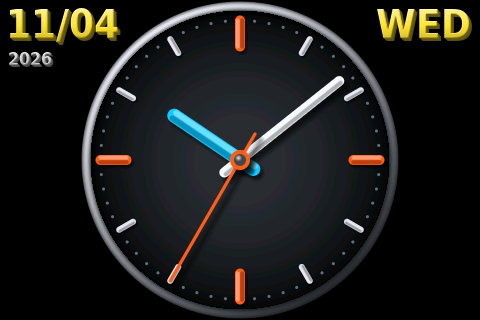
The clock face fills the panel height: a metallic bezel, a gradient dial with orange marks at 12 / 3 / 6 / 9, a cyan hour hand, a white minute hand and an orange second hand, all lit from the top-left with soft drop shadows. The date is shown outside the dial — month/day and year top-left, weekday top-right (Saturday blue, Sunday red). Before the clock has synced (NTP) only the face is drawn.
Rendering notes:
Idle clock: frame rendered in N ms when the clock starts.src/clock_font_data.rs, ~27 KB), since the bitmap fonts look stair-stepped
when enlarged. Regenerate them with
python3 tools/clock_font/gen_clock_font.py [font.ttf] (needs Pillow).Rendered by tools/screenshots from the firmware's own
drawing code. The earthquake data is synthetic sample data (made-up events,
not live) — the pages that show it carry a caption saying so. The map is a
real Google Maps tile when the tool is given a key (see below), else a schematic
stand-in.
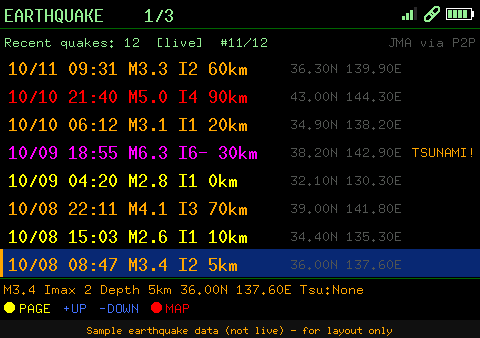 EARTHQUAKE | 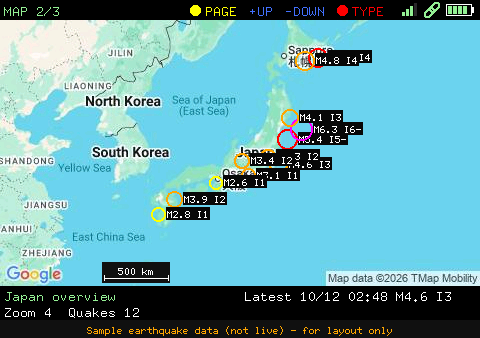 MAP (overview) | 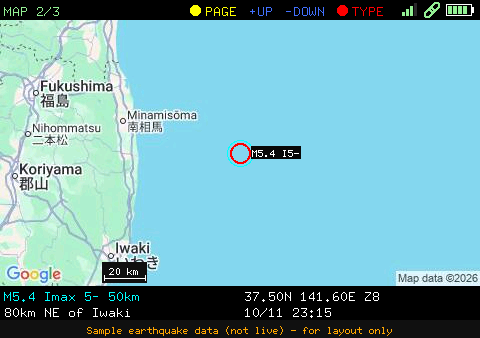 MAP (quake picked from the list) |
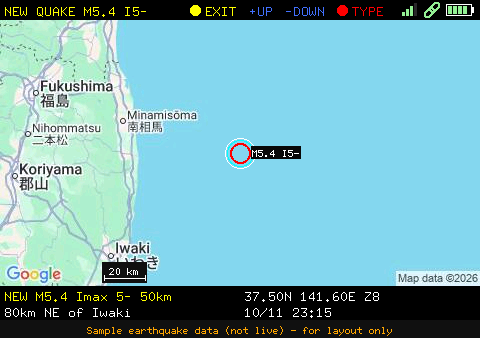 MAP (new earthquake) | 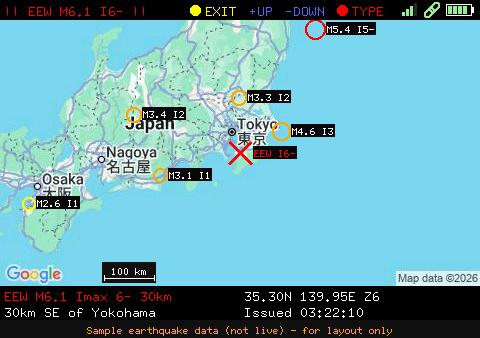 MAP (EEW) | 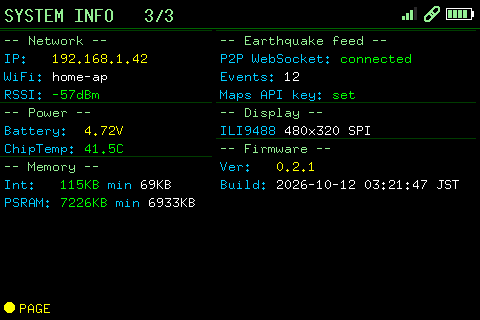 SYSTEM INFO |
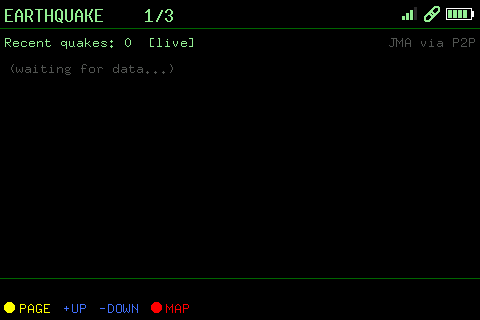 EARTHQUAKE (waiting for data) | 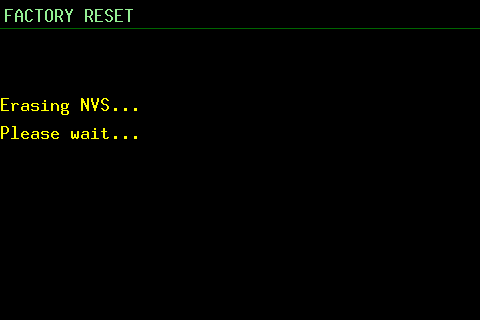 System message overlay | 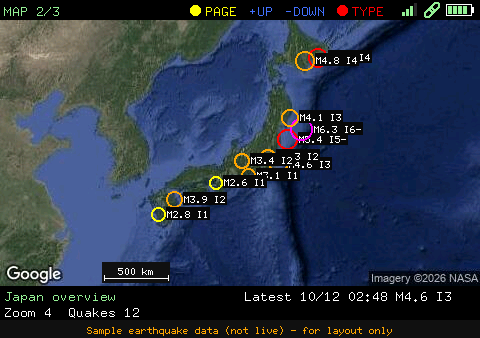 MAP (satellite) |
Idle clock ( idle_mode = "clock") |
With quake_enable = "true" in cfg.toml (the default) the unit shows recent
earthquakes and emergency earthquake warnings (緊急地震速報, EEW) from
P2P地震情報 (JSON API v2). The data is
originally issued by the Japan Meteorological Agency (気象庁). It needs Wi-Fi
and a synced clock (NTP), because the connection is TLS.
| Where | What you get |
|---|---|
| EARTHQUAKE page (TFT) | The 20 most recent events (8 rows visible, the list scrolls with the highlight): time (JST), magnitude, maximum intensity (I5- = 5弱, I5+ = 5強, …), depth and epicenter coordinates; tsunami warnings are flagged. + / − move the highlight, the action button (GPIO40) shows the highlighted epicenter on the MAP page |
| MAP page | Epicenters of recent earthquakes inside the visible map are drawn as circles — sized by magnitude, coloured by maximum intensity — with a label such as M5.2 I5- |
| Web UI (configuration page) | A Recent Earthquakes card with the epicenter name (Japanese), magnitude, intensity, depth and tsunami status. The epicenter name opens the Web UI map (/map?lat=…&lon=…&zoom=…) centred on it |
| EEW alert | On a warning the TFT switches to the MAP page by itself and centres the forecast epicenter: a large red X, the header turns red (!! EEW M6.3 I5- !!) and a box at the bottom right of the map shows magnitude, maximum forecast intensity, depth, coordinates and issue time. The Web UI shows a red banner with the forecast areas |
The TFT font is ASCII only, so Japanese epicenter and area names appear in the
Web UI only; the TFT shows the coordinates and, on the MAP page, the nearest
well-known place with distance and direction (e.g. 45km ESE of Iwaki, from a
built-in table of ~75 cities and islands in src/place.rs, so it
works offline and for epicenters at sea). The unit has no position sensor, so
it does not compute the distance to the epicenter.
How it works (src/quake.rs):
wss://api.p2pquake.net/v2/ws) receives the events as they are
registered. Warnings (code 556) raise the alert, earthquake reports (551) are
merged into the list. Test messages and warnings older than 3 minutes (by
their issue time) are ignored, so a boot in the middle of an old event does
not alert./v2/history) loads the initial list (the 20 latest events) at boot,
re-syncs it every 30 minutes, and takes over — polling every 10 s (EEW) /
60 s (list) — while the WebSocket is down.[HEAP] / [WS] / [QUAKE] in the log.esp_websocket_client ESP-IDF component, pulled from
the component registry at build time (declared in Cargo.toml), so the first
build needs network access.Testing without a real earthquake. Build with the sandbox feature:
cargo build --release --features quake-sandboxThis points the feed at the P2P sandbox, which replays old data (including a 2023 Hokkaido EEW) and skips the "older than 3 minutes" check, so the whole alert path fires right after boot. Never ship a sandbox build.
Not a safety device. Delivery is not guaranteed and can be delayed; the warning only covers what the Meteorological Agency issues as a warning. Do not rely on this unit for life-safety decisions. Use the official channels. Use of the data is subject to the P2P地震情報 terms for secondary use: credit the Japan Meteorological Agency and P2P地震情報 (the Web UI card already does).
With audio_enable = "true" the unit speaks through the on-board MAX98357A and
speaker:
EEW_REPEATS in src/voice.rs). Played
for the first report of an event, and for later reports only when the forecast
maximum intensity rises. It interrupts anything else.The chimes are generated by the firmware — sustained / bell-like notes with a
reverb that is applied to the chime only, not to the speech — so they also sound
without a voice bank. The audio thread runs at a raised priority on core 1 with a
~60 ms I2S DMA buffer, so that the TLS / JPEG work of a simultaneous map refetch
cannot make the sound break up.
The speech is not synthesized on the device and needs no network or API key at
run time. It is generated once on a PC with Google Cloud Text-to-Speech as
~340 short parts (fixed phrases, numbers 0–99 and 100–700, the nine seismic
intensities, and parts of region names such as 福島県 + 沖) and flashed to a
dedicated voice partition; the firmware strings the parts together. A
hypocenter name is spoken as far as its parts match (so 福島県沖 = 福島県 + 沖); a
name with an unknown part is cut short instead of being misread. To cover more
names, add parts to tools/voice/tokens.txt and
regenerate.
voice.bin (once, on a PC)Enable the Cloud Text-to-Speech API in the Google Cloud project (and allow it on the API key if the key has API restrictions), then:
cd tools/voice
GOOGLE_TTS_API_KEY=your-key python3 gen_voice.py            # default voice ja-JP-Neural2-B
# python3 gen_voice.py --voice ja-JP-Neural2-C --rate 1.05   # other voice / speed
Each part is synthesized once and cached in tools/voice/cache/, so re-running
costs no API calls unless a part changed (~340 short requests, within the free
tier). python3 gen_voice.py --dry-run makes a voice.bin of tone bursts with
no API call — only to test the flashing and playback path. Check the Google
Cloud TTS terms and pricing for your use; the generated audio is yours to flash
into your own device.
The voice partition (9 MB at 0x700000) is part of partitions.csv, so the
firmware has to be flashed once to write the new partition table, then the voice
bank. flash.sh does both, then opens the monitor:
./flash.sh                  # firmware + partition table, voice bank, monitor
./flash.sh --voice-only     # only the voice bank (after regenerating voice.bin)
./flash.sh --no-voice       # firmware only
./flash.sh --port /dev/ttyACM1 --no-monitor
By hand: cargo espflash flash --release, then
cargo espflash write-bin 0x700000 tools/voice/voice.bin.
A hand-built merged image (cargo espflash save-image --merge complete_flash.bin)
does not contain the voice bank; flash voice.bin separately as above.
build-flash-images.sh, however, folds voice.bin into its output when it is
present (see Build), so that one file
carries it. The boot log shows [VOICE] bank loaded: N parts (or why
announcements are off).
The Web UI configuration page has an Audio card (shown when audio_enable = "true"): Test EEW voice and Test new-quake voice play sample announcements
(also when the matching switch is off), and the sine test tone (100 Hz – 15 kHz,
off by default) can be switched on and tuned. The same card has the volume
slider (applied while you drag, stored in NVS on release) and the Announce
switches: EEW and new-earthquake announcements (chime + speech) can each be
turned on or off (both on by default; stored in NVS and overriding
voice_eew / voice_new in cfg.toml).
p2pquake.net ◄── quake.rs (WebSocket: EEW + events, REST fallback)
                    │
                    ├── display.rs ── ILI9488 driver + RGB565 framebuffer, screen saver / idle clock
                    │      └── display_pages.rs (EARTHQUAKE / MAP / SYSTEM INFO / clock drawing)
                    │             └── place.rs (epicenter → nearest place text)
                    ├── map_display.rs ── persistent fetch worker ──► Google Static Maps (HTTPS)
                    ├── voice.rs ── sentences from the `voice` flash partition
                    │      └── audio.rs ── I2S → MAX98357A (chimes, ADPCM speech, test tone)
                    └── httpserver.rs ── Web UI: config, quake list, map, audio
btn_ctrl.rs (buttons) · wifi.rs (STA, WPS, reconnect, network state) · boot_log.rseew-display/
├── src/
│ ├── main.rs # Entry point, peripheral initialisation
│ ├── display.rs # ILI9488 SPI driver, framebuffer, display task, screen saver / idle clock
│ ├── display_pages.rs # Page drawing (earthquake, map, info, idle clock); no ESP-IDF dependency
│ ├── clock_font_data.rs # Generated anti-aliased glyphs for the idle clock's date
│ ├── map_display.rs # Map tile fetch, JPEG decode, zoom
│ ├── audio.rs # MAX98357A I2S output: voice playback (ADPCM) + test tone
│ ├── voice.rs # Spoken-announcement sentences from the `voice` partition
│ ├── place.rs # Epicenter → nearest place text (offline table)
│ ├── quake.rs # Earthquake list + EEW (P2P地震情報 WebSocket / REST)
│ ├── httpserver.rs # HTTP server, NVS config management
│ ├── wifi.rs # Wi-Fi STA connection (DHCP / static IP), WPS, reconnect, event-driven network state
│ ├── syslogger.rs # UDP Syslog logger (RFC 5424)
│ ├── btn_ctrl.rs # Button handling
│ └── boot_log.rs # NVS boot counter and rolling reset-reason log (last 10 entries)
├── tools/
│ ├── voice/ # PC tool: generates voice.bin (Google Cloud TTS) — see Spoken announcements
│ ├── screenshots/ # Host tool: renders every TFT page to PNG (see below)
│ ├── clock_font/ # PC tool: generates src/clock_font_data.rs from a TTF
│ └── webui_screenshots/ # Host tool: screenshots of the Web UI pages (see Web UI)
├── docs/images/ # README images; tft/ = TFT screenshots, webui/ = Web UI screenshots
├── hw/ # KiCad schematic / PCB, BOM and fabrication files (see Hardware)
├── STL/ # 3D-printable enclosure (STL) + Fusion 360 sourcecfg.toml.tmp is the only template. Before building, copy it to cfg.toml
(which is not committed, since it holds your Wi-Fi credentials and API key):
cp cfg.toml.tmp cfg.tomlThen edit cfg.toml for your environment. The table name must match the crate
name, [eew-display], or the values are ignored.
Every key is optional; a missing key uses the built-in default below. The
shipped cfg.toml.tmp template already sets screen_timeout = "300" and
audio_enable = "true".
| Setting | Built-in default | Change it when |
|---|---|---|
display_enable | "true" | There is no TFT |
screen_timeout | "0" | You want the display to go idle after N seconds without a button press (0 = never); also in the Web UI |
idle_mode | "off" | What idle shows: "off" = backlight off, "clock" = analog clock; also in the Web UI |
quake_enable | "true" | You want to turn the earthquake / EEW feed off. The feed keeps a TLS WebSocket open (~30 KB of internal RAM) and needs Wi-Fi plus a synced clock. Read at boot only, so rebuild after changing it |
audio_enable | "false" (template: "true") | "true" starts the audio output (voice announcements + Web UI test tone); set "false" to keep the amplifier off |
audio_volume / voice_eew / voice_new | "70" / "true" / "true" | Voice volume in percent, and whether EEWs / new earthquakes are announced. The Web UI overrides these (stored in NVS) |
quiet_enable / quiet_start / quiet_end | "false" / "23:00" / "07:00" | Mute new-earthquake announcements (not EEW) between the two times of day, JST; see Quiet hours |
adc_conversion_factor | "80.098" (template: "437.98") | The battery voltage divider differs: voltage = raw ADC reading ÷ this factor |
web_user / web_password | admin / esp32 | Always — these protect the Web UI |
maps_api_key | empty | You want the map (see Google Maps API key) |
[eew-display]
wps_enable     = "true"     # "true": use WPS PBC on next boot when SSID is empty
wifi_ssid      = ""         # your-ssid
wifi_psk       = ""         # your-password
ip_mode        = "dhcp"           # "dhcp" or "static"
ip_address     = "192.168.0.200"
subnet_mask    = "255.255.255.0"
gateway        = "192.168.0.1"
dns            = "1.1.1.1"

syslog_server    = "192.168.0.140:514"
syslog_enable    = "false"
syslog_host_name = "esp32s3"
syslog_app_name  = "eew-display"

web_user     = "admin"
web_password = "esp32"

display_enable = "true"
idle_mode = "off"          # what to show when idle: "off" (backlight off) or "clock" (analog clock)
screen_timeout = "300"     # backlight off after this many idle seconds (0 = always on)

ntp_server1 = "time.aws.com"
ntp_server2 = "time.google.com"Values in cfg.toml are compiled into the firmware as defaults.
After boot they can be overridden via the Web UI or direct NVS writes; NVS values take priority.
A factory reset (hold BOOT ≥ 10 s, or Reset Defaults in the Web UI) erases NVS and
returns to the cfg.toml values.
The Web UI configuration page has these cards: Device Status, Recent Earthquakes, Audio, WiFi (SSID, password, WPS), Network (DHCP / static IP), Syslog, Authentication, Display (screen timeout), NTP Servers and Map Settings (map type, Maps API key), plus Boot Log, Reboot and Reset Defaults.
The map pages (LCD and Web UI) download images from the Maps Static API, so
they need a Google Maps Platform API key. Without maps_api_key the MAP page
has nothing to draw the epicenters on (there is no local tile cache), although
the EARTHQUAKE list and EEW alerts keep working.
Where to get one
Sign in to the Google Cloud console and create (or select) a project.
Link a billing account to the project. Maps Platform APIs require one, even though usage within the free monthly allowance is not charged — see the Google Maps Platform pricing page for the current allowance.
Open APIs & Services → Library, search for Maps Static API and click Enable.
Open APIs & Services → Credentials, click Create credentials → API key and copy the key. Step-by-step instructions are in Google's Maps Static API documentation.
Enter the key in the Web UI: Config page → Map Settings → Google Maps API
Key, then Save. It takes effect immediately (no reboot) and is stored
in NVS. To have a key built in as the default instead (for a fresh or
factory-reset device), set it in cfg.toml and rebuild:
maps_api_key = "your-api-key"Notes
maps_api_key in cfg.toml is only the default, used until a key is saved
and restored by a factory reset (saving an empty field also falls back to it)./api/mapkey). Keep the
device login password strong, and do not share firmware images built with your
own key (build-flash-images.sh builds from cfg.toml.tmp, whose key is empty).cfg.toml is not committed. Never put a real key in cfg.toml.tmp, which is
the template that gets committed. Because the Web UI can set the key, you can
leave cfg.toml empty and keep the key out of the build entirely.WPS (Wi-Fi Protected Setup) allows you to connect to a Wi-Fi network without manually entering the SSID and password. This device supports WPS Push Button Configuration (PBC) mode.
WPS runs at boot, when wps_enable = "true" and no SSID is stored; there is no
"Start WPS" button in the Web UI (the WiFi card only has the WPS Enable /
Disable switch and the SSID / password fields).
cfg.toml before building:
wifi_ssid      = ""           # empty: no credentials
wps_enable = "true" # use WPS when there is no SSIDcfg.toml defaults are restored (so an empty wifi_ssid with
wps_enable = "true" in cfg.toml gives WPS again) and the unit reboots.If no WPS handshake succeeds within 120 s the unit stays without Wi-Fi until the
next boot (and therefore without the Web UI, the map and the earthquake feed).
Reboot to try again, or enter the credentials in cfg.toml / the Web UI.
A background monitor checks every 30 s (after a 15 s grace period) and calls
esp_wifi_connect() when the station is not associated; after three failures in a
row it also restarts the Wi-Fi driver. The router being unreachable makes the
driver log Haven't to connect to a suitable AP now! — that is the driver
retrying, not an error of this firmware.
cfg.toml or the Web UI instead.Run setup_env.sh once on a fresh Ubuntu / Debian machine (or WSL2) before
building. The script performs all steps below automatically.
bash setup_env.shAfter the script finishes, open a new terminal (or reload your shell config) so the environment variables take effect:
source "$HOME/.cargo/env"
source ~/export-esp.sh| Step | Action |
|---|---|
| 1 | Install system packages via apt |
| 2 | Install Rust toolchain via rustup (skipped if already present) |
| 3 | Install ldproxy, espup, cargo-espflash via Cargo |
| 4 | Install & update the ESP32-S3 Xtensa toolchain via espup |
| 5 | Source ~/export-esp.sh (generated by espup) |
| 6 | Add udev rule for ESP32 USB device (303a:1001) and reload rules |
If you prefer to run the steps manually, expand the section below.
# 1. System packages
sudo apt update && sudo apt -y install \
    git python3 python3-pip gcc build-essential curl \
    pkg-config libudev-dev libtinfo5 clang libclang-dev \
    llvm-dev udev libssl-dev python3.10-venv

# 2. Rust
curl --proto '=https' --tlsv1.2 -sSf https://sh.rustup.rs | sh
# Select option 1 (default install), then:
source "$HOME/.cargo/env"

# 3. Cargo tools
cargo install ldproxy
cargo install espup
cargo install cargo-espflash

# 4. ESP32-S3 toolchain
espup install
espup update

# 5. Activate ESP environment (add to ~/.bashrc / ~/.zshrc for persistence)
. ~/export-esp.sh

# 6. udev rulesesp channel (selected automatically via rust-toolchain.toml)tools/voice/gen_voice.pycp cfg.toml.tmp cfg.toml # then edit it
cargo build --releaseThe first build downloads the esp_websocket_client component (used by the
earthquake feed), so it needs network access.
Add --features quake-sandbox to test that feed against the P2P sandbox.
./flash.sh                              # firmware + partition table + voice bank, then the monitor
cargo espflash flash --release --monitor   # firmware + partition table only
flash.sh also writes tools/voice/voice.bin to the voice
partition (see Spoken announcements). The first flash after
pulling the voice feature must include the partition table, as both commands do.
To create a single binary file with the bootloader, partition table and application (no voice bank) for distribution or web-based flashing:
cargo espflash save-image --release --merge --chip esp32s3 complete_flash.binTo build a merged image from the cfg.toml.tmp defaults in one go (Wi-Fi and
API key unset, for distribution), run build-flash-images.sh. The 16 MB image
is written to flash_images/flash_eew-display.bin; flash it alone to 0x0.
When tools/voice/voice.bin exists it is folded into the image at the voice
partition offset (0x700000), so the one file also carries the spoken
announcements — otherwise the image is built without them and the script says so.
Your own cfg.toml is restored afterwards.
Important: When flashing a merged image, always write it to offset 0x0, not 0x9000. Writing to 0x9000 will result in a boot failure with "invalid header: 0xffffffff" error.
# Using esptool.py
esptool.py --chip esp32s3 --port /dev/ttyACM0 write_flash 0x0 complete_flash.bin

# Using espflash
espflash write-bin 0x0 complete_flash.binYou can also flash the binary via a web browser using the ESP Web Flasher:
complete_flash.bin0x0 (very important!)| Partition | Offset | Size |
|---|---|---|
| nvs | 0x9000 | 24 KB |
| phy_init | 0xF000 | 4 KB |
| factory (app) | 0x10000 | 0x6F0000 (7104 KB) |
| voice (data) | 0x700000 | 0x900000 (9 MB) |
Flash: 16 MB, DIO mode, 40 MHz. The voice partition holds tools/voice/voice.bin
(~2.4 MB); see Spoken announcements.
tools/screenshots is a small host-side crate (separate from the firmware, built
with the stable toolchain for your PC) that compiles the firmware's own
src/display_pages.rs and renders each page into a 480×320 framebuffer, then
writes PNGs. Quake and map data are replaced by stubs filled with sample data
(pages that show it get a "sample data" caption band under the image).
cd tools/screenshots
cargo run --release -- [OUT_DIR] [SCALE]    # default: ../../docs/images/tft, 1
Map pages fetch real tiles with the same Static Maps request the firmware uses.
The key is taken from the GOOGLE_MAPS_API_KEY environment variable, else
maps_api_key in cfg.toml; tiles are cached in tools/screenshots/.tile-cache/
(gitignored). Without a key — or with SCREENSHOTS_OFFLINE=1 — a schematic map
is drawn instead. The firmware version on the SYSTEM INFO sample is read from
Cargo.toml.
Once the device is on Wi-Fi it serves a Web UI at http://<device_ip>/ (port 80).
Sign in with web_user / web_password (default admin / esp32 — change
them). The screenshots below were rendered from the firmware's own page HTML
against a mock of the device API with synthetic sample data (made-up
earthquakes and network); see Regenerating the Web UI screenshots.
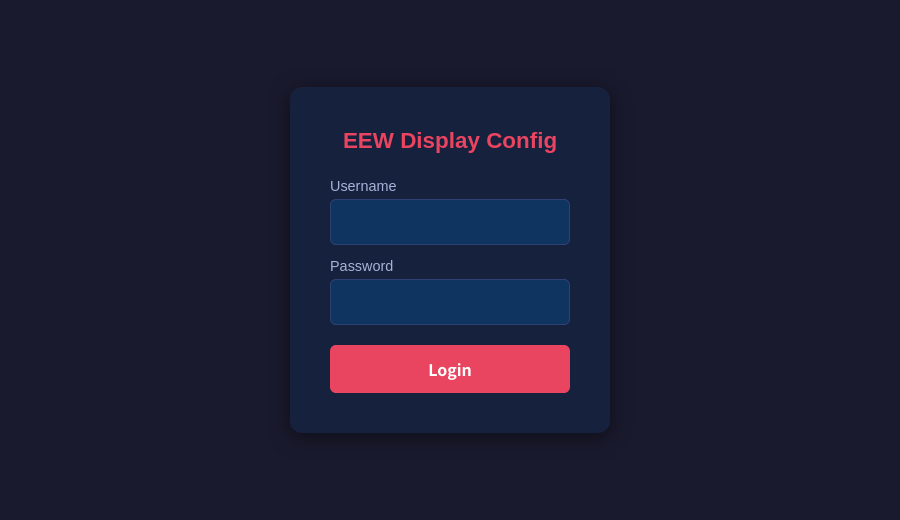
The page has a card per topic. Save to NVS stores the settings (most apply
immediately; Reboot applies the rest), Reset Defaults erases NVS and returns to
the cfg.toml values, and Boot Log shows the reset reasons of the last boots.
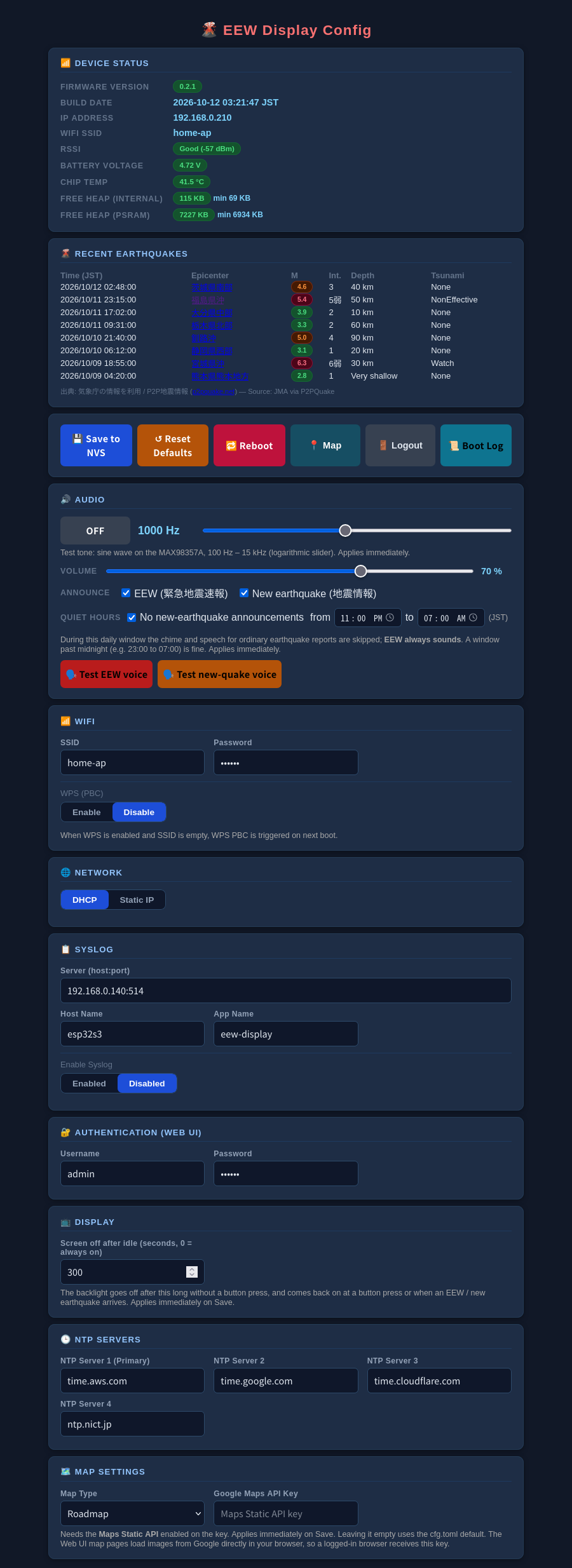
| Card | What it does |
|---|---|
| Device Status | Firmware version and build date, IP address, SSID, signal strength, battery voltage, chip temperature, free internal RAM and PSRAM (refreshed every 3 s) |
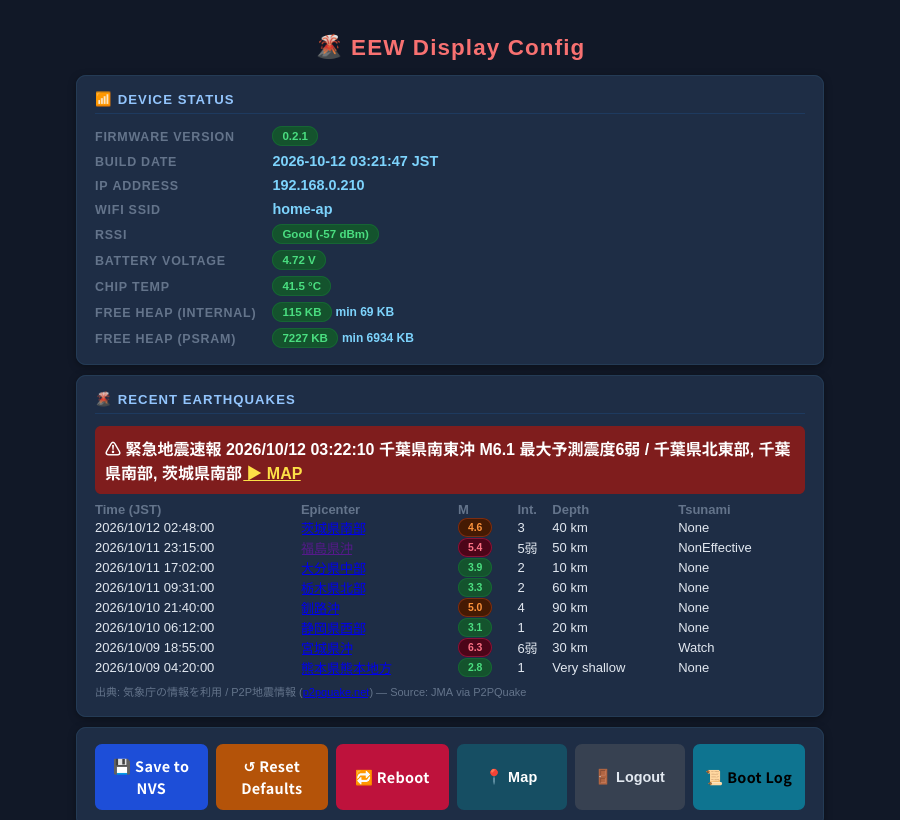
| Recent Earthquakes | The latest events with the epicenter name in Japanese (a link to the Web UI map centred on it), magnitude, intensity, depth and tsunami status; a red banner while an EEW is active |
| Audio | Test tone on/off with a 100 Hz – 15 kHz slider, Volume slider, Announce switches for EEW / new earthquake, Quiet hours (a daily window with no new-earthquake announcements; EEW always sounds), and Test EEW voice / Test new-quake voice buttons (shown when audio_enable = "true") |
| WiFi / Network | SSID and password, WPS enable, DHCP or static IP |
| Syslog | Optional remote logging (server, host name, app name) |
| Authentication | The Web UI user name and password |
| Display | Idle timeout (seconds) and what to do when idle: switch the backlight off, or show the analog clock |
| NTP Servers | Up to four time servers |
| Map Settings | Map type (satellite / roadmap) and the Google Maps API key |
While an EEW is active the Recent Earthquakes card shows the warning at the top, with a link that opens the map framed on the forecast epicenter:
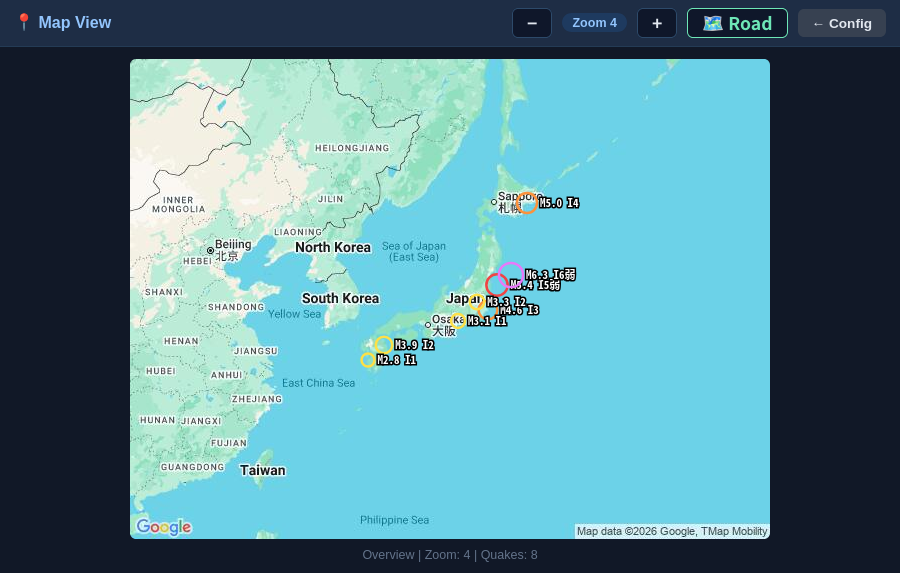
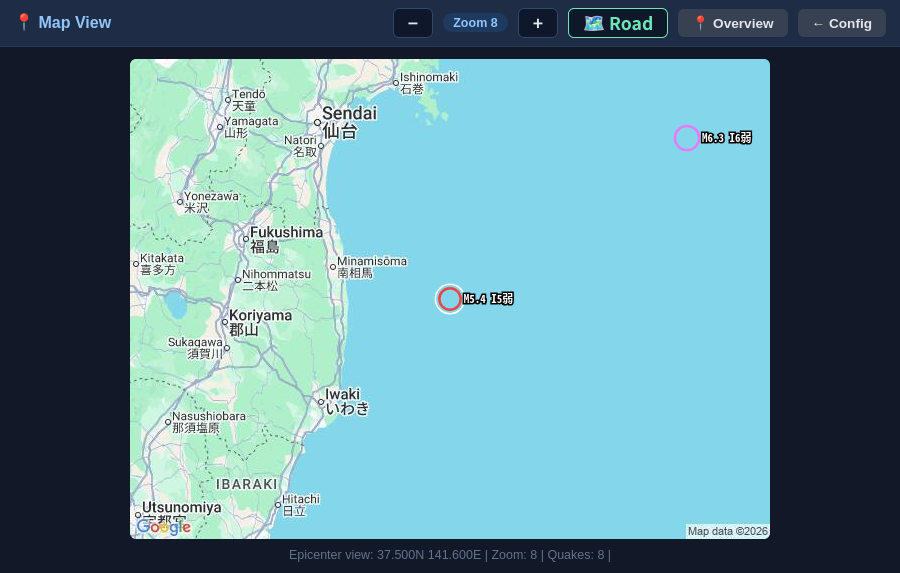
/map shows the recent epicenters on a Google map, drawn in the browser: circles
sized by magnitude and coloured by maximum intensity, labelled like M5.4 I5弱.
−/+ change the zoom and the satellite / road button switches the map type (both
act on the device's own map too). /map?lat=…&lon=…&zoom=… views an arbitrary
point — the earthquake list links to it — and Overview returns to the Japan
view.
| Overview | Epicenter view | During an EEW |
|---|---|---|
 |  | 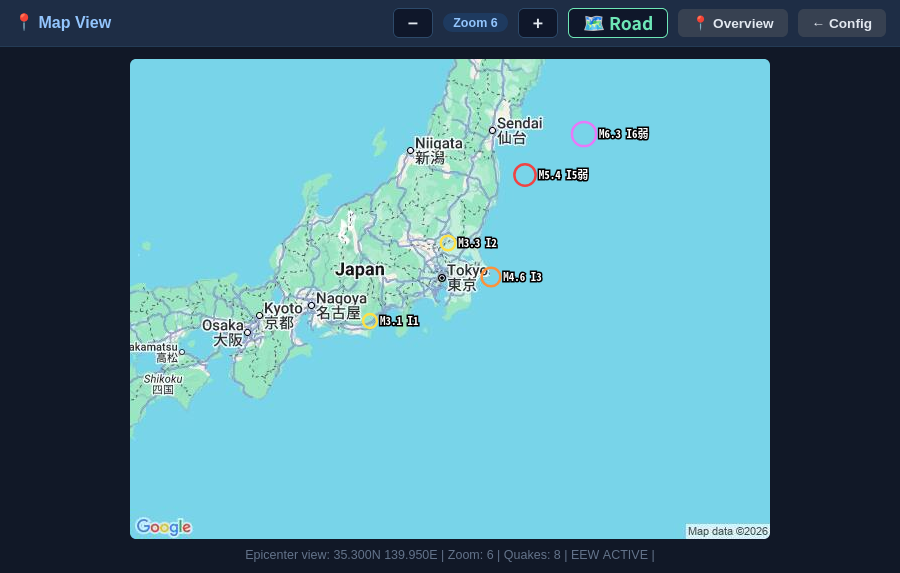 |
The map page downloads its images directly from Google using the Maps API key the device hands to a signed-in browser (see Google Maps API key).
tools/webui_screenshots/capture.py pulls the
login, configuration and map pages out of src/httpserver.rs, fills the
configuration template with sample settings, serves them from a small local mock of
the device API, and photographs them with headless Firefox:
python3 tools/webui_screenshots/capture.py # writes docs/images/webui/It needs Firefox and Pillow. Each distinct map view is fetched once from
Google with the key from GOOGLE_MAPS_API_KEY (else maps_api_key in cfg.toml)
and cached in tools/webui_screenshots/.tile-cache/ (gitignored), so re-running
costs no API calls; without a key a grey placeholder is used. The key never
appears in the pictures. (A snap-packaged Firefox can only write below your home
directory, so keep the output folder there.)
Once the device is on Wi-Fi, the Web UI is at http://<device_ip>/ (login
required: web_user / web_password).
| URL | Method | Description |
|---|---|---|
/login | GET / POST | Login |
/logout | GET | Logout |
/ | GET | Configuration page, device status and recent earthquakes (auth required) |
/map | GET | Map page with the recent epicenters; ?lat=&lon=&zoom= views an arbitrary point (e.g. an epicenter) |
/api/mapinfo | GET | Map centre and zoom the TFT is showing (JSON) |
/api/quakes | GET | Recent earthquakes and the active EEW, if any (JSON; enabled:false when quake_enable is off) |
/api/map/pixels | GET | Current map image (raw RGB565) |
/api/mapkey | GET | Maps API key and map type, for the browser-side map |
/api/map/zoomin, /api/map/zoomout | POST | Change map zoom |
/api/map/toggletype | POST | Toggle satellite / roadmap |
/api/config | POST | Save configuration to NVS |
/api/status | GET | Device / Wi-Fi status, heap, firmware version and build date (JSON) |
/api/reset | POST | Erase NVS and restore cfg.toml defaults |
/api/reboot | POST | Reboot the device |
/api/boot_log | GET | Boot history with reset reasons from NVS (JSON) |
/api/tone | GET / POST | Audio state (running, tone Hz / on, voice bank present, volume, announcement switches). POST any of: hz=100..15000, `on=true |
| Component / Library | Version | License | Purpose |
|---|---|---|---|
| eew-display (this project) | 0.3.0 | MIT | Firmware (Rust) |
| esp-idf-hal | 0.45.2 | MIT / Apache-2.0 | ESP32-S3 hardware abstraction (SPI, I2S, GPIO, ADC) |
| esp-idf-svc | 0.51 | MIT / Apache-2.0 | Wi-Fi, HTTP server/client, WebSocket, SNTP, etc. |
| esp-idf-sys / ESP-IDF | 0.36 / v5.4.2 | MIT / Apache-2.0 | Bindings and SDK |
| espressif/esp_websocket_client | ^1.4 | Apache-2.0 | WebSocket client (component registry, fetched at build time) |
| embedded-svc | 0.28 | MIT / Apache-2.0 | HTTP / WebSocket traits |
| jpeg-decoder | 0.3 | MIT / Apache-2.0 | Map tile decoding |
| embedded-graphics | 0.8.1 | MIT / Apache-2.0 | Display rendering (the ILI9488 driver is in src/display.rs) |
| serde / serde_json | 1 | MIT / Apache-2.0 | P2P地震情報 JSON |
| chrono | 0.4 | MIT / Apache-2.0 | Date and time |
| toml-cfg, heapless, anyhow, log | — | MIT / Apache-2.0 | Build-time config, buffers, errors, logging |
| DejaVu Sans Condensed Bold | 2.37 | Bitstream Vera / DejaVu (free to embed) | Idle-clock date glyphs, pre-rendered into src/clock_font_data.rs |
Map imagery is provided by the Google Maps Static API, earthquake / EEW data by P2P地震情報 (originally Japan Meteorological Agency data) and the spoken parts are synthesized with Google Cloud Text-to-Speech (on a PC, once); all are subject to their own terms of use.
| Qty | Value | Footprint | References |
|---|---|---|---|
| 4 | 0.1uF | Capacitor_SMD:C_0603_1608Metric | C4, C5, C8, C11 |
| 4 | MP | MountingHole:MountingHole_3.2mm_M3_Pad_Via | H1, H2, H3, H4 |
| 3 | 20K 1% | Resistor_SMD:R_0603_1608Metric | R1, R2, R7 |
| 2 | 100K/0 | Resistor_SMD:R_0603_1608Metric | R12, R13 |
| 2 | 10uF | Capacitor_SMD:C_0805_2012Metric | C6, C9 |
| 2 | 16pF | Capacitor_SMD:C_0603_1608Metric | C2, C3 |
| 2 | 1uF | Capacitor_SMD:C_0805_2012Metric | C1, C10 |
| 2 | 330 | Resistor_SMD:R_0603_1608Metric | R9, R10 |
| 2 | 5.1K | Resistor_SMD:R_0603_1608Metric | R4, R5 |
| 1 | 100K | Resistor_SMD:R_0603_1608Metric | R11 |
| 1 | 10K | Resistor_SMD:R_0603_1608Metric | R3 |
| 1 | 12K 1% | Resistor_SMD:R_0603_1608Metric | R8 |
| 1 | 2K | Resistor_SMD:R_0603_1608Metric | R6 |
| 1 | 32.7680KHz | Crystal:Crystal_SMD_3215-2Pin_3.2x1.5mm | Y1 |
| 1 | 4.7uF | Capacitor_SMD:C_0805_2012Metric | C7 |
| 1 | B2B-PH-K-S | Connector_JST:JST_PH_B2B-PH-K_1x02_P2.00mm_Vertical | J2 |
| 1 | CUS10F30 | Diode_SMD:D_SOD-323 | D3 |
| 1 | ESP32-S3-WROOM-1-N16R8 | Library:ESP32-S3-WROOM-1_EXP | U1 |
| 1 | ILI9488 MCU I8080 8/16BIT 3/4 | Library:ILI9488 MCU I8080 | U5 |
| 1 | LED GREEN | LED_SMD:LED_0603_1608Metric | D2 |
| 1 | LED RED | LED_SMD:LED_0603_1608Metric | D1 |
| 1 | MAX98357A | Library:TQFN-16-1EP_3x3mm_P0.5mm_EP1.23x1.23mm | U4 |
| 1 | MCP73831T-2ATI/OT | Package_TO_SOT_SMD:SOT-23-5 | U2 |
| 1 | MH2029-601Y | Inductor_SMD:L_0805_2012Metric | FB1 |
| 1 | MODE | Button_Switch_THT:SW_PUSH_6mm_H8mm | SW3 |
| 1 | PAGE/BOOT | Button_Switch_THT:SW_PUSH_6mm_H8mm | SW1 |
| 1 | SLIDE_SW | Library:SLIDE_SW_IS1235-G | SW5 |
| 1 | SPX3819M5-L | Package_TO_SOT_SMD:SOT-23-5 | U3 |
| 1 | SSM3J332R | Package_TO_SOT_SMD:SOT-23 | Q1 |
| 1 | Speaker_UM1515IA | Library:Speaker_UM1515IA | LS1 |
| 1 | USB4105-GF-A | Library:USB_C_5077CR-16-SMC2-BK-TR | J1 |
| 1 | ZOOM-IN | Button_Switch_THT:SW_PUSH_6mm_H8mm | SW2 |
| 1 | ZOOM-OUT | Button_Switch_THT:SW_PUSH_6mm_H8mm | SW4 |
It measures 139 × 64 mm and has 2 copper layers, 1.6 mm thick.
47 parts, built around the ESP32-S3-WROOM-1-N16R8, MCP73831T-2ATI/OT-HXY, SPX3819M5-L and B2B-PH-K-S. The full list of its parts is on this page, with links to each part's symbol and footprint where PCBKit's library has them.
From the hnz1102/EEW-display repository on GitHub, at the commit this page was made from: the board is hw/EEW-display.kicad_pcb and its schematic hw/EEW-display.kicad_sch. PCBKit opens the board in the browser, with nothing to install.
Its repository states no licence, so its author keeps all rights: ask hnz1102 before reusing the design.


hnz1102/mini-current-meter
Mini Current Meter using INA228A ultra-precise digital power monitor


hnz1102/ssh-serial-bridge
Firmware for the ESP32-S3 that bridges an SSH connection (over Wi-Fi) to UART and USB CDC serial ports. Written in Rust (esp-idf-hal / esp-idf-svc) with a C component (wolfSSH) for the SSH server.

hnz1102/dcpower
DC Power Unit for Breadboard based on ESP32-S3 microcontroller and AP33772S USB Power Delivery (PD) Sink Controller.

hnz1102/mini-power
Mini-Power is a small, portable DC power supply unit designed to provide a convenient and reliable source of adjustable voltage for your electronic devices and breadboard experiments.

antmicro/cm4-baseboard
Experimental baseboard supporting System on Modules with Raspberry Pi CM4/CM5 pinout