


2 layers121 × 68 mm
Freeds sanchez
pablozg/freeds
Derivador de energía solar excedente creado por Pablo Zerón, Diseño PCB por Amcalo, Tester original por Aeizoon, Wiki por Zoilo Mora
42 parts108
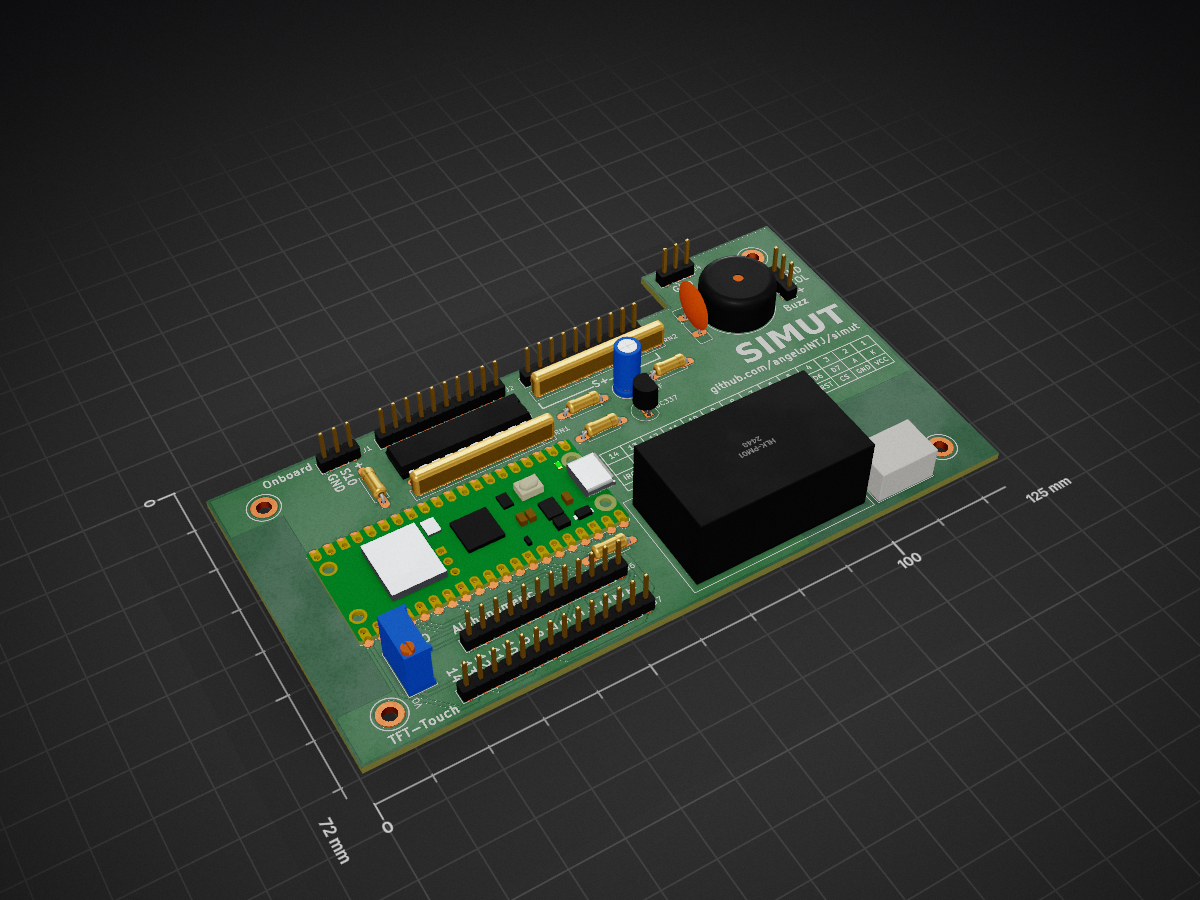
 angeloINTJ/simut7
Sistema Integrado de Monitoramento Universal e Telemetria: open-source firmware for the Raspberry Pi Pico W and Pico 2 W. Sixteen universal sensor slots, TFT touch panel or 16x2 LCD, embedded web UI, binary history, alarms, HTTP/MQTT telemetry, Home Assistant, Prometheus, syslog, signed OTA. Offline-first.
Simut PCB is an open-source printed circuit board by angeloINTJ, from the angeloINTJ/simut repository on GitHub, published under the MIT licence. It is a 2-layer board of 125 × 72 mm with 27 parts on 62 nets, routed with 243 tracks and 0 vias.
It is built around the HLK-PM01 and BC337. Its parts include 8 connectors, 5 resistors, 1 capacitor and 1 IC. It belongs with the home automation and IoT and sensors and measurement boards and the RP2040 and RP2350 boards of this library.


In English, Integrated Universal Monitoring and Telemetry System. The name is Portuguese, and so is the acronym: it is not translated.
Offline-first monitoring and telemetry for the Raspberry Pi Pico W and Pico 2 W, on sixteen universal sensor slots







SIMUT is monitoring and telemetry firmware for the Raspberry Pi Pico W and the Pico 2 W. It reads up to 16 sensors on universal slots — temperature, humidity and pressure today, through its DS18B20, DHT22 and BMP280/BME280 drivers — records them on the device, raises alarms, and keeps working with or without a network. One source tree builds three published devices:
They share one core:
/metrics endpoint and remote syslog (RFC 5424);Universal is the direction, not a feature. A slot has no fixed quantity: a sensor type is a driver under src/sensors/ and an entry in the type table, a new quantity is a row in the channel table (four of the eight it has room for are used), and the dashboard, the history, the alarms, the calibration and the telemetry read the driver's metadata instead of special-casing a part (adding a sensor). Three drivers ship today, and the table already has a row for luminosity that none of them fills. The project's direction is more drivers, contributed one at a time, and slots that actuate — relays, valves, signals — as well as read. No image drives an output yet: an alarm is a sound, a screen and a message to your server.
| Current release | v2.14.0 (2026-11-05); the changelog says what each version changed. SIMUT left beta with v2.7.0, on measurements: an 8.18 h soak with 0 reboots, and 6 of 6 over-the-air updates with nothing lost. |
| Published images | Four images, each as .uf2 and .bin. For the Pico W: release (TFT touch panel), alpha (16×2 LCD with a Bluetooth console) and air (headless battery logger). For the Pico 2 W (RP2350): releasetwo, the release, whose .uf2 carries its partition table and whose .bin boots on trial. The pt-BR and es-ES language packs and an OTA manifest ship alongside. An image with a different set of features comes from the build configurator, and CI builds it from main, for the Pico 2 W too. |
| Maturity |
|
| Tests | Every pull request runs 883 host test cases in 11 suites, 60 s of fuzzing and static analysis, and builds all eleven firmware images from a cold cache. Behaviour on real hardware is verified on a bench — see Verification on hardware. |
Known limitations. Each one is documented where it applies.
.bin, or a build from the configurator. A build of your own goes over USB.ctx=209 or ctx=455) appeared three times on the test image on 20–21 September and not since; the one caught with its context had Core 0 in the console (ctx=209). Both cores are now instrumented to explain the next one. A ctx=455 (empty trace) on the first boot after picotool load -x is not this: that reboot goes through the watchdog, and the record appeared after 11 of 11 such flashes and after none of 7 hardware resets (2026-09-30)./api/status replies arrive with their chunked framing broken (#189). The device does not restart and the next request works; the page misses one update.| Need | DIY Arduino sketch | ESPHome / Tasmota | SIMUT |
|---|---|---|---|
| Standalone with display | Manual coding | No TFT support | Built-in touch UI, or a 16×2 LCD |
| Regulated environments | No audit trail | No user RBAC | 32 accounts, per-account panel PIN, a persistent event log and remote syslog |
| Cold chain (probes down to −50 °C) | Basic readings | Basic monitoring | Calibrated multi-sensor, maintenance windows |
| Offline operation | Yes | Often cloud-dependent | Full local web + display |
| OTA updates | Manual reflash | OTA | Signed OTA + backup/restore |
| Security | None | Basic | HMAC-SHA256, 13-bit RBAC, lockouts, optional HTTPS |
| Home Assistant | Manual setup | Native | MQTT Discovery (opt-in) |
| Prometheus metrics | None | Built-in | /metrics endpoint |
| Remote audit log | None | Add-on | Syslog (RFC 5424 / UDP) |
SIMUT is for you if: you need a standalone, secure, auditable monitoring system that works with or without internet — today typical in laboratories, pharmacies, blood banks, vaccine storage and food cold chains, and wherever a sensor with a driver needs a screen, a history and an alarm.
ESPHome/Tasmota may be better if: you don't need a local display and prefer YAML configuration over a built-in web UI. (If what kept you there was Home Assistant: SIMUT speaks MQTT Discovery.)

Core 0 runs everything but the display, in one cooperative loop, and is the only core that writes the flash; Core 1 runs only the display, the touch panel or the LCD. The rules between the two are in docs/CONCURRENCY.md. The figure is drawn from the source by tools/readme_diagram.py, and CI checks that it still matches the code.
| TFT dashboard (Pico W) | TFT history graph (Pico W) | Web dashboard | Early alpha |
|---|---|---|---|
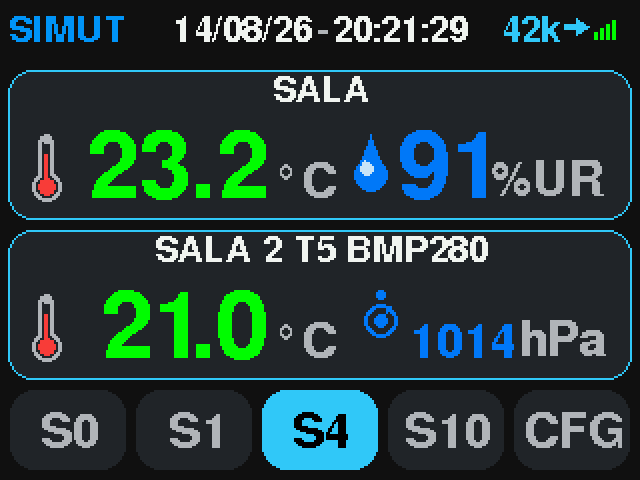 | 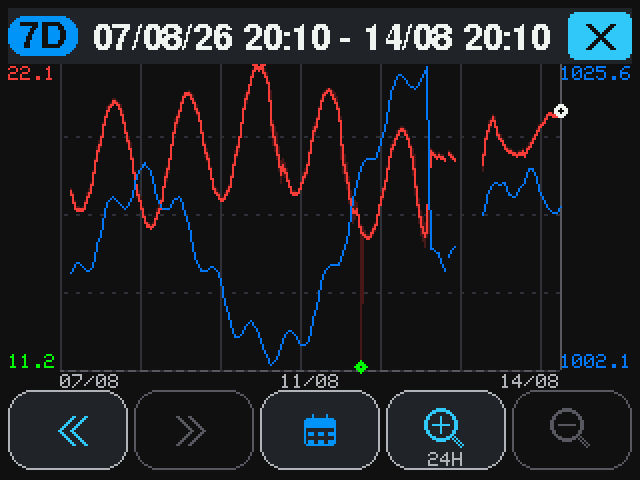 | 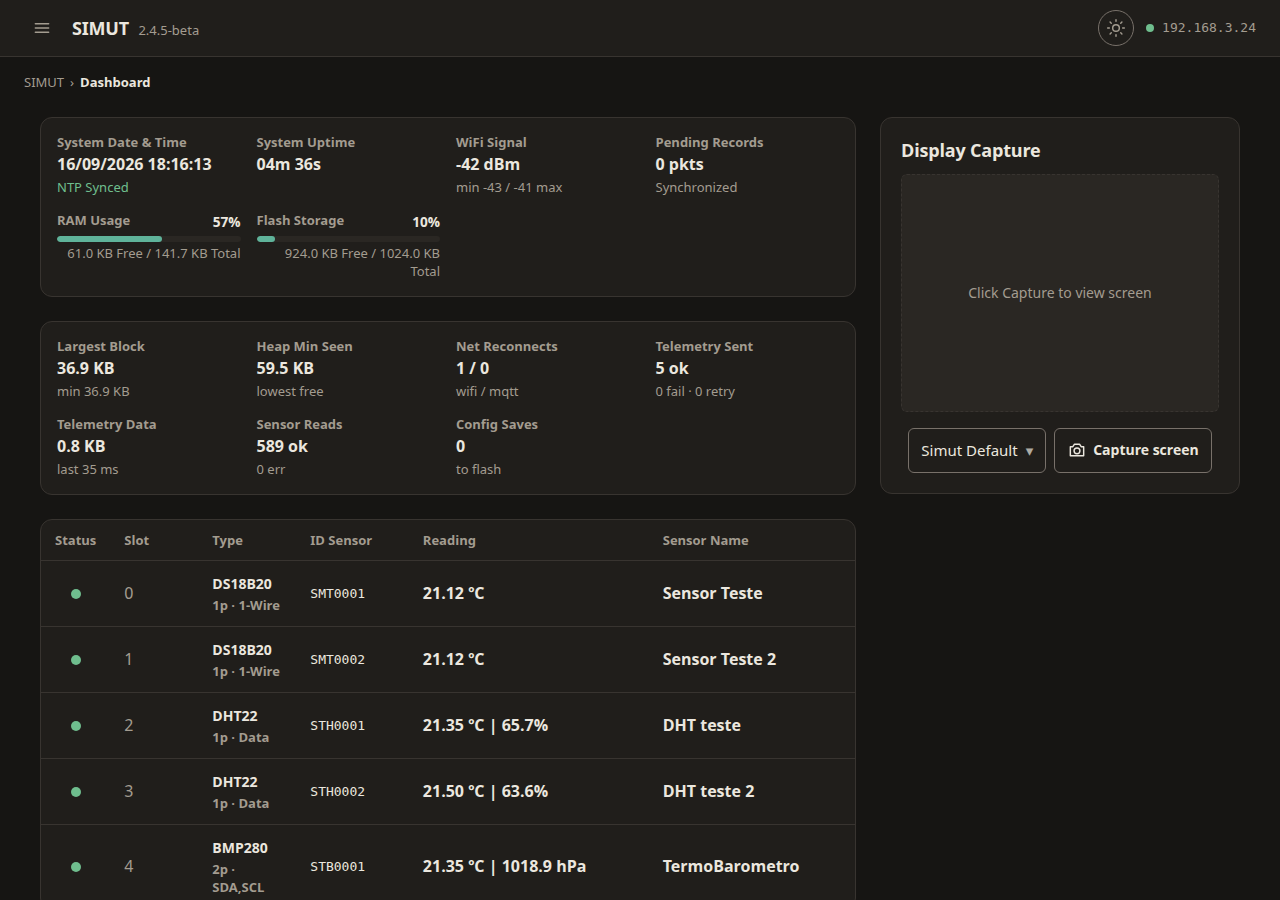 | 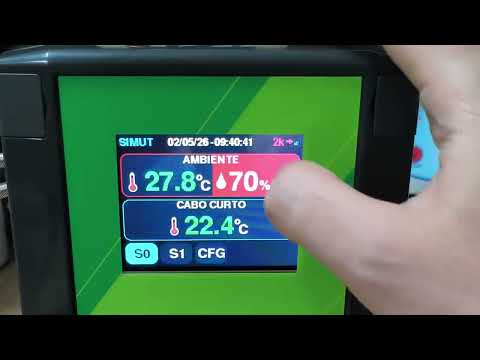 |
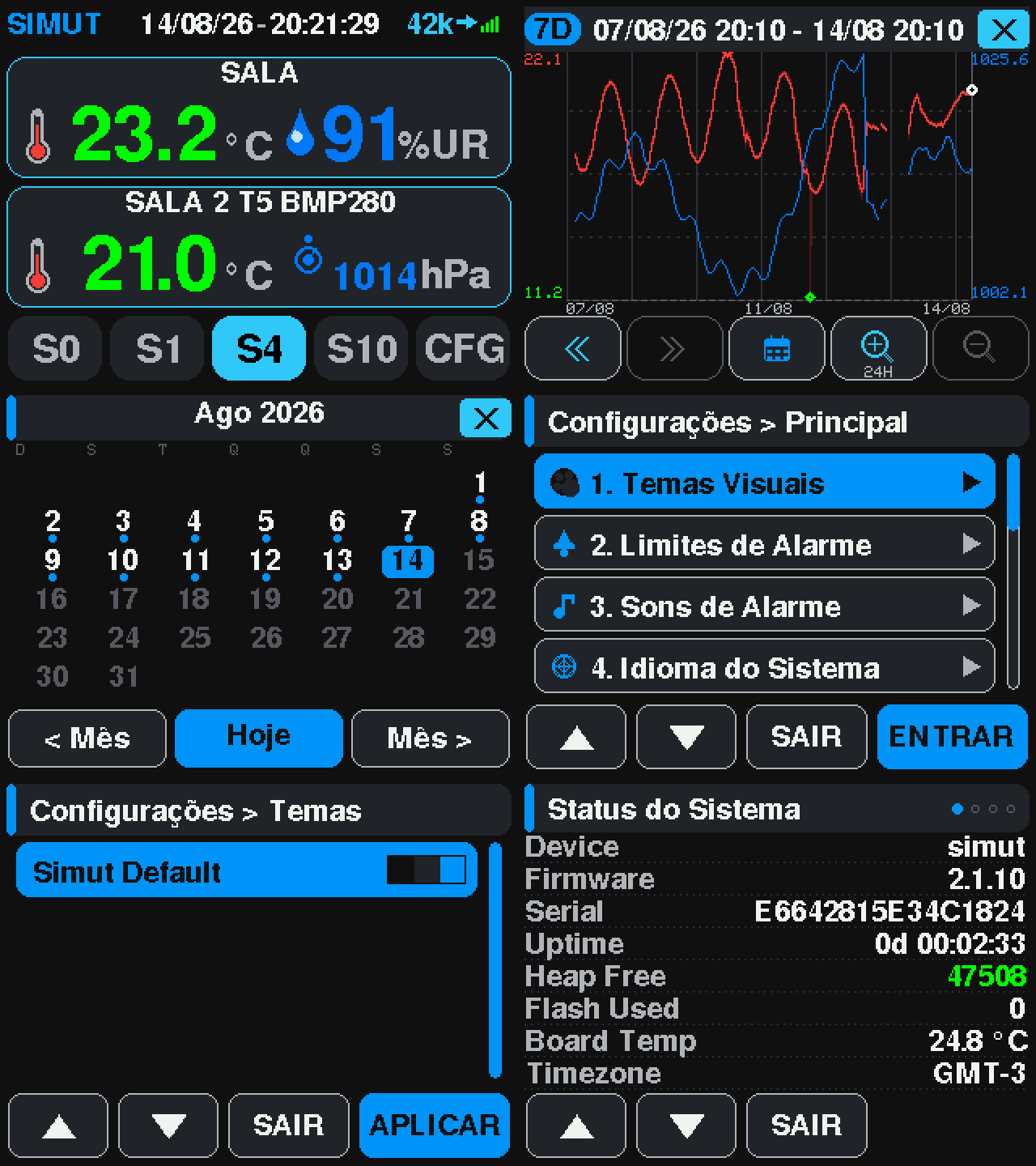
Every screen of the Pico W's original panel, captured off the real panel framebuffer: docs/images/screens/screens.md.
The early alpha video shows the first TFT + touch prototype — the UI has been redesigned since.
| Component | Specification |
|---|---|
| MCU | Raspberry Pi Pico W (RP2040) or Pico 2 W (RP2350), both dual-core. The SIMUT Wire, a plain Pico with an ENC28J60 Ethernet module in place of the radio (pico_wire, pico_wiretft), is built by CI and runs on the bench; it is not published |
| Display | release: ILI9341 320×240 TFT (SPI, DMA-driven), in the Ângulo look on the Pico 2 W (v2.12.0 and earlier drew the original panel there) and the original look on the Pico W · alpha: HD44780 16×2 character LCD (4-bit) · air: none |
| Touch | XPT2046 resistive touchscreen (release) |
| Sensors | 16 universal slots on GP0–GP15 — any mix of DS18B20 (1-Wire), DHT22 and BMP280/BME280. A BMx280 is I²C and takes two pins; two of them can share a pair (0x76/0x77). A new sensor type is a driver; a new quantity, a row in the channel table (adding a sensor) |
| Buzzer | Passive piezo (PIO-driven) — not on the Air |
| Storage | 2 MB internal flash (1 MB firmware slot + 1 MB LittleFS) |
See the wiring guide for the complete pinout and connection diagrams.
SIMUT PCB — layout available for download — the KiCad board design (
.kicad_pcb,.kicad_sch) lives inPCB_test/, and the ready-to-fab package (Gerbers + PTH/NPTH drills, no paste layers) is published as a public release: simut-pcb-v1.1 —simut_pcb_fabrication.zip.
release) — dashboard, history graphs and calendar, and identity at the glass: an account, then its PIN. The Pico 2 W release draws it in the Ângulo look; the Pico W release keeps the original panel. v2.12.0 and earlier drew the original panel on the Pico 2 W.alpha) — every slot in turn, the setup access point and a Bluetooth console; since v2.14.0 the web dashboard draws the glass itself, captured once or live (GET /api/lcd).GET /api/ui, gated..bak, and an event log with 170 event codes.Every feature in detail, and which ones a custom build can leave out: docs/FEATURES.md.
pip install zopfli — optional; the web pages compress 2,888 B smaller with it, and the flash budgets are measured with itdocker compose run build builds in a container — the path CONTRIBUTING.md recommends for new contributors# Clone the repository
git clone https://github.com/angeloINTJ/simut.git
cd simut
# Build firmware
pio run -e pico_w_release
# Flash to Pico W (auto-reset via 1200 bps touch; BOOTSEL works too)
pio run -e pico_w_release -t upload
# First flash only: upload LittleFS data (language packs, themes, favicon).
# Warning: uploadfs reformats the LittleFS partition — on a device already in
# service it destroys history, config and calibration. Never run it again
# after the device has data; language packs can be uploaded later from the
# web file manager instead. It copies both language packs, and the device
# loads the first alphabetically (es-ES): delete the one you do not want.
pio run -e pico_w_release -t uploadfsPrefer not to build? Every release ships simut_vX.Y.Z_release.uf2, _alpha.uf2 and _air.uf2 for the Pico W and, since v2.11.0, _releasetwo.uf2 for the Pico 2 W (drag-and-drop with BOOTSEL held), the matching .bin for over-the-air updates, and the pt-BR and es-ES language packs. An image with a different set of features comes from the build configurator.
Capture the admin password. A factory-fresh unit prints a random 8-character admin password once on the USB serial console (115200 baud). It is never stored in plain text. If you miss it, system admin reset confirm over USB prints a new one.
Join it to your network. The setup access point opens when you ask for it: type ap on the console (on the Air, after enable), or use Settings → 8 on the touch panel. From v2.7.1 to v2.8.0, a unit with no network configured opened it by itself; it no longer does.
<name>_SETUP (simut_SETUP from the factory). It is WPA2, and its per-device key is in the reply to ap, on the USB console and on the TFT's boot terminal.http://192.168.4.1.Without a screen, you can use the console instead: system ssid <name>, system pass <secret>, then reload confirm. The console stops at the first space, so a network name or password with a space has to go through the web page.
With no network configured, the unit asks for the date and time at the end of the boot, because without a network there is no NTP: the touch panel opens a date-and-time screen (SKIP leaves it, and Settings → 4 sets the clock later), and every image prints No network, provisional clock: conf time YYYY-MM-DD HH:MM:SS on the console. That command works on every image's console, over USB or Bluetooth: on the alpha and the Air, which have no panel, it is how the question is answered. The web page's Date & Time section sets the clock too.
Open the web interface at the address the device got — on the release image also http://simut.local — and log in as admin with the password from step 1. You will be asked to choose a new one.
Add sensors in Config → Sensors & GPIO, or let Scan for probes find them.
On the touch panel, Settings asks for an account and its PIN. The factory admin PIN is 1234, and it must be changed on first use.
simut/
├── src/                    # Firmware source (C++17)
│   ├── main.cpp            # Entry point
│   ├── AppManager*         # Application state machine, boot, alarms, Air cycle
│   ├── DisplayManager*     # TFT panel and alpha LCD (Core 1), touch, themes
│   ├── WebManager*         # Web server, HTTP API, sessions, OTA, TLS
│   ├── StorageManager*     # LittleFS, config, accounts, history files
│   ├── SensorManager*      # The sensor host: driver registry, read loop, error hysteresis
│   ├── NetworkManager*     # Wi-Fi, reconnect ladder, setup AP, mDNS, NTP
│   ├── TelemetryManager*   # HTTP(S)/MQTT(S) telemetry and the alarm line
│   ├── CommandManager*     # Serial and Bluetooth console
│   ├── LogManager*         # Event log and crash forensics
│   ├── HistoryV5.*         # V5 history codec
│   ├── air/                # SIMUT Air configuration
│   ├── display/            # Keypads, fonts and labels shared by the displays
│   ├── net/                # The network as a driver: CYW43 Wi-Fi, ENC28J60 (the Wire)
│   ├── sensors/            # Sensor drivers (DS18B20, DHT22, BMx280), channel table, calibration curves
│   ├── ota/                # Update staging, validation and applier
│   ├── ui/                 # The panel's UI drivers: original and Ângulo
│   └── SystemDefs*.h       # System constants and limits
├── data/                   # LittleFS assets (language packs, themes, favicon)
├── PCB_test/               # KiCad PCB design + Gerber/DRL fabrication files
├── test/                   # Native unit tests (Unity), eleven suites
├── tools/ # Build gates, bench suites, PicoHand, release scripts, theme editor| Environment | Purpose | Published |
|---|---|---|
pico_w_release | Production image for the TFT panel: emergency console, HTTPS server, mDNS | …_release |
pico_w_alpha | 16×2 character LCD (HD44780), no touch; emergency console + Bluetooth console | …_alpha |
pico_w_air | Experimental — SIMUT Air: headless, no buzzer, hibernation cycle (M0 awake / M1 wake-read-send-sleep); full console + Bluetooth. See §17 of the user manual | …_air |
pico_w_test | Bench image: the full console for the test suites; no HTTPS, no mDNS | — |
pico_w_test_https | pico_w_test plus the HTTPS server, for TLS validation; three of its pages are served from LittleFS to fit | — |
pico_w_asserts | Release + concurrency assertions | — |
pico2_w_release | The release for the Pico 2 W (RP2350): it boots from slot A or B of a partition table and updates over the air into the other, on trial (OTA_AB_RP2350.md). Its .uf2 is a factory image, with the partition table. It draws the touch panel in the Ângulo look (v2.12.0 and earlier drew the original panel) | …_releasetwo |
pico2_w_original | The Pico 2 W with the original panel, the look it carried up to v2.12.0; built by CI, not published, not a required check | — |
pico_wire | The SIMUT Wire: a plain Pico with no radio, an ENC28J60 Ethernet module (src/net/) and the 16×2 LCD; on the bench since 2026-10-12, built by CI, not published | — |
pico_wiretft | The Wire with the TFT panel and touch in place of the LCD, in the original look | — |
pico_wiretft_angulo | pico_wiretft drawn by the Ângulo UI driver (src/ui/angulo/) | — |
eleven native* envs | Host-side unit tests — see Testing | — |
Security note for
pico_w_alphaandpico_w_air: both compile the Bluetooth SPP console in (SIMUT_BLUETOOTH=1), so on those two images it is live attack surface. It is authenticated by the admin web password, with an exponential lockout that survives a reconnect, and a discovery window that closes 5 minutes after boot. Recovery commands are restricted to USB.The setup access point is WPA2 on every image, with a per-device key shown on the console and, where there is one, on the display. See SECURITY.md §2 and §8.
There is no debug environment.
pico_w_debugwas removed in v2.4.1 after never once linking: at-Ogthe image overflowed the 1020 KB app slot by ~100 KB. Flash is tight. The release image uses 98.2 % of the 1,044,480 B program slot (tools/flash_budget.jsonkeeps the measured value), and CI checks every.bin, with its 241 B signature, against the 1,040,384 B over-the-air ceiling. A GDB target would have to be built by cutting features. For the concurrency tripwire on hardware, usepico_w_asserts.
-Os — optimize for size-Wall -Wextra, and -Werror on src/ (third-party libraries are not held to it)-specs=nano.specs — newlib-nano for smaller binary-DNDEBUG on every imagetools/arduino_pico_overrides/patch.shA serial console is available over USB (115200 baud), and over Bluetooth SPP on the alpha and the Air.
The emergency console runs on the release and alpha images. Its 15 commands:
show net status, show system info, show system logdebug on|offsystem admin reset, system format, system factory, system https offsystem ssid <name>, system pass <secret>, system cors <origin|off>ap, time <date> <time>, reload, helpDestructive commands ask for confirm, and the four recoveries (system factory, system format, system admin reset, system https off) are refused over Bluetooth.
The full Cisco-style console (enable / configure terminal) runs on the air image and the pico_w_test bench images — see the CLI manual (in Portuguese). The Air adds air status | hibernate | stop | idle <sec> | charger <gpio|off>.
Where configuration happens:
The device exposes a REST API at http://<device-ip>/api/:
tools/check_authz.py in CI;GET /api/ui, gated by PERM_SYS_CONFIG and counted apart, outside the 62;pio test -e native # validators, telemetry cursor, labels, parsers, language packs, the License and update screens, the Settings menu, the password check, the web session, the alpha LCD's screens and the shadow of its glass (450 cases)
pio test -e native_history_v5 # V5 history codec (62)
pio test -e native_cli # CLI parser (43)
pio test -e native_lan # CLI parser, pack help, Settings menu, log codes and the alpha LCD's cable cells of a wired build (19)
pio test -e native_logpolicy # edge-triggered log persistence, autopsy bands, touch wake (59)
pio test -e native_alarmqueue # alarm telemetry queue (54)
pio test -e native_network # Wi-Fi reconnect state machine (54)
pio test -e native_wired # wired network state machine, against a fake ENC28J60 (19)
pio test -e native_air # SIMUT Air persistent config (17)
pio test -e native_sensors # sensor type table, scan JSON, the real BMx280 scan (23)
pio test -e native_otasig # OTA image signature check, the backup restore, and the RP2350's slot writer and update on trial (83)
# V5 codec reference checks (Python vs C++, 20k random cases)
python3 tools/check_history_v5_parity.py --cases 20000
python3 tools/history_v5.py --selftest --trials 200000Every push and pull request to main runs four jobs:
-Werror and the web UI, CLI help, log-code, channel-table and language-pack gates.main is protected: nine of these checks must pass before anything merges, every job except the pico_w_test_https, pico_wire, pico_wiretft, pico_wiretft_angulo and pico2_w_original images.
Behaviour is checked on a bench: a Pico 2 W with the TFT panel and touch, and a Pico W, the PicoHand, that works the target's RESET and BOOTSEL lines. Every measurement, dated, with its numbers: docs/VERIFICATION.md.
| Document | Description |
|---|---|
| User manual | Hardware setup, display/web/console guide, OTA, API reference, troubleshooting — kept current |
| Manual do usuário (pt-BR) | The same manual, in Portuguese |
| Complete manual (pt-BR) | The full product manual in Portuguese, updated for v2.14.0: installation, configuration, daily use and server integration, with 245 figures, screens and diagrams; the 10 still pending (2026-11-06) are marked where they belong |
| Wiring guide | Complete pinout and connection diagrams |
| Over-the-air updates | Updating from the web page, and what survives it |
| Recovery guide | Brick recovery — BOOTSEL, picotool, 1200 bps reset |
| CLI manual | Full console reference, the Air's included (in Portuguese) |
| Authorization matrix | Every HTTP route and the permission it requires |
| Security policy | Threat model, credential handling, incident response |
| Features | Every feature in detail |
| Verification on hardware | What has been measured on the bench, dated |
| Documentation index | Which documents are kept current and which are snapshots |
| Changelog | Version history and feature changes |
Most changes are written by an AI coding agent (Claude Code) in sessions the maintainer directs: from 1 September to 2 October 2026, 275 of the 371 commits on main carried a Co-Authored-By: Claude line. The instructions those sessions follow are CLAUDE.md and AGENTS.md (in Portuguese). The rules are the same for every change, whoever typed it:
main only through a pull request, after nine required checks pass: the eleven host test suites, also under AddressSanitizer and UBSan, 60 s of fuzzing, static analysis, and six of the eleven firmware images built from a cold cache;Contributions are welcome. Read CONTRIBUTING.md for the development setup, the code conventions and the pull request process.
All contributors must follow the Code of Conduct.
Thanks to everyone who has contributed:
This project follows the all-contributors specification.
Is your product or project using SIMUT? Add this badge to your README, documentation, or product page:
[](https://github.com/angeloINTJ/simut)
Large version (for presentations, posters, or product packaging):
[](https://github.com/angeloINTJ/simut)
MIT License — see LICENSE for details.
The firmware images also carry third-party software. THIRD_PARTY_NOTICES.md
names each component, its copyright holder, its licence and the images that carry it, and
LICENSES/ holds the licence texts. The device shows the same list on its License
screen and on the /license page.
Copyright © 2026 Ângelo Moisés Alves
| Qty | Value | Footprint | References |
|---|---|---|---|
| 5 | R | Resistor_THT:R_Axial_DIN0207_L6.3mm_D2.5mm_P7.62mm_Horizontal | R31, R32, R33, R34, R35 |
| 3 | Conn_01x03 | Connector_PinHeader_2.54mm:PinHeader_1x03_P2.54mm_Vertical | J1, J4, J5 |
| 2 | Conn_01x10 | Connector_PinHeader_2.54mm:PinHeader_1x10_P2.54mm_Vertical | J2, J3 |
| 2 | R_Network10 | Resistor_THT:R_Array_SIP11 | RN1, RN2 |
| 1 | BC337 | Package_TO_SOT_THT:TO-92_Inline | BC337 |
| 1 | Buzzer | Buzzer_Beeper:Buzzer_15x7.5RM7.6 | BZ1 |
| 1 | C_Small | Capacitor_THT:C_Disc_D10.0mm_W2.5mm_P5.00mm | C2 |
| 1 | C_Small_US | Capacitor_THT:C_Radial_D5.0mm_H11.0mm_P2.00mm | 100uF |
| 1 | Conn_01x03 | Connector_JST:JST_VH_B3P-VH-B_1x03_P3.96mm_Vertical | J8 |
| 1 | Conn_01x12 | Connector_PinHeader_2.54mm:PinHeader_1x12_P2.54mm_Vertical | J6 |
| 1 | Conn_01x14 | Connector_PinHeader_2.54mm:PinHeader_1x14_P2.54mm_Vertical | J7 |
| 1 | HLK-PM01 | Converter_ACDC:Converter_ACDC_Hi-Link_HLK-PMxx | U2 |
| 1 | R_Pack10 | Package_DIP:DIP-20_W7.62mm | RN3 |
| 1 | R_Potentiometer_Trim | Potentiometer_THT:Potentiometer_Bourns_3296W_Vertical | VO |
| 1 | RaspberryPi_Pico_W | Module:RaspberryPi_Pico_W_SMD_HandSolder | A1 |
The 23 most common of 27 parts.
It measures 125 × 72 mm and has 2 copper layers, 1.6 mm thick.
27 parts, built around the HLK-PM01 and BC337. The full list of its parts is on this page, with links to each part's symbol and footprint where PCBKit's library has them.
From the angeloINTJ/simut repository on GitHub, at the commit this page was made from: the board is PCB_test/simut PCB.kicad_pcb and its schematic PCB_test/simut PCB.kicad_sch. PCBKit opens the board in the browser, with nothing to install.
Its repository publishes it under the MIT licence: you may reuse it on that licence's terms (keep the author's notice, and for a copyleft licence share your changes alike).
pablozg/freeds
Derivador de energía solar excedente creado por Pablo Zerón, Diseño PCB por Amcalo, Tester original por Aeizoon, Wiki por Zoilo Mora


gnilsson2/YAPP_Box_KiCad_Generator
Generate Openscad boxes from KiCad PCB files.

jazzmonger/Traeger-PID-Controller
Traeger Smoker/Grill Controller based on an


HestiaPi/hestia-touch-pcb-dev
Testing release for the PCB files for HestiaPi Touch

cs2dsb/zcssr
A PCB and software for a SSR controller that monitors mains AC zero crossings to determine when to turn the SSR on.