

4 layers99 × 53.3 mm
PSLab
fossasia/pslab-hardware
PSLab Hardware Design and Schematics https://pslab.io
199 parts1.7kApache-2.0

 aamat09/baby-tracker-suite4
Baby care tracking suite: HA dashboards, n8n workflows, PostgreSQL, ESP32-C3 remote with 3D-printed enclosure
Baby remote is an open-source printed circuit board by aamat09, from the aamat09/baby-tracker-suite repository on GitHub, published under the MIT licence. It is a 2-layer board of 80 × 100 mm with 17 parts on 17 nets, routed with 127 tracks and 7 vias.
It is built around the WS2812B. Its parts include 15 switches, 1 IC and 1 diode. It belongs with the home automation and IoT boards and the ESP32 and RISC-V boards of this library.



A baby care tracking system built on Home Assistant, n8n, PostgreSQL, and ESP32. Born out of a contraction tracker built for labor, evolved into a full newborn care dashboard once my son arrived plus a ~$10 3D-printed physical remote for those 3am diaper-change logs.
When my wife went into labor, we needed a way to log contractions without fumbling with phone apps. We paired a Ring Alarm Panic Button (Z-Wave) to our home automation stack where one press logged the contraction, timestamped it in PostgreSQL, notified both phones, posted to Discord, and announced it on the Echo Show. It worked beautifully for 700+ contractions over two weeks.
When we got to the hospital, the Ring button was back home. So we added intensity-coded buttons (Mild/Moderate/Strong/Intense) to the HA dashboard with color coding, stats (average gap, frequency), and an on-demand AI assessment powered by Ollama that would estimate the labor stage.
My son was born the next day. The contraction tracker was retired the same day and replaced with a baby tracker covering feeds, diapers, sleep, baths, medicine, tummy time, weight, pumping, and notes.
Keeping the same low-friction (high-WAF) style, we then built a 3D-printed physical remote with labeled buttons so nobody has to unlock a phone to log a diaper change at 3am.
Physical Button / HA App / Siri Shortcut
        |
        v
   n8n Webhook (POST /webhook/baby-event)
        |
   +----+----+----+----+
   |    |    |    |    |
   v    v    v    v    v
  DB  Phone Phone Echo Discord
  PG   you   ptnr Show
        |
        v
   n8n Log API (GET /webhook/baby-log)
        |
        v
   HA REST Sensor (polls every 30s)
        |
        v
HA Dashboard (stats + journal + buttons)The original. Ring Panic Button press -> Z-Wave JS UI -> Python bridge -> MQTT + n8n webhook -> full pipeline.
| File | Description |
|---|---|
contraction-tracker/zwave_panic_mqtt.py | Python bridge: Z-Wave WebSocket -> MQTT + webhook |
contraction-tracker/n8n/contraction_tracker.json | Main workflow: webhook -> Discord, DB, notifications |
contraction-tracker/n8n/contraction_note_logger.json | MQTT-triggered note logger |
contraction-tracker/n8n/contraction_log_api.json | GET API: returns entries + 2-hour stats |
contraction-tracker/n8n/contraction_ai_assessment.json | On-demand Ollama AI labor stage assessment |
contraction-tracker/ha/dashboard.json | HA Lovelace dashboard (intensity buttons, journal, AI) |
contraction-tracker/ha/configuration_snippets.yaml | HA config: rest_command, input_text, REST sensor |
Features added during labor:
Full newborn care tracker. 17 event types across 8 categories.
| File | Description |
|---|---|
baby-tracker/n8n/baby_event_logger.json | Main workflow: webhook -> DB + phone notifications |
baby-tracker/n8n/baby_note_logger.json | MQTT-triggered note logger |
baby-tracker/n8n/baby_log_api.json | GET API: returns entries + daily stats |
baby-tracker/n8n/pump_reminder.json | 2-hour pump reminder (independent timers per pump) |
baby-tracker/ha/dashboard.json | HA Lovelace dashboard |
baby-tracker/ha/configuration_snippets.yaml | HA config snippets |
Event types:
Stats tracked: last feed time/type, last diaper time/type, feeds today, diapers today, sleep total today, baths/medicines/tummy times/pumps today.
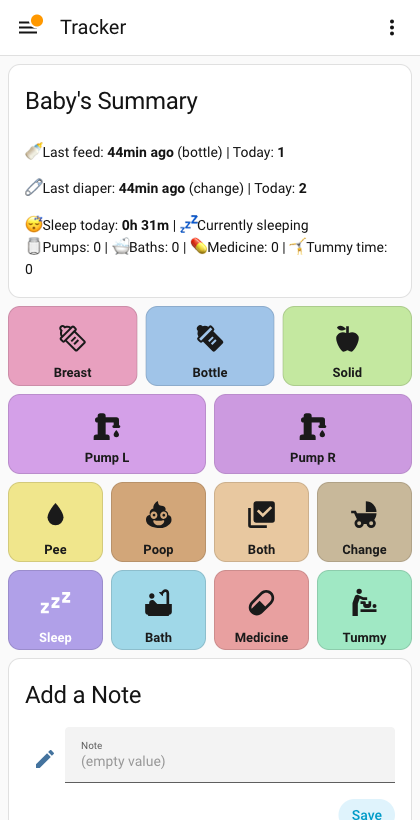
A single-container Home Assistant app that bundles everything above with no n8n and no external database: an Ingress web UI (the colorful button dashboard), local SQLite storage, the same stats/journal, pump reminders, and native HA entities via MQTT discovery — and it still listens to the ESP32 remote. It lives in its own installable repo:
➡️ hms-homelab/hms-baby-tracker (FastAPI + SQLite; add the repo URL under Settings → Add-ons/Apps → Repositories).
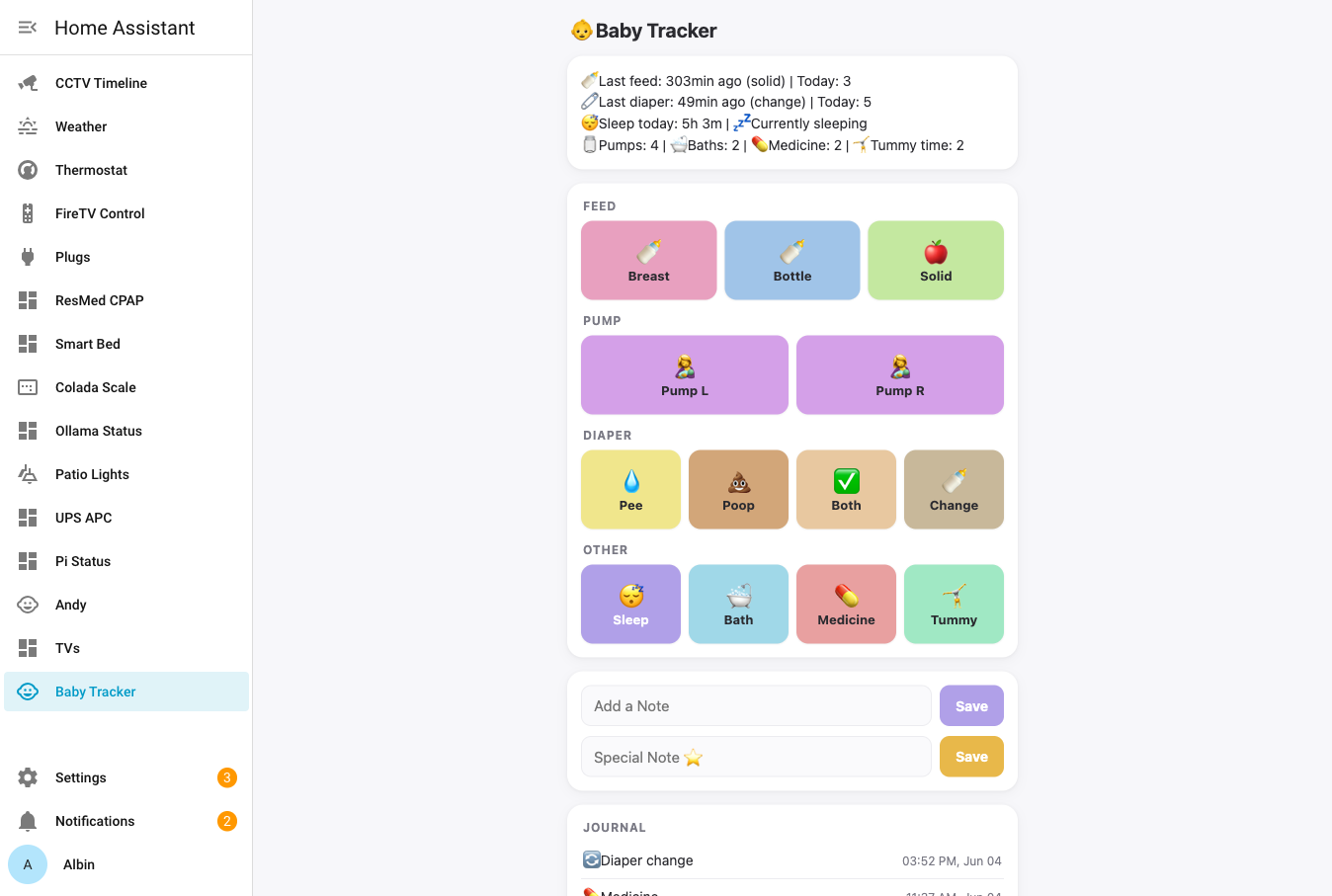
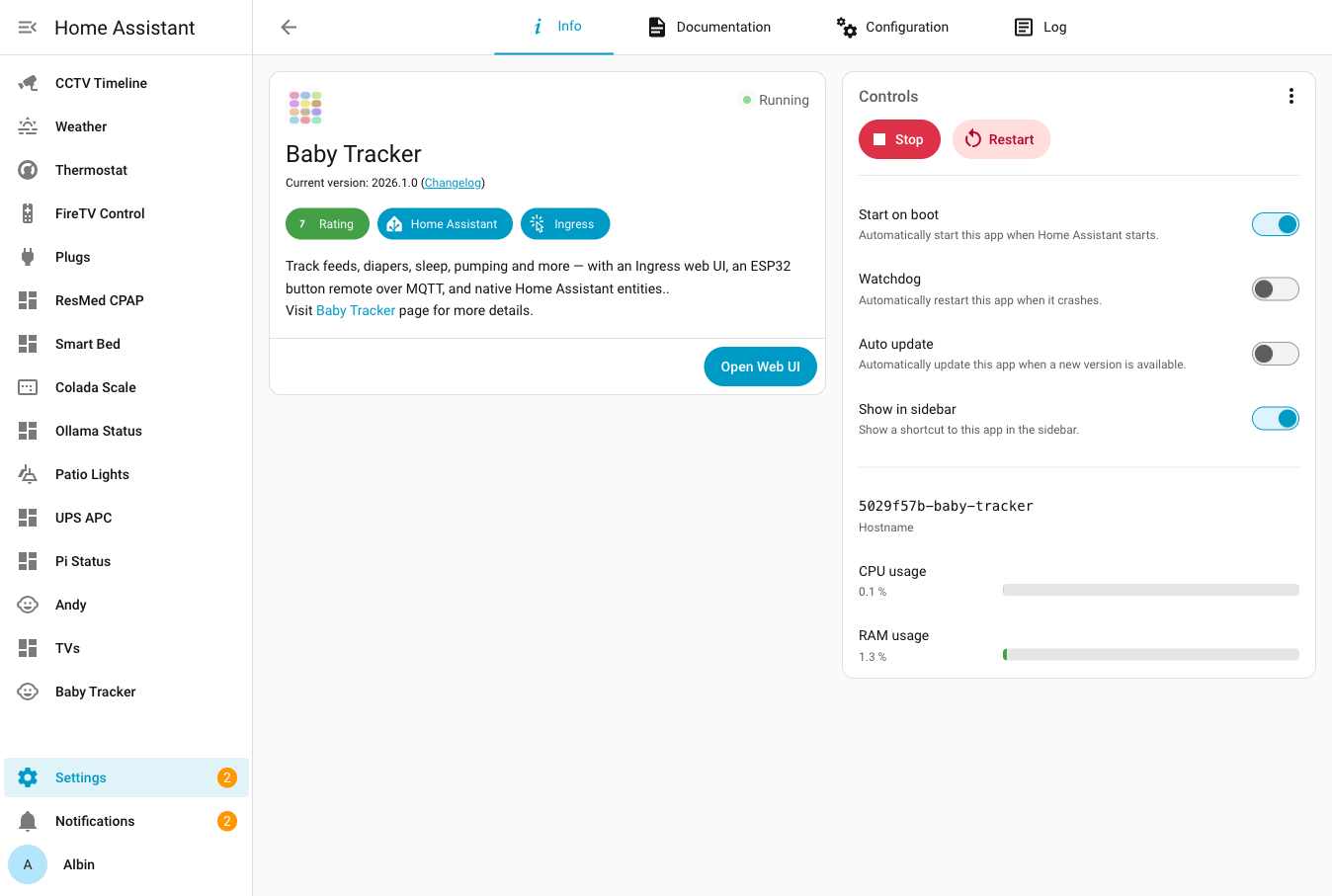
The add-on's Ingress web UI (left) and its Home Assistant app page (right) — runs as a native HA add-on, no n8n or external DB.
The n8n + PostgreSQL path in this repo remains as the advanced/legacy backend; the app is the portable, one-click way to run the whole thing.
3D-printed physical remote control with ESP32-C3, 15 tactile buttons, RGB LED feedback, and a 0.96" OLED status screen.
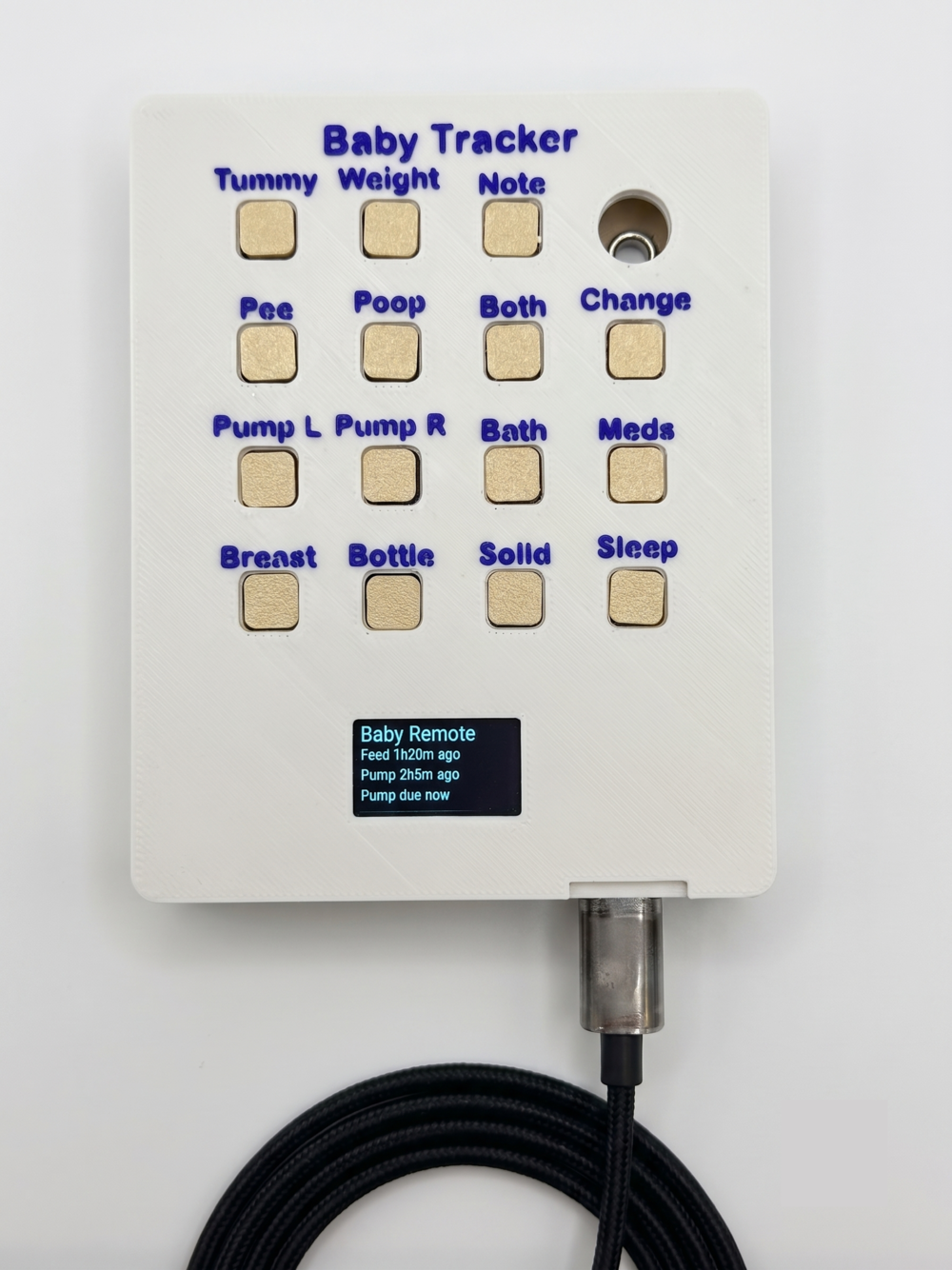
The remote with its 0.96" OLED — last feed, last pump and the next-pump reminder, pushed live over MQTT by n8n.
🎛️ Want one without building it? The remote is made in small batches — join the device waitlist →.
| File | Description |
|---|---|
baby-remote/kicad/ | 2-layer PCB (DRC-clean, Freerouting-routed) — the manufactured board |
baby-remote/kicad/fab/baby-remote-jlcpcb.zip | Gerbers + drill, ready to upload to JLCPCB |
baby-remote/scad/baby-remote-pcb.scad | OpenSCAD 3D-printed PCB substrate (grooved board = device back; bottom feet) |
baby-remote/scad/baby-remote-pcb-case.scad | OpenSCAD snap-fit cap (walls + ledge + barrels + labels); board snaps in |
baby-remote/scad/button_plunger.stl | Button plunger (print 15×) |
baby-remote/scad/led_window.stl | LED window (print 1× in clear filament) |
baby-remote/esphome/baby_remote.yaml | ESPHome firmware: matrix -> MQTT -> n8n / the app |
See Hardware for the button layout, matrix wiring, PCB, and BOM.
| File | Description |
|---|---|
db/schema.sql | PostgreSQL schema for both tables |
Both tables live in the maestro_hub database on PostgreSQL 17 at homelab.local.
The Baby Remote is a 3D-printed, battery-powered ESP32-C3 keypad. 15 tactile switches on a diodeless 4x4 scan matrix (16th cell is the LED window), each press published over MQTT to the same n8n webhook the app and Siri use.
Button layout (4x4 grid, last cell = RGB LED):
 Breast  | Bottle  |  Solid  |  Sleep
 Pump L  | Pump R  |  Bath   |  Meds
  Pee    |  Poop   |  Both   | Change
 Tummy   | Weight  |  Note   |  [LED]
Matrix -> GPIO (firmware baby-remote/esphome/baby_remote.yaml == PCB):
| Signal | GPIO | Net |
|---|---|---|
| Rows (drive) | GPIO0, GPIO1, GPIO3, GPIO4 | ROW0..3 |
| Columns (sense) | GPIO5, GPIO6, GPIO7, GPIO10 | COL0..3 |
| WS2812B LED | GPIO8 | LED_DIN |
PCB -- two interchangeable designs, both script-generated and reproducible:
baby-remote/kicad/) fully-routed 2-layer board (rows on
F.Cu, columns on B.Cu), DRC clean (0 violations / 0 unconnected / 0 parity),
Freerouting-routed, JLCPCB-ready. Regenerate with gen_schematic.py ->
pcbgen.py; route via Specctra DSN/SES.baby-remote/scad/baby-remote-pcb.scad) 3D-printed
substrate with copper-tape/tinned-wire grooves; rows on the top face, columns
on the bottom, switch legs bridging faces (crossing-free).BOM (~$10):
| Part | Qty |
|---|---|
| ESP32-C3 SuperMini | 1 |
| TP4056 USB-C LiPo charger | 1 |
| 3.7V LiPo 500mAh | 1 |
| 6x6x5mm tactile switches | 15 |
| WS2812B RGB LED | 1 |
| Slide switch (power) | 1 |
The fastest path — no n8n, no PostgreSQL, no manual scripts:
https://github.com/hms-homelab/hms-baby-tracker.notify_targets
(e.g. mobile_app_your_phone) to get press + pump-reminder notifications,
and adjust timezone / pump_hours.It auto-connects to the HA Mosquitto broker, so the ESP32 remote keeps
working (publishes to baby/remote/event) and native HA sensors/buttons
appear automatically via MQTT discovery. Data lives in the add-on's /data
(SQLite). Full reference:
hms-baby-tracker DOCS.
psql -d maestro_hub -f db/schema.sql# Import the n8n workflows (n8n UI or API)
# baby-tracker/n8n/*.json
# Add the HA snippets to configuration.yaml
# baby-tracker/ha/configuration_snippets.yaml
# Import the dashboard into HA storage (.storage/lovelace.<name>)
# baby-tracker/ha/dashboard.json
# Create the HA scripts referenced by the dashboard (rest_command + input_text,
# see baby-tracker/ha/configuration_snippets.yaml)esphome run baby-remote/esphome/baby_remote.yamlPrint the case parts (baby-remote/scad/*.stl), fabricate the PCB
(KiCad Gerbers or the OpenSCAD groove board), and assemble.
Part of the Smart Home Maestro homelab:
MIT License -- see LICENSE for details.
If this project is useful to you, consider buying me a coffee!

| Qty | Value | Footprint | References |
|---|---|---|---|
| 1 | Bath | Button_Switch_THT:SW_PUSH_6mm_H13mm | SW7 |
| 1 | Both | Button_Switch_THT:SW_PUSH_6mm_H13mm | SW11 |
| 1 | Bottle | Button_Switch_THT:SW_PUSH_6mm_H13mm | SW2 |
| 1 | Breast | Button_Switch_THT:SW_PUSH_6mm_H13mm | SW1 |
| 1 | Change | Button_Switch_THT:SW_PUSH_6mm_H13mm | SW12 |
| 1 | ESP32-C3 SuperMini | ESP32-C3-SuperMini:MODULE_ESP32-C3_SUPERMINI | U1 |
| 1 | Meds | Button_Switch_THT:SW_PUSH_6mm_H13mm | SW8 |
| 1 | Note | Button_Switch_THT:SW_PUSH_6mm_H13mm | SW15 |
| 1 | Pee | Button_Switch_THT:SW_PUSH_6mm_H13mm | SW9 |
| 1 | Poop | Button_Switch_THT:SW_PUSH_6mm_H13mm | SW10 |
| 1 | PumpL | Button_Switch_THT:SW_PUSH_6mm_H13mm | SW5 |
| 1 | PumpR | Button_Switch_THT:SW_PUSH_6mm_H13mm | SW6 |
| 1 | Sleep | Button_Switch_THT:SW_PUSH_6mm_H13mm | SW4 |
| 1 | Solid | Button_Switch_THT:SW_PUSH_6mm_H13mm | SW3 |
| 1 | Tummy | Button_Switch_THT:SW_PUSH_6mm_H13mm | SW13 |
| 1 | WS2812B | LED_SMD:LED_WS2812B_PLCC4_5.0x5.0mm_P3.2mm | LED1 |
| 1 | Weight | Button_Switch_THT:SW_PUSH_6mm_H13mm | SW14 |
fossasia/pslab-hardware
PSLab Hardware Design and Schematics https://pslab.io
FrameworkComputer/ExpansionCards
Reference designs and documentation to create Expansion Cards for the Framework Laptop


PrintersForAnts/Micron
If you want to purchase full kits there are 3 available (Kits are slowly updating to R1 hardware just make sure to double check the included hardware in your kit and if you have any questions reach out in the discord)


It measures 80 × 100 mm and has 2 copper layers, 1.6 mm thick.
17 parts, built around the WS2812B. The full list of its parts is on this page, with links to each part's symbol and footprint where PCBKit's library has them.
From the aamat09/baby-tracker-suite repository on GitHub, at the commit this page was made from: the board is baby-remote/kicad/baby-remote.kicad_pcb and its schematic baby-remote/kicad/baby-remote.kicad_sch. PCBKit opens the board in the browser, with nothing to install.
Its repository publishes it under the MIT licence: you may reuse it on that licence's terms (keep the author's notice, and for a copyleft licence share your changes alike).