Skip to the content
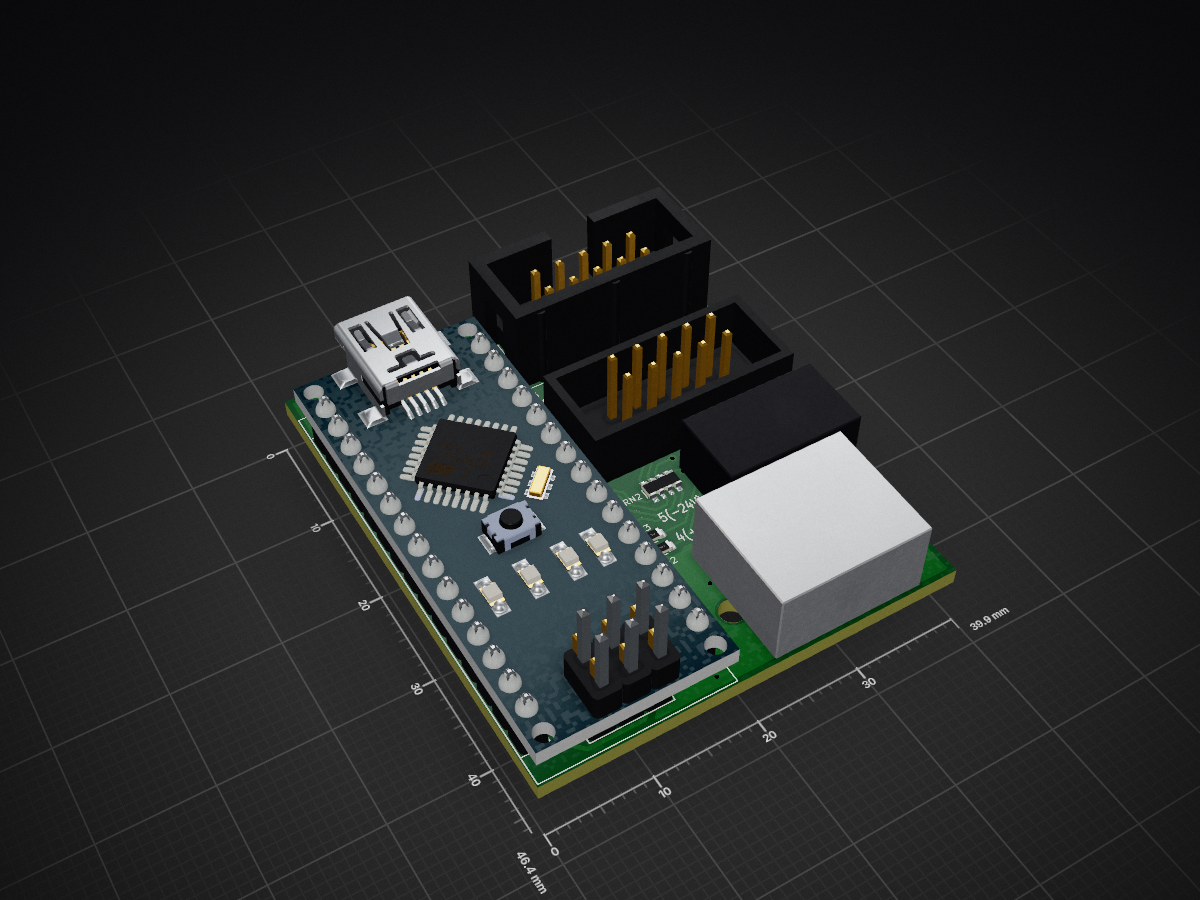
2 layers39.9 × 46.4 mmCrealityDryerV1, the printed circuit board in 3D

Creality Space Pi Plus CFS mod automation (PCB and sketch for Arduino IDE)

Size
39.9 × 46.4 mm
Copper layers
2
Thickness
1.6 mm
Parts
20
Nets
56
Pads
153
Tracks, vias
469, 38
Pours
1
Routed
Yes
KiCad
KiCad 8.0 (file 20240108)
Created
17 Jun 2025
Updated
9 Aug 2025

Overview

CrealityDryerV1 is an open-source printed circuit board by Ermakov, from the Ermakov/CrealitySpacePiAutomation repository on GitHub. It is a 2-layer board of 39.9 × 46.4 mm with 20 parts on 56 nets, routed with 469 tracks and 38 vias.

It is built around the ATMEGA328P-AU and SS14. Its parts include 6 capacitors, 6 connectors, 2 resistors, 1 IC and 1 diode. It belongs with the lEDs and displays boards and the AVR (ATmega, ATtiny) boards of this library.

Main components

2

README

README.md

Creality SpacePi automation and control module

This is PCB and Arduino IDE sketch for Creality Space Pi (Plus or not) automation.

Description:

  • necessary the module itself and IDC10 female-male cable
  • can be inserted into any Creality SpacePi dryer (double, single, built-in Creality CFS or not)
  • other functions and cables are optional (backlights, external control and power are not required for operation, but can be connected additionally)
  • the cable from the SpacePi display needs to be disconnected from the dryer board and inserted into the "display" socket on the module
  • an additional IDC10 cable connecting between the module "mainboard" socket and the dryer board (power is supplied from the dryer board via this cable)
  • RJ45 on the module connecting to any I2C master using a regular patch cord and provides data transfer in both directions, and also serves lighting (24V led strip) inside CFS or dryer
  • two pin terminal block on the module used for connecting the led strip; pad J4 on the back of the module (via diode) used for supply 24 volts to the strip directly from CFS (without connecting a patch cord with external power)

Module/sketch features:

  • interception of all signals between the display/buttons and the dryer board, the module sees the readings on the display and can control the dryer buttons
  • automatic switching on SpacePi after power is supplied
  • automatic switching on SpacePi drying mode to the values on the display when the module sees humidity above the set point (by default 30%, switching on for 4 hours, then a break of 4 hours, and so on)
  • solving the problem with the E4 error (when the dryer does not reach the expected temperature within 10 minutes) by restarting the drying mode every 9 minutes (until heating to the working temperature)
  • transferring data of temperature/humidity in the dryer via I2C as HTU21D sensor protocol
  • any information from the dryer display (including an error), as well as pressing any buttons using special I2C commands (see the sketch)

Parts

20
QtyValueFootprintReferences
3100nFCapacitor_SMD:C_0603_1608MetricC1, C3, C4
210KResistor_SMD:R_0603_1608MetricR2, R3
210pFCapacitor_SMD:C_0603_1608MetricC5, C6
1100RResistor_SMD:R_Array_Convex_4x0603RN2
116MHzCrystal:Crystal_SMD_3225-4Pin_3.2x2.5mmY1
11KResistor_SMD:R_Array_Convex_4x0603RN1
122uF 10VCapacitor_Tantalum_SMD:CP_EIA-3528-12_Kemet-TC2
18P8CMegaSensor:RJ45_OST_PJ012-8P8CX_VerticalSensorJ1
1ATmega328P-APackage_QFP:TQFP-32_7x7mm_P0.8mmU2
1Arduino_Nano_v2.xMegaSensor:Arduino_NanoA1
1DisplayMegaSensor:IDC-Header_2x05_P2.54mm_VerticalSilkJ3
1MainBoardMegaSensor:IDC-Famale_2x05_P2.54mm_VerticalSilkJ2
1PROGConnector_PinHeader_2.54mm:PinHeader_2x03_P2.54mm_VerticalJ5
1PWRMegaSensor:DG141R-2.54-02PJ6
1SS14Diode_SMD:D_SMAD1
1padTestPoint:TestPoint_Pad_1.5x1.5mmJ4

More from Ermakov/CrealitySpacePiAutomation

1
  • 2 layers39.9 × 46.4 mmCrealityDryer, the printed circuit board in 3D

    CrealityDryer

    Ermakov/CrealitySpacePiAutomation

    Creality Space Pi Plus CFS mod automation (PCB and sketch for Arduino IDE)

    18 parts33
Similar boards

  • 2 layersHB LC Dim6PWM CV, the printed circuit board in 3D

    HB LC Dim6PWM CV

    stan23/myPCBs

    Verschiedene Platinen für HomeMatic, AskSinPP und SmartHome

    57 parts21
  • 2 layers98.8 × 55.1 mmH bridge controller, the printed circuit board in 3D

    H bridge controller

    jayanta525/dual-h-bridge

    Dual H-Bridge Controller with IRF3205 and IR2104 MOSFET Driver, and with ATMega328P-AU PWM Controller

    104 parts5MIT
  • 2 layers55 × 35 mmMini BT Pcb-328P, the printed circuit board in 3D

    Mini BT Pcb-328P

    d-diot/Mini-BT-Pcb-328P

    MySensors ATMega328P + RFM69 and NRF24 battery (AAA and CR2032) powered pcb

    54 parts3
  • 2 layers78 × 99 mmB W Master, the printed circuit board in 3D

    B W Master

    Alihk93/B-W_Master_Slave_RF

    Design, validate, and release two manufacturable PCBs that together form a one-way wireless link: a solar-powered remote node (**R_Slave**) transmits a 433.92 MHz ASK/OOK signal to a mains-powered base unit…

    80 parts
  • 2 layers152 × 106.1 mmWorkboy, the printed circuit board in 3D

    Workboy

    dmang-dev/workboy

    Open, buildable recreation of Nintendo's unreleased Game Boy WorkBoy keyboard: firmware, clean-room ROM, DRC-clean PCB, 3D case, CI

    135 partsMIT
  • 2 layers140 × 30 mmFumeExtractorBoard v1, the printed circuit board in 3D

    FumeExtractorBoard v1

    lizard-electronics/Soldering_Fume_Extractor

    Portable soldering fume extractor based on an ATmega328P MCU.

    82 parts
  • 4 layers139.7 × 76.2 mmPev uvw sw, the printed circuit board in 3D

    Pev uvw sw

    MIH-pi/uvw_switch

    A three-phase motor DPDT relay switch

    86 partsMIT
  • 10 layers52.4 × 78.6 mmArduino nano clone, the printed circuit board in 3D

    Arduino nano clone

    projects-harishwa/Arduino-nano-clone

    Arduino nano PCB clone

    26 parts

Questions

How big is the CrealityDryerV1 PCB?

It measures 39.9 × 46.4 mm and has 2 copper layers, 1.6 mm thick.

What parts does the CrealityDryerV1 use?

20 parts, built around the ATMEGA328P-AU and SS14. The full list of its parts is on this page, with links to each part's symbol and footprint where PCBKit's library has them.

Where can I download the CrealityDryerV1 KiCad files?

From the Ermakov/CrealitySpacePiAutomation repository on GitHub, at the commit this page was made from: the board is CrealityDryerArduinoPCB(KiCad8)/CrealityDryerV1.kicad_pcb and its schematic CrealityDryerArduinoPCB(KiCad8)/CrealityDryer.kicad_sch. PCBKit opens the board in the browser, with nothing to install.

Can I use the CrealityDryerV1 design in my own project?

Its repository states no licence, so its author keeps all rights: ask Ermakov before reusing the design.