
2 layers58 × 28 mm

 zhxymj/CircuitTutor
中文需求 → 可编辑原理图 → 确定性门禁复验(ERC / ngspice / KiCad)
Candidate is an open-source printed circuit board by zhxymj, from the zhxymj/CircuitTutor repository on GitHub, published under the MIT licence. It is a 2-layer board of 50 × 55 mm with 11 parts on 26 nets, routed with 41 tracks and 9 vias.
It is built around the ATMEGA328P-PU, SHT41-AD1B-R2 and RC0805FR-0710KL, with the TSW-106-07-G-S and TSW-104-07-G-S among its other parts. Its parts include 4 capacitors, 3 resistors, 2 ICs and 2 connectors. It belongs with the AVR (ATmega, ATtiny) boards of this library.


用中文描述电路需求,在本机生成可编辑的原理图,再用确定性门禁(ERC / 额定值 / ngspice / KiCad 官方 ERC)复验,最后导出 SVG、BOM、SPICE、KiCad 工程与 PCB 候选。
当前产品版本:1.6.0。


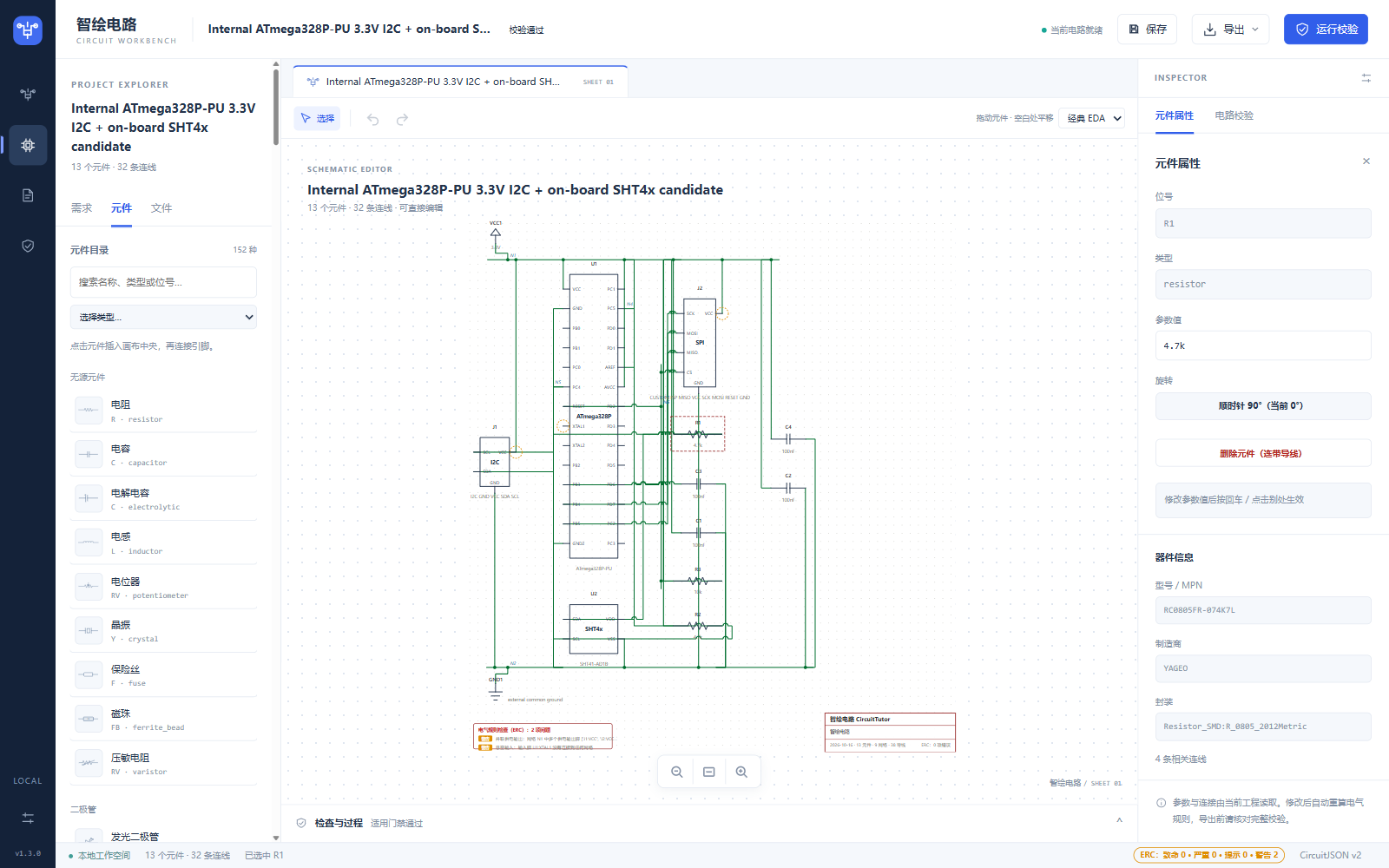
窄屏布局: 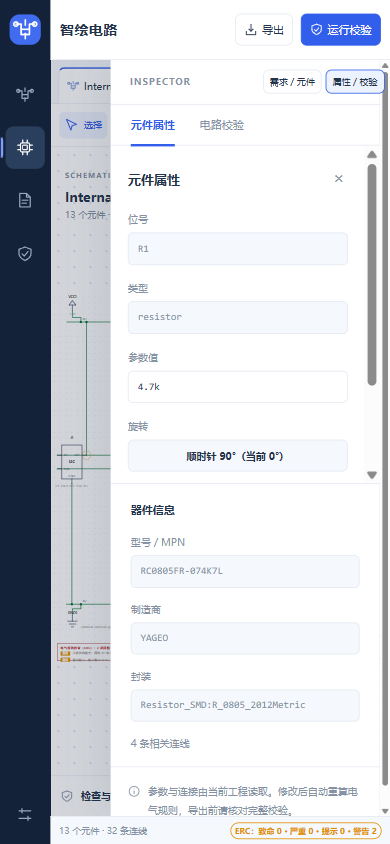
一个本地优先的电路设计助手。左侧用中文描述需求(或粘贴图片、TSX 代码、外部工具结果),中间得到一张可拖动、可改参、可连线、可撤销的真实原理图,右侧看到真实元件属性与校验结果,底部可查生成过程与检查明细。
它不追求"AI 说什么就是什么":生成的候选必须经过确定性门禁才能被接受,未运行的工具会如实显示"未完成",而不是当作通过。
.tran 输出绘制,并标注阈值与采样行数。需要 Python 3.10+,仅此而已。运行时零第三方依赖,无需 pip install。
git clone https://github.com/zhxymj/CircuitTutor.git
cd CircuitTutor
python server.py
然后打开 http://127.0.0.1:8765/。Windows 上也可以直接双击 启动演示.bat。
用 Docker:
docker compose up --build不配 Key 也能完整跑通——匹配到模板的需求会走本地离线路径。想用在线模型生成(自由需求、增量改图):
cp .env.template .env
# 在 .env 中填入 DEEPSEEK_API_KEY装了 kicad-cli 与 ngspice 后,对应的门禁会真正执行并给出官方结论;没装则如实显示"未完成"。
export KICAD_CLI_PATH=/path/to/kicad-cli
export NGSPICE_PATH=/path/to/ngspice默认加载工具链里的上游公开权重。若已用 tools/train_yolo_detector.py 完成本地训练,可登记为可选权重:
python tools/install_local_model.py --run evidence/yolo_training/round4_warmstart50
python tools/vision_detect.py --input path/to/image.png --model localCIRCUIT_VISION_MODEL:upstream(默认)或 local。CIRCUIT_VISION_LOCAL_MODEL_ROOT:本地权重目录,默认工具链 vision-models/hcd-local。resistor 与 capacitor.unpolarized 两类,其余符号不会被检测;权重不随仓库分发,仅限研究评估。全部通过环境变量或 .env 配置,默认值如下(与 core/config.py 一致):
| 变量 | 默认 | 说明 |
|---|---|---|
LSQC_HOST | 127.0.0.1 | 监听地址;仅本机可访问 |
LSQC_PORT | 8765 | 监听端口 |
DEEPSEEK_API_KEY | (空) | 未配置时只走本地模板,不调用在线模型 |
LLM_TIMEOUT_S | 90 | 单次模型调用超时(秒) |
LLM_RETRIES | 2 | 模型调用失败重试次数 |
LLM_STRUCT_RETRIES | 2 | 结构化输出重试次数 |
LLM_ERC_RETRIES | 1 | 带 ERC 反馈的重试次数 |
LLM_BUDGET | 5 | 单次生成允许的模型调用预算 |
LLM_MAX_TOKENS | 4096 | 单次响应最大 token |
MAX_QUERY_LEN | 500 | 需求文本最大长度 |
KICAD_CLI_TIMEOUT_S | 90 | 单次 KiCad CLI 超时(秒) |
KICAD_CLI_PATH | (自动探测) | 未设置时在 PATH 与工具链中查找 |
NGSPICE_PATH | (自动探测) | 未设置时在 PATH 与工具链中查找 |
LSQC_RATE_LIMIT | 30 | 每 IP 每分钟 LLM 端点请求上限,0 关闭 |
LSQC_KICAD_RATE_LIMIT | 20 | 每 IP 每分钟 KiCad 端点请求上限 |
LSQC_SSE_HEARTBEAT_S | 15 | SSE 心跳间隔(秒) |
LSQC_LOG_LEVEL | INFO | 日志级别 |
端口回退:若未设置 LSQC_PORT,但环境里存在标准变量 PORT(部分云平台会自动注入),服务会采用它并绑定 0.0.0.0:PORT。PORT 是外部环境变量名,与内部解析后的端口常量同名不同义,因此不列入上表。
智绘电路/
├── server.py            # 标准库 HTTP 服务与全部 API 路由
├── core/                # 领域逻辑:目录、模板、ERC、SPICE、KiCad、PCB、集成桥
├── web/                 # 原生 JS 前端(无构建步骤、无框架)
├── tests/               # 测试套件与统一跑测入口
├── tools/               # 构建、归档、工具链激活等脚本
├── docs/                # 用户手册、API、架构与说明文档
├── data/                # 少量运行所需数据与示例
└── third_party/ # 第三方来源归因(见下)统一入口是 tests/run_tests.py,按能力分组:
python tests/run_tests.py --profile fast      # 快速核心
python tests/run_tests.py --profile eda       # 电气/EDA 相关
python tests/run_tests.py --profile release   # 交付打包(需本地 7-Zip)
python tests/run_tests.py --profile all       # 全部
前端为原生 JS,相关契约由 Node 测试覆盖:
node tests/test_frontend.js
node tests/test_workbench_ui.js
部分验收套件依赖本地归档证据(
evidence/,体积很大且不入库),在全新克隆上会跳过或不可用;核心与 EDA 套件不依赖它。
前端原生 JS ↔ 标准库 HTTP 服务 ↔ 领域模块(目录/模板/ERC/SPICE/KiCad/PCB)↔ 外部工具桥(ngspice、kicad-cli、tscircuit、CircuitVision)。
生成链路是分阶段的:中文需求 → 澄清 → 候选电路 → 全目录结构校验 → 电气门禁 → 人工审核 → 应用/编辑/撤销。每个阶段的产物与结论分开记录,模板回退不记为 AI 生成成功,预览完成不等于通过电气验收。
细节见 docs/作品说明书.md、docs/架构-生成精确性.svg 与 docs/API.md。
manufacturing_release=false,需电子工程师与板厂复核。本项目自身以 MIT 许可发布,见 LICENSE。同时复用了若干开源项目,各自的来源、固定版本与许可事实记录在 docs/开源项目集成.md 与 third_party/:
| 上游 | 用途 | 许可 |
|---|---|---|
| tscircuit | 代码(TSX)建电路 | MIT / ISC |
| CircuitVision | 本机图片识别 | Apache-2.0 |
| HCD | 手绘几何候选(6 个算法) | 根许可证未明确,仅本地/私有使用,不声明为可再分发 |
| wavedrom | 教学瞬态时序图渲染 | MIT |
| KiCad 官方库与 CLI | ERC / DRC / 封装 | 库 CC BY-SA 4.0;CLI GPL |
| ngspice | SPICE 仿真 | 见上游 |
上游源码快照中的大体积部分(third_party/upstream/CircuitVision、third_party/upstream/HCD)保留在本地但不入库。逐项文件哈希与边界说明见 third_party/ 下的归因文件。
欢迎提交 issue 与 PR,请先阅读 CONTRIBUTING.md。安全问题请按 SECURITY.md 私下报告。
| Qty | Value | Footprint | References |
|---|---|---|---|
| 4 | 100nF | Capacitor_SMD:C_0805_2012Metric | C1, C2, C3, C4 |
| 2 | 4.7k | Resistor_SMD:R_0805_2012Metric | R1, R2 |
| 1 | 10k | Resistor_SMD:R_0805_2012Metric | R3 |
| 1 | ATmega328P-PU | Package_DIP:DIP-28_W7.62mm | U1 |
| 1 | CUSTOM ISP MISO VCC SCK MOSI RESET GND | Connector_PinHeader_2.54mm:PinHeader_1x06_P2.54mm_Vertical | J2 |
| 1 | I2C GND VCC SDA SCL | Connector_PinHeader_2.54mm:PinHeader_1x04_P2.54mm_Vertical | J1 |
| 1 | SHT41-AD1B | Sensor_Humidity:Sensirion_DFN-4_1.5x1.5mm_P0.8mm_SHT4x_NoCentralPad | U2 |


Bruhdows/klink
Klink is a magnetic tile system for building programmable machines. First up: a marble run with sensors, buttons, lights, gates, splitters and an elevator.

ehasunchy/kicad-pcb-projects
KiCad PCB design portfolio featuring ESP32 IoT hardware, power regulation, USB interfaces, schematics, PCB layouts, and manufacturing files.

JS2028EE/ESP32_FC
This is the current editable KiCad 10 project for a 70 x 65 mm, four-layer controller, with an ESP32-S3-WROOM-1-N8R8, BMI088 SPI IMU, BMP280 barometer and a separate 4-in-1 ESC.


qixuancao/pcbdraft
Evidence-driven PCB automation for KiCad.


chinawrj/FarmMesh-Node
Developing an integrated hardware and software solution for farm-wide Mesh networking: RP2350B/ESP32-C5 nodes, firmware, network protocols, and Wi-Fi/BLE sensor access.

It measures 50 × 55 mm and has 2 copper layers, 1.6 mm thick.
11 parts, built around the ATMEGA328P-PU, SHT41-AD1B-R2, RC0805FR-0710KL and TSW-106-07-G-S. The full list of its parts is on this page, with links to each part's symbol and footprint where PCBKit's library has them.
From the zhxymj/CircuitTutor repository on GitHub, at the commit this page was made from: the board is data/pcb_active/run_e34bf9d7ac6c45be85d4fb00b97e1fec/candidate.kicad_pcb. PCBKit opens the board in the browser, with nothing to install.
Its repository publishes it under the MIT licence: you may reuse it on that licence's terms (keep the author's notice, and for a copyleft licence share your changes alike).