
2 layers32 × 18 mm

 qixuancao/pcbdraft
Evidence-driven PCB automation for KiCad.
I2c-3v3-pullups a844fc2a is an open-source printed circuit board by qixuancao, from the qixuancao/pcbdraft repository on GitHub, published under the Apache-2.0 licence. It is a 2-layer board of 30 × 18 mm with 4 parts on 4 nets, routed with 27 tracks and 2 vias.
It is built around the TSW-104-07-G-S. Its parts include 2 resistors and 2 connectors.

用自然语言生成、检查和继续修改小型低压 KiCad 原型板。
PCBDraft 把一句板卡需求变成可审查的电路计划和原生 KiCad 工程,并把连接检查、 ERC、DRC、修改记录和候选产物留在项目目录。你可以继续用自然语言修改,也可以 随时在 KiCad 中接手。
实验性 Alpha(0.1.0):适合学习、验证想法和制作小型原型的工程候选, 不适合直接用于量产、高压、大功率、医疗或安全关键设计。ERC/DRC 通过不代表 电路可用、可制造或符合认证要求。
如果你的首要需求是任意复杂电路、完整 SI/PI/热/EMC 分析、器件可采购性保证, 或无人审核直接下单,PCBDraft 目前不适合。
.kicad_sch、.kicad_pcb 和工程文件;/resume、/projects 或 /open 找回工程;复杂电路覆盖、布局布线质量、元器件证据和硬件实测仍在建设中。目前没有能代表 “任意板成功率”的公开数字,也没有可替代人工审核的生产就绪结论。
运行环境:Python >=3.11,<3.14,稳定版 KiCad >=10.0.0,<10.1.0;当前精确
验收基线是 KiCad 10.0.5。
**版本提醒:**下面的默认安装命令从公开
main解析并固定到精确 SHA。当前页面 位于开发分支refactor/native-runtime-20260905,新的 TUI 项目选择器尚不等于main已具备;要评估该功能,请使用后文的开发分支源码步骤。
Linux / macOS:
(installer="$(mktemp "${TMPDIR:-/tmp}/pcbdraft-install.XXXXXX")" && trap 'rm -f -- "$installer"' EXIT && curl --fail --silent --show-error --location --proto '=https' --tlsv1.2 --output "$installer" https://raw.githubusercontent.com/qixuancao/pcbdraft/main/scripts/install.sh && bash "$installer")Windows PowerShell:
& ([scriptblock]::Create((Invoke-RestMethod -Uri 'https://raw.githubusercontent.com/qixuancao/pcbdraft/main/scripts/install.ps1')))安装器会先显示计划。系统 KiCad 的安装可能要求 sudo 或 UAC;PCBDraft 自身使用
uv 的用户级隔离工具环境。完整平台范围、只检查模式、固定提交和排错见
安装指南。
安装就绪和模型就绪是两件事。连接模型并检查环境:
pcbdraft connect
pcbdraft setup
pcbdraft doctor --json
pcbdraft
进入 TUI 后先创建工程:
/new led-demo再输入一个明确的小需求,例如:
设计一块 3.3V 指示灯原型板:一颗绿色 5mm LED、一个 330Ω 0805 电阻,
用 2 针连接器接入 3.3V 和 GND。请先说明假设,再生成可在 KiCad 中检查的候选工程。这只是示例需求,不是已验证成功率或硬件实测结果。生成后请人工检查器件型号、 引脚、封装、极性、额定值、网络、板框、间距以及 ERC/DRC 结果。
查看 LED、RC、I2C 的原生工程、真实结果与预览图库。 打开 KiCad 文件无需模型账户;复现生成会消耗模型用量。
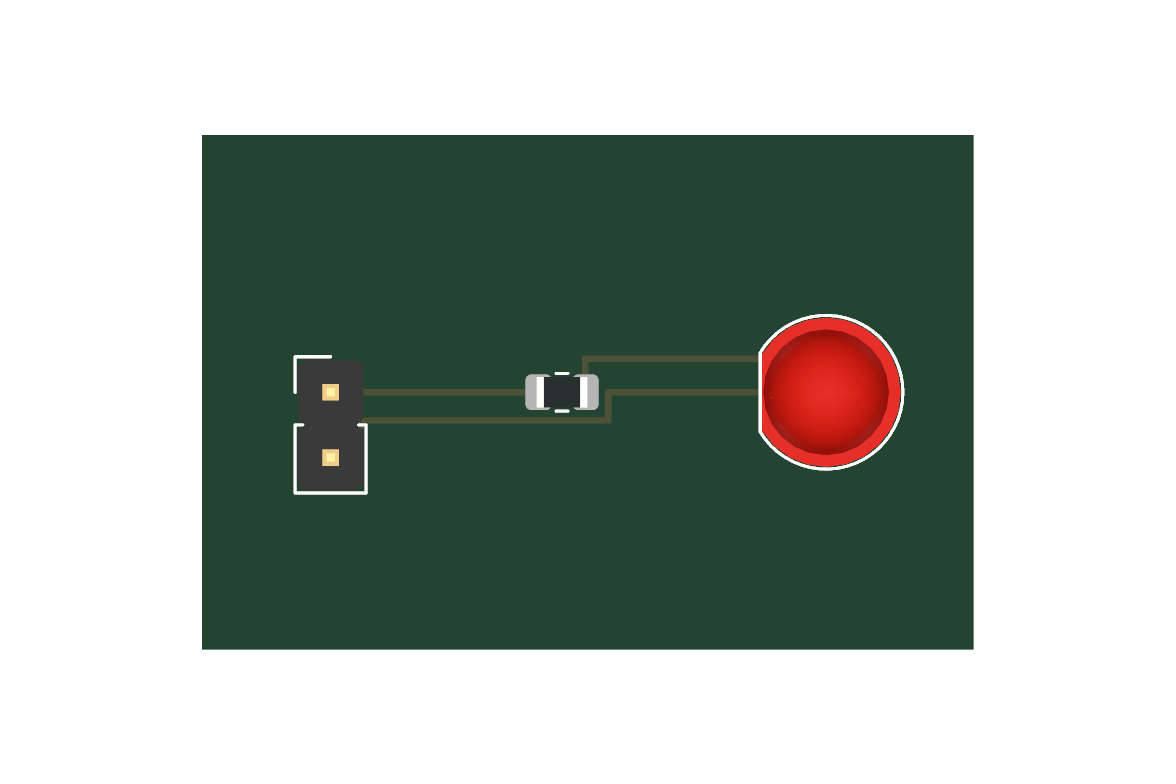
LED、RC 的当前 ERC/DRC 收据通过;I2C 的唯一尝试在 600 秒超时,DRC 未完成且无预览。 图中 LED 使用库内红色 3D 模型,设计值为绿色;图片未经改色,也不是硬件实拍。 这些案例不代表成功率、人工工程审核或生产就绪。
在 TUI 中输入 /resume,继续输入可筛选项目,使用 ↑ / ↓、Enter 和 Esc
操作。也可以直接使用:
/projects led
/open <项目名、完整 ID 或唯一 ID 前缀>
/resume 恢复的是保存于项目仓库中的 PCB 工程状态和审计记录。切换到不同工程
时会开始新的模型会话;已选中同一工程时保留当前会话。它不会恢复旧终端逐字聊天,
也不会自动重放中断的工具调用。
更多工作流和精确命令语义见 用户指南。
pcbdraft repository --json
pcbdraft repository /path/to/my-pcb-repository
pcbdraft gui
pcbdraft gui --project <项目 ID> --host 127.0.0.1 --port 9130
仓库中的 projects/ 保存实际工程。切换仓库不会搬移或删除已有项目。Web 工作台
默认只监听本机回环地址,用于查看 PCBDraft 工程,不是完整的 KiCad 替代品。
PCBDraft 不内置模型,自然语言规划需要可用的模型服务。它会把对话、工具返回的工程 信息,以及使用视觉功能时的板图图像发送给你选择的提供商;费用、日志保留、训练和 地域策略由该提供商与账户配置决定。本地端点可配置,具体模型的工具调用和视觉兼容性 需单独确认。不要把机密设计交给不符合你要求的服务。
KiCad 执行、项目文件、revision 和检查收据位于本地。模型只能使用 PCBDraft 暴露的 受限 PCB 工具,不能因此获得通用 shell 或任意文件系统访问权。
上面的默认安装命令从公开 main 解析并安装不可变提交;安装器也支持显式 --ref
或 -Ref。当前 README 位于开发分支
refactor/native-runtime-20260905;在它合并前,新的 TUI 项目选择器和本文描述的
部分开发行为不等于 main 已具备。要评估该分支:
git clone https://github.com/qixuancao/pcbdraft.git
cd pcbdraft
git switch refactor/native-runtime-20260905
uv sync --frozen --extra dev
uv run pcbdraft setup
uv run pcbdraft doctor --json
uv run pcbdraft
当前自动化检查尚未形成全绿发布门禁。分支上的定向测试或单板 smoke 也不能当作 稳定发行、自然语言成功率或硬件验证证据。
报告问题时请附操作系统、pcbdraft --version、kicad-cli --version、
pcbdraft doctor --json 的脱敏输出、最小需求和原始错误。不要上传 API Key 或私有板卡。
PCBDraft 使用 Apache License 2.0。部分会话、终端、提供商和通用工具代码 由 Nous Research 的 Hermes Agent(MIT)修改而来;完整归属与第三方许可见 NOTICE。PCBDraft 是独立项目,KiCad 商标归其权利人所有。


ehasunchy/kicad-pcb-projects
KiCad PCB design portfolio featuring ESP32 IoT hardware, power regulation, USB interfaces, schematics, PCB layouts, and manufacturing files.

JS2028EE/ESP32_FC
This is the current editable KiCad 10 project for a 70 x 65 mm, four-layer controller, with an ESP32-S3-WROOM-1-N8R8, BMI088 SPI IMU, BMP280 barometer and a separate 4-in-1 ESC.


Bruhdows/klink
Klink is a magnetic tile system for building programmable machines. First up: a marble run with sensors, buttons, lights, gates, splitters and an elevator.


joypad-ai/joypad-os
Universal controller firmware for building adapters, dongles, and custom controllers.

It measures 30 × 18 mm and has 2 copper layers, 1.6 mm thick.
4 parts, built around the TSW-104-07-G-S. The full list of its parts is on this page, with links to each part's symbol and footprint where PCBKit's library has them.
From the qixuancao/pcbdraft repository on GitHub, at the commit this page was made from: the board is examples/results/2026-09-09-single-attempts/cases/i2c-3v3-pullups/native/i2c-3v3-pullups-a844fc2a.kicad_pcb and its schematic examples/results/2026-09-09-single-attempts/cases/i2c-3v3-pullups/native/i2c-3v3-pullups-a844fc2a.kicad_sch. PCBKit opens the board in the browser, with nothing to install.
Its repository publishes it under the Apache-2.0 licence: you may reuse it on that licence's terms (keep the author's notice, and for a copyleft licence share your changes alike).