Skip to the content
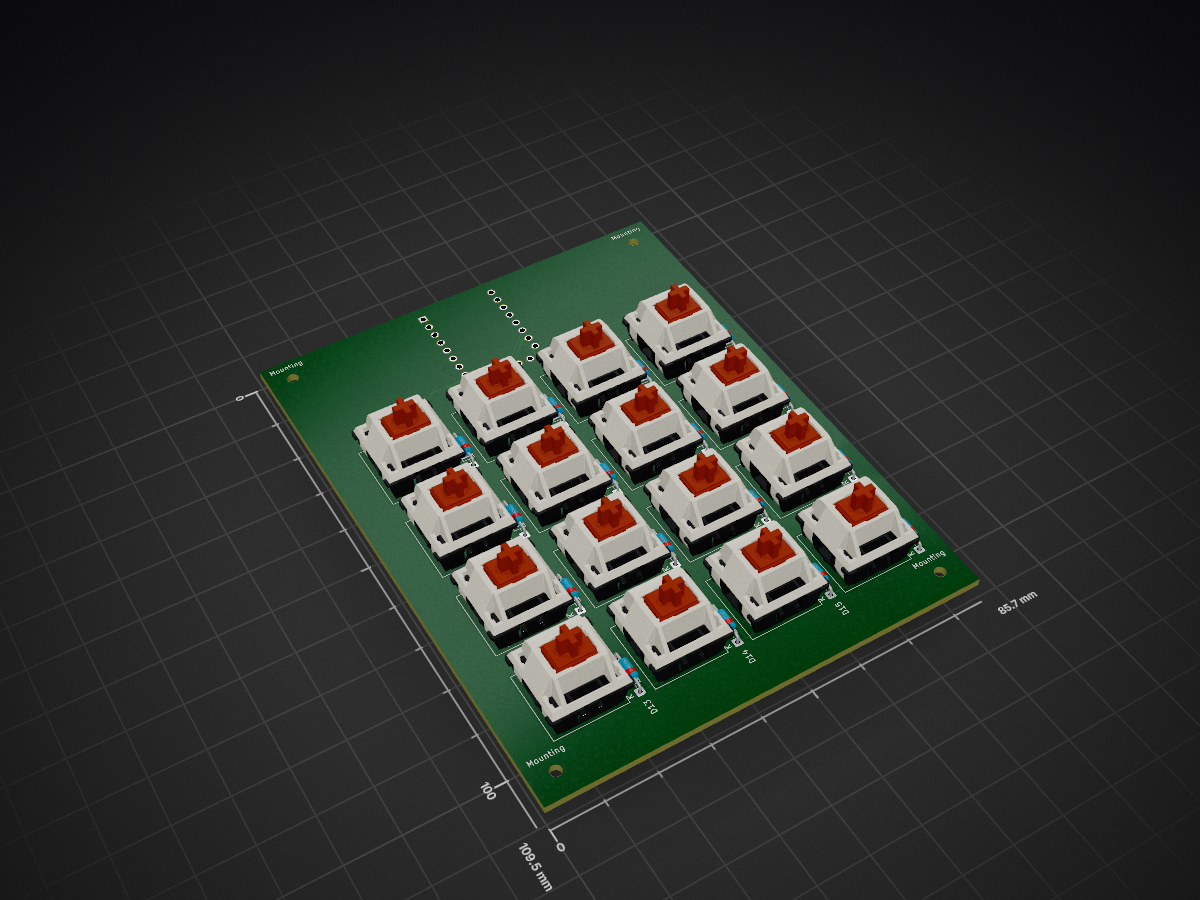
2 layers85.7 × 109.5 mmMACROPAD PCB done, the printed circuit board in 3D

A custom-built, programmable 16-key mechanical macropad powered by the RP2040 ZERO. This project combines custom PCB design, 3D mechanical modeling, and embedded programming to create a versatile productivity tool.

Size
85.7 × 109.5 mm
Copper layers
2
Thickness
1.6 mm
Parts
37
Nets
39
Pads
139
Tracks, vias
90, 0
Routed
Yes
KiCad
KiCad 10.0 (file 20260206)
Created
25 Apr 2026
Updated
4 Jun 2026

Overview

MACROPAD PCB done is an open-source printed circuit board by williamta2024-dev, from the williamta2024-dev/Marcopad repository on GitHub. It is a 2-layer board of 85.7 × 109.5 mm with 37 parts on 39 nets, routed with 90 tracks and 0 vias.

It is built around the RP2040-ZERO. Its parts include 16 diodes, 16 switches and 1 IC. It belongs with the keyboards and input boards and the RP2040 boards of this library.

Main components

1

README

README.md

RP2040 ZERO 4x4 Mechanical Macropad

A custom-built, programmable 16-key mechanical macropad powered by the RP2040 ZERO. This project combines custom PCB design, 3D mechanical modeling, and embedded programming to create a versatile productivity tool.

Features

  • 4x4 Matrix Layout: 16 fully programmable mechanical switches for shortcuts, macros, or media controls.
  • RP2040 ZERO: High-performance microcontroller with native USB support.
  • Custom PCB: Optimized layout for a compact footprint and reliable signal integrity.
  • 3D Printed Enclosure: A custom-designed case tailored specifically for the hardware assembly.
  • Customizable Firmware: Easily adaptable for various workflows (streaming, coding, gaming).

Hardware Specifications

ComponentDescription
MicrocontrollerRP2040 ZERO
Switches16x Mechanical Switches (MX-compatible)
PCBCustom designed in KiCad
Case3D Printed (ONSHAPE)
ConnectionUSB-C

Getting Started

Hardware Assembly

  1. PCB Fabrication: Order the PCB using the provided Gerber files in /hardware/pcb.
  2. Soldering: Solder the RP2040 ZERO and mechanical switches to the PCB.
  3. Enclosure: 3D print the top and bottom halves of the enclosure found in /hardware/enclosure.
  4. Final Assembly: Secure the PCB into the enclosure using M3 screws.

Firmware Setup

  1. Connect the macropad to your computer via USB-C.
  2. Flash the firmware located in the /firmware directory using the Arduino IDE or by copying files if using C++.
  3. Configure your keymaps in the configuration file to match your desired shortcuts. S

Schematic

Screenshot 2026-04-26 220612

PCB

Screenshot 2026-04-26 144108

3D Design

image ## Bill of Materials (BOM)

Here is the list of components, hardware, and materials required to build this project:

ItemComponent / PartDescriptionQtyEst. CostSource / Link
1MACROPAD PCB-PTH_Y3The PCB3$7.80Link
2Estardyn RP2040-Zero RP2040 for Raspberry Pi Microcontroller PICO Development Board Module Dual-Core 2MB FlashA raspberry pi for my macropad.1$6.71Link
320-100pc Mechanical Keyboard Switches Blue Red Brown Switch Customizable Hot-Swappable 3 Pins Cross Stem for Mechanical KeyboardKeyswitches for the Macropad1$0.99Link
410Pcs/lot M2 M2.5 M3 M3.5 M4 M5 M6 TM Screws Phillips Truss Mushroom Head Screw Black Plated Electronic Carbon Steel ScrewsFor the PCB to hold in place.1$1.57Link
5100PCS/LOT D0-35 1N4148 High-speed Switching DiodesFor the PCB1$1.14Link
6N3UD 20Pcs PBT Blank Keycap 1U 1X XDA Profile No Print Keycap Set for DIY Mechanical Keyboard Installation MX SwitchesKeycaps for the switches2$0.99Link

Parts

37
QtyValueFootprintReferences
161N4148Diode_THT:D_DO-35_SOD27_P7.62mm_HorizontalD1, D2, D3, D4, D5, D6, D7, D8, D9, D10, D11, D12, D13, D14, D15, D16
16SW_PushPCM_Switch_Keyboard_Cherry_MX:SW_Cherry_MX_PCB_1.00uSW1, SW2, SW3, SW4, SW5, SW6, SW7, SW8, SW9, SW10, SW11, SW12, SW13, SW14, SW15, SW16
4MountingHole_2.2mm_M2MountingHole:MountingHole_2.2mm_M2Mounting, Mounting, Mounting, Mounting
1RP2040-ZERORP2040-ZERO:MODULE_RP2040-ZEROU1

More from williamta2024-dev/Marcopad

1
  • 2 layersPCB for Macropad, the printed circuit board in 3D

    PCB for Macropad

    williamta2024-dev/Marcopad

    A custom-built, programmable 16-key mechanical macropad powered by the RP2040 ZERO. This project combines custom PCB design, 3D mechanical modeling, and embedded programming to create a versatile productivity tool.

    33 parts

Similar boards

  • 2 layers132.3 × 94.9 mmCheapino, the printed circuit board in 3D

    Cheapino

    tompi/cheapino

    An affordable split 36 keys keyboard

    59 parts1.2kCC-BY-4.0
  • 2 layers321 × 92.3 mmMx40, the printed circuit board in 3D

    Mx40

    zzeneg/stront

    Split keyboards with 38 or 40 keys, LCD display and Cirque trackpad

    181 parts353MIT
  • 2 layers255.9 × 99.3 mmZerosprey42, the printed circuit board in 3D

    Zerosprey42

    beekeeb/zerosprey42

    Zerosprey42 Keyboard is a wired, beginner friendly, choc hotswap, MonoBlockSplit (Unibody), column-staggered, DIY mechanical keyboard.

    96 parts140
  • 2 layers146.3 × 69.5 mmStress, the printed circuit board in 3D

    Stress

    GroooveBob/Stress

    Pocket Arcade Fight Pad

    22 parts102MIT
  • 2 layers54 × 64 mmDonConIOmini, the printed circuit board in 3D

    DonConIOmini

    ravinrabbid/DonCon2040

    RP2040 based firmware and hardware for DIY Taiko no Tatsujin Drum Controllers

    96 parts66MIT
  • 2 layers52 × 50 mmRP2040-TestPatternGenerator VGA, the printed circuit board in 3D

    RP2040-TestPatternGenerator VGA

    nmur/RP2040-TestPatternGenerator

    A simple test pattern generator running on the RP2040 microcontroller

    12 parts64GPL-3.0
  • 2 layers120 × 40 mmBuinchiez40, the printed circuit board in 3D

    Buinchiez40

    ChrisChrisLoLo/bunchiez40

    A pocket keyboard that makes use of mouse switches to achieve a miniscule size

    90 parts56GPL-3.0
  • 2 layers305.2 × 76.2 mmSoroka, the printed circuit board in 3D

    Soroka

    kapee1/soroka

    40% DIY-keyboard with base kit support

    126 parts47Unlicense

Questions

How big is the MACROPAD PCB done PCB?

It measures 85.7 × 109.5 mm and has 2 copper layers, 1.6 mm thick.

What parts does the MACROPAD PCB done use?

37 parts, built around the RP2040-ZERO. The full list of its parts is on this page, with links to each part's symbol and footprint where PCBKit's library has them.

Where can I download the MACROPAD PCB done KiCad files?

From the williamta2024-dev/Marcopad repository on GitHub, at the commit this page was made from: the board is Kicad PCB/MACROPAD PCB/MACROPAD PCB done.kicad_pcb and its schematic Kicad PCB/MACROPAD PCB/MACROPAD PCB.kicad_sch. PCBKit opens the board in the browser, with nothing to install.

Can I use the MACROPAD PCB done design in my own project?

Its repository states no licence, so its author keeps all rights: ask williamta2024-dev before reusing the design.