
2 layers321 × 92.3 mm

 tompi/cheapino1.2k
An affordable split 36 keys keyboard
Cheapino is an open-source printed circuit board by tompi, from the tompi/cheapino repository on GitHub, published under the CC-BY-4.0 licence. It is a 2-layer board of 132.3 × 94.9 mm with 59 parts on 44 nets, routed with 780 tracks and 28 vias.
It is built around the RP2040-ZERO. Its parts include 21 diodes, 18 switches and 1 IC. It belongs with the keyboards and input boards and the RP2040 boards of this library.
Probably one of the cheapest split keyboards you can build.
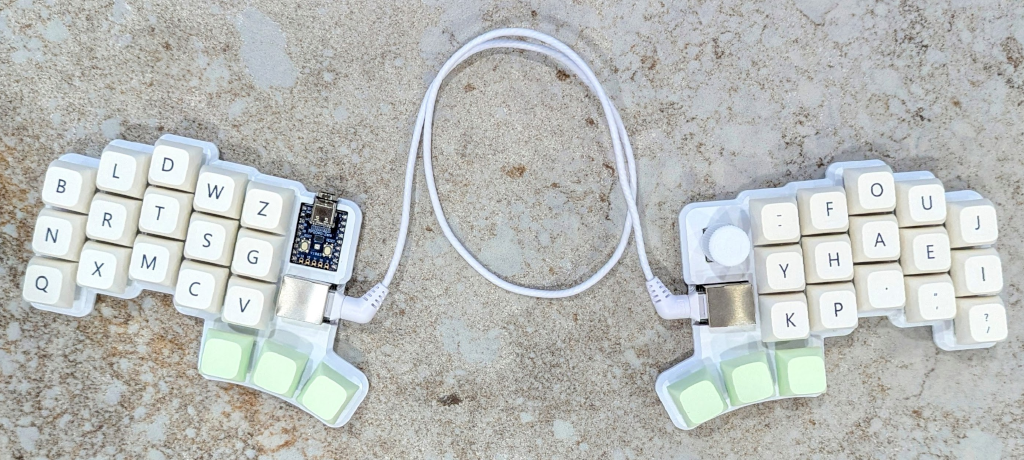
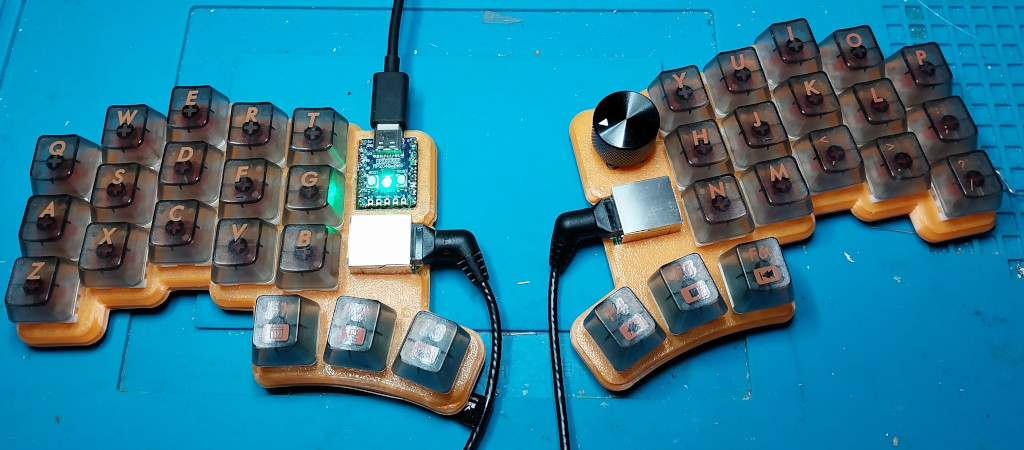
This is the result of really enjoying building keyboards, but not wanting to spend that much money on it. The pcb is reversible, connected using rj45, and utilizes a japanese duplex matrix, so only one mcu is needed. For hotswap I recommend a case(pictured above), but soldering the switches is of course the cheapest option :)
You want one? See the ordering guide for what you need and how to buy it.
See the build guide v2 for more details and pictures of how to actually build it.
Some info on the plate/case solutions I know about.
Checkout the troubleshooting guide if your Cheapino does not work.
See the firmware guide for how to build and customize keyboard firmware. The cheapino has vial support, or you can build your own QMK to customize EVERYTHING. Even the onboard RP2040-Zero LED is controllable by QMK...
I added a few tips and tricks here.
Loads of beautiful build pictures here.
This work is licensed under a Creative Commons Attribution license.
| Qty | Value | Footprint | References |
|---|---|---|---|
| 21 | DIODE | keebio:Diode-dual | D1, D2, D3, D4, D10, D11, D12, D13, D14, D15, D16, D17, D18, D19, D20, D21 +5 |
| 18 | SW_Push | project_footprints:Kailh_socket_MX_optional_reversible | K1, K2, K3, K4, K5, K6, K7, K10, K11, K12, K13, K14, K15, K16, K17, K18 +2 |
| 7 | SolderJumper_2_Open | Jumper:SolderJumper-2_P1.3mm_Open_TrianglePad1.0x1.5mm | JP1, JP2, JP3, JP4, JP5, JP6, JP7 |
| 2 | RJ45_Shielded | Connector_RJ:RJ45_Ninigi_GE | J_1_LEFT1, J_2_RIGHT1 |
| 1 | RP2040-Zero | rp2040:MCU_RP2040_Zero_34 | U1 |
| 1 | RotaryEncoder_Switch | Rotary_Encoder:RotaryEncoder_Alps_EC11E-Switch_Vertical_H20mm | ENC1 |
The 50 most common of 59 parts.

beekeeb/zerosprey42
Zerosprey42 Keyboard is a wired, beginner friendly, choc hotswap, MonoBlockSplit (Unibody), column-staggered, DIY mechanical keyboard.


ravinrabbid/DonCon2040
RP2040 based firmware and hardware for DIY Taiko no Tatsujin Drum Controllers

nmur/RP2040-TestPatternGenerator
A simple test pattern generator running on the RP2040 microcontroller

ChrisChrisLoLo/bunchiez40
A pocket keyboard that makes use of mouse switches to achieve a miniscule size


It measures 132.3 × 94.9 mm and has 2 copper layers, 1.6 mm thick.
59 parts, built around the RP2040-ZERO. The full list of its parts is on this page, with links to each part's symbol and footprint where PCBKit's library has them.
From the tompi/cheapino repository on GitHub, at the commit this page was made from: the board is pcb/cheapino.kicad_pcb and its schematic pcb/cheapino.kicad_sch. PCBKit opens the board in the browser, with nothing to install.
Its repository publishes it under the CC-BY-4.0 licence: you may reuse it on that licence's terms (keep the author's notice, and for a copyleft licence share your changes alike).