Skip to the content
4 layers97 × 97.4 mmQEdge UI, the printed circuit board in 3D

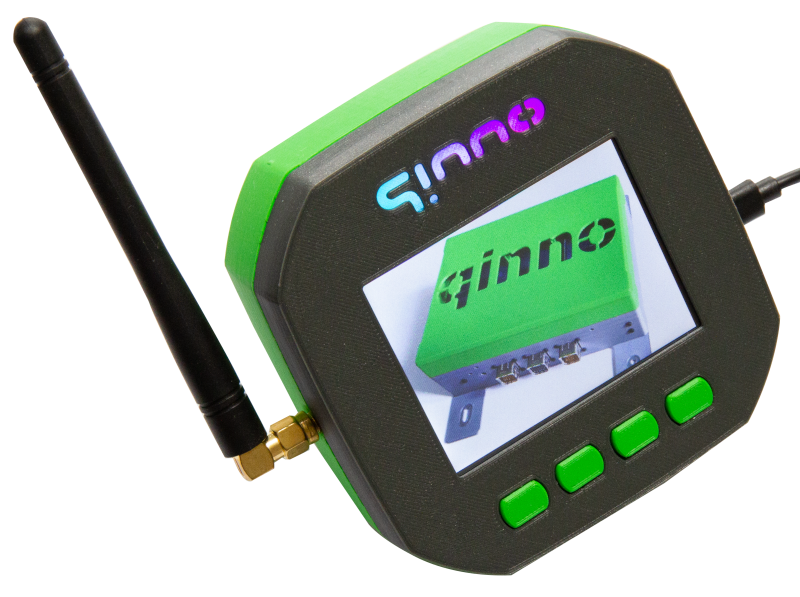
qedge+ is the industry's low power design alternative to the standard PC approach. qEdge-UI is part of qEdge+ and consists of a RaspBerry Pico with LCD, touch screen and keys and an 868MHz LoRa radio module.

Size
97 × 97.4 mm
Copper layers
4
Thickness
1.6 mm
Parts
170
Nets
162
Pads
677
Tracks, vias
1,255, 498
Pours
41
Routed
Yes
KiCad
KiCad 6 (file 20211014)
Created
22 Mar 2023
Updated
29 Apr 2025

Overview

QEdge UI is an open-source printed circuit board by qinno, from the qinno/qEdge-UI repository on GitHub. It is a 4-layer board of 97 × 97.4 mm with 170 parts on 162 nets, routed with 1,255 tracks and 498 vias.

It is built around the SP3485CN-L, 74HC4066PW and PCF8523TS/1, with the RFM95W-868S2, BSS138BKW and KSC221J among its other parts. Its parts include 69 resistors, 23 capacitors, 13 ICs, 10 diodes and 10 connectors. It belongs with the radio and wireless boards and the RP2040 boards of this library.

Main components

12

README

README.md

qEdge-UI

Preview

Update

qEdge-UI supports now PICO2-W plattform (RP2350) with minimum changes as qEdge-UI++. Compilation now works in the Arduino 2.x.x IDE. LittleFS upload does not work in the moment, copy the files in /data to the SD-card, system copies it automagically to LittleFS on the first start.

About

This project is an example of use of what can be achieved with free/libre and open source software and free/libre and open source tools in a professional proceeding. In contrast to the generally accepted approach of commercial companies, the development results of this project (hardware and mechanical design, as well as software source code) are also available under an open source licence.

Based on the Raspberry Pi Pico (2), we have created a design that can be used as a starting point for further development. In order to keep things as simple as possible we use the Arduino platform.

Key hardware features of qEdge-UI (qEdge-UI++):

  • Raspberry Pi Pico RP2040 (2350)
  • Dual-Core ARM Cortex M0+ CPU @133 MHz, NEW 200 MHz (ARM Cortex M33 @150 MHz or RISC-V)
  • 264KB SRAM and 2MB Flash (520 KB / 4MB)
  • WiFi + Bluetooth (Pico-W/Pico2-W)
  • USB interface and power supply
  • additional 12/24 VDC supply
  • 3,2" TFT-Display 320x240 with resistive touch
  • 4x1 keypad
  • expansion connector for UART, I²C, GPIO, ADC
  • RS-485 Interface
  • Micro-SD-card slot
  • LoRa module with stable SMA connector
  • RTC with ultracap buffer
  • Buzzer
  • RGB-LEDs for signalling
  • Raspberry Pi 3b/4b connectable (optional, not tested)

Preview

Getting Started

Electronics

To get started you will need the qEdge-UI electronic boards (main and display adapter). We provide the full KiCad project here.

Software

To get started with the software development you need a PC with:

  • preinstalled Windows 7 or newer (64Bit), Linux (32/64Bit) or MacOS 10.10 newer
  • An Arduino IDE 1.8.x or 2.x.x including USB Driver support
  • Addional you can use our qEdge-UI examples and libraries as a starting point for your own software development or you can download the precompiled UFS binaries of our qEdge-UI examples. Here you can find the sources and installation guideline.

Mechanics

To create the nice looking electronic box above you need a 3D printer and the mechanics

qEdge-UI Hardware Test App functionality

The main objective of the qEdge-UI HwTestApp software is to check the functionality of the hardware.

  • Touch - check precision of touch screen
  • Slideshow - show PNG files on SD-Card (micro)
  • UART - Test UART1 (RX/TX)
  • RS-485 - Test UART2 connected to RS-485 driver (RX/TX)
  • Micro-SD-card - check SD-card presence and list files on SD-card
  • LittleFS - list, copy, rename and delete files in the filesystem
  • LoRa - send/receive LoRa messages
  • WiFi - scan and log in a network for receiving NTP time information
  • GAME - space shooters clone to show performance
  • Info - show system infos
  • Keyboard - keyboard emulation
  • Settings - set RGB preferences and backlight, test Buzzer

Roadmap

See the open issues for a list of proposed features (and known issues).

Contributing

First of all, thank you for taking the time to contribute! Contributions are what make the open source community such an amazing place to learn, inspire and create. Every contribution you make benefits everyone else and is greatly appreciated.

Please try to create bug reports that are:

  • Reproducible. Include steps to reproduce the problem.
  • Specific. Include as much detail as possible: which version, what environment, etc.
  • Unique. Do not duplicate existing open issues.
  • Scoped to a Single Bug. One bug per report.

Use and Regulations

Please note that this is an engineering example and is not certified to European regulations such as CE and RED, so use it at your own risk. If you find this platform helpful, we can assist you in creating a production-ready and certified product.

Known limitations

This project is at the moment not used in a commercial open source product, but can be used as a starting point for that purpose. Please fell free to contact us for more information.

Support

Reach out to the maintainer at one of the following places:

Licenses

This project is licensed under the following open source licenses:

See corresponding Readme.md files in the folders Electronics, Mechanics and Software for more detailed information.

Raspberry Pi is a trademark of Raspberry Pi Ltd

Acknowledgements

Thanks to our partners supporting this project:

Thanks also for these awesome resources that were used during the development of the qEdge-UI:

Parts

170
QtyValueFootprintReferences
2222RResistor_SMD:R_0603_1608MetricR302, R303, R304, R305, R306, R308, R309, R310, R311, R312, R313, R315, R316, R317, R319, R320 +6
1510KResistor_SMD:R_0603_1608MetricR328, R330, R331, R333, R334, R335, R401, R410, R502, R503, R507, R509, R510, R511, R512
7100nCapacitor_SMD:C_0603_1608MetricC204, C207, C212, C302, C304, C501, C503
774HC4066PWqEdge-UI:SOP65P640X110-14NIC501, IC502, IC503, IC504, IC505, IC506, IC507
6FiducialFiducial:Fiducial_1mm_Mask3mmFID101, FID102, FID103, FID104, FID105, FID106
5100RResistor_SMD:R_0603_1608MetricR301, R307, R314, R318, R403
54K7Resistor_SMD:R_0603_1608MetricR404, R504, R506, R513, R514
5BSS138BKWPackage_TO_SOT_SMD:SOT-323_SC-70Q401, Q402, Q501, Q502, Q503
5KSC221JButton_Switch_SMD:SW_Push_1P1T_NO_CK_KSC6xxJSW301, SW401, SW402, SW403, SW404
5TestPointTestPoint:TestPoint_Pad_D1.0mmTP301, TP302, TP303, TP304, TP305
40RResistor_SMD:R_0603_1608MetricR338, R339, R340, R341
43mm_Mounting_HoleqEdge-UI:NPTH_3mm_IDH104, H105, H106, H107
4Spacer_M3_L=10mmMounting_Wuerth:Mounting_Wuerth_WA-SMSI-M3_H10mm_9774100360SPA101, SPA102, SPA103, SPA104
30R-JumperqEdge-UI:0603_3-pin-JumperR325, R326, R327
310uCapacitor_SMD:C_0603_1608MetricC206, C209, C301
322uCapacitor_SMD:C_0805_2012MetricC213, C214, C215
3ToolingHoleqEdge-UI:JLCSMT_ToolingHoleH101, H102, H103
3WS2812BLED_SMD:LED_WS2812B_PLCC4_5.0x5.0mm_P3.2mmD401, D402, D403
210nCapacitor_SMD:C_0603_1608MetricC205, C403
210uCapacitor_SMD:C_0805_2012MetricC201, C203
21KResistor_SMD:R_0603_1608MetricR336, R402
256RResistor_SMD:R_0603_1608MetricR505, R515
2Conn_01x20_FemaleConnector_PinSocket_2.54mm:PinSocket_1x20_P2.54mm_VerticalJ305, J306
2Conn_01x20_MaleConnector_PinHeader_2.54mm:PinHeader_1x20_P2.54mm_VerticalJ303, J304
2DMG2305UXPackage_TO_SOT_SMD:SOT-23Q301, Q303
2D_TVSqEdge-UI:D_SMA_bipolarD501, D502
2SolderJumper_2_OpenJumper:SolderJumper-2_P1.3mm_Open_TrianglePad1.0x1.5mmJP500, JP501
2qinnoqEdge-UI:Logo-qinno-2LOGO102, LOGO103
10.1F/5.5VqEdge-UI:Elna_DX5R5H104UC305
1100pCapacitor_SMD:C_0603_1608MetricC211
1100u/50VCapacitor_SMD:CP_Elec_8x10.5C202
11140084168qEdge-UI:Amphenol_1140084168J302
1115KResistor_SMD:R_0603_1608MetricR202
1130RResistor_SMD:R_0603_1608MetricR337
115K8Resistor_SMD:R_0603_1608MetricR201
115RResistor_SMD:R_0805_2012MetricR411
11N4148WDiode_SMD:D_SOD-123D301
122K1Resistor_SMD:R_0603_1608MetricR203
12n7Capacitor_SMD:C_0603_1608MetricC208
132.768kHzqEdge-UI:MicroCrystal_CM7V32768TBQA020Y301
133pCapacitor_SMD:C_0603_1608MetricC210
133u/1.5AqEdge-UI:Murata_1255AY100MP3L201
1390RResistor_SMD:R_0603_1608MetricR406
13K3Resistor_SMD:R_0603_1608MetricR407
13u3Capacitor_SMD:C_0603_1608MetricC303
13u3/5.0AqEdge-UI:Abracon_ASPI0530LR3R3MT2L202
147KResistor_SMD:R_0603_1608MetricR329
159KResistor_SMD:R_0603_1608MetricR204
1680RResistor_SMD:R_0603_1608MetricR405
17K87Resistor_SMD:R_0603_1608MetricR205
1AP64501SP-13qEdge-UI:SOIC127P600X163-9NIC202
1BAS32LDiode_SMD:D_MiniMELFD404
1Conn_01x02_MaleConnector_Phoenix_MC:PhoenixContact_MC_1,5_2-G-3.5_1x02_P3.50mm_HorizontalJ201
1Conn_01x03_MaleConnector_Phoenix_MC:PhoenixContact_MC_1,5_3-G-3.5_1x03_P3.50mm_HorizontalJ202
1DMMT5401Package_TO_SOT_SMD:SOT-23-6Q302
1F0805B3R00FSTRFuse:Fuse_0805_2012MetricF201
1KXG1205CBuzzer_Beeper:Buzzer_12x9.5RM7.6BZ401
1Logo_Open_Hardware_SmallSymbol:OSHW-Logo2_9.8x8mm_CopperLOGO101
1NCP1117ST33T3GqEdge-UI:SOT230P700X180-4NIC201
1PCF8523TSPackage_SO:TSSOP-14_4.4x5mm_P0.65mmU302
1PMEG6030EPDiode_SMD:D_SOD-128D202
1RFM95W-868S2qEdge-UI:HopeRF_RFM95W-868S2U501
1RPi-4B_HATqEdge-UI:Wuerth_WR-BHD_61234020621J301
1RPi-PicoqEdge-UI:RPi-Pico_THT_wo_DebugU301
1SMAJ26CAqEdge-UI:D_SMA_bipolarD201
1SMA_EdgeMountqEdge-UI:Samtec_SMA-J-P-X-ST-EM1J501
1SP3485CNPackage_SO:SOIC-8_3.9x4.9mm_P1.27mmU503
1SSA34-E3/61TDiode_SMD:D_SMAD300
1Wuerth_WR-MM_690367281676qEdge-UI:Wuerth_WR-MM_690367281676J400

More from qinno/qEdge-UI

1
  • 2 layers78 × 70 mmQEdge LCD Adapter, the printed circuit board in 3D

    QEdge LCD Adapter

    qinno/qEdge-UI

    qedge+ is the industry's low power design alternative to the standard PC approach. qEdge-UI is part of qEdge+ and consists of a RaspBerry Pico with LCD, touch screen and keys and an 868MHz LoRa radio module.

    38 parts3

Similar boards

  • 2 layers40 × 40 mmComponent capacitor polarized ruggedized, the printed circuit board in 3D

    Component capacitor polarized ruggedized

    probably-Erwins-Cat/Circuit-Nodes

    Circuit Nodes is an educational tool shared under CC BY-NC-SA 4.0 to help students understand electronic circuits by physically building them.

    10 parts3
  • 4 layers238.4 × 144.7 mmSdr trx, the printed circuit board in 3D

    Sdr trx

    andriy-bilynskyy/sdr-trx

    SDR transceiver

    646 parts13GPL-3.0
  • 4 layers112 × 57 mmUniversalboxArm1-0, the printed circuit board in 3D

    UniversalboxArm1-0

    Solartraveler/UniversalboxArm

    PCB for experimenting with a STM32

    170 parts2
  • 2 layers102.7 × 17.8 mmBivalveBit RevA, the printed circuit board in 3D

    BivalveBit RevA

    millerlp/BivalveBit_hardware

    Heart rate and valve gape sensor wearable for oysters and mussels

    52 partsGPL-3.0
  • 2 layers62.9 × 47 mmESP32 CAN, the printed circuit board in 3D

    ESP32 CAN

    FL0WL0W/ESP32C3-CAN-Extender

    This module uses an ESP32C3 with WiFi and BLE. It has 3 configurable outputs (5V push pull, Open Drain, 12V pullup), 4 analog or digital inputs, CAN transceiver, and an automotive power supply so it can be installed…

    72 parts20GPL-3.0
  • 2 layers91.5 × 53.2 mmNodeMCU Metriful, the printed circuit board in 3D

    NodeMCU Metriful

    axello/kicad

    Hodge podge of small electronic designs

    23 parts1
  • 4 layers200 × 100 mmHeteromycin, the printed circuit board in 3D

    Heteromycin

    hasenbanck/heteromycin

    A 3D printer board using a powerfull STM32 MCU, TMC5160/TMC2160 driver and a Raspberry Pi or compatible SBC

    373 parts40

Questions

How big is the QEdge UI PCB?

It measures 97 × 97.4 mm and has 4 copper layers, 1.6 mm thick.

What parts does the QEdge UI use?

170 parts, built around the SP3485CN-L, 74HC4066PW, PCF8523TS/1 and RFM95W-868S2. The full list of its parts is on this page, with links to each part's symbol and footprint where PCBKit's library has them.

Where can I download the QEdge UI KiCad files?

From the qinno/qEdge-UI repository on GitHub, at the commit this page was made from: the board is Electronics/qEdge-UI/qEdge-UI.kicad_pcb and its schematic Electronics/qEdge-LCD-Adapter/qEdge-LCD-Adapter.kicad_sch. PCBKit opens the board in the browser, with nothing to install.

Can I use the QEdge UI design in my own project?

Its repository states no licence, so its author keeps all rights: ask qinno before reusing the design.