4 layers180.8 × 300.3 mm
Dilemma
Bastardkb/Dilemma
The Dilemma is a vertical stagger low-profile keyboard with mods.
383 parts590

 pioz/aryess_keyboard2
Custom mechanical keyboard
Aryess is an open-source printed circuit board by pioz, from the pioz/aryess_keyboard repository on GitHub, published under the MIT licence. It is a 2-layer board of 303.8 × 94.2 mm with 238 parts on 185 nets, routed with 1,600 tracks and 221 vias.
It is built around the RP2040 and SK6812MINI-E. Its parts include 134 diodes, 62 switches, 17 capacitors, 6 resistors and 4 connectors. It belongs with the keyboards and input boards and the RP2040 boards of this library.


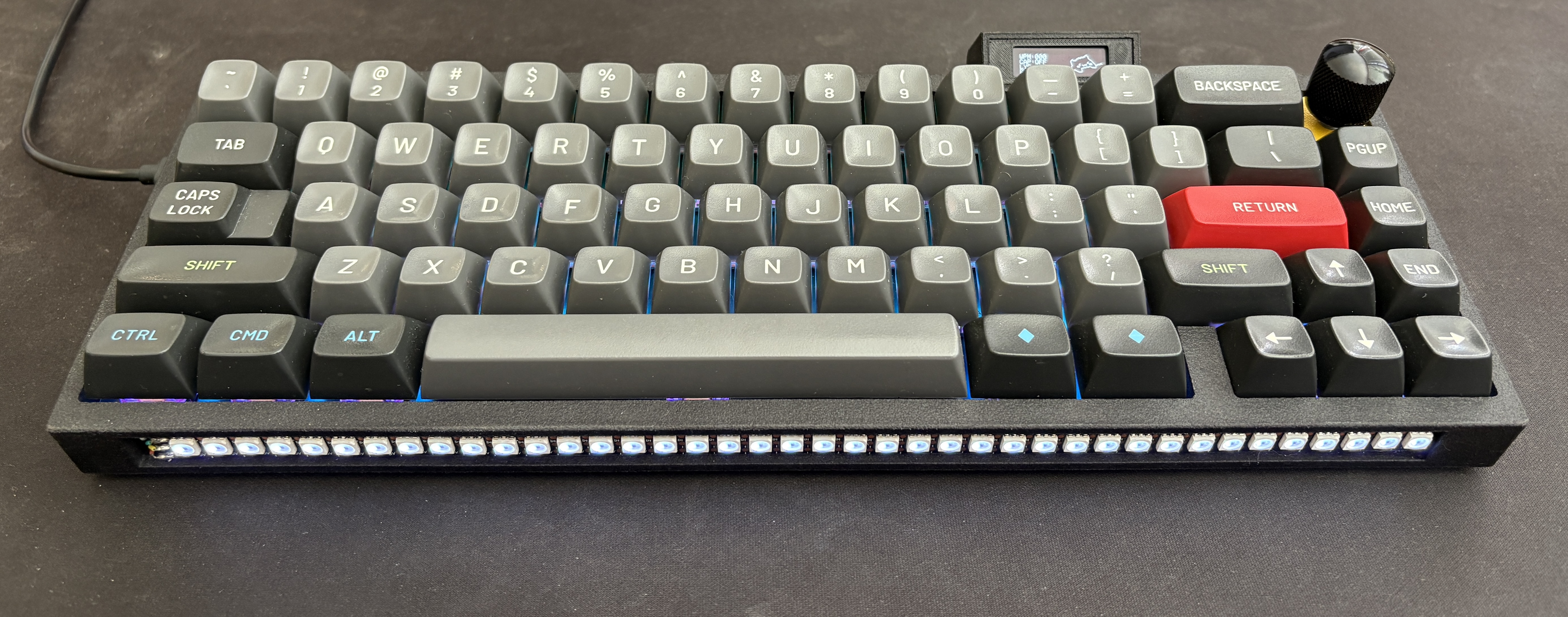
Aryess is a custom mechanical keyboard designed and built from the ground up by pioz. It features a completely custom PCB and a wide range of modern features for both productivity and aesthetics.
You can build your own Aryess keyboard by following these steps.
The PCB and plate production files are ready for you. You only need to upload them to JLCPCB:
pcb/production/aryess_2.zipplate/production/aryess_plate_2.zipGo to https://jlcpcb.com/, and upload both files.
When ordering the PCB:
You will receive fully assembled PCBs at home.
For the case, upload the file case/Aryess Case.step to a 3D printing service.
I personally used Weerg with these settings:
You can use any other 3D printing service if you prefer.
You will need some additional components. Here is the full list with purchase links:
| Component | Description | Purchase Link |
|---|---|---|
| OLED Display | SSD1306 OLED 128 x 32 | Buy on Amazon |
| JST Cables | 3x JST 4-pin 1mm pitch cables | |
| 1x JST 3-pin 1mm pitch cable | ||
| Rubber Feet | Round 20mm diameter rubber feet | Buy on Amazon |
| Rotary Encoder | Rotary encorder (EC11 compatible) | Buy on Amazon |
| Knob | Metal knob for rotary encoder | Buy on Amazon |
| LED Strip | APA102-compatible LED strip, ~27.5cm | Buy on Amazon |
| Stabilizers | MX compatible keyboard stabilizers | Buy on Amazon |
| Toggle Switch | On/Off switch | Buy on Amazon |
| Unified Daughterboard | USB-C daughterboard | Buy on 42keebs |
| O-Ring Gasket | VMQ-50 (Silicone 50 duro), AS568-264 | Buy on Amazon |
| Foam Sheet | Foam for case/PCB dampening | Buy on Amazon |
Some items can be found from different sellers depending on your country.
Once you have received the PCB, plate, case, and all components, you can start assembling your Aryess keyboard.
qmk compile -kb aryess -km defaultThis command compiles the firmware for the Aryess keyboard using the default keymap.
To flash the firmware, you must enter boot mode on the PCB.
If no firmware is present, connecting the board via USB will automatically enter boot mode.
If firmware is already flashed:
FN2 + ENTER.Once in boot mode, your computer should detect a new USB mass storage device
named something like RPI-RP2.
Copy the compiled .uf2 file (e.g., aryess_default.uf2) directly into the
root of that device. The board will automatically flash and reboot with the
new firmware.
| Qty | Value | Footprint | References |
|---|---|---|---|
| 67 | D | Diode_SMD:D_SOD-323 | D1, D2, D10, D11, D12, D13, D14, D15, D16, D17, D18, D19, D20, D21, D22, D23 +51 |
| 67 | SK6812MINI-E | PCM_marbastlib-various:LED_6028R | LED1, LED2, LED10, LED11, LED12, LED13, LED14, LED15, LED16, LED17, LED18, LED19, LED20, LED21, LED22, LED23 +51 |
| 11 | 100nf | Capacitor_SMD:C_0805_2012Metric | C1, C2, C3, C4, C5, C6, C7, C8, C9, C10, C11 |
| 4 | 1uf | Capacitor_SMD:C_0805_2012Metric | C12, C13, C16, C17 |
| 3 | 10k | Resistor_SMD:R_0805_2012Metric | R1, R4, R5 |
| 3 | Stabilizer 2u | PCM_marbastlib-mx:STAB_MX_2u | H1, H2, H3 |
| 2 | 22pf | Capacitor_SMD:C_0805_2012Metric | C14, C15 |
| 2 | 27 | Resistor_SMD:R_0805_2012Metric | R2, R3 |
| 1 | ' | PCM_marbastlib-mx:SW_MX_HS_CPG151101S11_1u | SW42 |
| 1 | , | PCM_marbastlib-mx:SW_MX_HS_CPG151101S11_1u | SW53 |
| 1 | - | PCM_marbastlib-mx:SW_MX_HS_CPG151101S11_1u | SW12 |
| 1 | . | PCM_marbastlib-mx:SW_MX_HS_CPG151101S11_1u | SW54 |
| 1 | / | PCM_marbastlib-mx:SW_MX_HS_CPG151101S11_1u | SW55 |
| 1 | 0 | PCM_marbastlib-mx:SW_MX_HS_CPG151101S11_1u | SW11 |
| 1 | 1 | PCM_marbastlib-mx:SW_MX_HS_CPG151101S11_1u | SW2 |
| 1 | 1k | Resistor_SMD:R_0805_2012Metric | R6 |
| 1 | 2 | PCM_marbastlib-mx:SW_MX_HS_CPG151101S11_1u | SW3 |
| 1 | 3 | PCM_marbastlib-mx:SW_MX_HS_CPG151101S11_1u | SW4 |
| 1 | 4 | PCM_marbastlib-mx:SW_MX_HS_CPG151101S11_1u | SW5 |
| 1 | 5 | PCM_marbastlib-mx:SW_MX_HS_CPG151101S11_1u | SW6 |
| 1 | 6 | PCM_marbastlib-mx:SW_MX_HS_CPG151101S11_1u | SW7 |
| 1 | 7 | PCM_marbastlib-mx:SW_MX_HS_CPG151101S11_1u | SW8 |
| 1 | 8 | PCM_marbastlib-mx:SW_MX_HS_CPG151101S11_1u | SW9 |
| 1 | 9 | PCM_marbastlib-mx:SW_MX_HS_CPG151101S11_1u | SW10 |
| 1 | ; | PCM_marbastlib-mx:SW_MX_HS_CPG151101S11_1u | SW41 |
| 1 | = | PCM_marbastlib-mx:SW_MX_HS_CPG151101S11_1u | SW13 |
| 1 | A | PCM_marbastlib-mx:SW_MX_HS_CPG151101S11_1u | SW32 |
| 1 | ALT | PCM_marbastlib-mx:SW_MX_HS_CPG151101S11_1u | SW61 |
| 1 | B | PCM_marbastlib-mx:SW_MX_HS_CPG151101S11_1u | SW50 |
| 1 | BACK | PCM_marbastlib-mx:SW_MX_HS_CPG151101S11_1u | SW14 |
| 1 | BOOT | Button_Switch_SMD:SW_SPST_TL3342 | SW69 |
| 1 | C | PCM_marbastlib-mx:SW_MX_HS_CPG151101S11_1u | SW48 |
| 1 | CAPS | PCM_marbastlib-mx:SW_MX_HS_CPG151101S11_1u | SW31 |
| 1 | CTRL | PCM_marbastlib-mx:SW_MX_HS_CPG151101S11_1u | SW59 |
| 1 | Crystal | Crystal:Crystal_SMD_3225-4Pin_3.2x2.5mm | Y1 |
| 1 | D | PCM_marbastlib-mx:SW_MX_HS_CPG151101S11_1u | SW34 |
| 1 | DOWN | PCM_marbastlib-mx:SW_MX_HS_CPG151101S11_1u | SW66 |
| 1 | E | PCM_marbastlib-mx:SW_MX_HS_CPG151101S11_1u | SW19 |
| 1 | ENTER | PCM_marbastlib-mx:SW_MX_HS_CPG151101S11_1u | SW43 |
| 1 | ESC | PCM_marbastlib-mx:SW_MX_HS_CPG151101S11_1u | SW1 |
| 1 | F | PCM_marbastlib-mx:SW_MX_HS_CPG151101S11_1u | SW35 |
| 1 | FN1 | PCM_marbastlib-mx:SW_MX_HS_CPG151101S11_1u | SW64 |
| 1 | FN2 | PCM_marbastlib-mx:SW_MX_HS_CPG151101S11_1u | SW63 |
| 1 | Flash | Package_SON:WSON-8-1EP_8x6mm_P1.27mm_EP3.4x4.3mm | U1 |
| 1 | G | PCM_marbastlib-mx:SW_MX_HS_CPG151101S11_1u | SW36 |
| 1 | H | PCM_marbastlib-mx:SW_MX_HS_CPG151101S11_1u | SW37 |
| 1 | HOME | PCM_marbastlib-mx:SW_MX_HS_CPG151101S11_1u | SW58 |
| 1 | I | PCM_marbastlib-mx:SW_MX_HS_CPG151101S11_1u | SW24 |
| 1 | J | PCM_marbastlib-mx:SW_MX_HS_CPG151101S11_1u | SW38 |
| 1 | K | PCM_marbastlib-mx:SW_MX_HS_CPG151101S11_1u | SW39 |
| 1 | L | PCM_marbastlib-mx:SW_MX_HS_CPG151101S11_1u | SW40 |
| 1 | LEDs | Connector_JST:JST_SH_SM04B-SRSS-TB_1x04-1MP_P1.00mm_Horizontal | J3 |
| 1 | LEFT | PCM_marbastlib-mx:SW_MX_HS_CPG151101S11_1u | SW65 |
| 1 | LSHIFT | PCM_marbastlib-mx:SW_MX_HS_CPG151101S11_1u | SW45 |
| 1 | M | PCM_marbastlib-mx:SW_MX_HS_CPG151101S11_1u | SW52 |
| 1 | N | PCM_marbastlib-mx:SW_MX_HS_CPG151101S11_1u | SW51 |
| 1 | O | PCM_marbastlib-mx:SW_MX_HS_CPG151101S11_1u | SW25 |
| 1 | OLED | Connector_JST:JST_SH_SM04B-SRSS-TB_1x04-1MP_P1.00mm_Horizontal | J2 |
| 1 | P | PCM_marbastlib-mx:SW_MX_HS_CPG151101S11_1u | SW26 |
| 1 | PgDn | PCM_marbastlib-mx:SW_MX_HS_CPG151101S11_1u | SW44 |
| 1 | PgUp | PCM_marbastlib-mx:SW_MX_HS_CPG151101S11_1u | SW30 |
| 1 | Q | PCM_marbastlib-mx:SW_MX_HS_CPG151101S11_1u | SW17 |
| 1 | R | PCM_marbastlib-mx:SW_MX_HS_CPG151101S11_1u | SW20 |
| 1 | RESET | Button_Switch_SMD:SW_SPST_TL3342 | SW68 |
| 1 | RIGHT | PCM_marbastlib-mx:SW_MX_HS_CPG151101S11_1u | SW67 |
| 1 | ROTARY | PCM_marbastlib-various:ROT_Alps_EC11E-Switch | SW15 |
| 1 | RP2040 | Package_DFN_QFN:QFN-56-1EP_7x7mm_P0.4mm_EP3.2x3.2mm | U3 |
| 1 | RSHIFT | PCM_marbastlib-mx:SW_MX_HS_CPG151101S11_1u | SW56 |
| 1 | S | PCM_marbastlib-mx:SW_MX_HS_CPG151101S11_1u | SW33 |
| 1 | SPACE | PCM_marbastlib-mx:SW_MX_HS_CPG151101S11_1u | SW62 |
| 1 | SUPER | PCM_marbastlib-mx:SW_MX_HS_CPG151101S11_1u | SW60 |
| 1 | Stabilizer 6.25u | PCM_marbastlib-mx:STAB_MX_6.25u | H4 |
| 1 | Switch | Connector_JST:JST_SH_SM03B-SRSS-TB_1x03-1MP_P1.00mm_Horizontal | J4 |
| 1 | T | PCM_marbastlib-mx:SW_MX_HS_CPG151101S11_1u | SW21 |
| 1 | TAB | PCM_marbastlib-mx:SW_MX_HS_CPG151101S11_1u | SW16 |
| 1 | U | PCM_marbastlib-mx:SW_MX_HS_CPG151101S11_1u | SW23 |
| 1 | UD | Connector_JST:JST_SH_SM04B-SRSS-TB_1x04-1MP_P1.00mm_Horizontal | J1 |
| 1 | UP | PCM_marbastlib-mx:SW_MX_HS_CPG151101S11_1u | SW57 |
| 1 | V | PCM_marbastlib-mx:SW_MX_HS_CPG151101S11_1u | SW49 |
| 1 | V Reg | Package_TO_SOT_SMD:SOT-23-5 | U2 |
The 231 most common of 238 parts.
Bastardkb/Dilemma
The Dilemma is a vertical stagger low-profile keyboard with mods.

Pwnsat/FlatSat
Flatsat v1.0 is a hardware based platform for aerospace cybersecurity research

FrameworkComputer/InputModules
Reference designs and documentation for the Input Module system in the Framework Laptop 16

weteor/Qazikat
qaz-like keyboard with offset space, arrow cluster and ISO-enter


yuz207/agentpad13
agentpad13 — open-source 13-key macropad for agentic work (RP2040, vial-qmk, planar joystick, Raw HID agent-status protocol)

defvs/minigeki
A portable implementation of an ONGEKI controller, with all necessary buttons, two macros, RGB LED support, USB-C.
It measures 303.8 × 94.2 mm and has 2 copper layers, 1.6 mm thick.
238 parts, built around the RP2040 and SK6812MINI-E. The full list of its parts is on this page, with links to each part's symbol and footprint where PCBKit's library has them.
From the pioz/aryess_keyboard repository on GitHub, at the commit this page was made from: the board is pcb/aryess.kicad_pcb and its schematic pcb/aryess.kicad_sch. PCBKit opens the board in the browser, with nothing to install.
Its repository publishes it under the MIT licence: you may reuse it on that licence's terms (keep the author's notice, and for a copyleft licence share your changes alike).