
2 layers354.5 × 132.5 mm
Panels001
jibonaronno/documentsA
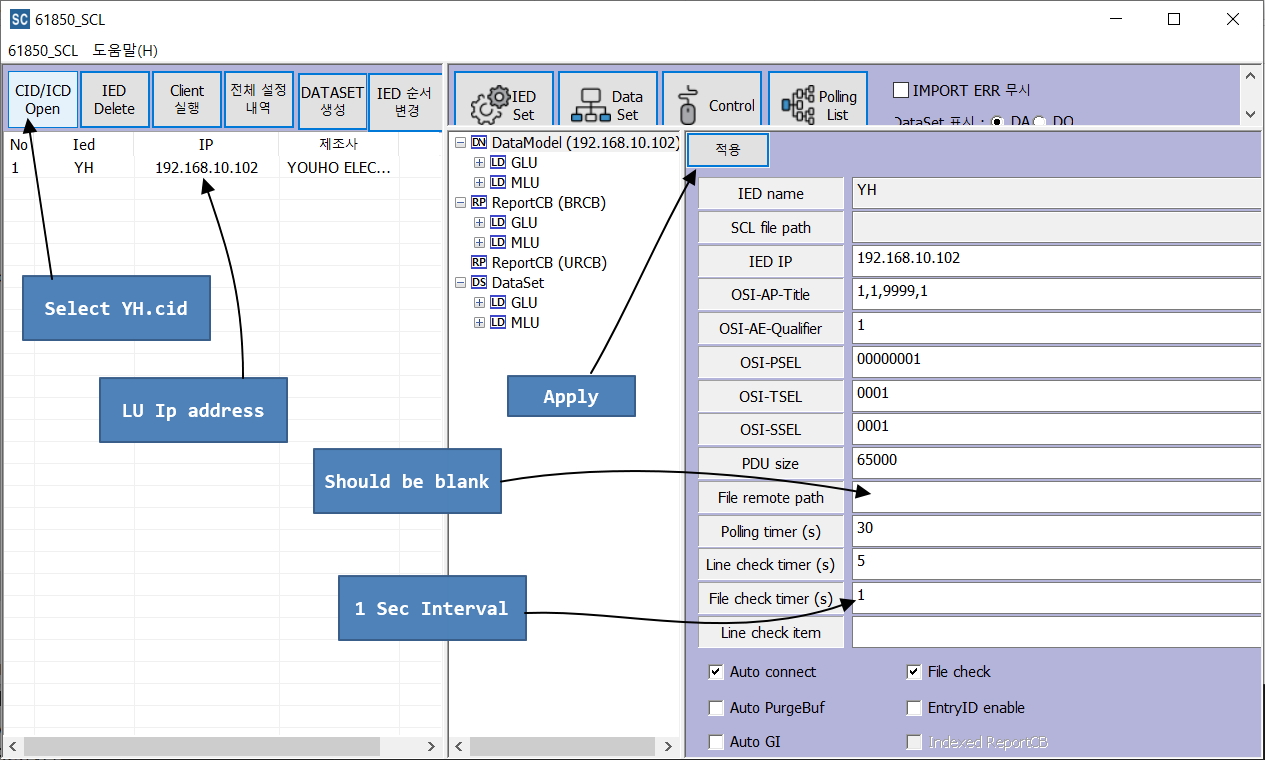
It is required to change settings using SCLManager.exe when required for new setup.
308 parts4

 jibonaronno/documentsA4
It is required to change settings using SCLManager.exe when required for new setup.
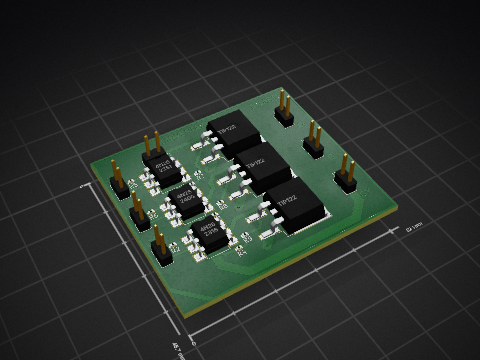
TIP122Board2 is an open-source printed circuit board by jibonaronno, from the jibonaronno/documentsA repository on GitHub. It is a 2-layer board with 12 parts on 9 nets.
It is built around the TIP122. Its parts include 5 resistors, 2 capacitors, 2 connectors, 1 IC and 1 diode.
SA_Client.ini has following configs:
LocalIp=192.168.10.105
...
...
PATH=D:/develop/MZAutomation/SAProgram/ClientProc_2017_Dev_NoTimer_Minsu/ClientProc/61850_CFG/CFG/61850/SA_CFG
SAVE_PATH =D:/develop/MZAutomation/SAProgram/ClientProc_2017_Dev_NoTimer_Minsu/ClientProc/61850_CFG/LOG/61850
ENG_PATH =D:/develop/MZAutomation/SAProgram/ClientProc_2017_Dev_NoTimer_Minsu/ClientProc/61850_CFG/DB/ied_info_gw.csv
These configurations should be changed if machine or location is changed.
It is required to change settings using SCLManager.exe when required for new setup.
Confluence Pages From PDA ACQ Operation and calculation / Integration of various current values Copy of 차단기 동작 특성 페이지 https://jlee193.atlassian.net/wiki/spaces/PDA/pages/514129921/Copy+of
Bushing Documentation Page From PDA 부싱 누설 전류 페이지 https://jlee193.atlassian.net/wiki/spaces/PDA/pages/296812597
An Initial Concept of hardware pptx file downloaded in Confluence folder 종합예방진단시스템(20210625)_HW팀.pptx 하드웨어 구성 https://jlee193.atlassian.net/wiki/spaces/PDA/pages/154042616
| Qty | Value | Footprint | References |
|---|---|---|---|
| 2 | 0.1/400 | Capacitor_THT:C_Rect_L4.0mm_W2.5mm_P2.50mm | C1, C2 |
| 2 | 270 | Resistor_THT:R_Axial_DIN0204_L3.6mm_D1.6mm_P7.62mm_Horizontal | R1, R2 |
| 1 | 22K | Resistor_THT:R_Axial_DIN0204_L3.6mm_D1.6mm_P7.62mm_Horizontal | R3 |
| 1 | 22K 1W | Resistor_THT:R_Axial_DIN0207_L6.3mm_D2.5mm_P7.62mm_Horizontal | R5 |
| 1 | 47E 5W | Resistor_THT:R_Axial_DIN0414_L11.9mm_D4.5mm_P15.24mm_Horizontal | R4 |
| 1 | Conn_01x10 | Connector_PinHeader_2.54mm:PinHeader_1x10_P2.54mm_Vertical | J1 |
| 1 | Conn_01x12 | Connector_Phoenix_MC_HighVoltage:PhoenixContact_MC_1,5_12-G-5.08_1x12_P5.08mm_Horizontal | J2 |
| 1 | D_Schottky | Diode_THT:D_A-405_P7.62mm_Horizontal | D1 |
| 1 | PC817 | Package_DIP:DIP-4_W7.62mm | U1 |
| 1 | TIP122 | Package_TO_SOT_THT:TO-220-3_Vertical | Q1 |
jibonaronno/documentsA
It is required to change settings using SCLManager.exe when required for new setup.

jibonaronno/documentsA
It is required to change settings using SCLManager.exe when required for new setup.

jibonaronno/documentsA
It is required to change settings using SCLManager.exe when required for new setup.

jibonaronno/documentsA
It is required to change settings using SCLManager.exe when required for new setup.

jibonaronno/documentsA
It is required to change settings using SCLManager.exe when required for new setup.

jibonaronno/documentsA
It is required to change settings using SCLManager.exe when required for new setup.

jibonaronno/documentsA
It is required to change settings using SCLManager.exe when required for new setup.

jibonaronno/documentsA
It is required to change settings using SCLManager.exe when required for new setup.

jibonaronno/documentsA
It is required to change settings using SCLManager.exe when required for new setup.

jibonaronno/documentsA
It is required to change settings using SCLManager.exe when required for new setup.

jibonaronno/documentsA
It is required to change settings using SCLManager.exe when required for new setup.

jibonaronno/documentsA
It is required to change settings using SCLManager.exe when required for new setup.

tenderlove/analog-terminal-bell
A bell for your terminal that is analog

cclienti/tig-welder
A DIY TIG welder that can be plugged to a traditionnal stick welder or to a high current source


futureshocked/NodeRed-ESP32-TerrariumController
This repository contains ESP32 sketches and Node-RED flows from the course "NodeRed ESP32 Make a Terrarium Controller".

ytcsc/TeCoLab
TeCoLab stands for Temperature Control Laboratory. It is a low-cost open-source didactic framework to test the performance of several control strategies regarding temperature control.
BioARTS-Lab/Miniature_Microscope
3D-printed fluorescence miniature microscope


Aniket95-code/Fan-Speed-Controller-NE555-PCB-design
A simple, low-cost DC fan speed controller built around the classic NE555 timer IC operating in astable mode. Fan speed is adjusted by varying the PWM duty cycle via a potentiometer, while a TIP122 Darlington transistor…
12 parts, built around the TIP122. The full list of its parts is on this page, with links to each part's symbol and footprint where PCBKit's library has them.
From the jibonaronno/documentsA repository on GitHub, at the commit this page was made from: the board is uprojects/MAMPower/TIP122Board/TIP122Board/TIP122Board2.kicad_pcb. PCBKit opens the board in the browser, with nothing to install.
Its repository states no licence, so its author keeps all rights: ask jibonaronno before reusing the design.