2 layers160 × 124.7 mm

 formulaslug/fs-2-schematics2
Electrical design repository for the FS-2 racecar
APPS ETC is an open-source printed circuit board by formulaslug, from the formulaslug/fs-2-schematics repository on GitHub. It is a 2-layer board of 93.5 × 69.6 mm with 27 parts on 47 nets, routed with 195 tracks and 21 vias.
It is built around the ISO1050DUB, MCP6004-E/P and DTM1312PC12PDR008. Its parts include 11 resistors, 9 capacitors, 4 ICs and 1 connector.



This is the electrical schematics repository for the FS-2 racecar.
Report Bug
·
Request Feature
In depth version of how to get started 🏎️
If you installed GitHub desktop, create an account and close the repository. I recommend cloning the repository into your documents folder.
How to clone repositories on GitHub desktop
The repository url is: https://github.com/formulaslug/fs-2-schematics
If you are tech savvy and using Git
$ git clone https://github.com/formulaslug/fs-2-schematics
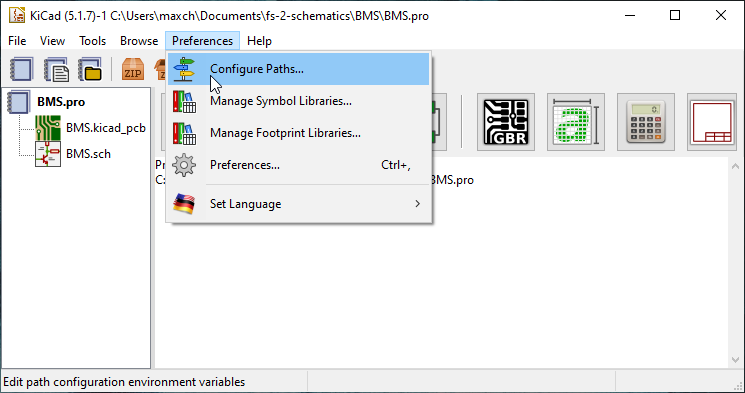
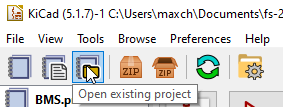
Make sure KiCAD is currently open
Then click on preferences -> Configure Paths..
Click on the plus on the bottom right to add a new path variable
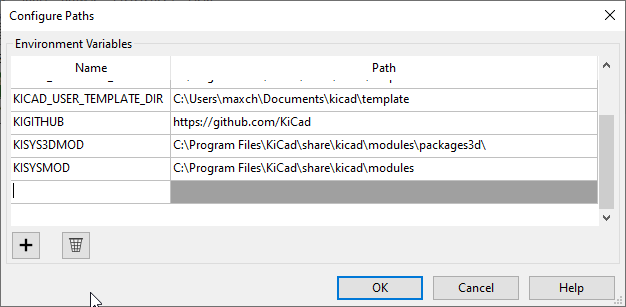
On the left, you want it FS_2_SCHEMATICS <- all caps
On the right, you want to set the path where you installed the repository (the folder is called fs-2-schematics)

Click on the folder on the right, and find fs-2-schematics repo like stated above
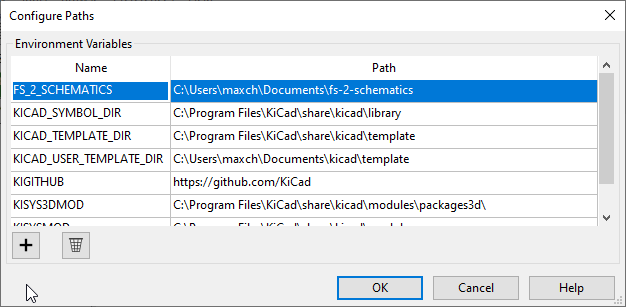
Should look something like this after its done
Example (might look different if you are using an Mac, or Linux):
| Left side | Right side |
|---|---|
| FS_2_SCHEMATICS | Docs\fs-2-schematics |
This is the design for the LTC6811-based BMS module, based on the design from fs-1.
| Qty | Value | Footprint | References |
|---|---|---|---|
| 4 | 100k | Resistor_SMD:R_0805_2012Metric_Pad1.20x1.40mm_HandSolder | R6, R9, R10, R11 |
| 4 | 180kO | Resistor_SMD:R_0805_2012Metric_Pad1.20x1.40mm_HandSolder | R1, R3, R4, R7 |
| 3 | 40 nF | Capacitor_SMD:C_0805_2012Metric_Pad1.18x1.45mm_HandSolder | C7, C8, C9 |
| 2 | 0.1 uF | Capacitor_SMD:C_0805_2012Metric_Pad1.18x1.45mm_HandSolder | C2, C6 |
| 2 | 100nF | Capacitor_SMD:C_0805_2012Metric_Pad1.18x1.45mm_HandSolder | C3, C4 |
| 2 | 330kO | Resistor_SMD:R_0805_2012Metric_Pad1.20x1.40mm_HandSolder | R2, R8 |
| 1 | 0.33 uF | Capacitor_SMD:C_0805_2012Metric_Pad1.18x1.45mm_HandSolder | C1 |
| 1 | 0.33uF | Capacitor_SMD:C_0805_2012Metric_Pad1.18x1.45mm_HandSolder | C5 |
| 1 | 120 O | Resistor_SMD:R_0805_2012Metric_Pad1.20x1.40mm_HandSolder | R5 |
| 1 | DTM1312PC12PDR008 | FSFootprints:TE_DTM1312PC12PDR008 | P1 |
| 1 | ISO1050DUB | Package_SO:SOP-8_6.62x9.15mm_P2.54mm | CAN_Tranceiver1 |
| 1 | LM7805_TO220 | Package_TO_SOT_THT:TO-220-3_Vertical | U6 |
| 1 | LM7809_TO220 | Package_TO_SOT_THT:TO-220-3_Vertical | U8 |
| 1 | LOGO | FSFootprints:FS_Logo | G*** |
| 1 | MCP6004 | FSFootprints:PDIP14_300MC_MCH | U2 |
| 1 | NUCLEO-L432KC | 1FS_2_Global_Footprint_Library:MODULE_NUCLEO-L432KC | U1 |


formulaslug/fs-2-schematics
Electrical design repository for the FS-2 racecar


formulaslug/fs-2-schematics
Electrical design repository for the FS-2 racecar

formulaslug/fs-2-schematics
Electrical design repository for the FS-2 racecar

formulaslug/fs-2-schematics
Electrical design repository for the FS-2 racecar


eddyem/stm32samples
Code samples and ready projects based on bare-metal STM32

lflaherty/ev-ecu
Custom ECU (firmware and hardware) for Bespoke Electric Vehicles


It measures 93.5 × 69.6 mm and has 2 copper layers, 1.6 mm thick.
27 parts, built around the ISO1050DUB, MCP6004-E/P and DTM1312PC12PDR008. The full list of its parts is on this page, with links to each part's symbol and footprint where PCBKit's library has them.
From the formulaslug/fs-2-schematics repository on GitHub, at the commit this page was made from: the board is APPS_ETCA/APPS_ETC.kicad_pcb. PCBKit opens the board in the browser, with nothing to install.
Its repository states no licence, so its author keeps all rights: ask formulaslug before reusing the design.