Skip to the content
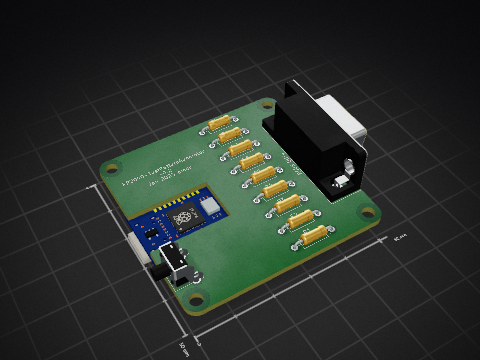
2 layers90 × 43 mmUsbPaddleKicad, the printed circuit board in 3D

UsbPaddleKicad

dshimmyo/usbPaddle

I'm pretty nostalgic about old game consoles like the Atari 2600, and for years I've been wondering why I can't play games like Breakout or Kaboom! or Warlords with a proper paddle controller, so I set out to find out…

Size
90 × 43 mm
Copper layers
2
Thickness
1.6 mm
Parts
17
Nets
23
Pads
67
Tracks, vias
93, 36
Pours
2
Routed
Yes
KiCad
KiCad 10.0 (file 20260206)
Created
19 Apr 2026
Updated
3 Sep 2026

Overview

UsbPaddleKicad is an open-source printed circuit board by dshimmyo, from the dshimmyo/usbPaddle repository on GitHub, published under the MIT licence. It is a 2-layer board of 90 × 43 mm with 17 parts on 23 nets, routed with 93 tracks and 36 vias.

It is built around the RP2040-ZERO. Its parts include 5 ICs, 4 capacitors and 4 resistors. It belongs with the RP2040 boards of this library.

Main components

1

README

README.md

I'm pretty nostalgic about old game consoles like the Atari 2600, and for years I've been wondering why I can't play games like Breakout or Kaboom! or Warlords with a proper paddle controller, so I set out to find out what I can do about it. This project is the beginning of that adventure. Basically, this is some arduino code that I installed into an Adafruit Keeboar 2040 which is based on and RP2040. Some time in the near future I'll build a more generic version using the RP2040. Anyway, the gist of it is, you'll need a 10K potentiometer with ground on one outer lug and 3.3vdc on the other outer lug. The wiper is wired to one of the analog input pins on the kb2040. The analog signal you get from the potentiometer is your paddle rotation. It's all in the code. The reason this script is so huge is because I had to experiment with a bunch of modes to see what works where. But basically, just use the default mode. Unfortunately it only works on basically on or two devices using one specific OS. I got it working on an Anbernic RG350xxH and RG40xxH running MuOS Banana. For some reason, using that specific OS and whatever version of retroarch they use, it works great with the paddle. Every other software, OS compbination I've tried maps the paddle as if it's a joystick so it control velocity which is wrong. The paddle is supposed to map directly to the position of the paddle.

Anyway, this would make more sense in a video and I'll post a schematic of my circuit soon.

Oh I forgot to mention I had to add a bunch of buttons to this paddle because when I switch to this device in retroarch I can't use the buttons on the anbernic so I needed a way to navigate out of the retroarch menus to play the game, thus all the dang buttons.

IMG_8095

In this image I'm running a gametank game using the GameTankEmulator which has native support for my paddle because I programmed it that way ;)

Parts

17
QtyValueFootprintReferences
4, , ,
4.1µFCapacitor_THT:C_Disc_D3.8mm_W2.6mm_P2.50mmC1, C2, C3, C4
410kΩResistor_THT:R_Axial_DIN0309_L9.0mm_D3.2mm_P12.70mm_HorizontalR1, R2, R3, R4
4RJ116P4CRJ116P4C:RJ6P4C_GLX-N-64MU2, U3, U4, U5
1RP2040-ZERORP2040-ZERO:MODULE_RP2040-ZEROU1

More from dshimmyo/usbPaddle

1
  • 2 layers51 × 72.5 mmUsbPaddleSingleKicad, the printed circuit board in 3D

    UsbPaddleSingleKicad

    dshimmyo/usbPaddle

    I'm pretty nostalgic about old game consoles like the Atari 2600, and for years I've been wondering why I can't play games like Breakout or Kaboom! or Warlords with a proper paddle controller, so I set out to find out…

    10 partsMIT

Similar boards

  • 2 layers132.3 × 94.9 mmCheapino, the printed circuit board in 3D

    Cheapino

    tompi/cheapino

    An affordable split 36 keys keyboard

    59 parts1.2kCC-BY-4.0
  • 2 layers321 × 92.3 mmMx40, the printed circuit board in 3D

    Mx40

    zzeneg/stront

    Split keyboards with 38 or 40 keys, LCD display and Cirque trackpad

    181 parts353MIT
  • 2 layers255.9 × 99.3 mmZerosprey42, the printed circuit board in 3D

    Zerosprey42

    beekeeb/zerosprey42

    Zerosprey42 Keyboard is a wired, beginner friendly, choc hotswap, MonoBlockSplit (Unibody), column-staggered, DIY mechanical keyboard.

    96 parts140
  • 2 layers146.3 × 69.5 mmStress, the printed circuit board in 3D

    Stress

    GroooveBob/Stress

    Pocket Arcade Fight Pad

    22 parts102MIT
  • 2 layers54 × 64 mmDonConIOmini, the printed circuit board in 3D

    DonConIOmini

    ravinrabbid/DonCon2040

    RP2040 based firmware and hardware for DIY Taiko no Tatsujin Drum Controllers

    96 parts66MIT
  • 2 layers52 × 50 mmRP2040-TestPatternGenerator VGA, the printed circuit board in 3D

    RP2040-TestPatternGenerator VGA

    nmur/RP2040-TestPatternGenerator

    A simple test pattern generator running on the RP2040 microcontroller

    12 parts64GPL-3.0
  • 2 layers120 × 40 mmBuinchiez40, the printed circuit board in 3D

    Buinchiez40

    ChrisChrisLoLo/bunchiez40

    A pocket keyboard that makes use of mouse switches to achieve a miniscule size

    90 parts56GPL-3.0
  • 2 layers305.2 × 76.2 mmSoroka, the printed circuit board in 3D

    Soroka

    kapee1/soroka

    40% DIY-keyboard with base kit support

    126 parts47Unlicense

Questions

How big is the UsbPaddleKicad PCB?

It measures 90 × 43 mm and has 2 copper layers, 1.6 mm thick.

What parts does the UsbPaddleKicad use?

17 parts, built around the RP2040-ZERO. The full list of its parts is on this page, with links to each part's symbol and footprint where PCBKit's library has them.

Where can I download the UsbPaddleKicad KiCad files?

From the dshimmyo/usbPaddle repository on GitHub, at the commit this page was made from: the board is usbPaddleKicad/usbPaddleKicad.kicad_pcb and its schematic usbPaddleKicad/usbPaddleKicad.kicad_sch. PCBKit opens the board in the browser, with nothing to install.

Can I use the UsbPaddleKicad design in my own project?

Its repository publishes it under the MIT licence: you may reuse it on that licence's terms (keep the author's notice, and for a copyleft licence share your changes alike).