
2 layers33.7 × 97.8 mm
HAN ESP TSS721
UtilitechAS/amsreader-firmware
ESP8266 and ESP32 compatible firmware to read, interpret and publish data to MQTT from smart electrical meters, both DLMS and DSMR is supported
29 parts470

 amitesh-singh/FASTUSBasp106
This is the fast avr programmer for AVR MCUs based on cheap stm32f103c8t6 board with usb-to-serial support.
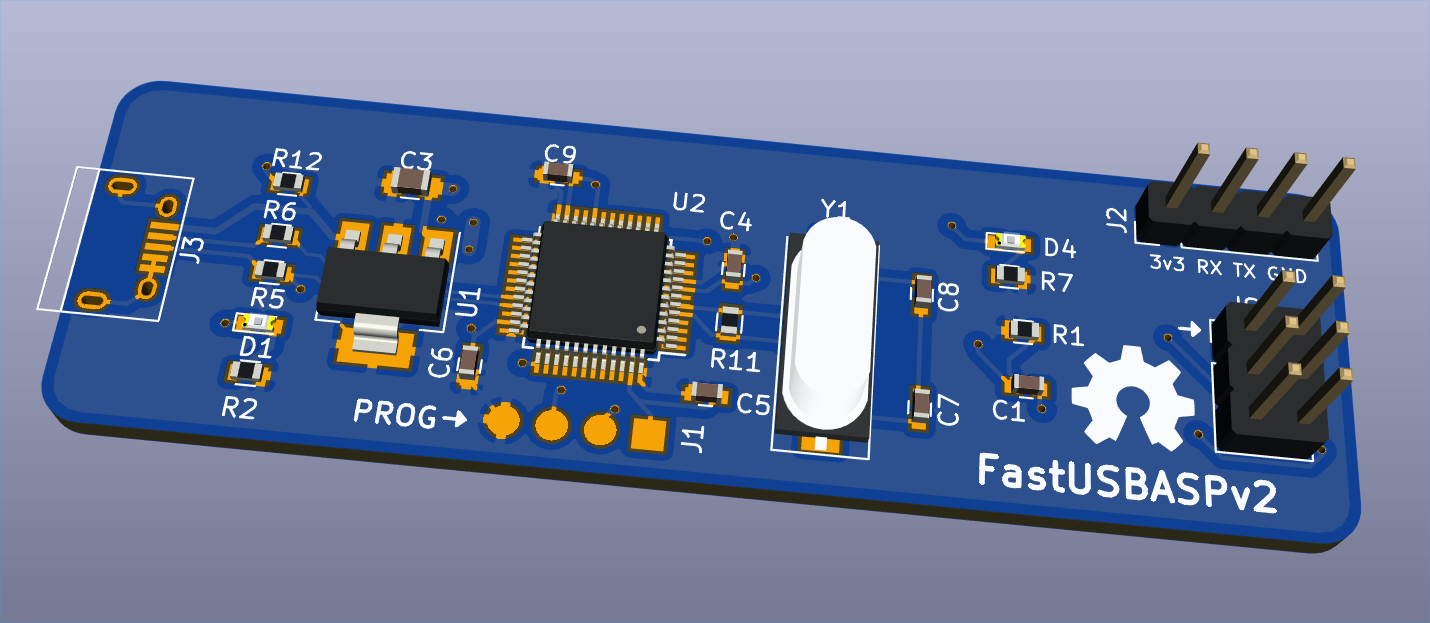
Fastusbasp v2 is an open-source printed circuit board by amitesh-singh, from the amitesh-singh/FASTUSBasp repository on GitHub. It is a 2-layer board of 69.2 × 20.8 mm with 25 parts on 47 nets, routed with 262 tracks and 36 vias.
It is built around the LM1117-3.3. Its parts include 8 capacitors, 7 resistors, 3 connectors, 2 ICs and 2 diodes. It belongs with the interfaces and adapters and microcontroller boards boards and the STM32 boards of this library.


This is the fast ISP programmer for AVR MCUs based on cheap stm32f103c8t6 aka blue-pill board with usb-to-serial support.

This blue pill board has wrong pullup resistor at usb D+ line. You might need to fix it before using blue pill as an AVR programmer. Refer to this guide: http://amitesh-singh.github.io/stm32/2017/10/09/correcting-usbpullup-resistor.html
Download the binaries from https://github.com/amitesh-singh/FASTUSBasp/releases/tag/v1.0.0
If you have fixed the pullup at D+ line, use fastusbasp.bin
The pre-compiled binary is at fastusbasp.bin.
$ st-flash write fastusbasp.bin 0x08000000In case, you did not fix the wrong pullup at D+ line, use
fastusbasp-wrongpullup.bin binary instead
$ st-flash write fastusbasp-wrongpullup.bin 0x08000000It uses SPI2 to communicate to AVR.
| Blue pill | AVR |
|---|---|
| PB15 | MOSI |
| PB14 | MISO |
| PB13 | SCK |
| PA8 | RST |
| 5v or 3.3v | 5v |
| GND | GND |
Serial ports are PA10(RX) and PA9 (TX).
This can be used to debug AVR Microcontrollers.
| Blue pill | AVR |
|---|---|
| PA10 | TX |
| PA9 | RX |
All pins SPI2(PB15, PB14, PB13), Serial(PA10, PA9) and RST(PA8) used are 5V tolerant.
Refer to udev/README.md
When you plug this device to PC, you should get following message ondmesg -wH
[Jan20 13:31] usb 3-1.1: new full-speed USB device number 5 using xhci_hcd
[  +0.107774] usb 3-1.1: New USB device found, idVendor=16c0, idProduct=05dc
[  +0.000004] usb 3-1.1: New USB device strings: Mfr=1, Product=2, SerialNumber=3
[  +0.000002] usb 3-1.1: Product: fastusbasp
[  +0.000002] usb 3-1.1: Manufacturer: http://amitesh-singh.github.io
[  +0.000001] usb 3-1.1: SerialNumber: AARAV
[  +0.040797] cdc_acm 3-1.1:1.0: ttyACM0: USB ACM device
[  +0.000804] usbcore: registered new interface driver cdc_acm
[  +0.000000] cdc_acm: USB Abstract Control Model driver for USB modems and ISDN adapters
/dev/ttyACM0 is the serial port.
$ avrdude -c usbasp-clone -p m16

avrdude: AVR device initialized and ready to accept instructions

Reading | ################################################## | 100% 0.00s

avrdude: Device signature = 0x1e9403 (probably m16)

avrdude: safemode: Fuses OK (E:FF, H:D8, L:CF)

avrdude done. Thank you.$ avrdude -c usbasp-clone -p m16 -U flash:w:blink.hex
avrdude: AVR device initialized and ready to accept instructions
Reading | ################################################## | 100% 0.00s
avrdude: Device signature = 0x1e9403 (probably m16)
avrdude: NOTE: "flash" memory has been specified, an erase cycle will be performed
To disable this feature, specify the -D option.
avrdude: erasing chip
avrdude: reading input file "blink.hex"
avrdude: input file blink.hex auto detected as Intel Hex
avrdude: writing flash (150 bytes):
Writing | ################################################## | 100% 0.02s
avrdude: 150 bytes of flash written
avrdude: verifying flash memory against blink.hex:
avrdude: load data flash data from input file blink.hex:
avrdude: input file blink.hex auto detected as Intel Hex
avrdude: input file blink.hex contains 150 bytes
avrdude: reading on-chip flash data:
Reading | ################################################## | 100% 0.01s$ avrdude -c usbasp-clone -p m16 -U flash:r:flash.bin:r
avrdude: AVR device initialized and ready to accept instructions
Reading | ################################################## | 100% 0.00s
avrdude: Device signature = 0x1e9403 (probably m16)
avrdude: reading flash memory:
Reading | ################################################## | 100% 0.33s
avrdude: writing output file "flash.bin"
avrdude: safemode: Fuses OK (E:FF, H:D8, L:CF)
avrdude done. Thank you.
$ hexdump flash.bin
0000000 c029 0000 c02f 0000 c02d 0000 c02b 0000
0000010 c029 0000 c027 0000 c025 0000 c023 0000
0000020 c021 0000 c01f 0000 c01d 0000 c01b 0000
0000030 c019 0000 c017 0000 c015 0000 c013 0000
0000040 c011 0000 c00f 0000 c00d 0000 c00b 0000
0000050 c009 0000 2411 be1f e5cf e0d4 bfde bfcdFlash Write speed: 15 KBps Flash Read Speed: 52.5 KBps
FASTUSBasp starts out with a fast ISP clock frequency (default: 3 MHz),
so the -B bitclock option might be required to achieve stable communication
in case target MCU F_CPU is bit low < 12MHz
To build fastusbasp firmware from source code, follow below guidelines.
Refer my post on how to setup stm32 devlopment environment on Arch linux. http://amitesh-singh.github.io/stm32/2017/04/09/setting-stm32-dev-environment-arch-linux.html
Make sure you have compiled libopencm3 library.
$ git clone --recurse-submodules https://github.com/amitesh-singh/FASTUSBasp
$ mkdir build
$ cd build
$ cmake ../
$ makeconnect st-link programmer to blue-pill and upload the firmware
$ make fastusbasp-upload$ make fasusbasp-ocduploadInstall stm32flash utility on linux.
To program stm32f103 via USART, you need to set BOOT0 as 1
and leave BOOT1 as 0.
Connect any usb to uart converter device and connect PA9 to RXD and PA10 to TXD and connect GND.
$ make fastusbasp-serialupload| Qty | Value | Footprint | References |
|---|---|---|---|
| 4 | 100nf | Capacitors_SMD:C_0603 | C4, C5, C6, C9 |
| 2 | 1k | Resistors_SMD:R_0603 | R2, R7 |
| 2 | 20R | Resistors_SMD:R_0603 | R5, R6 |
| 2 | 20pF | Capacitors_SMD:C_0603 | C7, C8 |
| 2 | LED | LEDs:LED_0603 | D1, D4 |
| 1 | 1.5k | Resistors_SMD:R_0603 | R12 |
| 1 | 100nF | Capacitors_SMD:C_0603 | C1 |
| 1 | 10k | Resistors_SMD:R_0603 | R1 |
| 1 | 10uF | Capacitors_SMD:C_0805 | C3 |
| 1 | 16MHz | Crystals:Crystal_SMD_HC49-SD | Y1 |
| 1 | 1M | Resistors_SMD:R_0603 | R11 |
| 1 | AVR-ISP-6 | Pin_Headers:Pin_Header_Straight_2x03_Pitch2.54mm | ISP |
| 1 | CONN_01X04 | Pin_Headers:Pin_Header_Straight_1x04_Pitch2.54mm | J2 |
| 1 | LM1117-3.3 | TO_SOT_Packages_SMD:SOT-223-3_TabPin2 | U1 |
| 1 | PROG | customfp:Pin_Header_SMD_pads_1x04_pitch2.54mm | J1 |
| 1 | STM32F103C8Tx | Housings_QFP:LQFP-48_7x7mm_Pitch0.5mm | U2 |
| 1 | USB_OTG | Connectors:USB_Micro-B | J3 |
The 24 most common of 25 parts.
UtilitechAS/amsreader-firmware
ESP8266 and ESP32 compatible firmware to read, interpret and publish data to MQTT from smart electrical meters, both DLMS and DSMR is supported

karawin/Ka-Radio
A wifi webradio with only low cost boards ESP8266 and VS1053 by Jp Cocatrix


doudar/SmartSpin2k
Transform your spin bike into a Smart Trainer!

plinkysynth/plinky_public
a public release of the plinky sw and hw

eddyem/stm32samples
Code samples and ready projects based on bare-metal STM32


It measures 69.2 × 20.8 mm and has 2 copper layers, 1.6 mm thick.
25 parts, built around the LM1117-3.3. The full list of its parts is on this page, with links to each part's symbol and footprint where PCBKit's library has them.
From the amitesh-singh/FASTUSBasp repository on GitHub, at the commit this page was made from: the board is pcb/fastusbasp_v2.kicad_pcb. PCBKit opens the board in the browser, with nothing to install.
Its repository states no licence, so its author keeps all rights: ask amitesh-singh before reusing the design.