2 layers100.4 × 45.7 mm

 alplix/yarrow
Open firmware for the FNIRSI GC-03 radiation detector
Yarrow counter basic is an open-source printed circuit board by alplix, from the alplix/yarrow repository on GitHub, published under the GPL-3.0 licence. It is a 2-layer board of 140 × 50 mm with 62 parts on 37 nets.
It is built around the CH32F203C8T6, 74AHCT1G04GV and AP2112K-3.3, with the USBLC6-2SC6, M2.5 and BAV99 among its other parts. Its parts include 20 resistors, 17 capacitors, 5 ICs, 5 connectors and 3 diodes. It belongs with the sensors and measurement boards of this library.


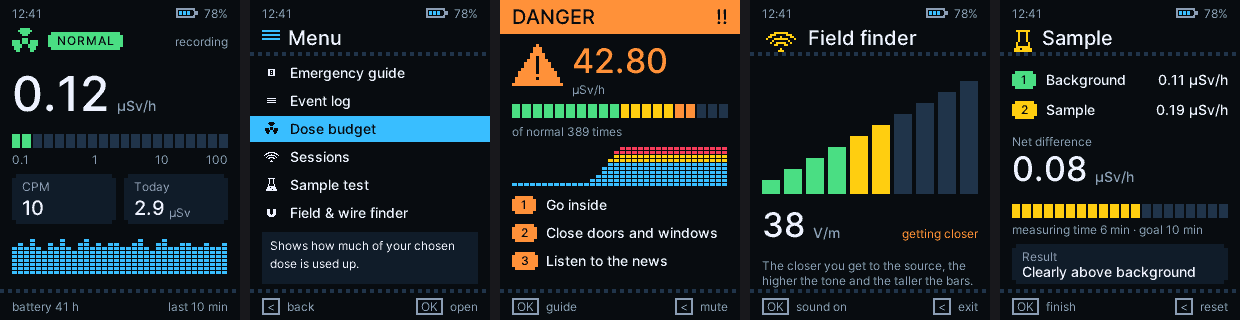
Open software for Geiger counters: firmware for the FNIRSI GC-03, a BOINC monitor that reads several kinds of counters, and a desktop app. Together they feed a live, open map of the natural background dose rate, city by city.
Website: yarrow.athena.org.tr · Live map: bitboinc.athena.org.tr/yarrow.php · Data by city: bitboinc.athena.org.tr/yarrow_history.php · Releases: firmware per language and Yarrow Hub
3D Printed Dock: https://www.crealitycloud.com/tr/model-detail/6adf8eee3737a58cb2d2e141?profileId=6adf8eee3737a58cb2d2e147
Firmware (src/) | Open firmware for the FNIRSI GC-03: readable at a glance, measures honestly, logs for years. |
BOINC monitor (monitor/) | A small program that reads a counter, cuts its pulses into exact 10-minute bins and sends them to the project as BOINC trickles. |
Yarrow Hub (hub/) | A desktop app that works without BOINC: live dose rate, history, statistics, alarms, CSV export. |
Website (site/) | The project page, in English and Turkish. |
| Counter | Connection | Monitor | Hub |
|---|---|---|---|
| FNIRSI GC-03 with the Yarrow firmware | USB serial | yes | yes |
| Radioactive@Home USB counters (boards 2.01 to 2.60, the kit, and 3.01) | USB HID, nothing to flash | yes | yes |
| GQ GMC-300 / 320 / 500 / 600 | USB serial | yes | yes (live, recorded while connected; no stored history) |
Only raw pulse counts from the tube are accepted, never a rate the counter has smoothed itself. A new counter is one small
driver in monitor/yarrow_src_*.c; see docs/boinc-monitor.md.
Download yarrow-hub-windows-x64-setup.exe.
It shows the live dose rate, keeps the history on your computer, draws statistics, shows nSv/h, µSv/h or µrem/h, rings
alarms at levels you choose and exports CSV. With a GC-03 it also sets the clock, calibrates the tube and installs
firmware. Built with Tauri (Rust and TypeScript); to build it: cd hub/app && cargo tauri build.
Radiation
Fields
Device
Download the file for your language from Releases and copy it to the device in update mode. The stock bootloader is never touched, so the stock firmware can always be put back the same way. Step by step: docs/install.md.
Needs arm-none-eabi-gcc, GNU make and Python 3 for the build helpers.
make                 # Turkish, build/yarrow-gc03.bin
make YLANG=en        # English, build/en/yarrow-gc03.bin
make release YLANG=en  # copies it to dist/yarrow-gc03-en.bin
make check           # host tests
make test            # runs the image in an ARM emulator
make sim             # renders every screen to build/sim
Details in docs/building.md.
Every language is its own firmware file, because the fonts take most of the room.
tr Türkçe | en English | de Deutsch | fr Français |
es Español | pt Português (Brasil) | it Italiano | nl Nederlands |
pl Polski | ru Русский | uk Українська | vi Tiếng Việt |
id Bahasa Indonesia | zh 简体中文 | ja 日本語 | ko 한국어 |
Adding one means copying src/lang/en.h, translating it and running tools/langcheck.py; a local model can do the first
pass: docs/translating.md.
| docs/install.md | putting Yarrow on the device and going back |
| docs/usage.md | keys, screens, alarms, sessions |
| docs/boinc-monitor.md | the BOINC monitor, supported counters, server checks, credit |
| docs/radioactive-at-home.md | the Radioactive@Home counters: boards, V2.60 schematic, report format |
| docs/data.md | what is sent, how it is checked, where to read the data |
| docs/calibration.md | matching the readings to a reference |
| docs/hardware.md | pins and memory map of the GC-03 |
| docs/serial-protocol.md | the USB command protocol |
| docs/log-format.md | how the log is stored and compressed |
| docs/building.md | toolchain, tests, simulator |
| docs/translating.md | adding a language |
| docs/bringup.md | test images for a new board |
GPL-3.0, see LICENSE. The Inter font in third_party/inter is under the SIL Open Font License.
| Qty | Value | Footprint | References |
|---|---|---|---|
| 9 | 100nF | C_0402_1005Metric | C8, C9, C10, C11, C12, C13, C14, C15, C16 |
| 4 | 10k | R_0402_1005Metric | R14, R15, R17, R19 |
| 4 | 5.1M | R_1206_3216Metric | R5, R6, R7, R8 |
| 3 | M2.5 | MountingHole_2.7mm_M2.5 | H1, H2, H3 |
| 2 | 10uF | C_0805_2012Metric | C5, C6 |
| 2 | 18pF | C_0402_1005Metric | C3, C4 |
| 2 | 4.7M | R_1206_3216Metric | R10, R11 |
| 2 | 5.1k | R_0402_1005Metric | R1, R2 |
| 1 | 0R (22R if D+ rings) | R_0402_1005Metric | DNP2 |
| 1 | 0R (22R if D- rings) | R_0402_1005Metric | DNP1 |
| 1 | 100R | R_0402_1005Metric | R20 |
| 1 | 10R | R_0603_1608Metric | R4 |
| 1 | 10nF 630V | C_1812_4532Metric | C2 |
| 1 | 1M | R_0402_1005Metric | R3 |
| 1 | 1k | R_0402_1005Metric | R18 |
| 1 | 1mH | L_7.3x7.3_H4.5 | L1 |
| 1 | 220k | R_0402_1005Metric | R12 |
| 1 | 22pF 1kV | C_1812_4532Metric | C1 |
| 1 | 22uF | C_0805_2012Metric | C7 |
| 1 | 2N7002 | SOT-23 | Q2 |
| 1 | 330k | R_0402_1005Metric | R13 |
| 1 | 4.3k | R_0402_1005Metric | R16 |
| 1 | 4.7nF | C_0402_1005Metric | C17 |
| 1 | 500 mA | Fuse_1206_3216Metric | F1 |
| 1 | 600V N-MOSFET | TO-252-3_TabPin2 | Q1 |
| 1 | 62k | R_0402_1005Metric | R9 |
| 1 | 74AHCT1G04 | SOT-23-5 | U5 |
| 1 | 8MHz | Crystal_SMD_3225-4Pin_3.2x2.5mm | Y1 |
| 1 | AP2112K-3.3 | SOT-23-5 | U2 |
| 1 | BAV99 | SOT-23 | D2 |
| 1 | BOOT0 | PinHeader_1x02_P2.54mm_Vertical | J3 |
| 1 | CH32F203C8T6 | LQFP-48_7x7mm_P0.5mm | U1 |
| 1 | ES1J | D_SMA | D1 |
| 1 | NRST | SW_SPST_B3S-1000 | SW1 |
| 1 | SWD | PinHeader_1x04_P2.54mm_Vertical | J2 |
| 1 | TLV3201 | SOT-23-5 | U4 |
| 1 | USB-C | USB_C_Receptacle_G-Switch_GT-USB-7010ASV | J1 |
| 1 | USBLC6-2SC6 | SOT-23-6 | U3 |
| 1 | green | LED_0805_2012Metric | D3 |
| 1 | piezo | Buzzer_12x9.5RM7.6 | BZ1 |
| 1 | tube clip, anode | TestPoint_THTPad_D3.0mm_Drill1.5mm | J4 |
| 1 | tube clip, cathode | TestPoint_THTPad_D3.0mm_Drill1.5mm | J5 |
It measures 140 × 50 mm and has 2 copper layers, 1.6 mm thick.
62 parts, built around the CH32F203C8T6, 74AHCT1G04GV, AP2112K-3.3 and USBLC6-2SC6. The full list of its parts is on this page, with links to each part's symbol and footprint where PCBKit's library has them.
From the alplix/yarrow repository on GitHub, at the commit this page was made from: the board is hardware/basic/kicad/yarrow_counter_basic.kicad_pcb and its schematic hardware/basic/kicad/yarrow_counter_basic.kicad_sch. PCBKit opens the board in the browser, with nothing to install.
Its repository publishes it under the GPL-3.0 licence: you may reuse it on that licence's terms (keep the author's notice, and for a copyleft licence share your changes alike).


blind-reckoning/Reckoner
Turns press-and-hold motorised blinds into Home Assistant covers. One Reckoner per blind, hidden in the wall box behind the buttons you already have.

JesseLevine727/AirNote
A touchless musical instrument built around a fully integrated RP2040, VL53L1X distance sensor and MAX98357A speaker amplifier. One hand selects eleven pentatonic notes over two octaves.


SP8EBC/radio-usb-interface
USB <--> Land Mobile Radio interace with full ground isolation on 2way audio and PTT control

