4 layers80 × 80 mm
Design of a Raspberry PICO IoT device on 4-layer pcb with sensors
Itachi-infinito/Raspberry-Pico-IoT-4-Layer-PCB
Raspberry Pi Pico IoT device on 4-layer PCB with sensors, KiCad schematics, PCB layout and 3D visualization.
61 parts
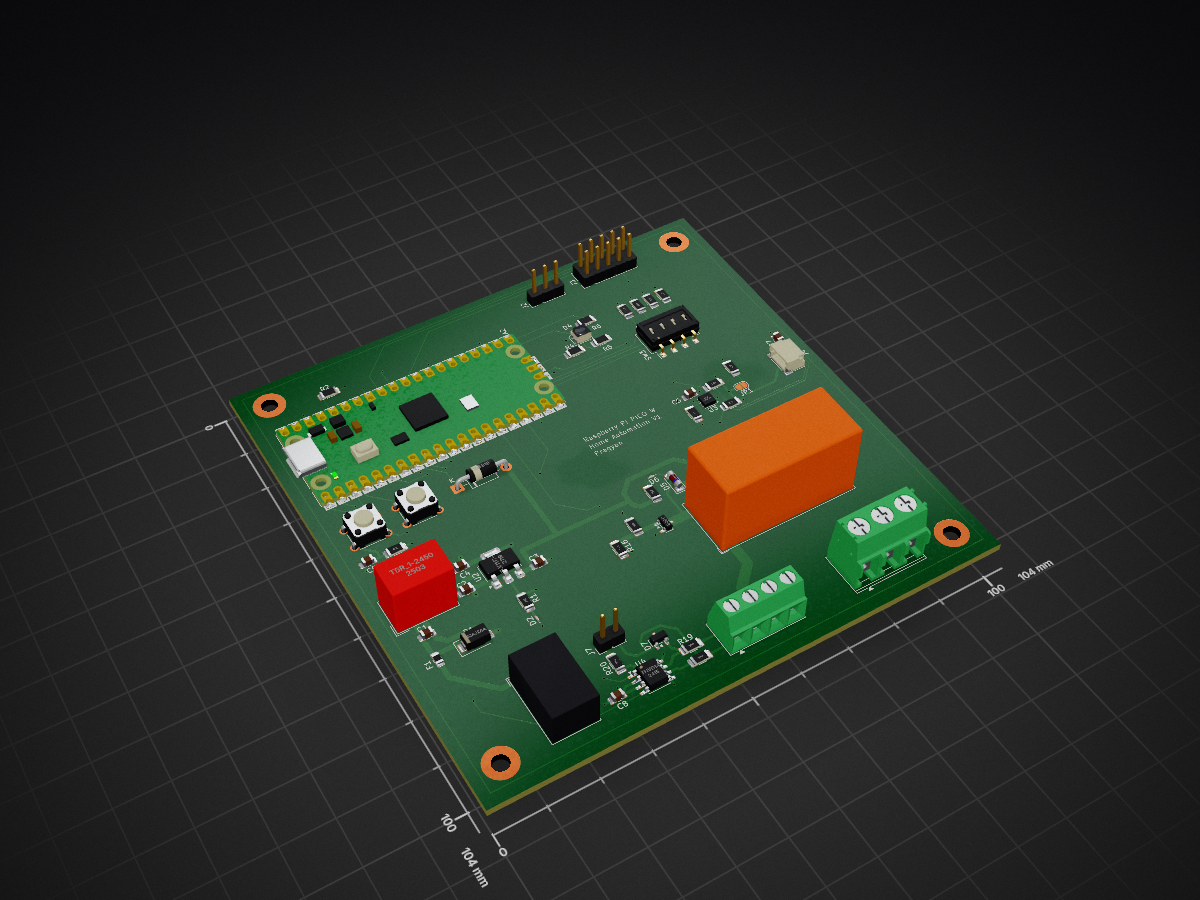
 PragyanSenDeka/RaspberryPiPicoBasedHomeAutomationPCB
Home automation node based on Raspberry Pi Pico W with WiFi and RS485/MODBUS. Features DIP-switch addressing, SHT31 temperature/humidity sensor, QWIIC I2C, RGB LED, buttons, SPI expansion, and a 230V 16A relay. Supports 8–24V DC input for scalable, reliable smart systems.
HomeAutomation pi is an open-source printed circuit board by PragyanSenDeka, from the PragyanSenDeka/RaspberryPiPicoBasedHomeAutomationPCB repository on GitHub. It is a 4-layer board of 104 × 104 mm with 58 parts on 58 nets, routed with 455 tracks and 75 vias.
It is built around the THVD1450D, TSR 1-2450 and SHT31-DIS-F, with the TLV1117-33DCY, BC817 and LL4148 among its other parts. Its parts include 20 resistors, 8 capacitors, 7 diodes, 7 connectors and 4 ICs. It belongs with the home automation and IoT and interfaces and adapters boards and the RP2040 boards of this library.


PicoW Smart Home Automation Controller
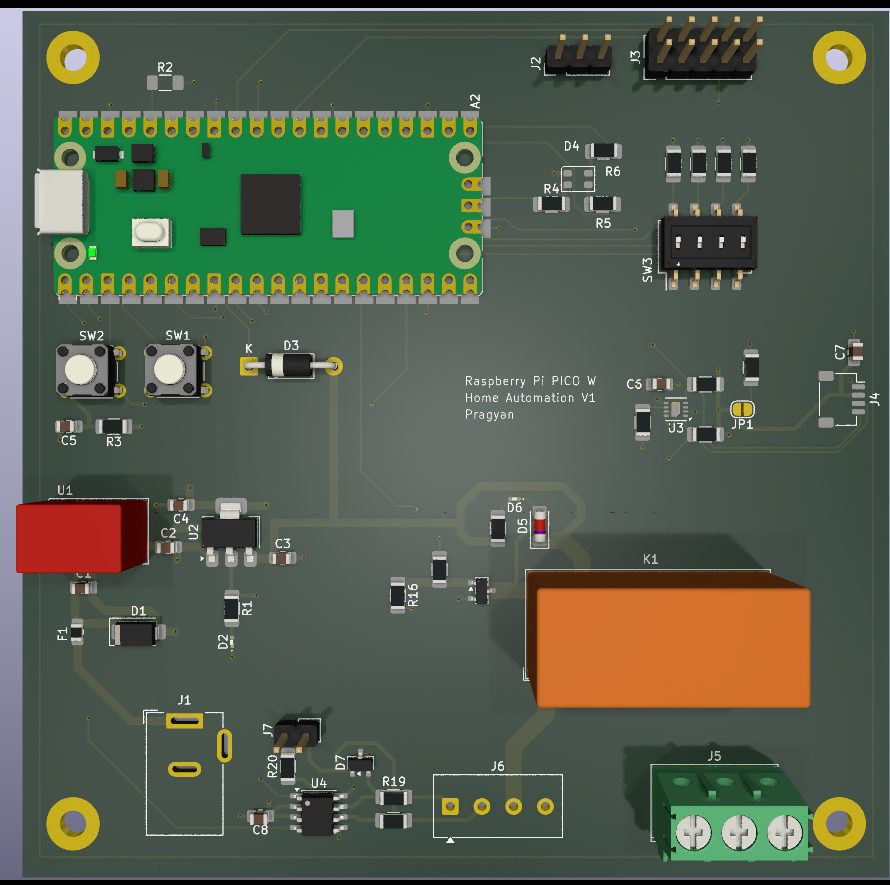
A robust home automation controller built around the Raspberry Pi Pico W, designed for reliable operation in real-world environments. It combines industrial communication (MODBUS over RS485) with modern IoT capabilities, making it suitable for smart homes, labs, and distributed control systems.
Features
Raspberry Pi Pico W (or compatible variants) for wireless connectivity
RS485 / MODBUS interface for industrial-grade communication
DIP switch-based MODBUS address selection for easy multi-node deployment
SHT31-DIS high-precision temperature and humidity sensor
QWIIC connector for plug-and-play I2C expansion
Reset button and user button for control and interaction
User RGB LED for status indication and debugging
2x5 SPI expansion header for additional peripherals
High-power relay (230V, 16A) for controlling appliances
Wide input voltage support: 8V to 24V DC
| Qty | Value | Footprint | References |
|---|---|---|---|
| 6 | 4k7 | Resistor_SMD:R_1206_3216Metric_Pad1.30x1.75mm_HandSolder | R7, R8, R9, R10, R13, R14 |
| 4 | 10k | Resistor_SMD:R_1206_3216Metric_Pad1.30x1.75mm_HandSolder | R1, R3, R11, R12 |
| 4 | C | Capacitor_SMD:C_0805_2012Metric_Pad1.18x1.45mm_HandSolder | C3, C4, C6, C7 |
| 4 | Pad | MountingHole:MountingHole_3.2mm_M3_Pad | H1, H2, H3, H4 |
| 4 | R | Resistor_SMD:R_1206_3216Metric_Pad1.30x1.75mm_HandSolder | R2, R4, R5, R6 |
| 3 | 10R | Resistor_SMD:R_1206_3216Metric_Pad1.30x1.75mm_HandSolder | R18, R19, R20 |
| 2 | 100n | Capacitor_SMD:C_0805_2012Metric_Pad1.18x1.45mm_HandSolder | C5, C8 |
| 2 | 1K | Resistor_SMD:R_1206_3216Metric_Pad1.30x1.75mm_HandSolder | R15, R17 |
| 2 | LED | LED_SMD:LED_0201_0603Metric_Pad0.64x0.40mm_HandSolder | D2, D6 |
| 2 | SW_SPST | Button_Switch_THT:SW_TH_Tactile_Omron_B3F-100x | SW1, SW2 |
| 1 | 10K | Resistor_SMD:R_1206_3216Metric_Pad1.30x1.75mm_HandSolder | R16 |
| 1 | 10u/16V | Capacitor_SMD:C_0805_2012Metric_Pad1.18x1.45mm_HandSolder | C2 |
| 1 | 1A | Fuse:Fuse_0805_2012Metric_Pad1.15x1.40mm_HandSolder | F1 |
| 1 | 1N5819 | Diode_THT:D_DO-41_SOD81_P10.16mm_Horizontal | D3 |
| 1 | 2u2/50V | Capacitor_SMD:C_0805_2012Metric_Pad1.18x1.45mm_HandSolder | C1 |
| 1 | BC817 | Package_TO_SOT_SMD:SOT-23 | Q1 |
| 1 | Barrel_Jack_Switch | Connector_BarrelJack:BarrelJack_Wuerth_6941xx301002 | J1 |
| 1 | Conn_01x02 | Connector_PinHeader_2.54mm:PinHeader_1x02_P2.54mm_Vertical | J7 |
| 1 | Conn_01x03 | Connector_PinHeader_2.54mm:PinHeader_1x03_P2.54mm_Vertical | J2 |
| 1 | Conn_01x04 | Connector_JST:JST_SH_SM04B-SRSS-TB_1x04-1MP_P1.00mm_Horizontal | J4 |
| 1 | Conn_02x05_Odd_Even | Connector_PinHeader_2.54mm:PinHeader_2x05_P2.54mm_Vertical | J3 |
| 1 | LED_ARGB | LED_SMD:LED_Cree-PLCC4_3.2x2.8mm_CCW | D4 |
| 1 | LL4148 | Diode_SMD:D_MiniMELF | D5 |
| 1 | RT314A05 | Relay_THT:Relay_SPDT_Schrack-RT1-16A-FormC_RM5mm | K1 |
| 1 | RaspberryPi_Pico | Module:RaspberryPi_Pico_SMD_HandSolder | A2 |
| 1 | SHT31-DIS | Sensor_Humidity:Sensirion_DFN-8-1EP_2.5x2.5mm_P0.5mm_EP1.1x1.7mm | U3 |
| 1 | SM712_SOT23 | Package_TO_SOT_SMD:SOT-23 | D7 |
| 1 | SMAJ24A | Diode_SMD:D_SMA | D1 |
| 1 | SW_DIP_x04 | Button_Switch_SMD:SW_DIP_SPSTx04_Slide_Omron_A6S-410x_W8.9mm_P2.54mm | SW3 |
| 1 | Screw_Terminal_01x03 | TerminalBlock_Phoenix:TerminalBlock_Phoenix_PT-1,5-3-5.0-H_1x03_P5.00mm_Horizontal | J5 |
| 1 | Screw_Terminal_01x04 | TerminalBlock_Phoenix:TerminalBlock_Phoenix_MKDS-1-4-3.81_1x04_P3.81mm_Horizontal | J6 |
| 1 | SolderJumper_2_Open | Jumper:SolderJumper-2_P1.3mm_Open_RoundedPad1.0x1.5mm | JP1 |
| 1 | THVD14 | Package_SO:SOIC-8_3.9x4.9mm_P1.27mm | U4 |
| 1 | TLV1117-33 | Package_TO_SOT_SMD:SOT-223-3_TabPin2 | U2 |
| 1 | TSR_1-2450 | Converter_DCDC:Converter_DCDC_TRACO_TSR-1_THT | U1 |
Itachi-infinito/Raspberry-Pico-IoT-4-Layer-PCB
Raspberry Pi Pico IoT device on 4-layer PCB with sensors, KiCad schematics, PCB layout and 3D visualization.

mhered/KiCAD_udemy_course
My notes on the course "PCB design with KiCAD - updated for KiCAD 9" by Dr Peter Dalmaris in Udemy

Ayan-nova/Design-of-a-Raspberry-PICO-Iot-Device-on-4-Layer-PCB-Design-With-Sensor-And-More
Design a Raspberry Pi Pico W-based Industrial IoT Gateway and Edge Controller using Kicad software.


Habib-creater/ESP32-IoT-Monitoring-Control-Board
4-layer ESP32-based IoT monitoring and control board with environmental sensing, relay control, USB-C, and Qwiic expansion.


Tanmayeers/Projects
Specifications: 1. Operting Voltage: 9V 2. Operating Current: 200mA 3. Output Voltage Swing: 6.5V 4. 3dB - Bandwidth: 100 ± 10 Hz 5. Noise: 5.406mVrms

jayatharshan12-design/ESP32-Custom-Development-Board-PCB-Design
It measures 104 × 104 mm and has 4 copper layers, 1.6 mm thick.
58 parts, built around the THVD1450D, TSR 1-2450, SHT31-DIS-F and TLV1117-33DCY. The full list of its parts is on this page, with links to each part's symbol and footprint where PCBKit's library has them.
From the PragyanSenDeka/RaspberryPiPicoBasedHomeAutomationPCB repository on GitHub, at the commit this page was made from: the board is homeAutomation_pi.kicad_pcb and its schematic homeAutomation_pi.kicad_sch. PCBKit opens the board in the browser, with nothing to install.
Its repository states no licence, so its author keeps all rights: ask PragyanSenDeka before reusing the design.