4 layers108 × 54 mm
MCU Powertrain
mark-belbin/motor-controller
Custom FOC motor controller designed for underwater robotics.
163 parts43GPL-3.0

 Edgeberry/Edgeberry-HWCartridge-ConsoleCAN4
An Edgeberry Hardware Cartridge with a CAN-bus interface and USB console access
Edgeberry console cartridge is an open-source printed circuit board by Edgeberry, from the Edgeberry/Edgeberry-HWCartridge-ConsoleCAN repository on GitHub, published under the CERN-OHL-W-2.0 licence. It is a 2-layer board of 49.8 × 63.2 mm with 88 parts on 63 nets, routed with 190 tracks and 0 vias.
It is built around the MCP2562-H/P, FT232RL and MCP2515-I. Its parts include 10 capacitors, 6 resistors, 3 ICs, 2 diodes and 2 connectors. It belongs with the retro computing and games and interfaces and adapters boards of this library.



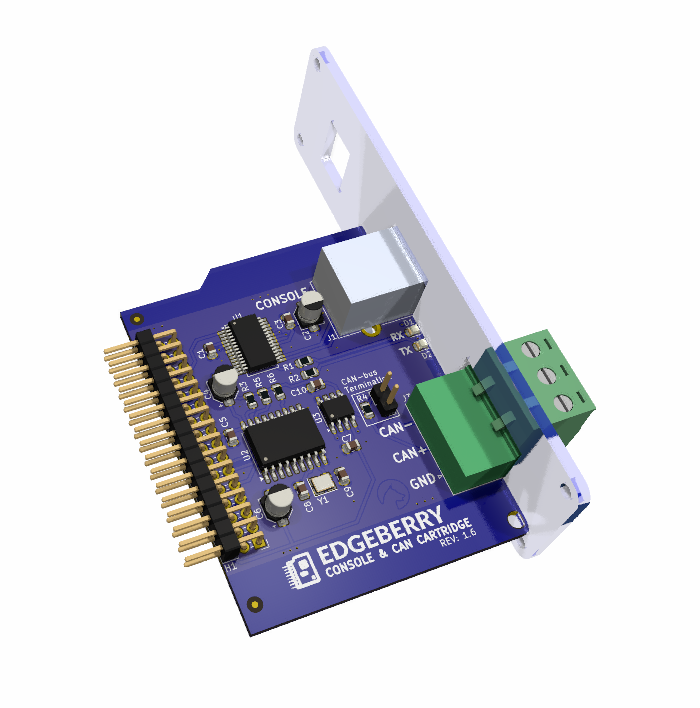
The Edgeberry Console & CAN Hardware Cartridge allows you to use your Edgeberry device in a wide range of industrial applications. The CAN-bus is utilized in diverse fields, from medical equipment to heavy industrial machinery. Additionally, the USB interface provides access to your Raspberry Pi's console, enabling direct local control over your device.
Configure your Raspberry Pi to enable console access on the UART with raspi-config, or by manually adding following lines the boot configuration file /boot/firmware/config.txt:
enable_uart=1
dtparam=uart0
dtparam=uart0_console
Now reboot the device to apply these settings.
Connect to your Edgeberry device with your computer system, and open a terminal emulation program (e.g. minicom, PuTTY) with the following settings
Speed: 115200 baud
Bits: 8
Parity: None
Stop Bits: 1
Flow Control: None
If this went well, you now have access to your Edgeberry's console.
To enable the CAN interface, add the following lines the boot configuration file /boot/firmware/config.txt:
# CAN interface
dtoverlay=mcp2515-can0,oscillator=16000000,interrupt=25
And reboot your device. After rebooting, set up the CAN interface
sudo ip link set can0 up type can bitrate 500000Now you can see the can0 interface when running ifconfig.
https://github.com/iDoka/awesome-canbus
https://www.beyondlogic.org/adding-can-controller-area-network-to-the-raspberry-pi/
https://www.hackster.io/youness/how-to-connect-raspberry-pi-to-can-bus-b60235
http://lnxpps.de/rpie/
Copyright© 2024 Sanne 'SpuQ' Santens. This project is released under the CERN OHL-W license. The Rules & Guidelines apply to the usage of the Edgeberry™ brand.
If you'd like to contribute to this project, please follow these guidelines:
main.| Qty | Value | Footprint | References |
|---|---|---|---|
| 10 | , , , , , , , , , | ||
| 7 | LOGO | LOGO | G***, G***, G***, G***, G***, G***, G*** |
| 5 | 100nF | Capacitor_SMD:C_0805_2012Metric | C1, C3, C5, C7, C10 |
| 3 | 10uF | Capacitor_SMD:CP_Elec_4x5.4 | C2, C4, C6 |
| 3 | 4K7 | Resistor_SMD:R_0805_2012Metric | R3, R5, R6 |
| 2 | 22R | Resistor_SMD:R_0805_2012Metric | R1, R2 |
| 2 | 22pF | Capacitor_SMD:C_0805_2012Metric | C8, C9 |
| 2 | LED | LED_SMD:LED_0805_2012Metric | D1, D2 |
| 1 | 120R | Resistor_SMD:R_0805_2012Metric | R4 |
| 1 | 16MHz | Crystal:Crystal_SMD_3225-4Pin_3.2x2.5mm | Y1 |
| 1 | Edgeberry_Cartridge_Header | Connector_PinHeader_2.54mm:PinHeader_2x16_P2.54mm_Horizontal | H1 |
| 1 | FT232RL | Package_SO:SSOP-28_5.3x10.2mm_P0.65mm | U1 |
| 1 | Jumper_2_Open | Connector_PinHeader_2.54mm:PinHeader_1x02_P2.54mm_Vertical | JP1 |
| 1 | LOGO | emcosys:SpuQ_5mm_copper | G*** |
| 1 | MCP2515 | Package_SO:SOIC-18W_7.5x11.6mm_P1.27mm | U2 |
| 1 | MCP2562 | Package_SO:SOIC-8_3.9x4.9mm_P1.27mm | U3 |
| 1 | Screw_Terminal_01x03 | Connector_Phoenix_MSTB:PhoenixContact_MSTBA_2,5_3-G-5,08_1x03_P5.08mm_Horizontal | J3 |
| 1 | USB_B | Connector_USB:USB_B_OST_USB-B1HSxx_Horizontal | J1 |
The 44 most common of 88 parts.
mark-belbin/motor-controller
Custom FOC motor controller designed for underwater robotics.

austindriggs/urc-payload-pcb
All-purpose control and interface board designed to manage mission-critical sensors and electronics for University Rover Challenge at WVU.


team-mountaineers-urc-2023/electronics
Block diagrams, schematics, and PCB files related to the electronics subteam


OpenAutoDiagnosticTool/oadt-hardware
Open-source hardware repository for the OpenAutoDiagnosticTool. All schematics and PCB files are stored here.
It measures 49.8 × 63.2 mm and has 2 copper layers, 1.6 mm thick.
88 parts, built around the MCP2562-H/P, FT232RL and MCP2515-I. The full list of its parts is on this page, with links to each part's symbol and footprint where PCBKit's library has them.
From the Edgeberry/Edgeberry-HWCartridge-ConsoleCAN repository on GitHub, at the commit this page was made from: the board is Edgeberry_console_cartridge.kicad_pcb and its schematic Edgeberry_console_cartridge.kicad_sch. PCBKit opens the board in the browser, with nothing to install.
Its repository publishes it under the CERN-OHL-W-2.0 licence: you may reuse it on that licence's terms (keep the author's notice, and for a copyleft licence share your changes alike).