Skip to the content
2 layers212 × 230 mmLEFT Side Panel, the printed circuit board in 3D

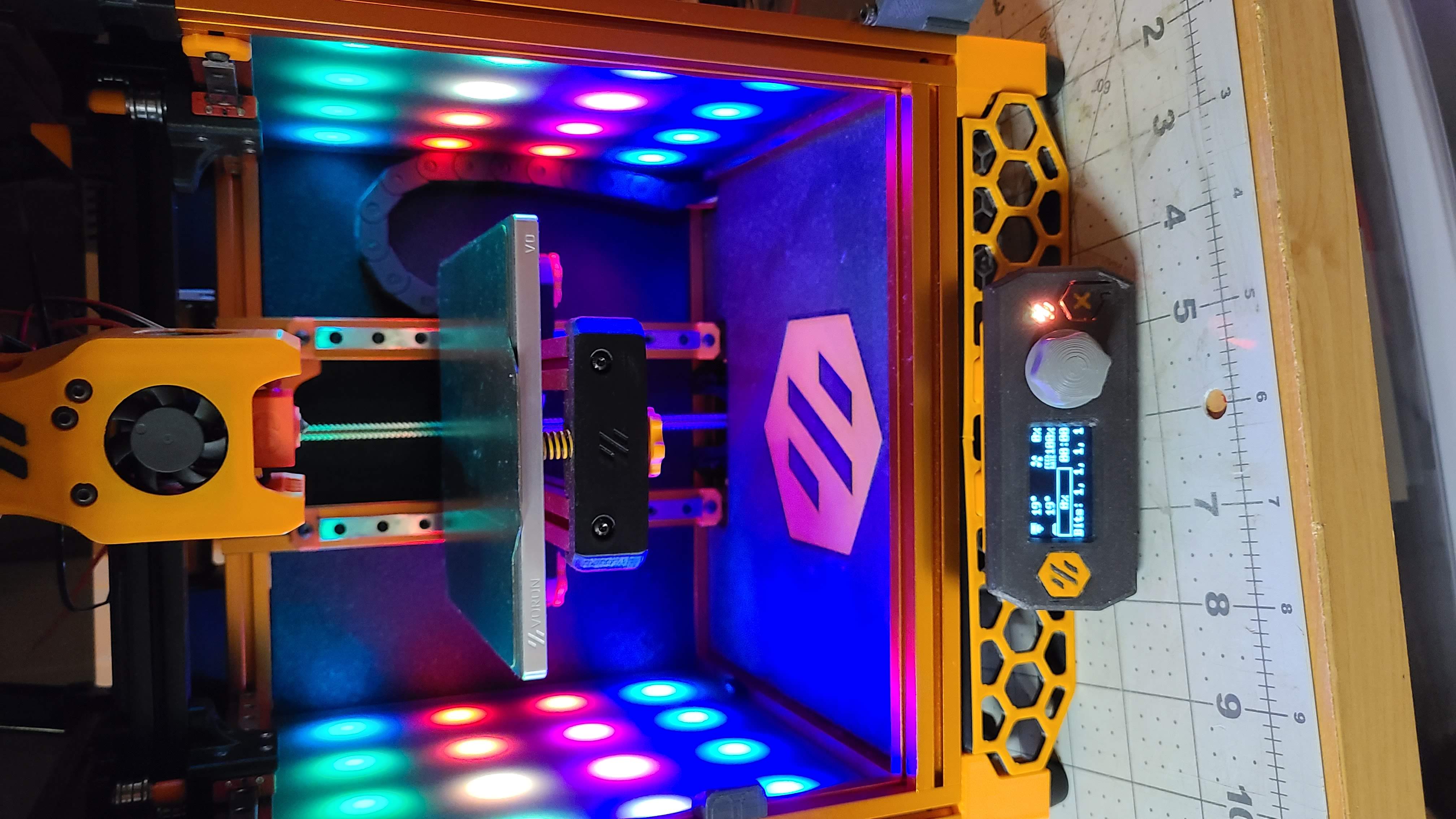
Side panels for the Voron Zero printer that has 16 WS2812 RGB LED's per side.

Size
212 × 230 mm
Copper layers
2
Thickness
1.6 mm
Parts
17
Nets
19
Pads
70
Tracks, vias
118, 27
Pours
2
Routed
Yes
KiCad
KiCad 5 (file 20171130)
Created
28 Nov 2021
Updated
22 May 2023

Overview

LEFT Side Panel is an open-source printed circuit board by timmit99, from the timmit99/Voron_Zero_RGB_Side_Panels repository on GitHub, published under the GPL-3.0 licence. It is a 2-layer board of 212 × 230 mm with 17 parts on 19 nets, routed with 118 tracks and 27 vias.

It is built around the WS2812B. Its parts include 16 diodes and 1 connector. It belongs with the lEDs and displays boards of this library.

Main components

1

README

README.md

Voron Zero RGB Side Panels

Side panels for the Voron Zero printer with 16 WS2812 RGB LED's per side.

The build below has some 3mm TAP Plastic black LED acrylic installed INSIDE the frame extrusions to diffuse the LEDs. They are cut per the DXF and the PDF in the CAD folder.

NOTE: The notched corners are intended to go in the front corners to allow the panel to clear the bottom blind joint. My prefernce is to have the matte finish towards the inside of the printer as the glossy side is easy to scratch and scratches are very visible.

alt text

I've published the files also over on PCBWays project site!

https://www.pcbway.com/project/shareproject/Voron_Zero_Side_Panel___Left.html

https://www.pcbway.com/project/shareproject/Voron_Zero_Side_Panel___Right.html

Build steps

  1. Order set of PCB's.
  2. Order 32 5050 RGB/RGBW LED's.
  3. Print replacement panel clips.
  4. Assemble PCB's with your choice of 0.1" 6 pin connector (JST-XH, Dupont, bare wire).
  5. Plug in and test.
  6. DONE!

Parts

17
QtyValueFootprintReferences
16WS2812BLED_SMD:LED_WS2812B_PLCC4_5.0x5.0mm_P3.2mmD1, D2, D3, D4, D5, D6, D7, D8, D9, D10, D11, D12, D13, D14, D15, D16
1Conn_01x06Connector_PinHeader_2.54mm:PinHeader_1x06_P2.54mm_VerticalJ1

Similar boards

  • 4 layers99 × 53.3 mmPSLab, the printed circuit board in 3D

    PSLab

    fossasia/pslab-hardware

    PSLab Hardware Design and Schematics https://pslab.io

    199 parts1.7kApache-2.0
  • 2 layers26 × 30 mmMicrocontroller, the printed circuit board in 3D

    Microcontroller

    FrameworkComputer/ExpansionCards

    Reference designs and documentation to create Expansion Cards for the Framework Laptop

    34 parts1.1kCC-BY-4.0
  • 4 layers82.6 × 82.5 mmJumperless2, the printed circuit board in 3D

    Jumperless2

    Architeuthis-Flux/Jumperless

    A jumperless breadboard

    208 parts914
  • 2 layers95.3 × 161.9 mmDfh badge, the printed circuit board in 3D

    Dfh badge

    tanaes/whopping_Voron_mods

    135 parts787GPL-3.0
  • 2 layers42.8 × 28.8 mmMM Skirt, the printed circuit board in 3D

    MM Skirt

    PrintersForAnts/Micron

    If you want to purchase full kits there are 3 available (Kits are slowly updating to R1 hardware just make sure to double check the included hardware in your kit and if you have any questions reach out in the discord)

    11 parts741GPL-3.0
  • 2 layers149.6 × 127.1 mmErgodash, the printed circuit board in 3D

    Ergodash

    omkbd/ErgoDash

    keyboard

    187 parts732MIT
  • 2 layers285.5 × 95 mmReviung46 ver1 1, the printed circuit board in 3D

    Reviung46 ver1 1

    gtips/reviung

    The REVIUNG41 is 41-key column staggered keyboard.

    119 parts517MIT
  • 2 layers177.7 × 144.5 mmCOMM PANEL, the printed circuit board in 3D

    COMM PANEL

    jrsteensen/OpenHornet

    OpenHornet 1:1 F/A-18C Simulator Repository

    275 parts431

Questions

How big is the LEFT Side Panel PCB?

It measures 212 × 230 mm and has 2 copper layers, 1.6 mm thick.

What parts does the LEFT Side Panel use?

17 parts, built around the WS2812B. The full list of its parts is on this page, with links to each part's symbol and footprint where PCBKit's library has them.

Where can I download the LEFT Side Panel KiCad files?

From the timmit99/Voron_Zero_RGB_Side_Panels repository on GitHub, at the commit this page was made from: the board is Kicad/Left_Side/LEFT_Side Panel.kicad_pcb. PCBKit opens the board in the browser, with nothing to install.

Can I use the LEFT Side Panel design in my own project?

Its repository publishes it under the GPL-3.0 licence: you may reuse it on that licence's terms (keep the author's notice, and for a copyleft licence share your changes alike).