2 layers34 × 46 mm

 solosky/nfc-emu117
NFC模拟器
Nfcemu is an open-source printed circuit board by solosky, from the solosky/nfc-emu repository on GitHub, published under the Apache-2.0 licence. It is a 2-layer board of 34 × 46 mm with 58 parts on 64 nets, routed with 390 tracks and 169 vias.
It is built around the ATMEGA328P-AU, CH343P and SX1308, with the AO3401A among its other parts. Its parts include 22 resistors, 13 diodes, 9 capacitors, 4 ICs and 2 transistors. It belongs with the AVR (ATmega, ATtiny) boards of this library.


这是一个可以模拟NTAG215的模拟器。 可以用来模拟Amiibo和门禁卡。 硬件理论上支持Mifare的卡片,但目前固件不支持。
| RevA | RevB |
|---|---|
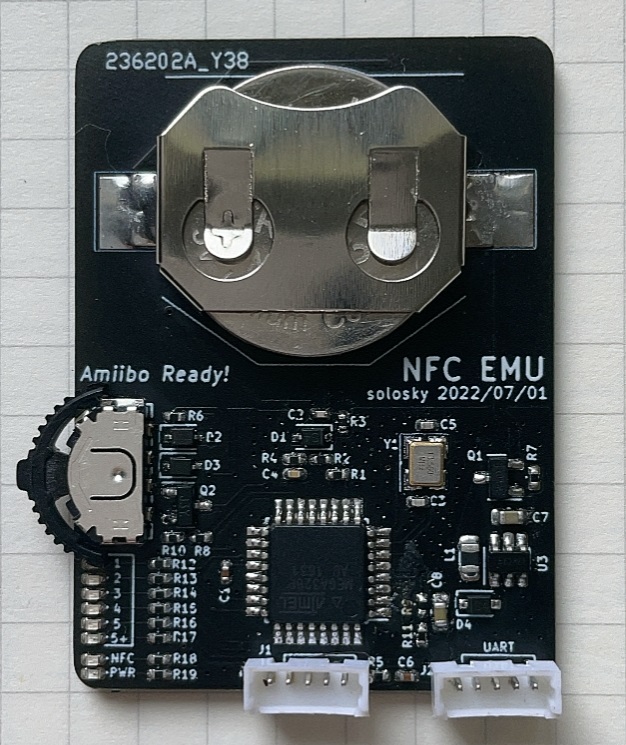 | 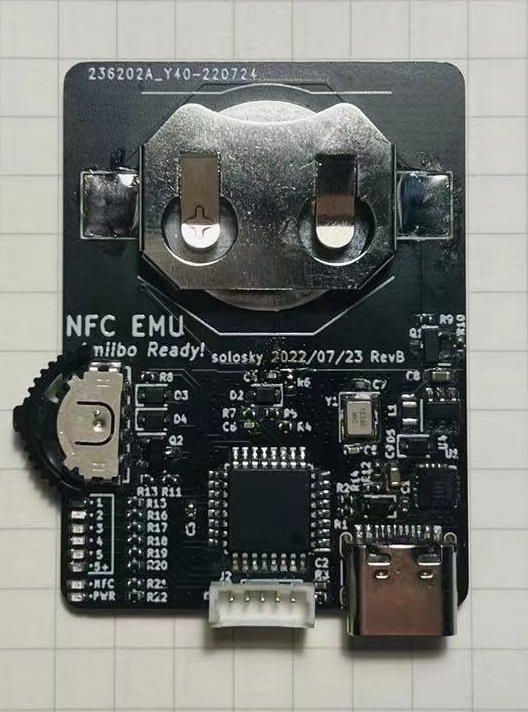 |
| 可用 | 和RevA相比新增了CH343P串口芯片,可以直接通过USB下载固件。注意:RevB未能完整测试,使用慎重!! |
本固件是基于Ardunio框架实现的,所以固件烧写方法很类似。 主要分两步,第一步刷入bootloader, 第二步使用串口刷入固件。 bootloader只需要刷写一次即可,之后的固件更新可以直接用串口刷入新固件。
需要的软件:progisp 需要的硬件:USB ISP
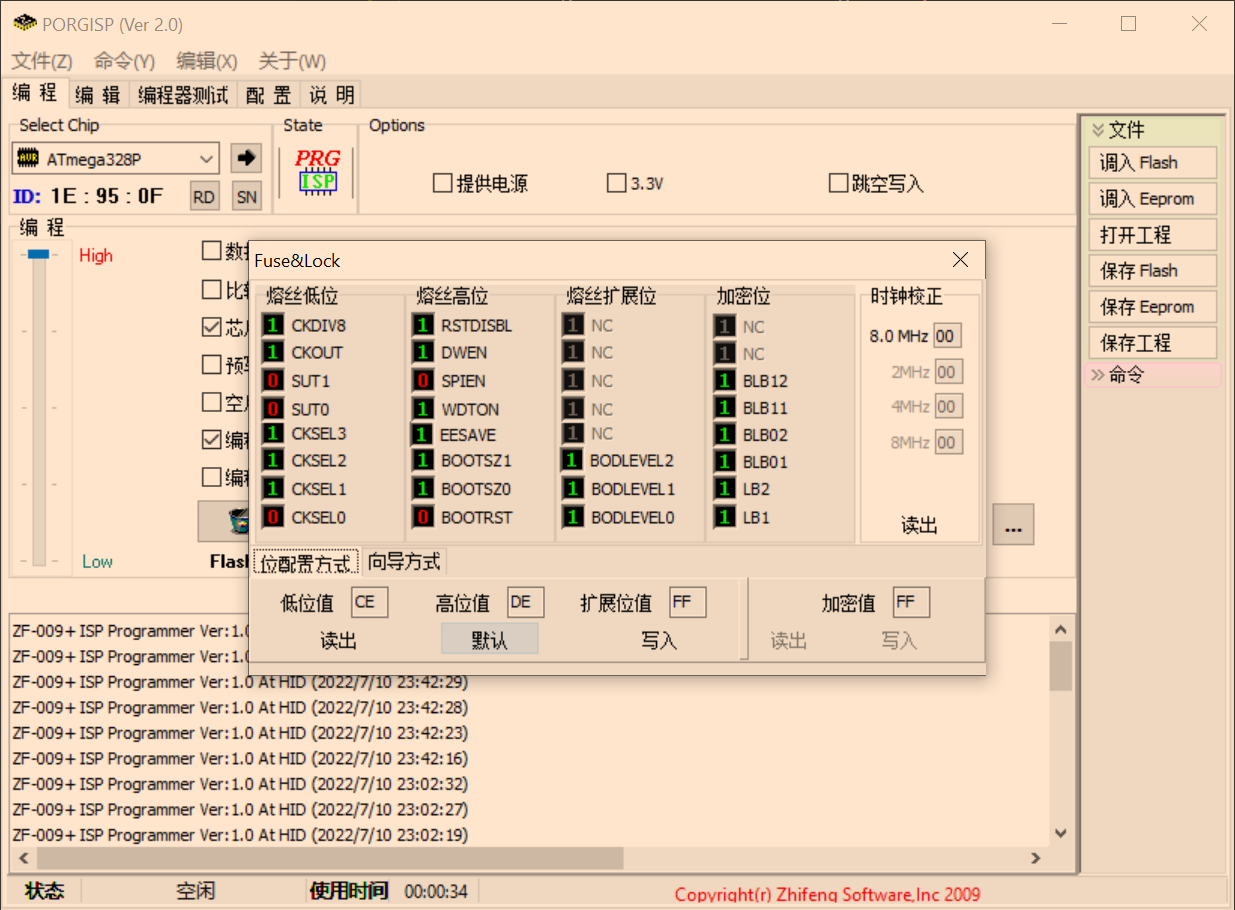
连接左边标记为ISP的接口到USB ISP烧写器上,接线顺序如下:
CLK MOSI MISO RESET GND
注意需要把电池安装上,在刷入bootloader过程中需要一直按住中键打开电源。
刷入步骤:
首先需要下载 vscode, 安装platformio插件,并安装arduino框架。
因为用了非标准的13.56M的晶振,需要新建一个board。 在 C:\Users{{用户名}}.platformio\platforms\atmelavr\boards下面新建一个文件 ATmega328PNfcEmu.json, 内容如下:
{
  "build": {
    "core": "MiniCore",
    "extra_flags": "-DARDUINO_AVR_ATmega328P",
    "f_cpu": "13560000L",
    "mcu": "atmega328p",
    "variant": "standard"
  },
  "bootloader": {
    "led_pin": "B5"
  },
  "debug": {
    "simavr_target": "atmega328p",
    "avr-stub": {
      "speed": 115200
    }
  },
  "frameworks": [
    "arduino"
  ],
  "name": "ATmega328P/PA NFC EMU",
  "upload": {
    "maximum_ram_size": 2048,
"maximum_size": 32768,使用vscode打开项目的fw文件夹,platformio插件会自动启动识别为一个platformio的项目。 点击编译按钮就可以完成编译。
刷入固件使用vscode的platformio插件完成。
需要额外一个带DTR信号的USB转串口的模块,连接右边的UART接口按如下顺序连接USB串口模块。
+5V TXD RXD DTR GND
注意:TXD连串口模块的RXD,RXD连串口模块的TXD。
自带了的USB转串口模块,直接插上USB线,系统自动识别出串口设备。
刷入之前,修改platformio.ini中的 upload_port,monitor_port的值为设备的串口号。 点击上传按钮就可以下载固件到设备中。
硬件上支持14443-3A的低速卡,比如NTAG215, Mifare等常见卡。 软件层面目前只支持模拟NTAG215,Mifare卡暂时不支持。
目前使用中耗电量为22mA,CR2032勉强能使用,还需要进一步优化电路减少功耗。
因为设计了断电电路,不使用基本不耗电,使用时间取决于使用次数。
注意:一定要使用南孚的传应CR2032电池,其他电池不一定能提供这么大的放电电流!
可以用手机APP写入,也可以用PN532等NFC读写器写入。
如果手机支持NFC,可以下载如下软件写入Amiibo:
iOS: AppleStore搜索Umiibo写入。 Umiibo是收费软件,但只需要6元RMB,没有应用内购买,很良心的APP的,强烈推荐购买。
Andriod: https://github.com/HiddenRamblings/TagMo/releases 下载最新版本的TAGMO安装。
如果以上都没有,可以购买PN532模块,然后安装Linux虚拟机,将PN532 USB设备接入虚拟机后,执行如下命令写入标签。
sudo apt update
sudo apt install libnfc-devnfc-mfultralight w "SSB Zelda.bin" --full
NFC device: pn532 opened
1 ISO14443A passive target(s) found:
040402cb5d6480
Using MIFARE Ultralight card with UID: 040402cb5d6480
WARNING: Tag is EV1 or NTAG - PASSWORD may be required
NTAG Type: NTAG215 (504 user bytes)
Checking if UL badge is DirectWrite...
Original Block 0 (Pages 0-2): 0404028acb5d648072480000
Original UID: 040402cb5d6480
Attempt to write Block 0 (pages 0-2) ...
Writing Page 0: 04 04 02 8a
Writing Page 1: cb 5d 64 80
Writing Page 2: 72 48 00 00
Block 0 written successfully
Card is DirectWrite
Writing 135 pages |.......................................................................................................................................|
Done, 135 of 135 pages written (0 pages skipped, 0 pages failed).默认固件所有标签都是空白的,需要用APP写入标签才能使用。
可以使用重置标签操作结合APP来无限刷Amiibo!
注意:写入和重置标签会产生Flash的写入操作,一般来说Flash的写入操作是有次数限制的,按ATMEGA328p的手册来说,每扇区至少有10000次写入寿命,所以每个标签的至少能刷写10000次左右(重置和写入算两次操作),超过这个次数当前标签的数据可能永久无法写入。
后续可以考虑实现写均衡来充分利用剩余未使用的空间来提高标签的写入次数。
此项目是移植 Simple NFC,主要的模拟代码来源SimpleNFC,感谢 @Nonannet 提供的代码,非常棒的实现!
QQ群:109761876
| Qty | Value | Footprint | References |
|---|---|---|---|
| 10 | 20K | Resistor_SMD:R_0402_1005Metric | R5, R7, R15, R16, R17, R18, R19, R20, R21, R22 |
| 8 | LED_Small | LED_SMD:LED_0402_1005Metric | D6, D7, D8, D9, D10, D11, D12, D13 |
| 4 | 10K | Resistor_SMD:R_0402_1005Metric | R3, R8, R10, R13 |
| 4 | D_Small | Diode_SMD:D_SOD-323 | D2, D3, D4, D5 |
| 3 | 0.1uF | Capacitor_SMD:C_0402_1005Metric | C1, C2, C3 |
| 3 | 470 | Resistor_SMD:R_0402_1005Metric | R1, R2, R4 |
| 2 | 10uF | Capacitor_SMD:C_0603_1608Metric | C8, C9 |
| 2 | 22pF | Capacitor_SMD:C_0402_1005Metric | C5, C7 |
| 1 | 0 | Resistor_SMD:R_0402_1005Metric | R9 |
| 1 | 100K | Resistor_SMD:R_0402_1005Metric | R14 |
| 1 | 10nF | Capacitor_SMD:C_0402_1005Metric | C6 |
| 1 | 13.56Mhz | Crystal:Crystal_SMD_3225-4Pin_3.2x2.5mm | Y1 |
| 1 | 1K | Resistor_SMD:R_0402_1005Metric | R11 |
| 1 | 1N5819 | Diode_SMD:D_SOD-323 | D1 |
| 1 | 2K | Resistor_SMD:R_0402_1005Metric | R6 |
| 1 | 4.7uH | Inductor_SMD:L_0805_2012Metric | L1 |
| 1 | 51p | Capacitor_SMD:C_0402_1005Metric | C4 |
| 1 | 560K | Resistor_SMD:R_0402_1005Metric | R12 |
| 1 | AO3401A | Package_TO_SOT_SMD:SOT-23 | Q1 |
| 1 | ATmega328P-A | Package_QFP:TQFP-32_7x7mm_P0.8mm | U2 |
| 1 | Antenna_Loop | MyLib:NFC_ANT2 | AE1 |
| 1 | Battery_Cell | Battery:BatteryHolder_Keystone_3002_1x2032 | BT1 |
| 1 | CH343P | Package_DFN_QFN:QFN-16-1EP_3x3mm_P0.5mm_EP1.45x1.45mm | U1 |
| 1 | Conn_01x05 | Connector_PinHeader_1.27mm:PinHeader_1x05_P1.27mm_Vertical | J2 |
| 1 | LOGO | MyLib:nfc_emu | G*** |
| 1 | MSW | MyLib:MSW | U3 |
| 1 | Q_NPN_BEC | Package_TO_SOT_SMD:SOT-23 | Q2 |
| 1 | SX1308 | Package_TO_SOT_SMD:TSOT-23-6 | U4 |
| 1 | USB_C_Receptacle_USB2.0 | Connector_USB:USB_C_Receptacle_HRO_TYPE-C-31-M-12 | J1 |
The 57 most common of 58 parts.

TilenTinta/Greenhouse_LoRa_Node
An open-source monitoring system designed for use in greenhouses, orchards or other agricultural environments


NuttyShell/NuttyBadge
NuttyBadge: A NuttyShell crafted multi-tool. Opensourced Hardawre and Software

jlcjak/astra_piNas
Six-layer CM5 Lite dual-NVMe carrier with PCIe switch, Ethernet, microSD, USB-C PD and PoE. Review design; fabrication hold documented.

jmcpheron/pico-quorum
Several people, several keys, one Safe. Hardware approvals for Safe multisig wallets.


rh1tech/frank-lab
FRANK Board Laboratory (work-in-progress board prototopyes)
It measures 34 × 46 mm and has 2 copper layers, 1.6 mm thick.
58 parts, built around the ATMEGA328P-AU, CH343P, SX1308 and AO3401A. The full list of its parts is on this page, with links to each part's symbol and footprint where PCBKit's library has them.
From the solosky/nfc-emu repository on GitHub, at the commit this page was made from: the board is hw/RevB/nfcemulator/nfcemu.kicad_pcb and its schematic hw/RevA/nfcemulator/nfcemu.kicad_sch. PCBKit opens the board in the browser, with nothing to install.
Its repository publishes it under the Apache-2.0 licence: you may reuse it on that licence's terms (keep the author's notice, and for a copyleft licence share your changes alike).