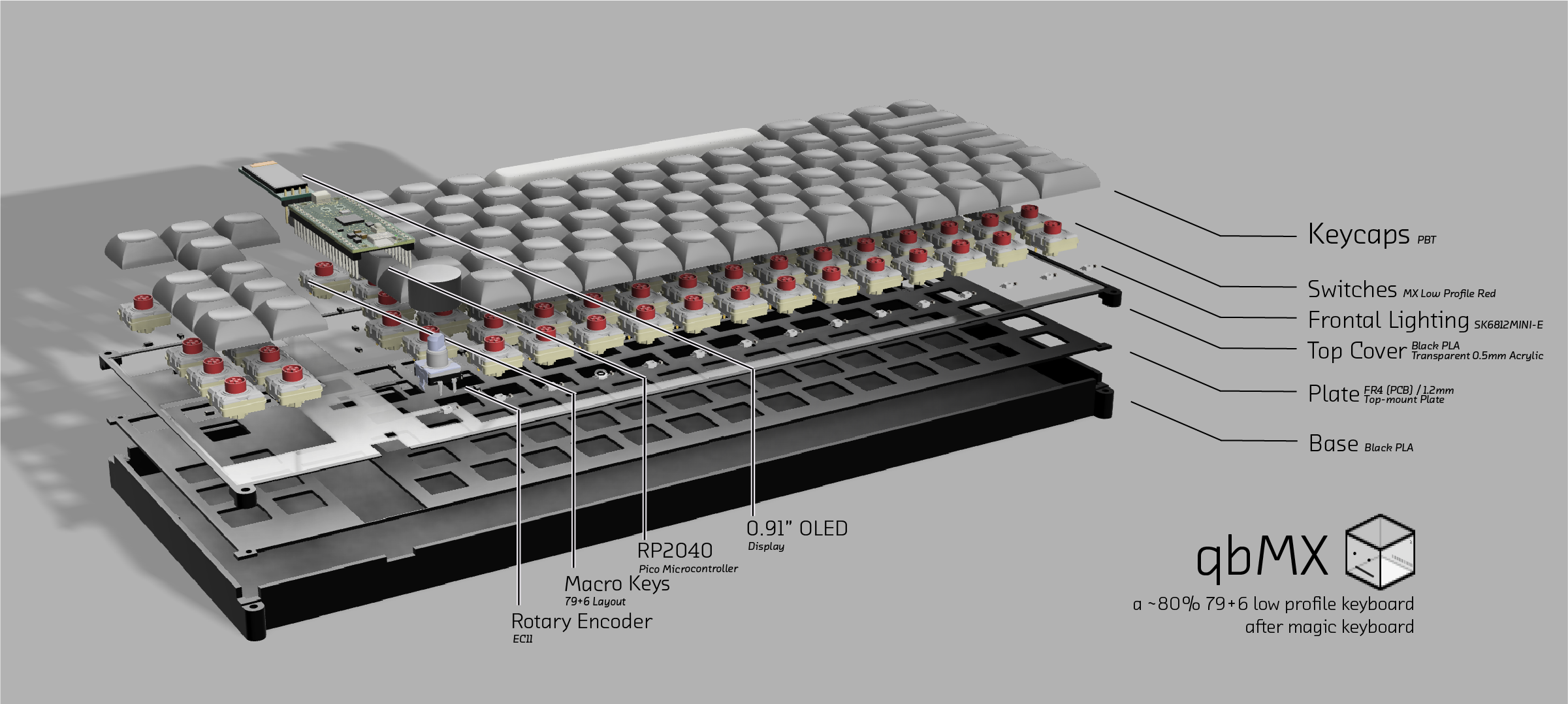
Keeb is an open-source printed circuit board by qubixal, from the qubixal/qbMX repository on GitHub. It is a 2-layer board of 345 × 120 mm with 204 parts on 135 nets, routed with 859 tracks and 20 vias.
It is built around the 1N4148W and SK6812MINI-E. Its parts include 86 diodes, 85 switches, 15 capacitors, 15 inductors and 1 IC. It belongs with the keyboards and input boards and the RP2040 boards of this library.
A custom mechanical keyboard built from scratch for Hack Club Keeb YSWS.
Overview
qbMX is a fully custom mechanical keyboard designed in KiCad and Fusion. It features:
85-key (79+6) layout with a rotary encoder, modelled after Apple's Magic Keyboard.
Cherry MX Low-Profile Red switches, and on-plate stabalisers (instead of on-pcb)
Uses the RP2040 microcontroller (Orpheus Pico)
A 0.91" 128x32 OLED display
15 mini-LEDs at the top of the keyboard
Custom PCB, ordered and assembled by me
Why I Built qbMX
I wanted to learn about and build a keyboard myself, since I'd never done it before.
Designing the matrix and optimising GPIO lanes with functionality was a cool challenge. Oh, and I just wanted a keyboard; and Keeb gave me an excuse to make it.
After building all physical hardware, download the firmware folder then:
cmd
export PICO_SDK_PATH=/path/to/pico-sdk

cd firmware && mkdir build && cd build

cmake .. && make
hold BOOTSEL on the Pico, plug in the USB and drag qbmx.uf2 to the mass storage device.
OLED Shows 5 pages:
0. Current keyboard layer
Custom text/bitmap
LED mode + brightness
WPM counter with bar graph
Host temps (CPU avg, GPU avg, Pico internal temp)
For temperature tracking to work properly,
Install pyserial
cmd
pip3 install pyserial
Run host script which auto-detects the Pico port
cmd
python3 firmware/host_temp.py
Note: osx-cpu-temp will return 0.0°C on Apple Silicon Macs without SMC entitlements; where the OLED will show N/A in this case. You may instead compile osx-cpu-temp from source or use sudo powermetrics.
Programmable Keys (Column 14, Rows 0-5)
By default they are mapped to F13-F18 (USB HID keycodes 0x68 -> 0x6D), which is recognised by every major OS. It can be remapped in system settings.
Other functions include:
Short press rotary encoder to pause, Long press rotary encoder to toggle between volume and brightness (backlight) mode
This is a reversible 100mm x 100mm pcb with support for mx or choc switches (no hotswap), per key led, rotary encoders, and exposes the SDA/SCL/GND/VCC lines in the form of the pimoroni trackball pins (meaning you can…
The WLF is a 40-key split keyboard (20 keys per half) with a column-staggered matrix and a splayed thumb cluster.
214 parts19MIT
Questions
How big is the Keeb PCB?
It measures 345 × 120 mm and has 2 copper layers, 1.6 mm thick.
What parts does the Keeb use?
204 parts, built around the 1N4148W and SK6812MINI-E. The full list of its parts is on this page, with links to each part's symbol and footprint where PCBKit's library has them.
Where can I download the Keeb KiCad files?
From the qubixal/qbMX repository on GitHub, at the commit this page was made from: the board is keeb.kicad_pcb and its schematic keeb.kicad_sch. PCBKit opens the board in the browser, with nothing to install.
Can I use the Keeb design in my own project?
Its repository states no licence, so its author keeps all rights: ask qubixal before reusing the design.