2 layers10.1 × 13.6 mm
5v to-3v3-ldo-10uf-22uf-33ohm-25x20mm jlcpcb
PCBAgent/PCBAgent
PCBAgent takes one circuit request and, with no further input, designs a private board on the ASUS Ascent GX10: simulated, sourced, and routed offline.
4 parts
 PCBAgent/PCBAgent
PCBAgent takes one circuit request and, with no further input, designs a private board on the ASUS Ascent GX10: simulated, sourced, and routed offline.
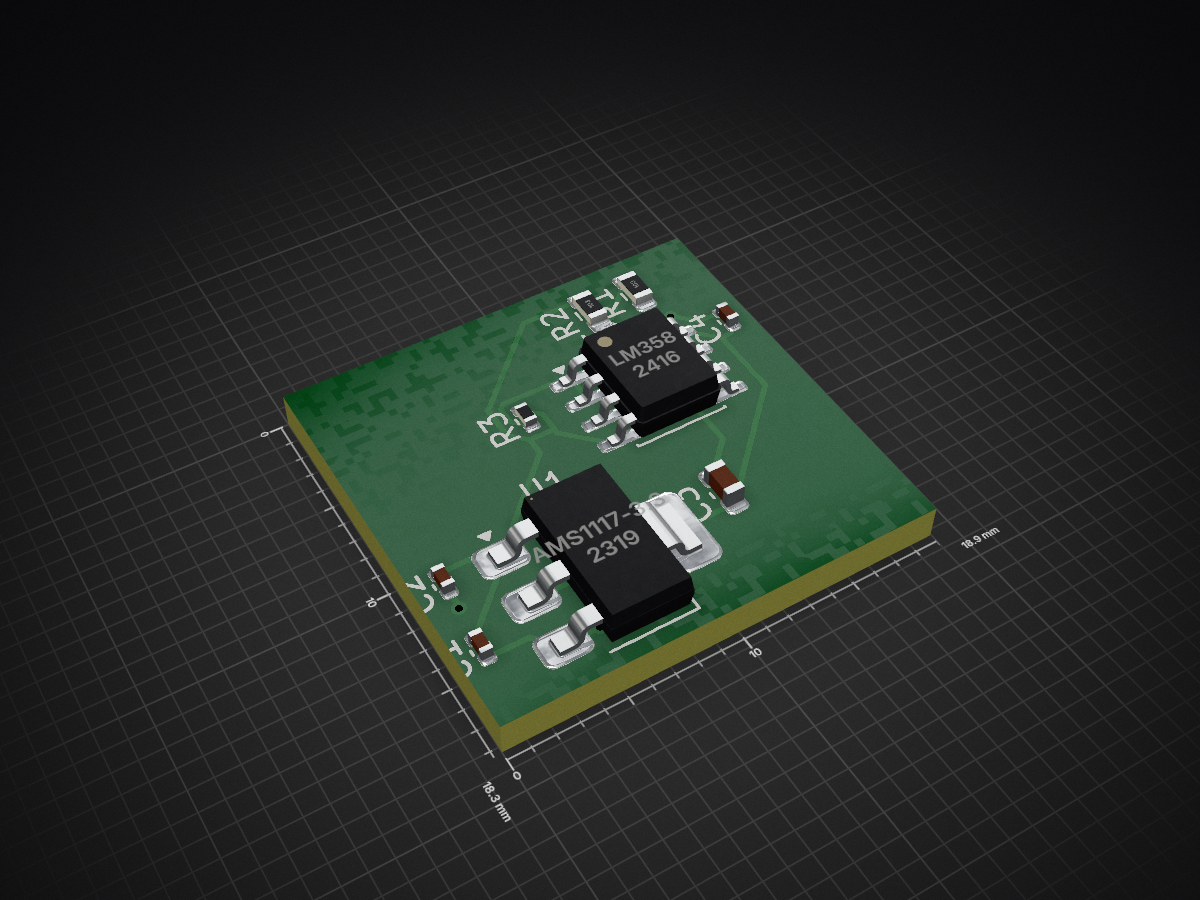
Ldo-5v-3v3-lm358 is an open-source printed circuit board by PCBAgent, from the PCBAgent/PCBAgent repository on GitHub. It is a 2-layer board of 18.9 × 18.3 mm with 9 parts on 6 nets, routed with 57 tracks and 4 vias.
It is built around the LM358 and AMS1117-3.3. Its parts include 4 capacitors, 3 resistors and 2 ICs.


PCBAgent takes one circuit request and, with no further input, designs a private board on the ASUS Ascent GX10: simulated, sourced, and routed offline.
A schematic is the product. Part values, pinouts, and the board outline should not have to leave the machine before software can help. PCBAgent runs that work on the GX10, an ultra-small AI computer with the NVIDIA GB10 Grace Blackwell Superchip and 128 GB of unified memory. Nemotron, ngspice, a local JLCPCB catalog, KiCad, and Freerouting all run on the box. Unplugging the network does not stop a design.
Cloud schematic tools upload the design before they answer. Here the model and the checkers share the machine where the design is created. There is no cloud round trip, no vendor API for the netlist, and no infrastructure to keep up for a single board. The same flow still runs with the network disconnected.
One request becomes a checked board. The model writes the circuit. SPICE, the parts catalog, the placer, and KiCad decide whether that circuit is true. After the first prompt, the run continues on its own until you cancel it, and you can watch placement and routing in KiCad while it does.
/design writes a circuit spec and a SKiDL file. SKiDL emits a SPICE netlist, and ngspice runs it. The model does not hand-write a simulator deck./design: the model changes the circuit and the same checks run again. It does not edit the spec to hide a failure./layout asks the model for placement constraints, such as a capacitor next to its IC. It does not emit coordinates or traces. A placer chooses positions, Freerouting draws the copper, and KiCad's design-rule check scores the board. layout.py --demo records that sequence and plays it in the PCB editor with no further prompts.Two finished boards are in designs/:
5v-to-3v3-divider, a 5 V to 3.3 V divider into a 33 ohm load5v-to-3v3-ldo-10uf-22uf-33ohm-25x20mm-jlcpcb, the same request on an AMS1117-3.3 with 10 µF in and 22 µF outReplay the routed board in the KiCad PCB Editor from the GX10 desktop. Enable Preferences → Plugins → Enable KiCad API first.
source .venv/bin/activate
.venv/bin/python skills/layout/demo.py designs/5v-to-3v3-ldo-10uf-22uf-33ohm-25x20mm-jlcpcb --replay
Parts move into place, then the copper appears. layout/board.png in the same design is the still image of the routed board. To record a new animation while laying out again, run skills/layout/layout.py designs/<slug> --demo.
A new design starts in Pi with a single command, for example:
/design 5 V supply to 3.3 V LDO using one linear regulator IC, a 10 µF input capacitor, and a 22 µF output capacitor, output voltage 3.3 V within 0.05 V, output current 0.1 A within 0.01 A into a 33 ohm load, maximum board size 25 mm by 20 mm, JLCPCBThe same agent, in its own window instead of the terminal. Skills, commands, and checks are unchanged. On the GX10 desktop:
python3 chat/window.py/design and the rest of the flow work as they do in pi. Close the window to stop that session.
KiCad 9 or newer is installed separately. From this checkout:
./setup.sh
source .venv/bin/activate
ollama list
setup.sh installs Pi and uv when they are missing, installs SKiDL into .venv, and downloads Freerouting 2.5.0. Use an exact model id from ollama list. Start the Ollama bridge in one terminal:
export PCB_OLLAMA_MODEL=<id from ollama list>
.venv/bin/python tools/ollama_bridge.py
In another terminal, from this checkout:
export PCB_OLLAMA_MODEL=<id from ollama list>
pi --provider pcb-ollama --model "$PCB_OLLAMA_MODEL" --thinking off
Trust the project when asked. .pi/settings.json loads this package. Restart Pi after pulling extension changes, or run /reload in a session that is already open. Stop a run yourself with Escape in Pi, or Ctrl+C in a CLI process.
From another machine on the LAN, the GX10 is reached with ssh <user>@<hostname>.local, or ssh <user>@<gx10-ip> if .local does not resolve. At the GX10 keyboard, whoami, hostname, and hostname -I print those values.
.venv/bin/python -m pytest tests -q
node --test tests/test_policy.mjs
Stage commands, when you want to run them without the agent:
.venv/bin/python tools/pcb_stage.py designs/<slug> prepare
.venv/bin/python tools/pcb_stage.py designs/<slug> verify
.venv/bin/python tools/pcb_stage.py designs/<slug> parts
.venv/bin/python tools/pcb_stage.py designs/<slug> netlist
.venv/bin/python skills/layout/layout.py designs/<slug>
Each stage prints a short JSON result and writes a full log. Simulation evidence, part ratings, and the netlist report stay next to the design. A passing check covers the measurements and rules the runners implement.
| Qty | Value | Footprint | References |
|---|---|---|---|
| 2 | 100nF | C_0402_1005Metric | C2, C4 |
| 2 | 10k | R_0603_1608Metric | R1, R2 |
| 1 | 10uF | C_0402_1005Metric | C1 |
| 1 | 22uF | C_0603_1608Metric | C3 |
| 1 | 33 | R_0402_1005Metric | R3 |
| 1 | AMS1117-3.3 | SOT-223-3_TabPin2 | U1 |
| 1 | LM358 | SOIC-8_3.9x4.9mm_P1.27mm | U2 |
PCBAgent/PCBAgent
PCBAgent takes one circuit request and, with no further input, designs a private board on the ASUS Ascent GX10: simulated, sourced, and routed offline.

PCBAgent/PCBAgent
PCBAgent takes one circuit request and, with no further input, designs a private board on the ASUS Ascent GX10: simulated, sourced, and routed offline.

PCBAgent/PCBAgent
PCBAgent takes one circuit request and, with no further input, designs a private board on the ASUS Ascent GX10: simulated, sourced, and routed offline.

PCBAgent/PCBAgent
PCBAgent takes one circuit request and, with no further input, designs a private board on the ASUS Ascent GX10: simulated, sourced, and routed offline.

PCBAgent/PCBAgent
PCBAgent takes one circuit request and, with no further input, designs a private board on the ASUS Ascent GX10: simulated, sourced, and routed offline.

PCBAgent/PCBAgent
PCBAgent takes one circuit request and, with no further input, designs a private board on the ASUS Ascent GX10: simulated, sourced, and routed offline.

PCBAgent/PCBAgent
PCBAgent takes one circuit request and, with no further input, designs a private board on the ASUS Ascent GX10: simulated, sourced, and routed offline.

PCBAgent/PCBAgent
PCBAgent takes one circuit request and, with no further input, designs a private board on the ASUS Ascent GX10: simulated, sourced, and routed offline.

PCBAgent/PCBAgent
PCBAgent takes one circuit request and, with no further input, designs a private board on the ASUS Ascent GX10: simulated, sourced, and routed offline.

maximus64/opendiag-hardware
OpenDIAG - Open Source OBD2 Interface (Hardware)

CK20000/STM32-Digital-Twin-Project-Status-Architecture
Tired of paywalled PCB simulators? Open-source, physics-accurate digital twin for KiCad. Real MCU (Renode), real analog (ngspice), live PyQt6 dashboard. No stubs, no fake numbers. Fork and grow it.

Kikkiu17/espiot
A small board built to measure current and voltage of any appliance.


LaboratorioGluon/Minisumo-FullMango
Robot minisumo de competición para la OSHWDEM 2026

It measures 18.9 × 18.3 mm and has 2 copper layers, 1.6 mm thick.
9 parts, built around the LM358 and AMS1117-3.3. The full list of its parts is on this page, with links to each part's symbol and footprint where PCBKit's library has them.
From the PCBAgent/PCBAgent repository on GitHub, at the commit this page was made from: the board is designs/ldo-5v-3v3-lm358/layout/board.kicad_pcb. PCBKit opens the board in the browser, with nothing to install.
Its repository states no licence, so its author keeps all rights: ask PCBAgent before reusing the design.