
4 layers160 × 100 mm
Bench robotics controller 5eab0a5d
mrcha033/hw-codesign
Agentic hardware co-design: brief to KiCad, firmware, 3D review, and explicit fabrication blockers.
46 parts2Apache-2.0

 mrcha033/hw-codesign2
Agentic hardware co-design: brief to KiCad, firmware, 3D review, and explicit fabrication blockers.
Sensor data logger is an open-source printed circuit board by mrcha033, from the mrcha033/hw-codesign repository on GitHub, published under the Apache-2.0 licence. It is a 2-layer board of 70 × 50 mm with 20 parts on 18 nets, routed with 123 tracks and 1 via.
It is built around the ESP32-S3-WROOM-1-N8, ICM-42688-P and LM74700QDBVRQ1, with the USBLC6-2SC6 and USB4105-GF-A among its other parts. Its parts include 5 resistors, 3 capacitors, 3 ICs, 2 connectors and 1 diode. It belongs with the sensors and measurement boards and the ESP32 and RP2040 boards of this library.


Give an AI agent a hardware brief. Get KiCad, firmware, a 3D assembly, and an explicit fabrication-blocker report.
Agentic hardware co-design from brief to KiCad, firmware, 3D review, and explicit
fabrication blockers. For 13 supported board families, hw-codesign turns a
prompt into a reviewable candidate while keeping missing sourcing, toolchain,
manufacturing, and physical evidence visible instead of silently treating it as
success.
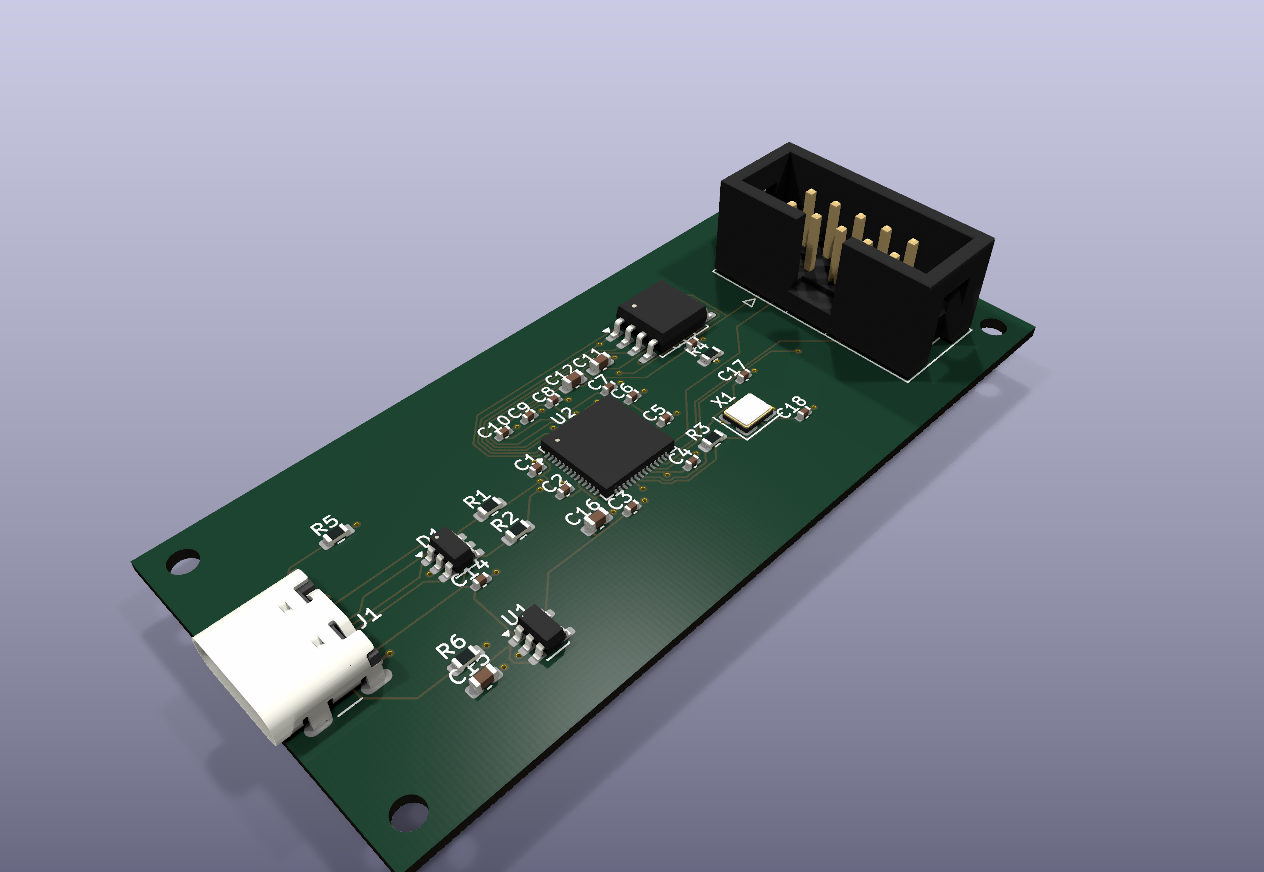
Explore the interactive 3D review
Rotate and zoom the generated RP2040 USB candidate, then inspect its evidence and unresolved blockers.
Explore the interactive 3D review · Install from PyPI · Watch the 20-second demo · Read the validation contract
The render is a candidate-level CAD preview, not a photo of fabricated or qualified hardware.
Python 3.11 or newer is required. This public install path was smoke-tested in a clean Python 3.11 environment against version 0.1.4.
python3.11 -m pip install "hw-codesign[mcp]==0.1.4"
mkdir my-hardware-workspace && cd my-hardware-workspace
hw --root . create-project my_usb_board --template rp2040_usb_device
hw --root . validate-spec my_usb_board
That creates and validates a typed RP2040 project. Continue to
generate the full demo candidate, or run
hw --help to inspect the CLI.
The published package has also been independently exercised in a disposable Debian 13 x86-64 container with Python 3.11.15. See the clean-platform reproduction report for the exact environment, commands, and passing output.
The demo is a dated full-toolchain repository run against the RP2040 USB-device family. It produced a candidate, not a fabrication-qualified board: 44 of 48 recorded gates passed, 1 failed, and 3 were blocked. Freerouting reports zero raw unrouted connections and KiCad reports zero post-fill unconnected items; native ERC and DRC each report zero violations. The native Zephyr build is blocked because the selected ARM toolchain lacks newlib runtime files.
The remaining evidence is material: sourcing fails, current supplier
availability is blocked, the native Zephyr build is blocked on ARM newlib, and
physical qualification is blocked. The
board has not been fabricated, and the U2.57 via-in-pad fill/cap/tent process is
unqualified. Bundle 7d6731501a24716965593f7fcdc168a3d739d1b0a1b7a57f7a0b29fee51c1b84 records those boundaries.
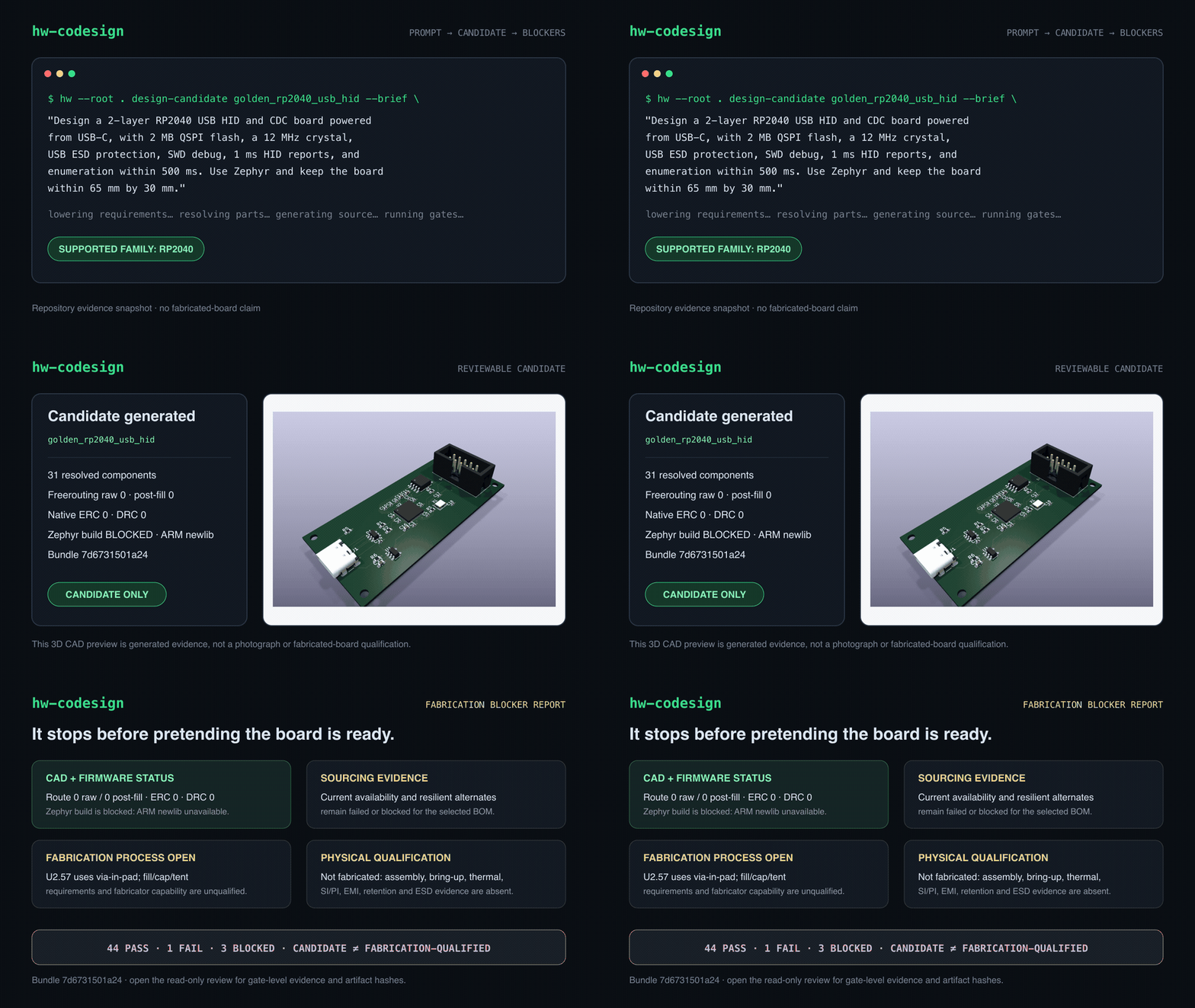
| Brief | Candidate | Blocker report |
|---|---|---|
| Natural-language constraints are lowered into typed project fields with provenance. | The run emits electronics source, KiCad artifacts, firmware, BOM, review bundle, and hashes. | Every gate is pass, fail, or blocked; physical evidence gaps stay release-blocking. |
hw-codesign is available as a CLI (hw), an MCP server (hw-mcp), and a
repository-owned agent plugin. Its design surface is template- and
contract-driven. It is not an arbitrary-prompt PCB oracle.
Python 3.11 or newer is required.
python3.11 -m pip install "hw-codesign[mcp]==0.1.4"
hw --help
The v0.1.4 release
also publishes a wheel, source distribution, standalone archives for Linux,
macOS, and Windows, a self-contained review, and checksums. The public container
is ghcr.io/mrcha033/hw-codesign:0.1.4.
git clone https://github.com/mrcha033/hw-codesign.git
cd hw-codesign
python3.11 -m venv .venv
.venv/bin/pip install '.[mcp]'
export PATH="$PWD/.venv/bin:$PATH"
hw --help
The self-contained review is live at https://mrcha033.github.io/hw-codesign/ and can be inspected without a receiver or cloud account.
Create the same candidate class used in the demo:
mkdir my-hardware-workspace
cd my-hardware-workspace

hw --root . create-project my_usb_board --template rp2040_usb_device
hw --root . update-requirements my_usb_board \
  "Design a 2-layer RP2040 USB HID and CDC board powered from USB-C. Use Zephyr."
hw --root . design-candidate my_usb_board --brief \
  "Design a 2-layer RP2040 USB HID and CDC board powered from USB-C. Use Zephyr."
hw --root . export-standalone-review my_usb_board
The generated HTML review is self-contained. No receiver or cloud account is required to inspect it.
Claude Desktop configuration:
{
  "mcpServers": {
    "hw-codesign": {
      "command": "/absolute/path/to/hw-codesign/.venv/bin/hw-mcp",
      "args": [],
      "env": {
        "HW_PLATFORM_ROOT": "/absolute/path/to/a/writable/hardware-workspace"
      }
    }
  }
}
Claude Code:
claude mcp add hw-codesign \
  -e HW_PLATFORM_ROOT="$PWD" \
  -- /absolute/path/to/hw-codesign/.venv/bin/hw-mcp
For Codex or Claude plugin use, clone this repository and install the
hw-codesign marketplace entry:
codex plugin marketplace add /absolute/path/to/hw-codesign
codex plugin add hw-codesign@hw-codesign| Status | Meaning |
|---|---|
pass | The named gate ran and its declared checks passed. |
fail | The gate ran and found a concrete defect or unmet contract. |
blocked | Evidence or a required tool/input is missing. This is never treated as pass. |
candidate | Reviewable generated artifacts exist, but release promotion is not authorized. |
released | The configured release gate passed and the release bundle was exported. This does not imply physical qualification unless physical evidence is present and approved. |
Every public tool response carries release_eligible, candidate_only, and
release_blocking_failures. Only the release-gate and release-export paths can
set release_eligible: true.
All 13 shipped templates conform to the current typed spec schema. Their design and physical maturity are not identical; inspect each candidate's gate report.
| Group | Templates |
|---|---|
| USB devices | rp2040_usb_device, usb_hid_controller, avr_32u4_hid, nrf52840_dongle |
| Sensors and gateways | ble_sensor_node, sensor_data_logger, lora_sensor_node, esp32_wifi_gateway, samd21_sensor_hub, stm32g0_power_monitor |
| Robotics and power | robotics_controller_full, mini_servo_robot, bldc_esc |
Use hw diagnose-environment to inspect the installed native backends, or see
Adapting the design system before adding a materially
different topology.
The MCP names use the same lifecycle as the CLI:
hw_get_capabilities
  → hw_create_project
  → hw_update_requirements
  → hw_design_candidate
  → hw_check_cross_domain_consistency
  → hw_generate_physical_qualification_plan
  → hw_record_physical_evidence
  → hw_check_release_gate
  → hw_export_release_bundle
Agents can also author circuit blocks, placement constraints, and firmware modules, explore alternatives, compare candidates, and run adversarial grounding benchmarks. See the MCP tool reference for the complete contract.
If a new board family or backend is your goal, start with
Adapting the design system and preserve the
pass/fail/blocked claim boundary in every new tool path.
| Path | Purpose |
|---|---|
src/hw_codesign/ | CLI, MCP service, generators, validators, and review UI |
src/hw_codesign/templates/ | Supported family specifications |
parts/ | Curated components, role sets, supplier records, and datasheet evidence |
projects/golden_rp2040_usb_hid/ | Date-stamped golden candidate and current evidence gaps |
docs/demo/ | 20-second demo and self-contained read-only review |
schemas/ | Typed project and result contracts |
tests/ | Cross-platform regression and evidence-boundary tests |
python3.11 -m venv .venv
.venv/bin/pip install '.[dev,mcp]'
npm ci --ignore-scripts
pytest -q
ruff check .
Native gates require their corresponding tools. Diagnose the current machine before interpreting a blocked result:
hw diagnose-environment --target fabrication_release --backend kicad
hw check my_usb_board
See CONTRIBUTING.md for contribution scope, tests, and claim boundaries. Security reports should follow SECURITY.md.
The project is licensed under Apache-2.0. The vendored KiCad footprint
under src/hw_codesign/footprints/ retains its CC-BY-SA 4.0 license with the
KiCad libraries exception; see NOTICE for the boundary.
| Qty | Value | Footprint | References |
|---|---|---|---|
| 4 | MountingHole | MountingHole:MountingHole_3.2mm_Pad | H1, H2, H3, H4 |
| 3 | 4K7 | Resistor_SMD:R_0603_1608Metric | R1, R2, R3 |
| 2 | 100nF | Capacitor_SMD:C_0603_1608Metric | C1, C2 |
| 2 | 5K1 USB-C Rd | Resistor_SMD:R_0603_1608Metric | R5, R6 |
| 1 | 22uF | Capacitor_SMD:C_1206_3216Metric | C9 |
| 1 | 3V3 Buck | Package_DFN_QFN:VQFN-16 | U3 |
| 1 | 500mA Fuse | HW_Curated:MIDI_Fuse | F1 |
| 1 | ESP32-S3-WROOM-1 | RF_Module:ESP32-S3-WROOM-1 | U1 |
| 1 | ICM-42688-P | Package_LGA:LGA-14 | U2 |
| 1 | Ideal Diode | Package_TO_SOT_SMD:SOT-23-6 | Q1 |
| 1 | UART DEBUG | Connector_Samtec:FTSH-105 | J2 |
| 1 | USB ESD | Package_TO_SOT_SMD:SOT-23-6 | D1 |
| 1 | USB-C POWER | Connector_USB:USB_C_GCT_USB4105 | J1 |
It measures 70 × 50 mm and has 2 copper layers, 1.6 mm thick.
20 parts, built around the ESP32-S3-WROOM-1-N8, ICM-42688-P, LM74700QDBVRQ1 and USBLC6-2SC6. The full list of its parts is on this page, with links to each part's symbol and footprint where PCBKit's library has them.
From the mrcha033/hw-codesign repository on GitHub, at the commit this page was made from: the board is projects/sensor_data_logger/history/iterations/0003/electronics/generated/kicad/sensor_data_logger.kicad_pcb. PCBKit opens the board in the browser, with nothing to install.
Its repository publishes it under the Apache-2.0 licence: you may reuse it on that licence's terms (keep the author's notice, and for a copyleft licence share your changes alike).
mrcha033/hw-codesign
Agentic hardware co-design: brief to KiCad, firmware, 3D review, and explicit fabrication blockers.

mrcha033/hw-codesign
Agentic hardware co-design: brief to KiCad, firmware, 3D review, and explicit fabrication blockers.

mrcha033/hw-codesign
Agentic hardware co-design: brief to KiCad, firmware, 3D review, and explicit fabrication blockers.

mrcha033/hw-codesign
Agentic hardware co-design: brief to KiCad, firmware, 3D review, and explicit fabrication blockers.

mrcha033/hw-codesign
Agentic hardware co-design: brief to KiCad, firmware, 3D review, and explicit fabrication blockers.

mrcha033/hw-codesign
Agentic hardware co-design: brief to KiCad, firmware, 3D review, and explicit fabrication blockers.

mrcha033/hw-codesign
Agentic hardware co-design: brief to KiCad, firmware, 3D review, and explicit fabrication blockers.

gonewx/quadcuber
本目录是 A1 电子源目录。打开 quadcuber.kicadpro,包含原生可编辑原理图和四层 PCB、本地符号/封装库。本设计为单块PCB,RP2040、QSPI Flash、晶振、USB-C、驱动和电源均直接焊接在板上;A0的Pico H插装已移除。马达使用EV3裸插座。接线定义仍从 ../wiring/spec.py 导入,固件未改动,也没有把 R/L 固件描述成已支持四臂控制。

fdiwth/tvc-drone
This repository contains the documentation, hardware designs, and source code for a Thrust Vector Control (TVC) drone.

ThorbenH/ba-thesis-project
This git project is dedicated to a prototype implementation that attempts to track and evaluate the motion of a barbell in the gym.

ukinori/flightcontroller
STM32H743 VTOL/fixed-wing flight-controller hardware in KiCad 10: routed 4-layer PCB, schematics, BOM notes, connector pinouts and verification reports. Experimental prototype; PX4 port planned.

Gupatron/Gupsfirstpcb
This is the first pcb that I will manufacture and intend to use for teleop usecases in my personal projects.

jjhcwoo/Acculux-device
The objective of this project is to add functionality to the existing NIR Imaging Inc. device in the way of: - Orientation tracking - Positional tracking - Force sensing


animesh-chouhan/open-telegraph
A pocket-size Morse key. One button, one RGB LED, an ESP32-S3, and a battery. Plug it in over USB-C or pair it over Bluetooth and it types Morse into any device as a standard keyboard. Fully open, down to the copper.