2 layers42 × 67 mm

 madebyrobq/Ortho4x10TKL33
An open source mechanical keyboard
Ortho410TKL is an open-source printed circuit board by madebyrobq, from the madebyrobq/Ortho4x10TKL repository on GitHub, published under the MIT licence. It is a 2-layer board of 195.3 × 90.5 mm with 114 parts on 97 nets, routed with 550 tracks and 52 vias.
It is built around the RP2040 and W25Q128JVSIQ. Its parts include 40 diodes, 16 capacitors, 9 resistors, 3 ICs and 2 connectors. It belongs with the keyboards and input boards and the RP2040 boards of this library.


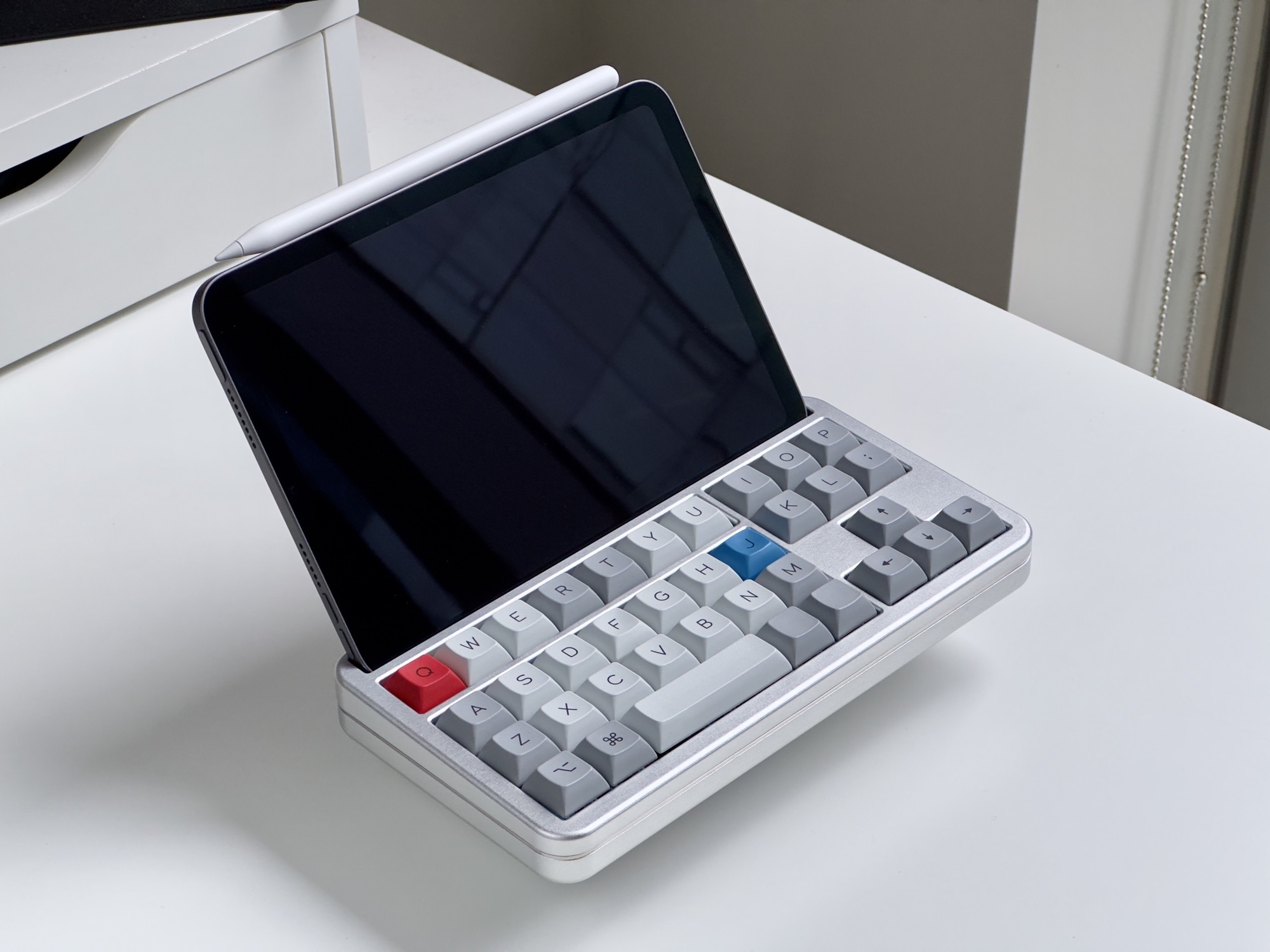
An open-source custom mechanical keyboard featuring
The goals of this project were:
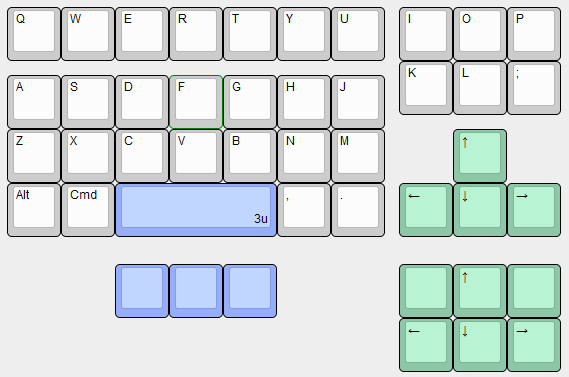
Spacebar cluster supports 3x1U and 1x3U layouts. Stabilizers are not currently supported but can be substituted with loose switches if desired.
Arrow cluster supports 4 or 6 keys, although the top cases in this repo will cover up 2 of them. Still, the switches are there if you prefer to have them.
This is my keymap, note that with VIAL firmware some setup will be manual in the VIAL application or loaded from a saved layout
Default Layer:
┌───────┬───────┬───────┬───────┬───────┬───────┬───────┐┌───────┬───────┬───────┐
│   Q (TAB) W   │   E   │   R   │   T   │   Y   │   U   ││   I   │   O (DEL) P   │
└───────┴───────┴───────┴───────┴───────┴───────┴───────┘├───────┼───────┼───────┤
┌───────┬───────┬───────┬───────┬───────┬───────┬───────┐│   K   │   L (ENT) ;   │
│   A (ESC) S   │   D   │   F   │   G   │   H   │   J   │└───────┴───────┴───────┘
├───────┼───────┼───────┼───────┼───────┼───────┼───────┤┌       ┌───────┐       ┐
│  Z(⇧) │   X   │   C   │   V   │   B   │   N   │  M(⇧) │  PG DN │   Up  │ PG UP
├───────┼───────┼───────┼───────┼───────┼───────┼───────┤┌───────┼───────┼───────┐
│   ⌥   │   ⌘   │         Space         │   ,   │   .   ││  Left │  Down │ Right │
└───────┴───────┴───────┴───────┴───────┴───────┴───────┘└───────┴───────┴───────┘

Raise Layer:
┌───────┬───────┬───────┬───────┬───────┬───────┬───────┐┌───────┬───────┬───────┐
│   1  (`)  2   │   3   │   4   │   -   │   +   │       ││   [   │   ]   |   '   │
└───────┴───────┴───────┴───────┴───────┴───────┴───────┘├───────┼───────┼───────┤
┌───────┬───────┬───────┬───────┬───────┬───────┬───────┐│   (   │   )   |       │
│   4   |   5   │   6   │   0   │   /   │   *   │   =   │└───────┴───────┴───────┘
├───────┼───────┼───────┼───────┼───────┼───────┼───────┤┌       ┌───────┐       ┐
│  7(⇧) │   8   │   9   │   .   │   |   │   &   │   ?   │        │   ⇧   │
├───────┼───────┼───────┼───────┼───────┼───────┼───────┤┌───────┼───────┼───────┐
│   ⌥   │  0(⌘) │                       │       │       ││   <   │   ⌃   │   >   │
└───────┴───────┴───────┴───────┴───────┴───────┴───────┘└───────┴───────┴───────┘
Key Overrides I use:
Shift + , = !Shift + . = ?Shift + / = \Cmd + Q = Cmd + Tab (quit too many apps adapting to this layout lol)Version 0.1 - First PCBA ordered from JLCPCB, it works!
Vial firmware is compiled in here, along with saved keymaps (including combos and settings that could not be baked into the firmware) which can be loaded from the Vial application.
QMK firmware source will be added soon
Can be 3D printed or CNC'd. The 3D printed variants simply have hex holes to fit a standoff, which can be glued in and act as the thread for the screws. The CNC files will work for 3D printing as well if the holes on the top case are tapped manually.
| Part | Note |
|---|---|
| PCBA | PCB files |
| Plate | Laser Cut Plate 1.5mm brass / steel / etc. |
| Top Case | Multiple options |
| Bottom Case | STL or STEP |
| Screws | 4x M2.5 10mm counter sunk |
| Hex standoffs or nuts (if 3D printing) | 4x M2.5 5mm |
| Rubber feet/bumpons | 4x |
| Switches and keycaps | 36 to 40 each |
I'm quite satisfied with getting this working, and I had to order a minimum of 5 PCBs so I don't plan on making more for a while. But if you find this and use it as an example, here are some ideas of what could be added or improved:
For excellent custom keyboard and PCB tutorials (highly recommend starting here if you are interested): Noah Kiser, Joe Scotto
For layout inspiration: Zicodia ("LMAO"), tominabox1 and whydobearsxplod ("QAZ"), Jack Humbert ("Planck")
Offered without warranty or liability! Use / modify / order at your own risk. No customer support.
For a first attempt, and as a hobby project, it turned out quite well! But this was just for fun and not made with the rigor or intent to commercialize it (for now...) so it isn't perfect.
Feel free to use this repository under the license provided. If it helps you make something cool, I would be happy to see it!
| Qty | Value | Footprint | References |
|---|---|---|---|
| 40 | D_Small | Diode_SMD:D_SOD-123 | D1, D2, D10, D11, D12, D13, D14, D15, D16, D17, D18, D19, D20, D21, D22, D23 +24 |
| 40 | MX_SW_HS | PCM_marbastlib-mx:SW_MX_HS_1u | MX1, MX2, MX10, MX11, MX12, MX13, MX14, MX15, MX16, MX17, MX18, MX19, MX20, MX21, MX22, MX23 +24 |
| 8 | 100n | Capacitor_SMD:C_0402_1005Metric | C5, C7, C8, C9, C13, C14, C15, C16 |
| 5 | 1u | Capacitor_SMD:C_0402_1005Metric | C1, C2, C4, C6, C12 |
| 5 | 5.1k | Resistor_SMD:R_0402_1005Metric | R1, R2, R3, R8, R9 |
| 2 | 1k | Resistor_SMD:R_0402_1005Metric | R6, R7 |
| 2 | 22p | Capacitor_SMD:C_0402_1005Metric | C10, C11 |
| 2 | 27 | Resistor_SMD:R_0402_1005Metric | R4, R5 |
| 2 | SW_Push | Button_Switch_SMD:SW_SPST_TL3342 | SW_BOOT1, SW_RESET1 |
| 1 | 10u | Capacitor_SMD:C_0603_1608Metric | C3 |
| 1 | Conn_01x05 | Connector_PinHeader_2.54mm:PinHeader_1x05_P2.54mm_Vertical | J3 |
| 1 | Crystal_GND24 | Crystal:Crystal_SMD_3225-4Pin_3.2x2.5mm | Y1 |
| 1 | Fuse_Small | Fuse:Fuse_1206_3216Metric | F1 |
| 1 | RP2040 | Package_DFN_QFN:QFN-56-1EP_7x7mm_P0.4mm_EP3.2x3.2mm | U1 |
| 1 | USB_C_Receptacle_USB2.0 | Connector_USB:USB_C_Receptacle_HRO_TYPE-C-31-M-12 | J1 |
| 1 | W25Q128JVS | Package_SO:SOIC-8_5.23x5.23mm_P1.27mm | U4 |
| 1 | XC6206PxxxMR | Package_TO_SOT_SMD:SOT-23-3 | U2 |

shanteacontrols/OpenDeck
A platform for building interactive control and sensing devices using MIDI and OSC built with Zephyr RTOS.


polpo/picogus
Emulation of ISA sound cards and CD-ROM on Raspberry Pi Pico (GUS, SB/Adlib, MPU-401, Tandy, CMS, Panasonic CD-ROM) with USB mouse/joystick support

Bastardkb/Dilemma
The Dilemma is a vertical stagger low-profile keyboard with mods.

Staacks/gbinterceptor
Capture or stream Game Boy gameplay footage via USB without modifying the Game Boy.


It measures 195.3 × 90.5 mm and has 2 copper layers, 1.6 mm thick.
114 parts, built around the RP2040 and W25Q128JVSIQ. The full list of its parts is on this page, with links to each part's symbol and footprint where PCBKit's library has them.
From the madebyrobq/Ortho4x10TKL repository on GitHub, at the commit this page was made from: the board is PCB/Ortho410TKL.kicad_pcb and its schematic PCB/Ortho410TKL.kicad_sch. PCBKit opens the board in the browser, with nothing to install.
Its repository publishes it under the MIT licence: you may reuse it on that licence's terms (keep the author's notice, and for a copyleft licence share your changes alike).