4 layers40 × 20 mm

 jjhorton/Pico_Pmod7
An PMod board for the Raspberry Pi RP2040/Pico
Pico pmod is an open-source printed circuit board by jjhorton, from the jjhorton/Pico_Pmod repository on GitHub. It is a 2-layer board of 50 × 37 mm with 45 parts on 58 nets, routed with 690 tracks and 45 vias.
It is built around the RP2040 and W25Q128JVSIQ. Its parts include 16 capacitors, 9 resistors, 5 connectors, 3 ICs and 3 diodes. It belongs with the RP2040 boards of this library.


The aim of this repo is to have a PCB on which I was able to mount a standard Raspberry Pi Pico and have an extended duel PMod Connector. This would allow me to connect up the Raspberry Pi Pico upto a range of PMod Boards that I already own, as well as to connect it upto some of the FPGA boards that I already own though there PMod connector.
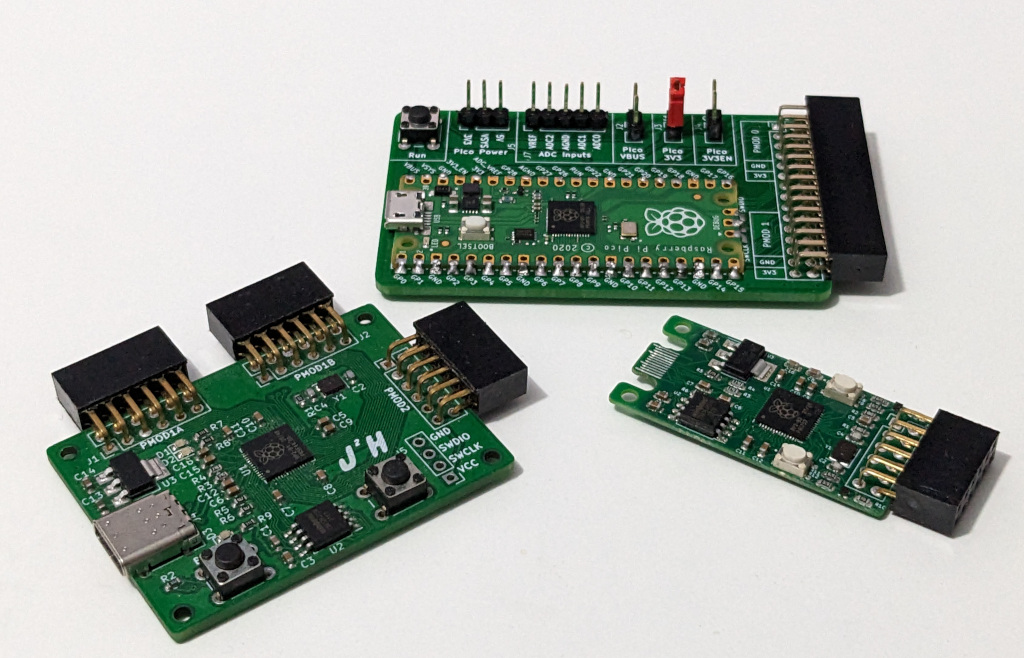
| Board | Build Status | Description |
|---|---|---|
| Pico PMod |  | Raspberry Pi Pico Based PMod Breakout Board |
| RP2040 PMod |  | A PMod Board based on the RP2040 Chip |
| RP2040 Mini PMod |  | A mini Board with a single PMod connector and SD card reader |
For working with the pre existing PMod Boards I've made a PMod Host board, this hosts the accessories such as an Seven Segment display [blocked] or PMOD buttons [blocked]. This allows me to work with boards I already have For my FPGA development boards, and connect them up to the Pico.
The second board is designed to use the RP2040 chip directly, and create a small form factor PMod Board, this will use the RP2040 reference design, with a USB-C (2.0) Port, and 3 PMod Connectors that allow for PMod Devices to be connected up to the RP2040.
These are some examples that I have written to make use of the Host board with
my existing PMod accessories that I have around, these are two examples from Mouser which can be purchased, they are a Seven Segment Display and a 8 way switch. These simple examples can be found in the Software Folder, are written in C and require the Pico SDK to be able to build them.
These Software examples currently target only the board Pico Pmod Board, pins need to be changed for them to work with the RP2040 Board.
| Qty | Value | Footprint | References |
|---|---|---|---|
| 9 | 100n | Capacitor_SMD:C_0603_1608Metric | C3, C5, C6, C7, C8, C9, C10, C11, C12 |
| 4 | MountingHole_2.2mm_M2 | MountingHole:MountingHole_2.2mm_M2 | Hole1, Hole2, Hole3, Hole4 |
| 3 | 330 | Resistor_SMD:R_0603_1608Metric | R7, R8, R9 |
| 3 | Conn_02x06_Odd_Even | Connector_PinHeader_2.54mm:PinHeader_2x06_P2.54mm_Vertical | J1, J2, J3 |
| 3 | LED | LED_SMD:LED_0603_1608Metric | D1, D2, D3 |
| 2 | 10u | Capacitor_SMD:C_0603_1608Metric | C13, C14 |
| 2 | 1K | Resistor_SMD:R_0603_1608Metric | R1, R2 |
| 2 | 1u | Capacitor_SMD:C_0603_1608Metric | C15, C16 |
| 2 | 20p | Capacitor_SMD:C_0603_1608Metric | C2, C4 |
| 2 | 27 | Resistor_SMD:R_0603_1608Metric | R3, R4 |
| 2 | 5.1k | Resistor_SMD:R_0603_1608Metric | R5, R6 |
| 2 | SW_Push | Button_Switch_THT:SW_PUSH_6mm_H4.3mm | SW1, SW2 |
| 1 | 12MHz | Crystal:Crystal_SMD_SeikoEpson_FA238-4Pin_3.2x2.5mm | Y1 |
| 1 | 2u2 | Capacitor_SMD:C_0603_1608Metric | C1 |
| 1 | Conn_01x04 | Connector_PinHeader_2.54mm:PinHeader_1x04_P2.54mm_Vertical | J5 |
| 1 | LOGO | jjh:Untitled | L2 |
| 1 | LOGO | jjh:j2h_small | L1 |
| 1 | NCP1117-3.3_SOT223 | Package_TO_SOT_SMD:SOT-223-3_TabPin2 | U3 |
| 1 | RP2040 | RaspberryPi:RP2040-QFN-56 | U1 |
| 1 | USB_C_Receptacle_USB2.0 | Connector_USB:USB_C_Receptacle_Amphenol_12401610E4-2A_CircularHoles | J4 |
| 1 | W25Q128JVS | Package_SO:SOIC-8_5.23x5.23mm_P1.27mm | U2 |


shanteacontrols/OpenDeck
A platform for building interactive control and sensing devices using MIDI and OSC built with Zephyr RTOS.


polpo/picogus
Emulation of ISA sound cards and CD-ROM on Raspberry Pi Pico (GUS, SB/Adlib, MPU-401, Tandy, CMS, Panasonic CD-ROM) with USB mouse/joystick support

Bastardkb/Dilemma
The Dilemma is a vertical stagger low-profile keyboard with mods.

Staacks/gbinterceptor
Capture or stream Game Boy gameplay footage via USB without modifying the Game Boy.


It measures 50 × 37 mm and has 2 copper layers, 1.6 mm thick.
45 parts, built around the RP2040 and W25Q128JVSIQ. The full list of its parts is on this page, with links to each part's symbol and footprint where PCBKit's library has them.
From the jjhorton/Pico_Pmod repository on GitHub, at the commit this page was made from: the board is Hardware/RP2040_PMod/pico_pmod.kicad_pcb and its schematic Hardware/Pico_PMod/pico_pmod_host.kicad_sch. PCBKit opens the board in the browser, with nothing to install.
Its repository states no licence, so its author keeps all rights: ask jjhorton before reusing the design.