

2 layers354.5 × 132.5 mm
Panels001
jibonaronno/documentsA
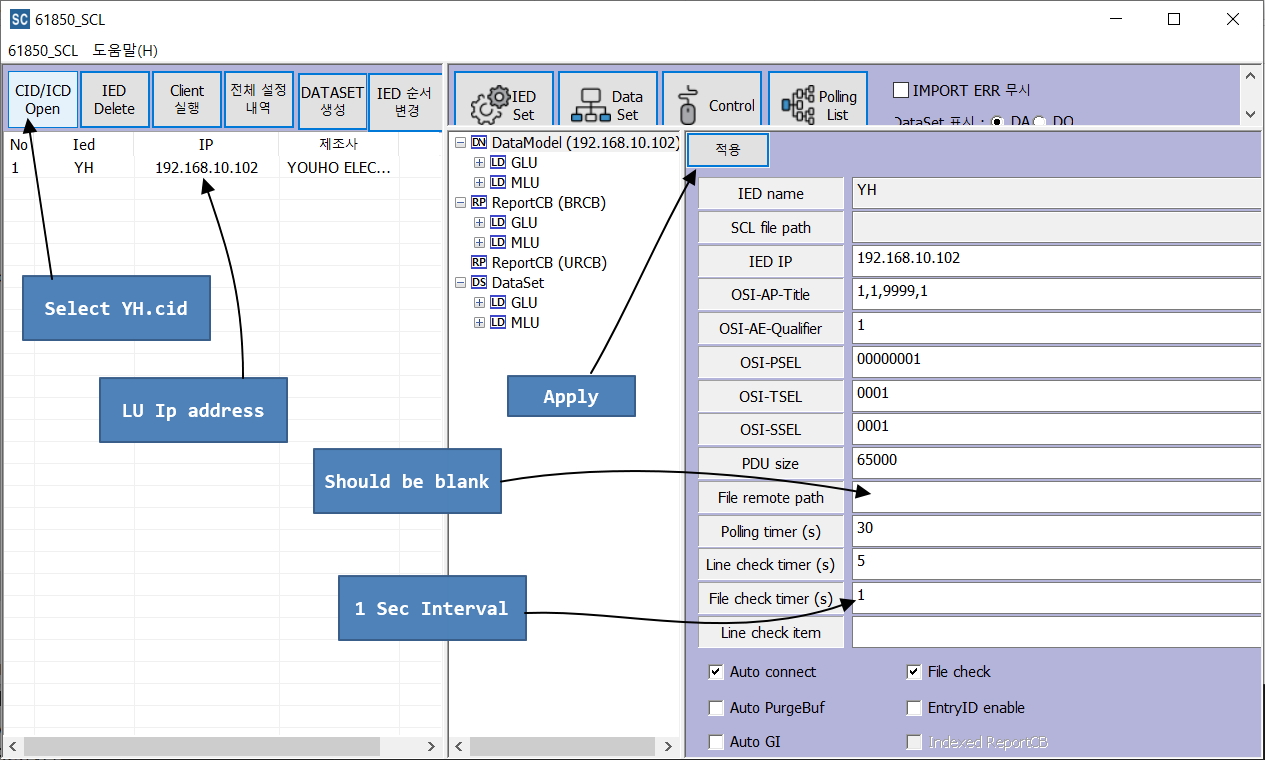
It is required to change settings using SCLManager.exe when required for new setup.
308 parts4

It is required to change settings using SCLManager.exe when required for new setup.
TPIA is an open-source printed circuit board by jibonaronno, from the jibonaronno/documentsA repository on GitHub. It is a 2-layer board with 21 parts on 51 nets, routed with 10 tracks and 0 vias.
It is built around the SS14. Its parts include 6 capacitors, 5 resistors, 4 diodes, 3 switches and 2 ICs.
SA_Client.ini has following configs:
LocalIp=192.168.10.105
...
...
PATH=D:/develop/MZAutomation/SAProgram/ClientProc_2017_Dev_NoTimer_Minsu/ClientProc/61850_CFG/CFG/61850/SA_CFG
SAVE_PATH =D:/develop/MZAutomation/SAProgram/ClientProc_2017_Dev_NoTimer_Minsu/ClientProc/61850_CFG/LOG/61850
ENG_PATH =D:/develop/MZAutomation/SAProgram/ClientProc_2017_Dev_NoTimer_Minsu/ClientProc/61850_CFG/DB/ied_info_gw.csv
These configurations should be changed if machine or location is changed.
It is required to change settings using SCLManager.exe when required for new setup.
Confluence Pages From PDA ACQ Operation and calculation / Integration of various current values Copy of 차단기 동작 특성 페이지 https://jlee193.atlassian.net/wiki/spaces/PDA/pages/514129921/Copy+of
Bushing Documentation Page From PDA 부싱 누설 전류 페이지 https://jlee193.atlassian.net/wiki/spaces/PDA/pages/296812597
An Initial Concept of hardware pptx file downloaded in Confluence folder 종합예방진단시스템(20210625)_HW팀.pptx 하드웨어 구성 https://jlee193.atlassian.net/wiki/spaces/PDA/pages/154042616
| Qty | Value | Footprint | References |
|---|---|---|---|
| 6 | 100n | Capacitor_SMD:C_1206_3216Metric | C1, C2, C3, C4, C5, C6 |
| 4 | 10K | Resistor_SMD:R_1206_3216Metric | R1, R2, R3, R4 |
| 3 | SW_Push | Button_Switch_SMD:SW_SPST_PTS810 | SW1, SW2, SW3 |
| 2 | S2 | Diode_SMD:D_SOD-323 | D2, D3 |
| 1 | 1K | Resistor_SMD:R_1206_3216Metric | R5 |
| 1 | Conn_01x06 | Connector_Phoenix_MC_HighVoltage:PhoenixContact_MC_1,5_6-G-5.08_1x06_P5.08mm_Horizontal | J1 |
| 1 | MMSZ4680T1G CE | Diode_SMD:D_SOD-123 | D1 |
| 1 | SS14 | Diode_SMD:D_SMA | D4 |
| 1 | buck2596 | DC_DC_LM2596_small:DC_DC_LM2596_small | U2 |
| 1 | ~ | Wiznet_W5100SEBV_Pico:Wiznet_Pico | U1 |
jibonaronno/documentsA
It is required to change settings using SCLManager.exe when required for new setup.

jibonaronno/documentsA
It is required to change settings using SCLManager.exe when required for new setup.

jibonaronno/documentsA
It is required to change settings using SCLManager.exe when required for new setup.

jibonaronno/documentsA
It is required to change settings using SCLManager.exe when required for new setup.

jibonaronno/documentsA
It is required to change settings using SCLManager.exe when required for new setup.

jibonaronno/documentsA
It is required to change settings using SCLManager.exe when required for new setup.

jibonaronno/documentsA
It is required to change settings using SCLManager.exe when required for new setup.

jibonaronno/documentsA
It is required to change settings using SCLManager.exe when required for new setup.

jibonaronno/documentsA
It is required to change settings using SCLManager.exe when required for new setup.

jibonaronno/documentsA
It is required to change settings using SCLManager.exe when required for new setup.

jibonaronno/documentsA
It is required to change settings using SCLManager.exe when required for new setup.

jibonaronno/documentsA
It is required to change settings using SCLManager.exe when required for new setup.

JGAguado/Smart_Plant
The Smart Plant is a board that can be plugged directly on the soil, close to the plant, that allows the measurement of the environment (soil moisture, environment temperature & illuminance), and presents the…

ugcs/ddc
Drone Show Software is software designed for drone shows, allowing flight path planning as well as control of dozens of drones simultaneously in a synchronized manner.

eddyem/stm32samples
Code samples and ready projects based on bare-metal STM32


execuc/u2if
USB to interfaces implementing MicroPython "machine" module functionalities on a computer.

ZeroPhone/ZeroPhone-PCBs
PCB files for ZeroPhone - for gerbers and schematics, go to "Releases" tab!

21 parts, built around the SS14. The full list of its parts is on this page, with links to each part's symbol and footprint where PCBKit's library has them.
From the jibonaronno/documentsA repository on GitHub, at the commit this page was made from: the board is uprojects/WiznetW5100S_TPI_FOR_EX/TPIA/TPIA.kicad_pcb. PCBKit opens the board in the browser, with nothing to install.
Its repository states no licence, so its author keeps all rights: ask jibonaronno before reusing the design.