Skip to the content
2 layers95.5 × 127.5 mmChoc keypad, the printed circuit board in 3D

Put your circuits on your plastic bricks of choice

Size
95.5 × 127.5 mm
Copper layers
2
Thickness
1.6 mm
Parts
148
Nets
80
Pads
504
Tracks, vias
707, 136
Pours
2
Routed
Yes
KiCad
KiCad 5 (file 20171130)
Created
17 Jan 2021
Updated
22 Apr 2022

Overview

Choc keypad is an open-source printed circuit board by jamesmunns, from the jamesmunns/brick-mount repository on GitHub. It is a 2-layer board of 95.5 × 127.5 mm with 148 parts on 80 nets, routed with 707 tracks and 136 vias.

Its parts include 67 diodes, 43 capacitors, 25 switches, 8 connectors and 4 resistors. It belongs with the keyboards and input boards of this library.
README

README.md

Brick Boards

Brick Board prototyping boards

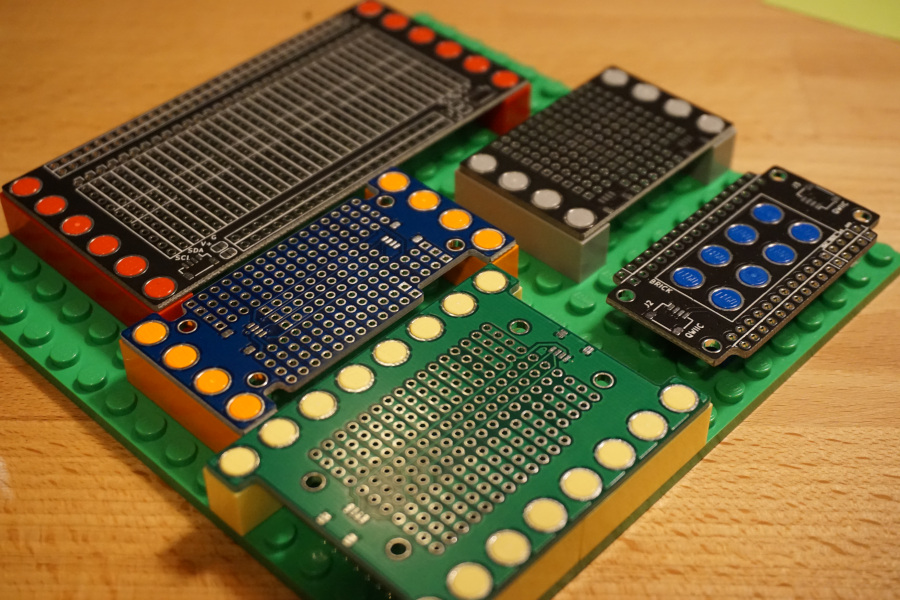
Boards designed to be compatible with LEGO and other plastic building blocks.

There are KiCAD footprints for a variety of different brick arrangements in the parts folder. I've also included a number of personal projects using these footprints in the boards/ folder.

LICENSE

The contents of the parts/brick-4_9id-6_0od.pretty/ folder are licensed under a CC0 license.

Parts

148
QtyValueFootprintReferences
431uFCapacitor_SMD:C_0603_1608MetricC1, C2, C10, C11, C12, C13, C14, C15, C16, C17, C18, C19, C20, C21, C22, C23 +27
43TC2020-RGBbrick-misc:TC2020RGBD25, D26, D27, D28, D29, D30, D31, D32, D33, D34, D35, D36, D37, D38, D39, D40 +27
25Chockeyswitches:PG1350SW1, SW2, SW10, SW11, SW12, SW13, SW14, SW15, SW16, SW17, SW18, SW19, SW20, SW21, SW22, SW23 +9
24D_SchottkyDiode_SMD:D_SOD-123D1, D2, D10, D11, D12, D13, D14, D15, D16, D17, D18, D19, D20, D21, D22, D23 +8
5Conn_01x08brick-4_9id-6_0od:brick-1x8J1, J2, J3, J4, J5
410KResistor_SMD:R_0603_1608MetricR1, R2, R3, R4
1Conn_01x02brick-4_9id-6_0od:brick-1x2J6
1Conn_01x06Connector_PinSocket_2.54mm:PinSocket_1x06_P2.54mm_HorizontalJ8
1Conn_02x06_Odd_EvenConnector_PinSocket_2.54mm:PinSocket_2x06_P2.54mm_HorizontalJ7

The 147 most common of 148 parts.

More from jamesmunns/brick-mount

12
  • 4 layers97 × 87 mmSprocket panel, the printed circuit board in 3D

    Sprocket panel

    jamesmunns/brick-mount

    Put your circuits on your plastic bricks of choice

    494 parts40
  • 2 layers97 × 99 mmProto quarter panel, the printed circuit board in 3D

    Proto quarter panel

    jamesmunns/brick-mount

    Put your circuits on your plastic bricks of choice

    188 parts40
  • 4 layers34 × 47.5 mmChar panel, the printed circuit board in 3D

    Char panel

    jamesmunns/brick-mount

    Put your circuits on your plastic bricks of choice

    136 parts40
  • 2 layers97 × 95 mmProto half cables panel, the printed circuit board in 3D

    Proto half cables panel

    jamesmunns/brick-mount

    Put your circuits on your plastic bricks of choice

    116 parts40
  • 4 layers15.5 × 47.5 mmChar, the printed circuit board in 3D

    Char

    jamesmunns/brick-mount

    Put your circuits on your plastic bricks of choice

    60 parts40
  • 2 layers47 × 47 mmClink, the printed circuit board in 3D

    Clink

    jamesmunns/brick-mount

    Put your circuits on your plastic bricks of choice

    60 parts40
  • 2 layers63.5 × 95.5 mmProto half cables, the printed circuit board in 3D

    Proto half cables

    jamesmunns/brick-mount

    Put your circuits on your plastic bricks of choice

    46 parts40
  • 2 layers47 × 95 mmProto half, the printed circuit board in 3D

    Proto half

    jamesmunns/brick-mount

    Put your circuits on your plastic bricks of choice

    42 parts40
  • 4 layers47 × 15 mmSprocket, the printed circuit board in 3D

    Sprocket

    jamesmunns/brick-mount

    Put your circuits on your plastic bricks of choice

    35 parts40
  • 2 layers79 × 47 mmBlack pill breakout, the printed circuit board in 3D

    Black pill breakout

    jamesmunns/brick-mount

    Put your circuits on your plastic bricks of choice

    27 parts40
  • 2 layers47 × 31 mmProto quarter, the printed circuit board in 3D

    Proto quarter

    jamesmunns/brick-mount

    Put your circuits on your plastic bricks of choice

    18 parts40
  • 2 layers47.5 × 63.5 mmFeather large, the printed circuit board in 3D

    Feather large

    jamesmunns/brick-mount

    Put your circuits on your plastic bricks of choice

    15 parts40

Similar boards

  • 2 layers220 × 329.2 mmControl Boards, the printed circuit board in 3D

    Control Boards

    nasa-jpl/open-source-rover

    A build-it-yourself, 6-wheel rover based on the rovers on Mars!

    148 parts9.8kApache-2.0
  • 2 layers229.9 × 111.8 mmAvr colorvideo, the printed circuit board in 3D

    Avr colorvideo

    74hc595/Amethyst

    8-bit ATmega1284 retro computer

    148 parts306BSD-3-Clause
  • 2 layers285.4 × 94.9 mmRosaline, the printed circuit board in 3D

    Rosaline

    peej/rosaline-keyboard

    40% staggered through-hole component keyboard PCB for standard 60% cases

    148 parts53MIT
  • 2 layers99.1 × 99.1 mmRADIO, the printed circuit board in 3D

    RADIO

    dawsonjon/OpenXcvr

    Cost Effective HF transceiver based on max1000 FPGA module

    148 parts38MIT
  • 2 layersSap be, the printed circuit board in 3D

    Sap be

    kyllikki/eda-designs

    EDA designs

    148 parts32MIT
  • 2 layers74.3 × 99.7 mmLfk17, the printed circuit board in 3D

    Lfk17

    lfkeyboards/lfk17

    148 parts27
  • 2 layers48 × 35 mmSDB panel, the printed circuit board in 3D

    SDB panel

    str-dst/simplified-daughterboard

    A simple USB daughterboard

    148 parts26CC-BY-SA-4.0
  • 2 layers322.3 × 133.3 mmHyd fuel, the printed circuit board in 3D

    Hyd fuel

    OpenA3XX/opena3xx-panel-design

    OpenA3XX: Panels, 3D Printed Components & Reference Archive

    148 parts18

Questions

How big is the Choc keypad PCB?

It measures 95.5 × 127.5 mm and has 2 copper layers, 1.6 mm thick.

What parts does the Choc keypad use?

148 parts. The full list of its parts is on this page, with links to each part's symbol and footprint where PCBKit's library has them.

Where can I download the Choc keypad KiCad files?

From the jamesmunns/brick-mount repository on GitHub, at the commit this page was made from: the board is boards/choc-keypad/choc-keypad.kicad_pcb. PCBKit opens the board in the browser, with nothing to install.

Can I use the Choc keypad design in my own project?

Its repository states no licence, so its author keeps all rights: ask jamesmunns before reusing the design.