

4 layers89 × 61 mm

 JackoChan2005/TTC-Map
A Toronto rail explorer and ESP32 LED display built around one transit-state API. The web map shows Lines 1, 2, 4, 5 and 6 over OpenStreetMap, with route search, station details, directional markers and a schematic view.
TTC Map is an open-source printed circuit board by JackoChan2005, from the JackoChan2005/TTC-Map repository on GitHub. It is a 2-layer board of 110 × 60 mm with 35 parts on 63 nets, routed with 363 tracks and 29 vias.
It is built around the 74HC595 and JMK105BJ105KV-F. Its parts include 12 resistors, 8 diodes, 6 transistors, 4 capacitors and 4 ICs. It belongs with the ESP32 boards of this library.
A Toronto rail explorer and ESP32 LED display built around one transit-state API. The web map shows Lines 1, 2, 4, 5 and 6 over OpenStreetMap, with route search, station details, directional markers and a schematic view.
The project implements GTFS import and validation, bounded NTAS polling, estimated train positions, a shared web/LED state model, the browser interface and firmware for an eight-LED board revision. Contributor history is available in Git; individual ownership and asset permissions are documented in docs/ASSETS.md.
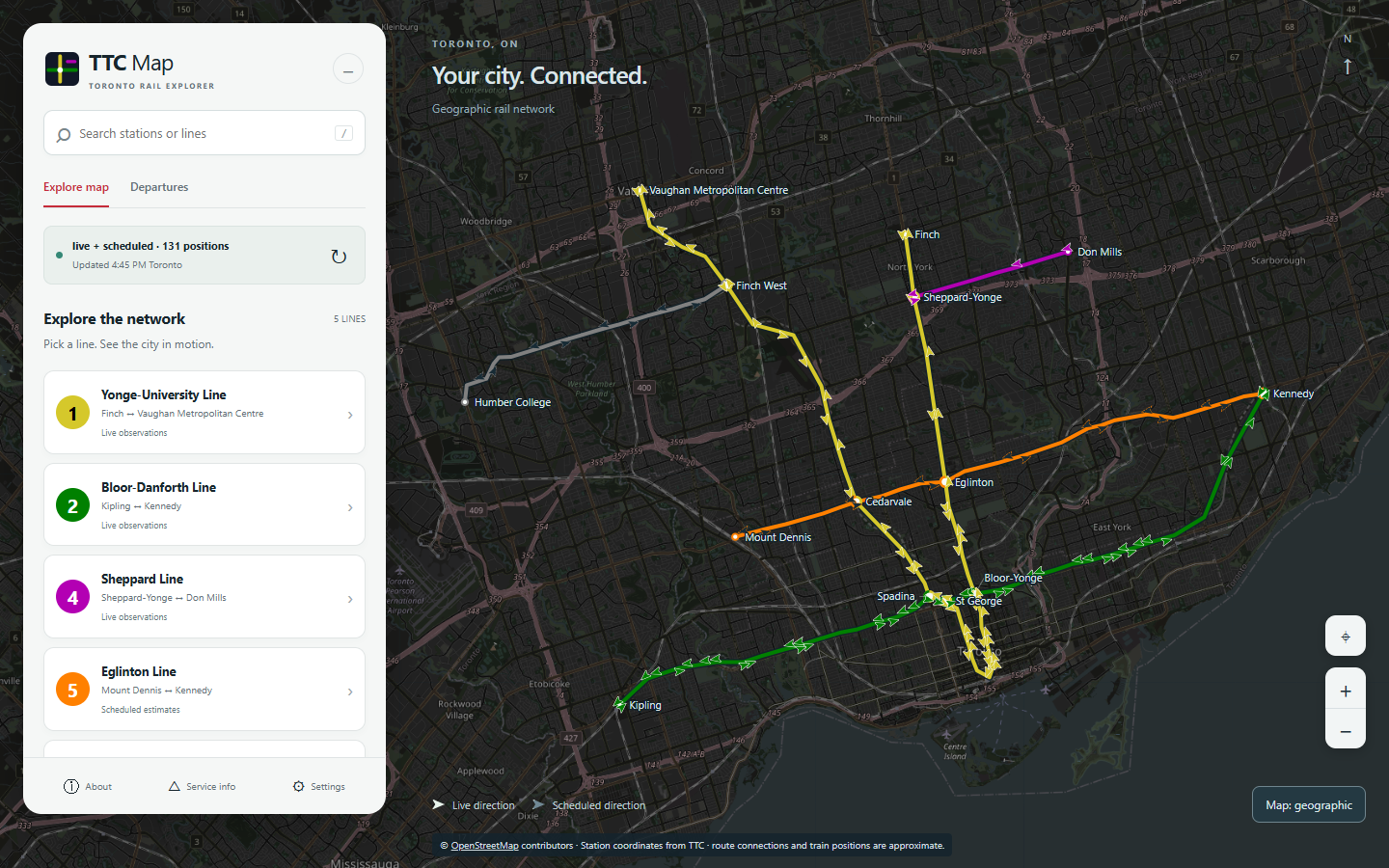
The image records a real-data session on September 12, 2026; it is not a live feed.
Toronto Open Data GTFS -> validated SQLite schedules/topology --+
TTC NTAS countdowns -> per-line snapshots and interpolation ----+-> map state
                                                               |-> web explorer
                                                               +-> ESP32 LED frame
Python/FastAPI serves the vanilla JavaScript/SVG frontend. SQLite, pandas and HTTPX handle data; ESP-IDF/PlatformIO builds the firmware. There is no frontend build step and no Node server.
Install uv, clone this
repository, then double-click start.bat or run it from PowerShell:
.\start.batThe launcher installs the locked dependencies and starts the server. It keeps
Python packages in %LOCALAPPDATA%\TTC-Map\venv, outside OneDrive. Python 3.13 is
selected by .python-version; uv can download it if needed. Do not repair or
reuse an old OneDrive-managed .venv to run this launcher.
Open http://localhost:8000 for the map, /search/ for timetable search, and
/docs or /redoc for the local interactive API reference. Stop with Ctrl+C.
For another port: .\start.bat serve --port 8001.
Windows setup and clean-checkout verification includes manual commands, separate-checkout environments and offline rehearsal.
Install uv, then open a terminal in this repository and run:
./start.commandOn macOS you can also double-click start.command. The launcher installs the
locked dependencies into .venv and starts the server. Open
http://localhost:8000 and stop with Ctrl+C. Use
./start.command serve --port 8001 for another port or ./start.command refresh
for a feed check. If an extracted archive loses executable permissions, run
bash start.command.
Equivalent manual commands:
uv sync --locked
uv run --no-sync ttcmap serve
Python 3.12+ is supported by the package; the repository pins 3.13 for development. Use one worker and a local SQLite database. Linux startup has been checked under Ubuntu 24.04 (WSL2); macOS runtime and physical hardware validation remain separate checks. See setup verification.
Run these after the platform-specific setup. On Windows, set
$env:UV_PROJECT_ENVIRONMENT = "$env:LOCALAPPDATA\TTC-Map\venv" first, or use
.\start.bat refresh for a feed check.
| Command | Purpose |
|---|---|
uv run --no-sync ttcmap refresh | Check/rebuild the feed; add --force for a forced rebuild |
uv run --no-sync ttcmap build-network | Regenerate exports from the verified cache |
uv run --no-sync pytest | Backend tests |
uv run --no-sync ruff check src tests | Python lint |
node --test tests/web/*.test.mjs | Frontend unit tests, optional Node.js |
node scripts/build-schematic.mjs | Regenerate schematic after network export |
Browser tests use a pinned optional Playwright install; see SETUP.md. There is no separate JavaScript build, type-checker or linter configured.
The local API reference reads /openapi.json and can send GET requests without
external scripts. All transit routes are below /api/v1:
| GET endpoint | Data |
|---|---|
/health, /gtfs/status | Dataset and per-line source diagnostics |
/map-config | Matching generation, network and schematic |
/network, /layout/{name} | Topology or an individual layout |
/map-state | Estimated positions; source and optional time selection |
/departures?route=1 | Scheduled departure window |
/led-state, /led-state.bin | Board frame as JSON or packed bits |
Refresh is CLI-only. The former POST /api/v1/gtfs/refresh is removed so a viewer
cannot trigger an expensive rebuild. The web refresh button reloads read endpoints.
| Directory | Purpose |
|---|---|
src/ttcmap/ | API, GTFS pipeline, source selection and LED renderer |
web/ | Explorer, timetable and local API reference |
shared/ | Reviewed station identities and generated network/layout exports |
firmware/ | ESP-IDF firmware; local Wi-Fi settings are gitignored |
hardware/ | Integrated KiCad design and eight-LED board map |
tests/, scripts/ | Validation and schematic generation |
data/ | Ignored feeds, database, local validation and private asset archive |
Run from an editable repository checkout. A standalone wheel does not include the web/shared/hardware resources and is not a supported deployment package.
Copy .env.example to .env for optional overrides; all fields are in
src/ttcmap/config.py. Local paths resolve against the checkout. For OneDrive
installations that also need database isolation, configure DATA_DIR and DB_PATH
to local storage. Cloud synchronization is not multi-host database coordination.
/api/v1/health and refresh logs. First import,
expired schedules or a failed upgrade can cause 503 responses.See ARCHITECTURE.md, UI_API_AUDIT.md, validation results and asset/publication status.
| Qty | Value | Footprint | References |
|---|---|---|---|
| 8 | LED | LED_THT:LED_D3.0mm | D1, D2, D3, D4, D5, D6, D7, D8 |
| 6 | 10k | Resistor_SMD:R_0805_2012Metric | R1, R3, R5, R7, R9, R13 |
| 6 | PMOS | My-Custom-Footprints:SOT95P240X120-3N | Q1, Q2, Q3, Q4, Q5, Q7 |
| 4 | 1.818 | Resistor_SMD:R_0805_2012Metric | R2, R4, R6, R8 |
| 2 | 5.1k | Resistor_SMD:R_0805_2012Metric | R11, R12 |
| 2 | 74HC595 | My-Custom-Footprints:SOIC127P600X175-16N | U2, U3 |
| 2 | CL05A104KA5NNNC | My-Custom-Footprints:CAPC1005X55N | C3, C4 |
| 2 | JMK105BJ105KV-F | My-Custom-Footprints:CAPC1005X55N | C1, C2 |
| 1 | ESP32-DEVKIT-V1 | My-Custom-Footprints:MODULE_ESP32_DEVKIT_V1 | U1 |
| 1 | MCP1703Ax-330xxDB | Package_TO_SOT_SMD:SOT-223-3_TabPin2 | U4 |
| 1 | USB_C_Receptacle_USB2.0_16P | Connector_USB:USB_C_Receptacle_GCT_USB4105-xx-A_16P_TopMnt_Horizontal | J1 |
It measures 110 × 60 mm and has 2 copper layers, 1.6 mm thick.
35 parts, built around the 74HC595 and JMK105BJ105KV-F. The full list of its parts is on this page, with links to each part's symbol and footprint where PCBKit's library has them.
From the JackoChan2005/TTC-Map repository on GitHub, at the commit this page was made from: the board is hardware/TTC-map.kicad_pcb and its schematic hardware/TTC-map.kicad_sch. PCBKit opens the board in the browser, with nothing to install.
Its repository states no licence, so its author keeps all rights: ask JackoChan2005 before reusing the design.

tardate/LittleArduinoProjects
a collection of "Little Electronic & Arduino Projects", most involving electronics or an Arduino in one way or another!

ChrisChrisLoLo/beyblock20
The magnetic, modular, 20-key macropad that can join together to form an ortholinear board

slu4coder/Minimal-64x4-Home-Computer
My DIY TTL home computer with VGA and PS/2 and 4x the processing power of a Commodore C64 or Apple II.

electroniceel/protoboard
Advanced protoboard layout with 1.27mm pitch for smd parts

TobleMiner/DC-UPS
A small DC UPS, designed to keep small appliances like consumer network equipment running during power outages

