Skip to the content
PCBKitNew board
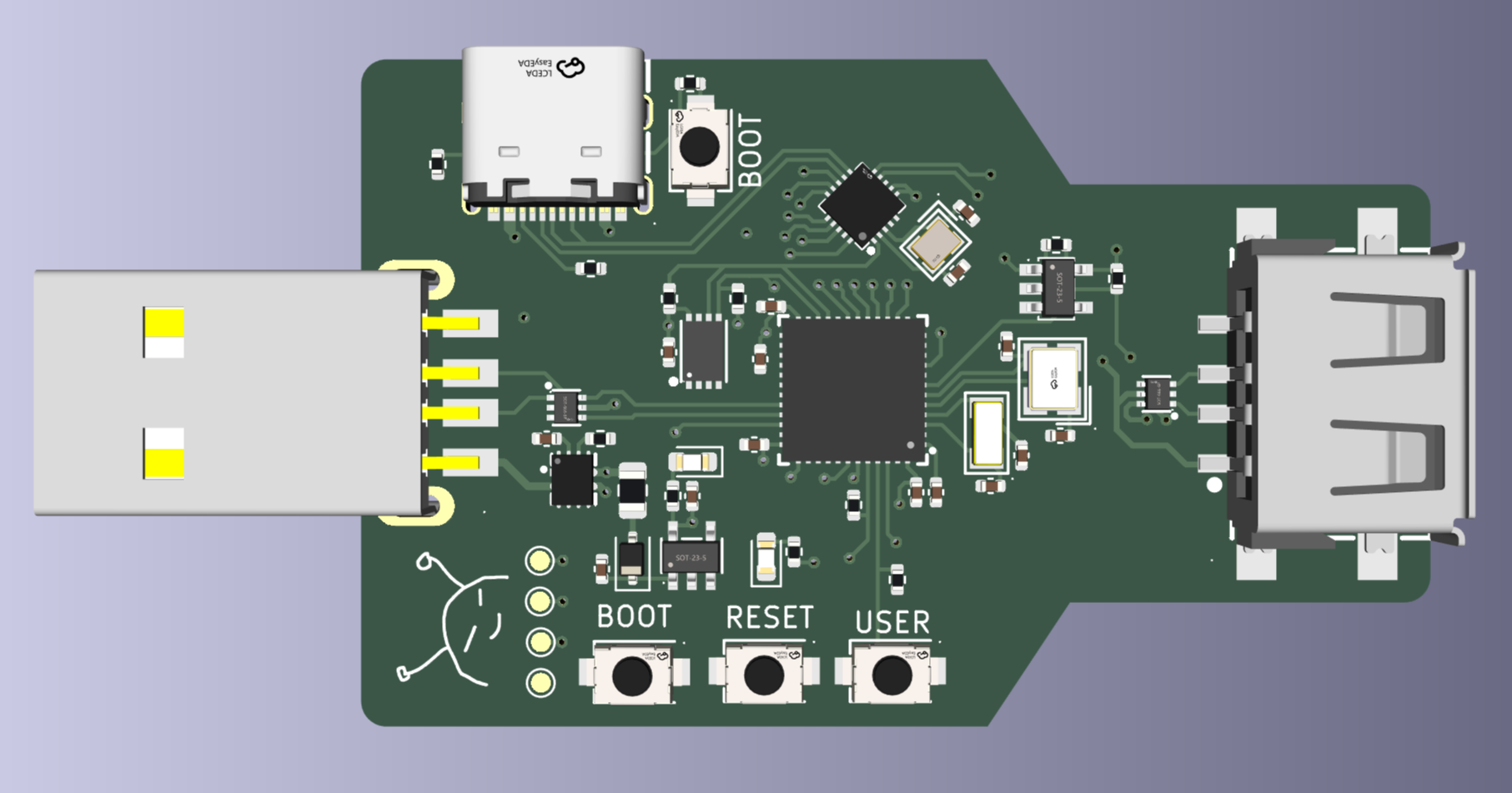
4 layers76.1 × 70.7 mmUsb sp dev, the printed circuit board in 3D

Have you ever tried to plug a USB device into a computer that has USB restrictions enabled? It's frustrating, isn't it? You can't use your USB devices, and you have no way to bypass the restrictions.

Size
76.1 × 70.7 mm
Copper layers
4
Thickness
1.6 mm
Parts
79
Nets
89
Pads
318
Tracks, vias
582, 183
Pours
4
Routed
Yes
KiCad
KiCad 10.0 (file 20260206)
Created
13 Sep 2025
Updated
7 Jun 2026

Overview

Usb sp dev is an open-source printed circuit board by Ismael034, from the Ismael034/usbsp repository on GitHub, published under the MIT licence. It is a 4-layer board of 76.1 × 70.7 mm with 79 parts on 89 nets, routed with 582 tracks and 183 vias.

It is built around the CH32V203C8U6, RH-5015 and KH-TYPE-C-16P, with the CH572D, SD101CWS and SN74LVC1G08DBVR among its other parts. Its parts include 24 ICs, 15 capacitors, 14 resistors, 4 diodes and 2 connectors. It belongs with the RISC-V boards of this library.

Main components

12

README

README.md

USBsp

Have you ever tried to plug a USB device into a computer that has USB restrictions enabled? It's frustrating, isn't it? You can't use your USB devices, and you have no way to bypass the restrictions. But what if I told you that you could spoof the USB identifiers so you bypass these restrictions? That's where USBsp comes in.

Here is your solution!

USBsp hardware

USBsp is a USB device that can spoof the USB identifiers of any device you want. It is based on the CH32V203 and CH572D microcontrollers. With USBsp, you can easily bypass USB restrictions and use your USB devices without any issues.

Features

  • Spoofs basic USB descriptor fields: VID, PID, bcdDevice, manufacturer, product and serial.
  • Stores the spoofed descriptor settings in EEPROM.
  • WebUSB control panel for changing settings from a Chromium-based browser.
  • Can read descriptor-like values from the currently connected downstream USB device and use them as a starting point.
  • Basic live packet capture.
  • Simple HID keyboard/mouse visualizers.

Building

The required toolchain is alredy included. It is a custom toolchain made by WCH, downloaded from here. This toolchain constains custom targets for their MCUs. Other toolchains (like xpack) have not been tested.

Clone the repository and add the toolchain to the path

text
git clone https://github.com/Ismael034/usbsp.git
cd usbsp
export PATH=$PWD/toolchain/bin/:$PATH

Configure meson

text
meson setup build-ch32v203 --cross-file ch32v203/ch32v203-cross.ini
meson setup build-ch572d --cross-file ch572d/ch572d-cross.ini

Build with ninja

text
ninja -C build-ch32v203 ch32v203/ch32v203.hex
ninja -C build-ch572d ch572d/ch572d.hex

If everything goes well, you'll end up with two .hex files – one for each MCU.

Flashing

To flash the firmware to your MCU, you can use one of the following tools:

text
wlink flash ./build-ch32v203/ch32v203/ch32v203.hex
wlink flash ./build-ch572d/ch572d/ch572d.hex

Tests

It is also possible to build a test firmware, which will test hardware funcionality like EEPROM access, USBD, USBH, buttons, etc. You can build it using a predefined custom target.

text
ninja -C build-ch32v203 ch32v203/ch32v203_test.hex

Parts

79
QtyValueFootprintReferences
8RH-5015usb_sp_dev:SMD_RH-5015U10, U11, U12, U13, U14, U15, U16, U17
8TestPointTestPoint:TestPoint_Pad_D1.0mmTP1, TP2, TP3, TP4, TP5, TP6, TP7, TP8
610kΩResistor_SMD:R_0603_1608MetricR1, R2, R3, R4, R6, R13
615pFCapacitor_SMD:C_0402_1005MetricC2, C3, C6, C7, C13, C14
6~usb_sp_dev:SMD-PAD-5x5SMD-PAD-5x1, SMD-PAD-5x2, SMD-PAD-5x3, SMD-PAD-5x4, SMD-PAD-5x5, SMD-PAD-5x6
55.1kΩResistor_SMD:R_0603_1608MetricR8, R9, R10, R11, R12
4100nFCapacitor_SMD:C_0603_1608MetricC9, C11, C12, C15
4TC-6601-5_0-260-8_3usb_sp_dev:SW-SMD_4P-L6.0-W6.0-P4.50-LS8.2U2, U3, U4, U20
310uFCapacitor_SMD:C_0603_1608MetricC4, C5, C8
3USBLC6-2P6usb_sp:SOT-666-6_L1.6-W1.2-P0.50-LS1.6-BLD1, D2, D3
21kΩResistor_SMD:R_0603_1608MetricR5, R7
2HDR-IDC-2_54-2X5Pusb_sp:IDC-TH_10P-P2.54_C5665P1, P2
2HX_PH254-01-04-Z-L11_5_STRAIGHT_PIN_HEADERusb_sp_dev:HDR-TH_4P-HX-PH254-01-04-Z-L11.5U22, U24
2KH-TYPE-C-16Pusb_sp:USB-C-SMD_KH-TYPE-C-16PU18, U23
110.0 QTJ6.3usb_sp:USB-A-SMD_10.0-QTJ6.3USB1
1100nFCapacitor_SMD:C_0402_1005MetricC1
125.5kΩResistor_SMD:R_0603_1608MetricR14
132.768kHzusb_sp:CRYSTAL-SMD_L3.2-W1.5-1U9
14.7uFCapacitor_SMD:C_0603_1608MetricC10
18MHzusb_sp:CRYSTAL-SMD_4P-L3.2-W2.5-BLX1
1CH32V203C8U6usb_sp:TQFN-48_L7.0-W7.0-P0.50-BL-EP5.5U19
1CH572Dusb_sp:QFN-20_L3.0-W3.0-P0.40-TL-EP1.7U21
1JK-SMD0805-020-30VFuse:Fuse_0805_2012MetricF1
1ME6211C33M5G-Nusb_sp:SOT-23-5_L3.0-W1.7-P0.95-LS2.8-BLLDO1
1NCD0603R1LED_SMD:LED_0603_1608MetricPWR1
1PZ254V-11-03P_C2937625usb_sp:HDR-TH_3P-P2.54-V-MU8
1SD101CWSDiode_SMD:D_SOD-323U7
1SN74LVC1G08DBVRusb_sp_dev:SOT-23-5_L3.0-W1.7-P0.95-LS2.8-BRU5
1TPS2121RUXRusb_sp:VQFN-HR-12_L2.5-W2.0-P0.50-BLU6
1XL-1608UGC-04LED_SMD:LED_0603_1608MetricLED1
1XTM20032000DT00351001usb_sp:CRYSTAL-SMD_4P-L2.0-W1.6-BLX2
1ZD24C02B-MAGMTusb_sp:UDFN-8_L3.0-W2.0-P0.50-BL-EP-3U1

Questions

How big is the Usb sp dev PCB?

It measures 76.1 × 70.7 mm and has 4 copper layers, 1.6 mm thick.

What parts does the Usb sp dev use?

79 parts, built around the CH32V203C8U6, RH-5015, KH-TYPE-C-16P and CH572D. The full list of its parts is on this page, with links to each part's symbol and footprint where PCBKit's library has them.

Where can I download the Usb sp dev KiCad files?

From the Ismael034/usbsp repository on GitHub, at the commit this page was made from: the board is hardware/dev/usb_sp_dev.kicad_pcb and its schematic hardware/1_1.kicad_sch. PCBKit opens the board in the browser, with nothing to install.

Can I use the Usb sp dev design in my own project?

Its repository publishes it under the MIT licence: you may reuse it on that licence's terms (keep the author's notice, and for a copyleft licence share your changes alike).

More from Ismael034/usbsp

2
  • 4 layers33.6 × 53.9 mmUsb sp prod, the printed circuit board in 3D

    Usb sp prod

    Ismael034/usbsp

    Have you ever tried to plug a USB device into a computer that has USB restrictions enabled? It's frustrating, isn't it? You can't use your USB devices, and you have no way to bypass the restrictions.

    53 parts2MIT
  • 4 layers38.1 × 59.7 mmUsb sp, the printed circuit board in 3D

    Usb sp

    Ismael034/usbsp

    Have you ever tried to plug a USB device into a computer that has USB restrictions enabled? It's frustrating, isn't it? You can't use your USB devices, and you have no way to bypass the restrictions.

    48 parts2MIT

Similar boards

  • 4 layers27.7 × 59.7 mmCh32v203-dev, the printed circuit board in 3D

    Ch32v203-dev

    Ismael034/ch32v203-dev

    Just another CH32V203 development board

    36 parts1
  • 4 layers26 × 32.5 mmUSBnet, the printed circuit board in 3D

    USBnet

    Ismael034/USBnet

    USBnet: Internet via USB (and HID!)

    53 parts1MIT
  • 2 layers61.5 × 100.3 mmStair lights, the printed circuit board in 3D

    Stair lights

    ogruendel/stair-lights

    80 parts
  • 4 layers49.1 × 54.3 mmRp2350-hdmi hexpansion, the printed circuit board in 3D

    Rp2350-hdmi hexpansion

    Corteil/rp2350-hdmi-hexpansion

    RP2350 HDMI hexpansion for the EMF Tildagon badge -- mirrors the badge's display to a monitor over HSTX/DVI

    57 parts2
  • 2 layers20.3 × 30.3 mmSlickbug, the printed circuit board in 3D

    Slickbug

    HalFrgrd/slickbug

    A small SWD programmer using the Seeed Studio XIAO RP2040. I wanted a compact debugger with a tiny target footprint (roughly 4.8mm by 1.1mm).

    10 partsMIT
  • 2 layers34.6 × 10.9 mmCh570funprog withuart, the printed circuit board in 3D

    Ch570funprog withuart

    cnlohr/ch570funprog

    CH570-based RISC-V Programmer

    27 parts6MIT
  • 4 layers19.1 × 16.8 mmSynthPass, the printed circuit board in 3D

    SynthPass

    JackToaster/SynthPass

    An open-source protocol & hardware design for to detect nose boops & transfer simple data, designed for protogen/synth fursuits

    17 parts4GPL-3.0
  • 2 layers17.8 × 28.9 mmCH572, the printed circuit board in 3D

    CH572

    cyao1234/c57

    Low-cost bluetooth devboard with a ch572 MCU. To program it press the boot button, and use either mountriver studio or ch32fun.

    23 partsCERN-OHL-P-2.0