2 layers56.4 × 78.4 mm

 falue/rebekkaSwitchFoil
This repo is using a HLK-LD2450 microwave human presence sensor and a Sparkfun Thing Plus. This uses Micropython. See below for instructions to set it up.
SwitchFoil is an open-source printed circuit board by falue, from the falue/rebekkaSwitchFoil repository on GitHub. It is a 2-layer board of 142.2 × 106.7 mm with 31 parts on 49 nets, routed with 264 tracks and 10 vias.
It is built around the IRM-05-5, HC-SR04 and HLK-LD2410C, with the S9014 among its other parts. Its parts include 8 connectors, 6 resistors, 3 switches, 2 ICs and 2 diodes.


This repo is using a HLK-LD2450 microwave human presence sensor and a Sparkfun Thing Plus. This uses Micropython. See below for instructions to set it up.
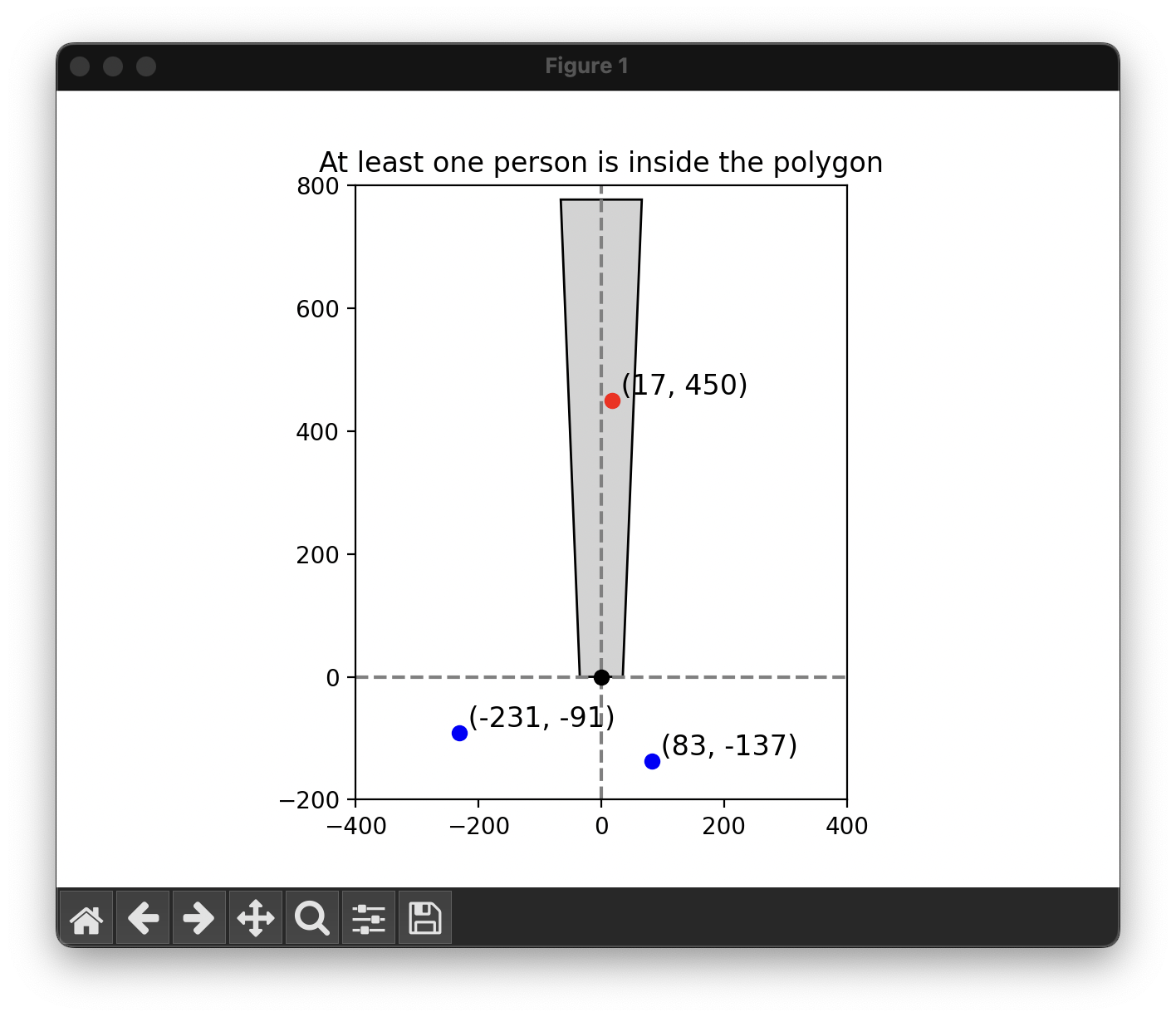
When at least one human being is in a pre defined target area in front of the sensor, a relay is triggered. In this application, this relay is wired to eg. a 30VAC source that switches off a PDLC foil (Polymer Dispersed Liquid Crystal) in front of a mirror.
Change the area in which the relay triggers in the main.py file:
p1 = (-66, 777)
p2 = (66, 777)
p3 = (35, 0)
p4 = (-35, 0)
Points clockwise, all values in cm.
Visualized and tested with script _archive/tests/test-polygon-finder.py.
Based on
Can be installed in case, but must have good wave transmission characteristics at 24 GHz and cannot contain metallic materials or materials that have a shielding effect on electromagnetic waves.
For example data and a lot more, check out the > HLK-LD2450-Instruction-Manual.pdf.
| Key | Value |
|---|---|
| Max targets | 3 |
| ISM band | 24 GHz |
| Detection distance | 6m |
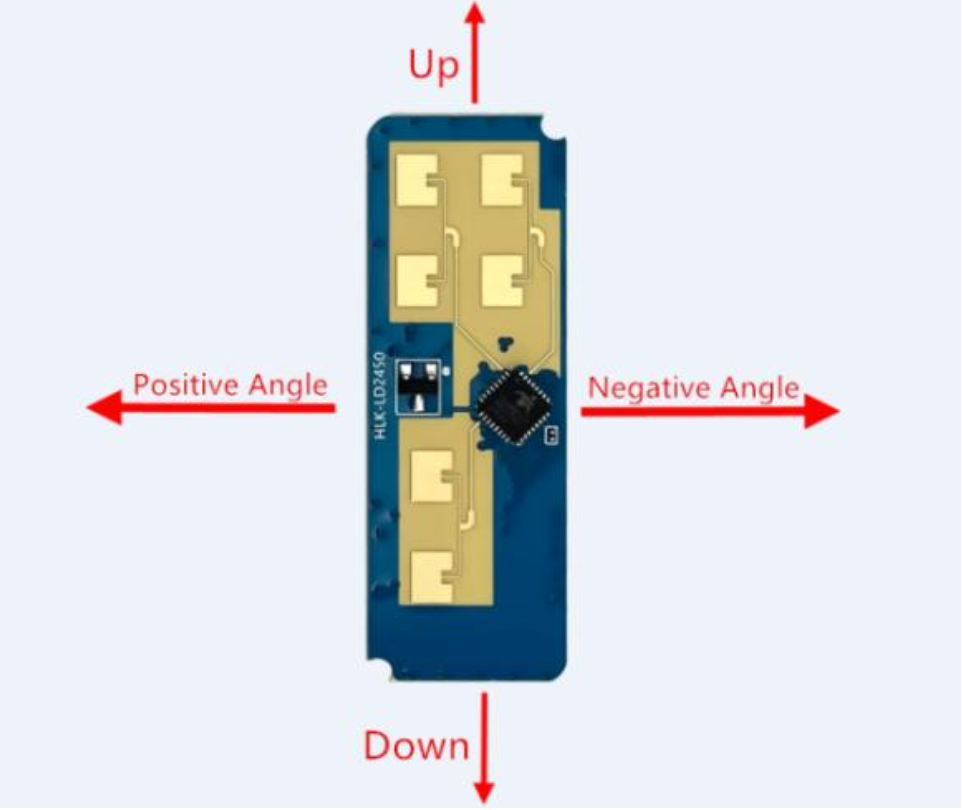
| Detection angle | ±60° |
| Data per target | Xmm, Ymm, Speed mm/s |
Attention:
- Do not install multiple sensor directly opposite to each other to avoid mutual interference
- Install 150cm to 200cm from floor
Get https://github.com/espressif/esptool
First, erase flash memory from dir esptool-maser
cd _archive/esptool
esptool.py --port /dev/cu.usbserial-02762195 erase_flash
If:
A fatal error occurred: Could not open /dev/cu.usbserial-02762195, the port is busy or doesn't exist.
([Errno 16] could not open port /dev/cu.usbserial-02762195: [Errno 16] Resource busy: '/dev/cu.usbserial-02762195')
Unconnect & reconnect, immedietly run the command above again
Download generic firmware esp wroom:
Eg. v1.23.0 (2024-06-02) .bin
Flash firmware:
esptool.py --chip esp32 --port /dev/cu.usbserial-02762195 --baud 460800 write_flash -z 0x1000 ESP32_GENERIC-20240602-v1.23.0.bin For vscode:
connect device or three dots when hovering over project name select devicesstop script)hard reset deviceAttention
- When changing the
pymakr.conffile, its changes only take effect after its uploaded to the board. Right click on thepymakr.conffile > "pymakr" > "upload to device" before you upload the whole thing- When using "Development mode" (auto-upload files after each change), folders, subfolders and their content (like the
libraries) do not get uploaded
Delete main file directly on the flash memory:
rshell --port /dev/cu.usbserial-0275EAB2repl ~ /dev/cu.usbserial-0275EAB2ctrl+x = exitimport osos.remove("main.py")Example:
{
  "py_ignore": [
    "_archive",
    "_tools",
    "docs",
    ".DS_Store",
    ".git",
    ".gitignore",
    ".gitmodules",
    ".vscode",
    "env",
    "README.md",
    "README.pdf",
    "venv"
  ],
  "name": "Rebekkas Smart Foil Extravaganza"
}
In terminal:
import os
os.listdir()
os.chdir("libraries")| Qty | Value | Footprint | References |
|---|---|---|---|
| 4 | MountingHole | MountingHole:MountingHole_3.2mm_M3 | H1, H2, H3, H4 |
| 2 | 2k7 | Resistor_THT:R_Axial_DIN0207_L6.3mm_D2.5mm_P7.62mm_Horizontal | R7, R9 |
| 2 | 4k7 | Resistor_THT:R_Axial_DIN0207_L6.3mm_D2.5mm_P7.62mm_Horizontal | R8, R10 |
| 1 | 10k | Potentiometer_THT:Potentiometer_Vishay_T73YP_Vertical | RV1 |
| 1 | 1N4004 | Diode_THT:D_A-405_P7.62mm_Horizontal | D5 |
| 1 | 230 to 30VAC | Transformer_THT:Transformer_Myrra_EI30-5_44000_Horizontal | T1 |
| 1 | 33k | Resistor_THT:R_Axial_DIN0207_L6.3mm_D2.5mm_P7.62mm_Horizontal | R13 |
| 1 | AC-30-OUT | TerminalBlock_Phoenix:TerminalBlock_Phoenix_MKDS-1,5-2_1x02_P5.00mm_Horizontal | J7 |
| 1 | ButtonA | pts636:pts636 | SW2 |
| 1 | ButtonB | pts636:pts636 | SW1 |
| 1 | Conn_01x03 | Connector_PinHeader_2.54mm:PinHeader_1x03_P2.54mm_Vertical | J10 |
| 1 | Conn_01x04 | Connector_PinHeader_2.54mm:PinHeader_1x04_P2.54mm_Vertical | J9 |
| 1 | Fuse | Fuse:Fuseholder_Cylinder-5x20mm_Schurter_0031_8201_Horizontal_Open | F1 |
| 1 | HC-SR04 | Connector_PinHeader_2.54mm:PinHeader_1x04_P2.54mm_Vertical | J4 |
| 1 | HLK-LD2410C | Connector_PinHeader_2.54mm:PinHeader_1x05_P2.54mm_Vertical | J8 |
| 1 | IRM-05-5 | Converter_ACDC:Converter_ACDC_MeanWell_IRM-05-xx_THT | PS2 |
| 1 | Jumper_3_Bridged12 | Connector_PinHeader_2.54mm:PinHeader_1x03_P2.54mm_Vertical | JP1 |
| 1 | LD2450 | ld2450:ld2450 | U4 |
| 1 | LED | LED_THT:LED_D5.0mm | D1 |
| 1 | Omron G5LE-1-ASI DC3 | Relay_THT:Relay_SPDT_Finder_36.11 | K1 |
| 1 | PIR | Connector_PinHeader_2.54mm:PinHeader_1x03_P2.54mm_Vertical | J3 |
| 1 | R | Resistor_THT:R_Axial_DIN0207_L6.3mm_D2.5mm_P7.62mm_Horizontal | R1 |
| 1 | S9014 | Connector_PinHeader_2.54mm:PinHeader_1x03_P2.54mm_Vertical | Q2 |
| 1 | Sparkfun ToF | Connector_PinHeader_2.54mm:PinHeader_1x06_P2.54mm_Vertical | J1 |
| 1 | ThingPlus | SparkFun-Board:ThingPlus_With_Connectors | U1 |
| 1 | c8 inlet | c8-inlet:c8-inlet-old | J5 |


AlexD717/HA-Sensor-Node
Sensor node featuring a temperature, humidity, and mmWave sensor


mgiesen/Magic-Tabmount
Der "Magic Tabmount" ist eine smarte Wandhalterung für das iPad (Generation 5 bis 9). Durch ein integriertes Magnetsystem kann das iPad mit einem Handgriff an der Wand befestigt oder wieder entfernt werden.
It measures 142.2 × 106.7 mm and has 2 copper layers, 1.6 mm thick.
31 parts, built around the IRM-05-5, HC-SR04, HLK-LD2410C and S9014. The full list of its parts is on this page, with links to each part's symbol and footprint where PCBKit's library has them.
From the falue/rebekkaSwitchFoil repository on GitHub, at the commit this page was made from: the board is docs/pcb/SwitchFoil.kicad_pcb and its schematic docs/pcb/SwitchFoil.kicad_sch. PCBKit opens the board in the browser, with nothing to install.
Its repository states no licence, so its author keeps all rights: ask falue before reusing the design.