2 layers44.6 × 27.1 mm

 eyendamuri/aeropod
An esp32 based mp3 player with the ability to play video too.
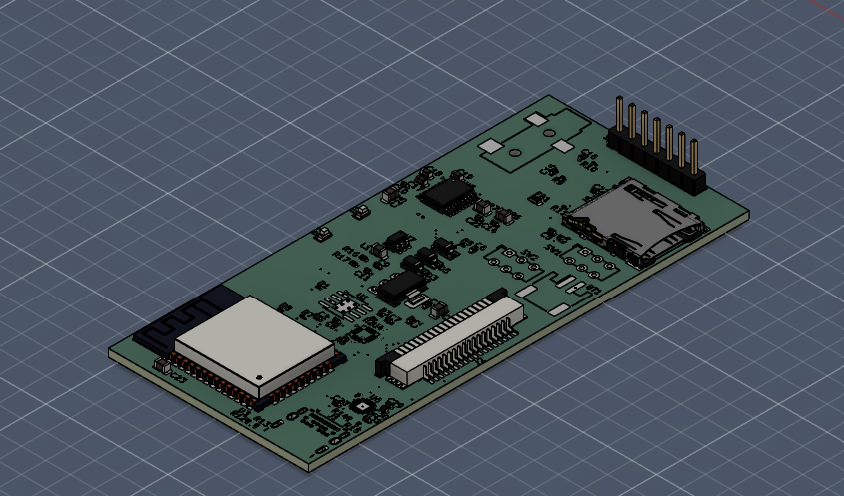
Aeropod2 is an open-source printed circuit board by eyendamuri, from the eyendamuri/aeropod repository on GitHub. It is a 4-layer board of 41 × 90.2 mm with 67 parts on 89 nets, routed with 894 tracks and 147 vias.
It is built around the ESP32-WROOM-32, MPR121QR2 and MT3608, with the AMS1117-3.3, PCM5102APW and TP4056-42-ESOP8 among its other parts. Its parts include 27 capacitors, 17 resistors, 7 ICs, 5 diodes and 5 connectors. It belongs with the ESP32 boards of this library.


A handheld music player built from scratch: custom hardware, custom firmware, custom everything.
aeropod is an iPod-inspired portable media player built around an ESP32. It has a capacitive click wheel, a 240×320 colour display, and plays music three different ways: local files from a microSD card, Spotify (both as a Spotify Connect speaker and through the Web API), and as a Bluetooth speaker over A2DP. It even plays MJPEG video. Everything runs on a custom 4-layer circuit board I designed, inside a 3D-printed case.
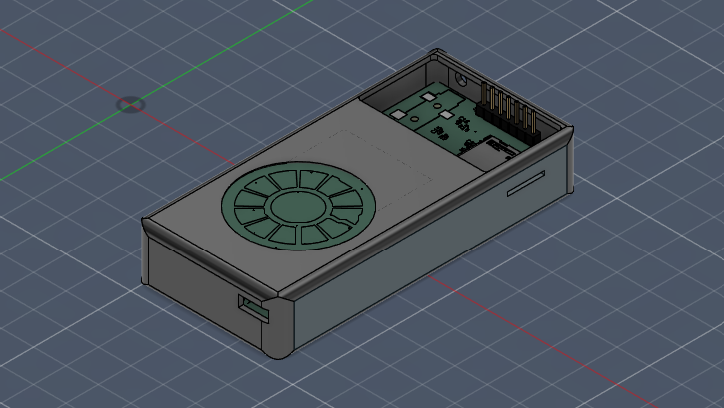
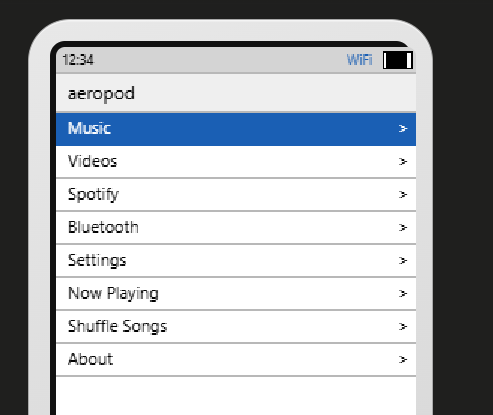
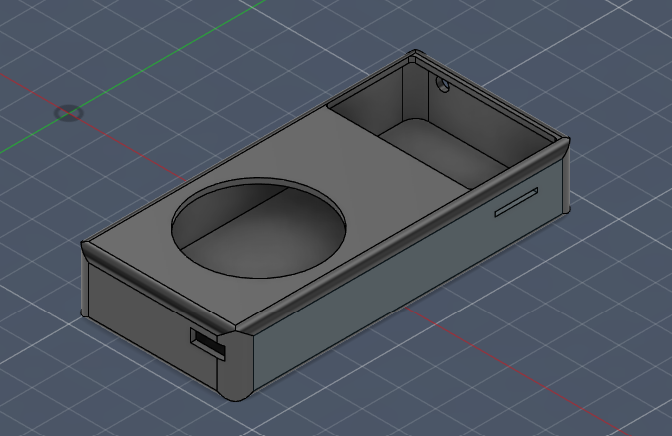
aeropod is two custom PCBs plus a 3D-printed enclosure.
| Subsystem | Part | Notes |
|---|---|---|
| MCU | ESP32-WROOM-32 | dual-core, Wi-Fi + Classic Bluetooth |
| Display | ST7789 240×320 SPI IPS LCD | PWM backlight |
| Audio DAC | PCM5102A | 32-bit I²S stereo DAC |
| Touch input | MPR121 | 12-zone capacitive click wheel |
| Buttons | 5× tactile | Menu / Prev / Next / Play / Center |
| Storage | microSD (SPI) | FAT, holds the music library |
| Power | USB-C → TP4056 charger → LiPo → AMS1117-3.3V + MT3608 boost |
Main board: 4-layer, ~41 × 90 mm, 67 components, 147 vias. Click wheel board: the rounded daughterboard that carries the capacitive ring and buttons.
| Peripheral | Pins |
|---|---|
| ST7789 display | SCK 18, MOSI 23, CS 5, DC 17, RST 16, BL 27 |
| microSD (shared SPI bus) | CS 15 |
| PCM5102A I²S | BCK 26, LRCK 25, DATA 22 |
| MPR121 click wheel (I²C) | SDA 21, SCL 4, IRQ 13 |
| Buttons | MENU 34, PREV 35, NEXT 32, PLAY 33, CENTER 39 |
The firmware is written in C on ESP-IDF v5.2+, about 7,300 lines across a dozen modules. It's organised so each subsystem (audio, video, Spotify, Bluetooth, storage, UI) is self-contained.
Boot sequence: NVS → display + splash → click-wheel/buttons → SD mount + library scan → audio player → video player → Wi-Fi → Spotify → Bluetooth → UI.
Task / core layout:
| Core | Task | Job |
|---|---|---|
| 0 | ui_task | 33 fps render + input dispatch |
| 0 | mpr_ring | MPR121 click-wheel IRQ processing |
| 0 | cw_btn | mechanical button polling |
| 1 | player_task | MP3 decode (minimp3) + I²S output |
| 0 | http_fetch | HTTP audio stream fetch |
| 0 | sp_connect | Spotify Connect mDNS + polling |
Spotify uses OAuth 2.0 PKCE device-code login (you authorise on your phone, tokens are saved to NVS and auto-refresh), the Spotify Web API over HTTPS for browse/search/ playback control, and a Spotify Connect receiver that announces over mDNS and decodes the audio stream to the I²S DAC.
Bluetooth uses the ESP32's Classic BT (BR/EDR) stack with A2DP for audio and AVRCP for transport controls, running alongside Wi-Fi via software coexistence.
aeropod/
├── aeropod_firmware/        ESP-IDF firmware (C)
│   ├── main/
│   │   ├── audio/           I²S output + MP3/AAC/WAV player
│   │   ├── bt_audio/        Bluetooth A2DP sink/source + AVRCP
│   │   ├── drivers/         display (ST7789), click wheel (MPR121), fonts
│   │   ├── network/         Wi-Fi manager + HTTP streaming
│   │   ├── spotify/         OAuth PKCE, Web API, Spotify Connect
│   │   ├── storage/         microSD + in-memory media library
│   │   ├── ui/              screen stack + screens (menus, now-playing...)
│   │   ├── video/           MJPEG player (TJpgDec)
│   │   ├── config.h         all hardware pin assignments
│   │   └── main.c           boot + app_main
│   └── BUILD.md             full build instructions
├── aeropod2/                main board - KiCad 10 project + 3D model
│   ├── gerbers/             fabrication gerbers + drill files
│   └── production/          bom.csv, positions.csv (pick & place), JLC-ready zip
├── clickwheel/              click-wheel board - KiCad 10 project + 3D model
│   ├── gerbers/             fabrication gerbers + drill files
│   └── production/          bom.csv, positions.csv (pick & place), JLC-ready zip
├── case/                    printable enclosure - .f3d source, .step, .stl
├── ASSEMBLY.md              how it all goes together
├── bom.csv                  full bill of materials with prices and links
└── aeropod case (Assembly).step full case assembly modelEverything needed to physically build an aeropod is in the repo:
aeropod2/gerbers/ and clickwheel/gerbers/ (drill files included)positions.csv in each board's production/ folder, plus a ready-to-upload JLCPCB package (aeropod2.zip / clickwheel.zip)case/Aeropod_Case.step, case/Aeropod_Case.stl, and the editable Fusion 360 source case/Aeropod_Case.f3dASSEMBLY.md for the step-by-step assembly planFull machine-readable version with links in bom.csv. Prices are
approximate and were checked in August 2026.
| Part | Description | Qty | Unit | Total | Buy |
|---|---|---|---|---|---|
| Main board (aeropod2) | 4-layer PCB, 41 x 90 mm, fabricated and assembled, min order 5 | 5 | $23.60 | $118.00 | JLCPCB |
| Clickwheel board | 2-layer PCB, fabricated and assembled, min order 5 | 5 | $7.60 | $38.00 | JLCPCB |
| ST7789 display module | 2 inch IPS LCD, 240x320, SPI | 1 | $15.99 | $15.99 | Waveshare |
| LiPo battery | 3.7 V single cell, 1000 mAh, JST-PH | 1 | $8.99 | $8.99 | Adafruit |
| microSD card | 32 GB, Class 10 | 1 | $7.99 | $7.99 | Amazon |
| FFC ribbon cable | 18 pin, 1.0 mm pitch, same-side contacts | 1 | $6.99 | $6.99 | Amazon |
| Earbuds or small speaker | 3.5 mm earbuds, or 8 ohm speaker | 1 | $5.99 | $5.99 | Amazon |
| Hot glue gun and sticks | Mounting the main board and battery, closing the case | 1 | $9.99 | $9.99 | Amazon |
| Cardstock sheet | Backing behind the click-wheel board | 1 | $4.99 | $4.99 | Amazon |
| 3D printed case | Printed through Hack Club's Printing Legion | 1 | $0.00 | $0.00 | Printing Legion |
| $217.92 |
The parts placed on the two boards (ESP32-WROOM-32, PCM5102A, MPR121, CP2102N,
TP4056, AMS1117, MT3608, connectors, and passives) are covered by the assembly
cost above. They are itemised with individual prices and LCSC links in
bom.csv in case you want to source them yourself and hand solder.
Full instructions are in aeropod_firmware/BUILD.md. Short version:
# Requires ESP-IDF v5.2+ and an ESP32
. $IDF_PATH/export.sh

cd aeropod_firmware
idf.py set-target esp32
idf.py build
idf.py -p /dev/ttyUSB0 flash monitor   # COMx on Windows
Two third-party decoders are downloaded during setup rather than committed here
(see BUILD.md): minimp3 (MP3) and TJpgDec (JPEG/video). For Spotify, register a
free app at the Spotify developer dashboard and drop your Client ID into config.h
(or enter it at runtime in Settings).
| Qty | Value | Footprint | References |
|---|---|---|---|
| 14 | 100nF | Capacitor_SMD:C_0402_1005Metric | C1, C2, C3, C7, C8, C9, C10, C14, C21, C22, C28, C29, C30, C31 |
| 5 | 10uF | Capacitor_SMD:C_0805_2012Metric | C4, C23, C25, C26, C27 |
| 3 | 10k | Resistor_SMD:R_0201_0603Metric | R4, R5, R11 |
| 3 | 2.2uF | Capacitor_SMD:C_0603_1608Metric | C17, C18, C19 |
| 3 | D_Schottky | Diode_SMD:D_SOD-123 | D3, D4, D5 |
| 2 | 0.1uF | Capacitor_SMD:C_0402_1005Metric | C5, C6 |
| 2 | 1k | Resistor_SMD:R_0201_0603Metric | R2, R3 |
| 2 | 2.2nF | Capacitor_SMD:C_0402_1005Metric | C15, C16 |
| 2 | 4.7k | Resistor_SMD:R_0201_0603Metric | R7, R8 |
| 2 | 470 | Resistor_SMD:R_0201_0603Metric | R9, R10 |
| 2 | 5.1k | Resistor_SMD:R_0201_0603Metric | R12, R13 |
| 2 | LED | LED_SMD:LED_0603_1608Metric | D1, D2 |
| 2 | SW_Push_SPDT | Button_Switch_THT:SW_E-Switch_EG1271_SPDT | SW1, SW2 |
| 1 | 1.2k | Resistor_SMD:R_0201_0603Metric | R1 |
| 1 | 130k | Resistor_SMD:R_0402_1005Metric | R17 |
| 1 | 22.1k | Resistor_SMD:R_0201_0603Metric | R14 |
| 1 | 22uF | Capacitor_SMD:C_0402_1005Metric | C11 |
| 1 | 4.7uH | Inductor_SMD:L_0805_2012Metric | L1 |
| 1 | 47.5k | Resistor_SMD:R_0201_0603Metric | R15 |
| 1 | 600 @ 100 MHz | Resistor_SMD:R_0603_1608Metric | FB1 |
| 1 | 750k | Resistor_SMD:R_0402_1005Metric | R16 |
| 1 | 75k | Resistor_SMD:R_0201_0603Metric | R6 |
| 1 | AMS1117-3.3 | Package_TO_SOT_SMD:SOT-223-3_TabPin2 | U2 |
| 1 | AudioJack3_Ground | Connector_Audio:Jack_3.5mm_CUI_SJ-3523-SMT_Horizontal | J4 |
| 1 | Battery_Cell | Connector_JST:JST_PH_S2B-PH-SM4-TB_1x02-1MP_P2.00mm_Horizontal | BT1 |
| 1 | CP2102N-Axx-xQFN20 | footprints:QFN20_CP2102N_SIL | U6 |
| 1 | Conn_01x07 | Connector_PinHeader_2.54mm:PinHeader_1x07_P2.54mm_Vertical | J6 |
| 1 | Conn_01x18 | Connector_FFC-FPC:TE_1-84953-8_1x18-1MP_P1.0mm_Horizontal | J2 |
| 1 | ESP32-WROOM-32 | RF_Module:ESP32-WROOM-32 | U3 |
| 1 | MPR121QR2 | Package_DFN_QFN:UQFN-20_3x3mm_P0.4mm | U4 |
| 1 | MT3608 | Package_TO_SOT_SMD:SOT-23-6 | U7 |
| 1 | Micro_SD_Card | Connector_Card:microSD_HC_Hirose_DM3AT-SF-PEJM5 | J5 |
| 1 | NetTie_2 | NetTie:NetTie-2_SMD_Pad0.5mm | NT1 |
| 1 | PCM5102A | Package_SO:TSSOP-20_4.4x6.5mm_P0.65mm | U5 |
| 1 | TP4056-42-ESOP8 | Package_SO:SOIC-8-1EP_3.9x4.9mm_P1.27mm_EP2.41x3.3mm_ThermalVias | U1 |
| 1 | USB_C_Receptacle_USB2.0_14P | Connector_USB:USB_C_Receptacle_CNCTech_C-ARA1-AK51X | J1 |

koushik12328/Smart_mining_helmet
An ESP32-powered safety helmet featuring gas detection, impact sensing, and IoT connectivity


Kalash4152/smart-dustbin-round-two
Designed and simulated a Smart Dustbin & Smart Traffic Lights system using Arduino, ESP32, and sensors at DJSCE Unplugged 2.0.


MAATHES-THILAK-K/ESP32-S3_FLIGHT_CONTROLLER
A custom-designed flight controller based on the ESP32-S3 module, built for compatibility with the esp-fc firmware and Betaflight-like configuration.
It measures 41 × 90.2 mm and has 4 copper layers, 1.6 mm thick.
67 parts, built around the ESP32-WROOM-32, MPR121QR2, MT3608 and AMS1117-3.3. The full list of its parts is on this page, with links to each part's symbol and footprint where PCBKit's library has them.
From the eyendamuri/aeropod repository on GitHub, at the commit this page was made from: the board is aeropod2/aeropod2.kicad_pcb and its schematic aeropod2/aeropod2.kicad_sch. PCBKit opens the board in the browser, with nothing to install.
Its repository states no licence, so its author keeps all rights: ask eyendamuri before reusing the design.