4 layers347 × 156.1 mm
ENV KB RGB
Envious-Data/Env-KB
A custom mechanical keyboard inspired by the CFTKB Mysterium utilizing the Raspberry Pi Pico
377 parts256GPL-3.0

 Envious-Data/Env-KB256
A custom mechanical keyboard inspired by the CFTKB Mysterium utilizing the Raspberry Pi Pico
ENV KB is an open-source printed circuit board by Envious-Data, from the Envious-Data/Env-KB repository on GitHub, published under the GPL-3.0 licence. It is a 2-layer board of 347 × 156.3 mm with 231 parts on 137 nets, routed with 1,492 tracks and 27 vias.
It belongs with the keyboards and input boards and the RP2040 boards of this library.
A custom mechanical keyboard inspired by the CFTKB Mysterium.
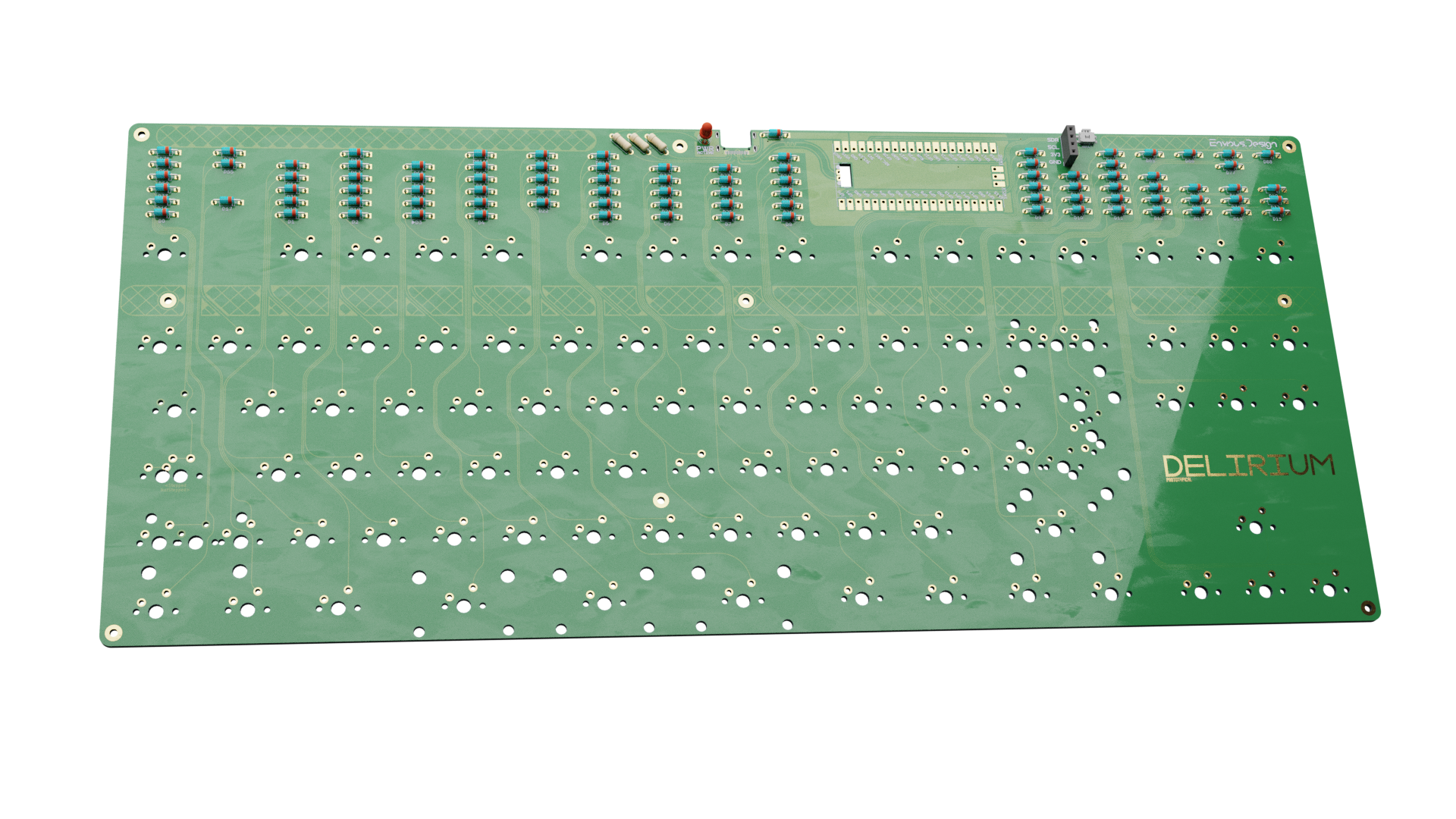
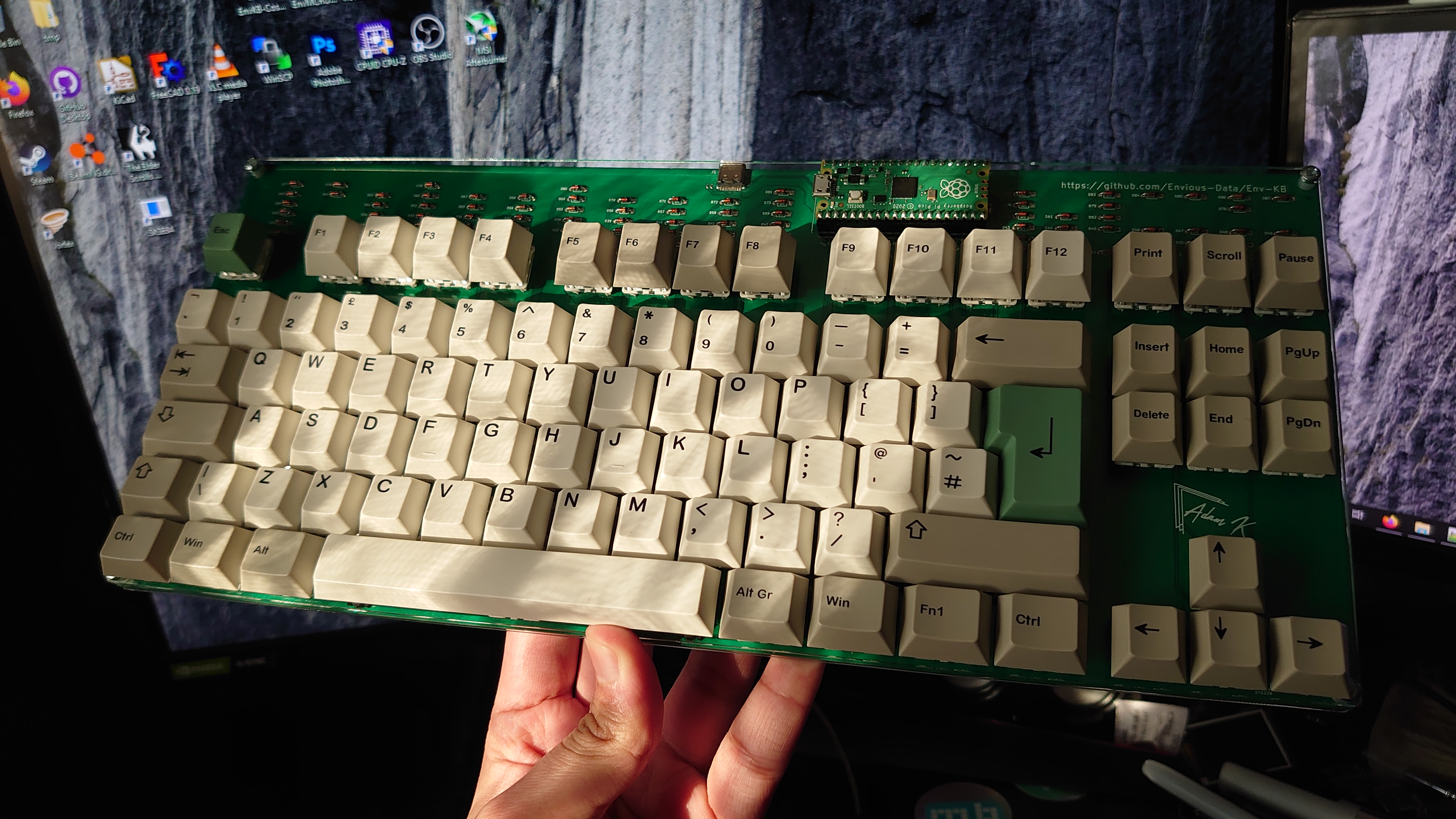
This is a raspberry pi pico powered keyboard I designed as I wanted something similar to a CFTKB Mysterium but easier to solder and a bit more robustly designed.
Pre-compiled firmwares can be found here
1x Type-C-31-M-14
90x 1n4148 DO-35
90x MX keyboard switches (5 pin advised if without switch plate)
3x 5.1K 1/4W resistors
1x 3mm LED
1x 1x04 2.54mm pin socket (optional oled)
1x Panasonic EVQPU SMD switch (optional reset)
raspberry pi pico
10x m2 female standoffs 10mm
20x m2 screws <5mm
(this list may not be totally accurate since I often forget what has changed inbetween when the readme is updated.
Most part orientations should be marked on the PCB however it is important to note that you NEED to connect the pads under the MCU to the respective pads on the board for USB to work, you also need 5.1K resistors to work with USB PD compatible ports.
the type-c port may be difficult for some to solder so use loads of flux and minimal amounts of solder, its best to solder the large 4 outer pins of the shell first.
uh well why not, I think it would be a nice example for people to use as a example. When I came up with the idea of this keyboard there was 1 other raspberry pi pico keyboard so I decided it would be cool to make a keyboard.

PCBWAY Kindly sponsored a batch of PCBs of which you can see pictures of inside the pictures folder.
| Qty | Value | Footprint | References |
|---|---|---|---|
| 92 | D | Diode_THT:D_DO-35_SOD27_P7.62mm_Horizontal | D0, D1, D2, D10, D11, D12, D13, D14, D15, D16, D17, D18, D19, D20, D21, D22 +76 |
| 80 | KEYSW | MX_Only:MXOnly-1U-NoLED | K_0, K_1, K_2, K_10, K_11, K_12, K_13, K_14, K_15, K_16, K_17, K_18, K_19, K_20, K_21, K_22 +64 |
| 10 | MountingHole | MountingHole:MountingHole_2.2mm_M2_Pad | H0, H1, H3, H4, H4, H6, H7, H9, H10, H11 |
| 9 | KEYSW | MX_Only:MXOnly-1.25U-NoLED | K_50A1, K_64, K_78, K_79, K_80, K_82, K_83, K_84, K_85 |
| 5 | Stabilizer | Mounting_Keyboard_Stabilizer:Stabilizer_Cherry_MX_2u | STAB1, STAB2, STAB3, STAB4, STAB5 |
| 2 | G*** | kibuzzard-628AE061 | kibuzzard-628AE061, kibuzzard-628AE061 |
| 2 | G*** | kibuzzard-628ADF99 | kibuzzard-628ADF99, kibuzzard-628ADF99 |
| 2 | KEYSW | MX_Only:MXOnly-1.5U-NoLED | K_33, K_46 |
| 1 | 1n4002 | Diode_THT:D_DO-35_SOD27_P7.62mm_Horizontal | D89 |
| 1 | 47K Resistor | Resistor_THT:R_Axial_DIN0207_L6.3mm_D2.5mm_P7.62mm_Horizontal | PowerLedResistor0 |
| 1 | 5.1k | Resistor_THT:R_Axial_DIN0207_L6.3mm_D2.5mm_P7.62mm_Horizontal | RESISTOR0 |
| 1 | 5.1k | Resistor_THT:R_Axial_DIN0207_L6.3mm_D2.5mm_P7.62mm_Horizontal | RESISTOR1 |
| 1 | Conn_01x04 | Connector_PinSocket_2.54mm:PinSocket_1x04_P2.54mm_Vertical | I2CHeader0 |
| 1 | EVQ | Button_Switch_SMD:Panasonic_EVQPUL_EVQPUC | SW-RST0 |
| 1 | G*** | kibuzzard-628AE874 | kibuzzard-628AE874 |
| 1 | G*** | kibuzzard-628AE882 | kibuzzard-628AE882 |
| 1 | G*** | kibuzzard-628AE933 | kibuzzard-628AE933 |
| 1 | G*** | kibuzzard-628AE966 | kibuzzard-628AE966 |
| 1 | G*** | kibuzzard-628AE8A6 | kibuzzard-628AE8A6 |
| 1 | G*** | kibuzzard-6250C4E7 | kibuzzard-6250C4E7 |
| 1 | G*** | kibuzzard-628AE805 | kibuzzard-628AE805 |
| 1 | G*** | kibuzzard-628AEA91 | kibuzzard-628AEA91 |
| 1 | G*** | kibuzzard-628AE7FB | kibuzzard-628AE7FB |
| 1 | G*** | kibuzzard-628AE868 | kibuzzard-628AE868 |
| 1 | G*** | kibuzzard-628AE82F | kibuzzard-628AE82F |
| 1 | G*** | kibuzzard-628AE80F | kibuzzard-628AE80F |
| 1 | G*** | kibuzzard-628AE768 | kibuzzard-628AE768 |
| 1 | G*** | kibuzzard-628AE7EF | kibuzzard-628AE7EF |
| 1 | G*** | kibuzzard-628AE860 | kibuzzard-628AE860 |
| 1 | HRO-TYPE-C-31-M-12 | josh-connectors:USB_C_TYPE-C-31-M-14 | USB1 |
| 1 | KEYSW | MX_Only:MXOnly-2.25U-NoLED | K_64B1 |
| 1 | KEYSW | MX_Only:MXOnly-2.75U-NoLED | K_76 |
| 1 | KEYSW | MX_Only:MXOnly-1.75U-NoLED | K_50 |
| 1 | LED 3mm | LED_THT:LED_D3.0mm | PowerLED0 |
| 1 | MX-NoLED | MX_Only:MXOnly-2.25U-NoLED | K_63B1 |
| 1 | MX-NoLED | MX_Only:MXOnly-1U-NoLED | K_63 |
| 1 | Pico | EM_Extras:RPi_Pico_SMD_TH | RPI0 |
It measures 347 × 156.3 mm and has 2 copper layers, 1.6 mm thick.
231 parts. The full list of its parts is on this page, with links to each part's symbol and footprint where PCBKit's library has them.
From the Envious-Data/Env-KB repository on GitHub, at the commit this page was made from: the board is KiCad Files/MainPCB/ENV_KB.kicad_pcb and its schematic KiCad Files/BackplatePCB/ENV_KB_BACKPLATE.kicad_sch. PCBKit opens the board in the browser, with nothing to install.
Its repository publishes it under the GPL-3.0 licence: you may reuse it on that licence's terms (keep the author's notice, and for a copyleft licence share your changes alike).
Envious-Data/Env-KB
A custom mechanical keyboard inspired by the CFTKB Mysterium utilizing the Raspberry Pi Pico

Envious-Data/Env-KB
A custom mechanical keyboard inspired by the CFTKB Mysterium utilizing the Raspberry Pi Pico

UzixLS/zxuno1010-board
10x10cm PCB variant of ZX-UNO project for G738/G706 enclosure

OpenModbus/OM-64DO
A compact industrial-grade 64-channel Modbus RTU output module.

Duckle29/pulsr
A simple tiny PCB for handling the high peak currents of periodically firing a solenoid


advaitconty/Modulus
A keyboard, designed to be completely modular via USB Type-C ports

cruunnerr/CrallyBoard
Smart Home System / Alarm System / Input Output System for Raspberry Pi CM4
