2 layers76.2 × 76.2 mm
PaperBack Converter
dqydj/PaperBack_EPaper_Display
Internet Connected or Standard Input EPaper Display
92 parts83MIT
 dqydj/PaperBack_EPaper_Display83
Internet Connected or Standard Input EPaper Display
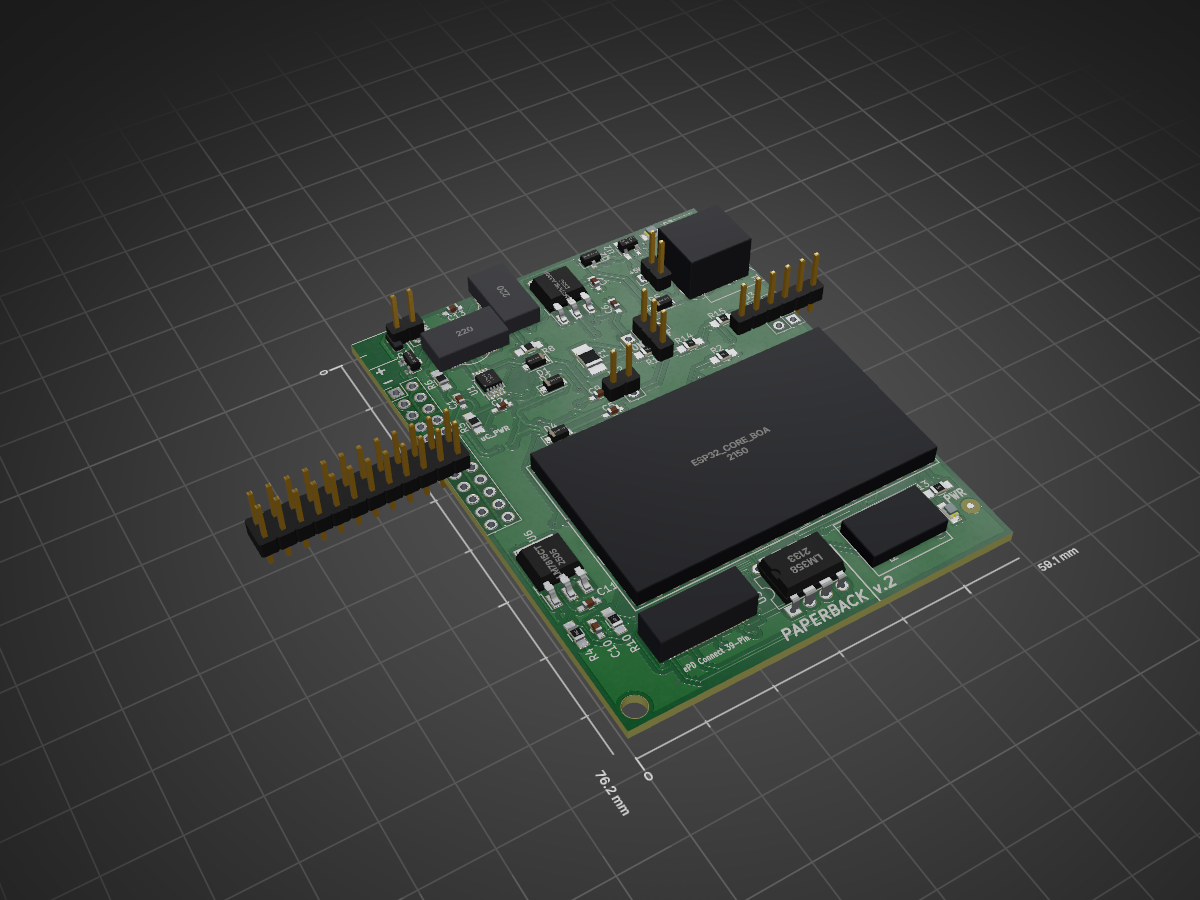
PaperBack Display is an open-source printed circuit board by dqydj, from the dqydj/PaperBack_EPaper_Display repository on GitHub, published under the MIT licence. It is a 2-layer board of 59.1 × 76.2 mm with 64 parts on 49 nets, routed with 1,422 tracks and 109 vias.
It is built around the LM358, LM7815CT and LM7915CT, with the IRLML6402 among its other parts. Its parts include 15 resistors, 13 capacitors, 7 ICs, 6 diodes and 6 connectors. It belongs with the lEDs and displays boards and the ESP32 and RISC-V boards of this library.


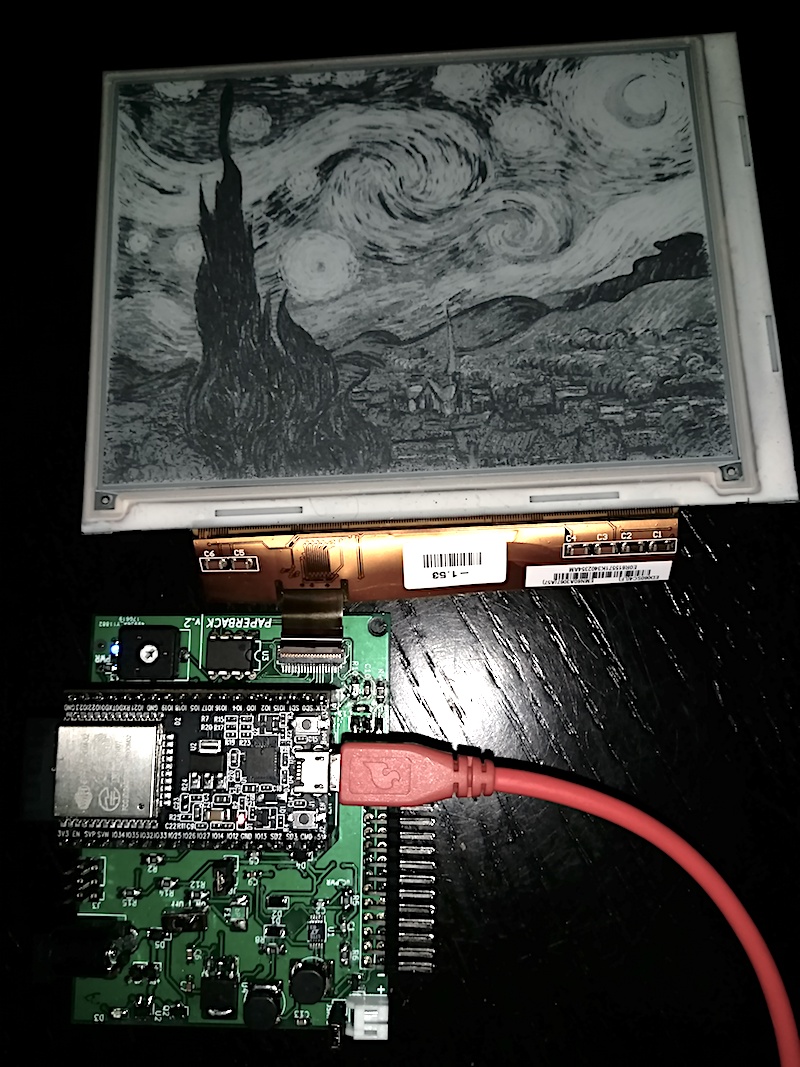
PaperBack is a modular, internet connected OR VGA EPaper Display. It consists of a breakout board for a 39 pin ePaper display and an ESP32 in one mode. In the other, remove the ESP32 and attach a VGA Conversion board and use regular VGA input to drive the display!
PaperBack is an entry in the 2017 Hackaday Prize, you can see a more complete (and verbose!) writeup here.
Currently, PaperBack works both driven by an ESP32 Development Board, or directly via VGA with the attached second PCB.
Hardware Overview:
Remember, choose one at a time! You can use the ESP32 breakout board with the ESP32 dev board, or remove the dev board and attach the VGA converter.
Unplug any ESP32 from the socket and attach both boards, then attach power (see below). When the board detects a signal it will start to refresh.
All firmware is in the /firmware_VGA/FPGA and /firmware_VGA/Microcontroller directories.
The user switches change color depth (read: shades of gray. 2 color is black & white.) and refresh speed: Switch 3 (Furthest from Microcontroller) Switch 2 Switch 1 (Closest to Microcontroller)
Remove the second PCB if attached, then add the ESP32. There are easy ways to add power (there are pins exposed too, but these are easiest). Unless using Lithium and the DC adapter, only use one at a time!
Demos:
convert.py in /software/image_converter automatically converts images which are compatible with Paperback's basic image demo. The image demo is in /firmware_ESP32/Paperback_Greyscale_Static_Image.| Qty | Value | Footprint | References |
|---|---|---|---|
| 4 | 10k | Resistors_SMD:R_0805_HandSoldering | R1, R2, R3, R12 |
| 4 | D_Schottky | PK_Footprints:D_SOD-123F | D1, D2, D4, D5 |
| 3 | 4.7uF | Capacitors_SMD:C_0603_HandSoldering | C6, C7, C13 |
| 2 | 1uF > 15V | Capacitors_SMD:C_0603_HandSoldering | C10, C11 |
| 2 | 22uH | PK_Footprints:DG6050C_Murata_Inductor | L1, L2 |
| 2 | 39k | Resistors_SMD:R_0805_HandSoldering | R4, R10 |
| 2 | CONN_01X03 | Pin_Headers:Pin_Header_Straight_1x03_Pitch2.54mm | J3, J4 |
| 2 | IRLML6402 | TO_SOT_Packages_SMD:SOT-23 | Q1, Q2 |
| 2 | Jumper | Pin_Headers:Pin_Header_Straight_1x02_Pitch2.54mm | JP1, JP2 |
| 2 | LED | LEDs:LED_0805 | D3, D6 |
| 1 | .1uF | Capacitors_SMD:C_0603_HandSoldering | C1 |
| 1 | .33uF > 20V | Capacitors_SMD:C_0603_HandSoldering | C8 |
| 1 | .33uF > 22V | Capacitors_SMD:C_0603_HandSoldering | C9 |
| 1 | .75A | Resistors_SMD:R_1210_HandSoldering | F1 |
| 1 | 100k | PK_Footprints:CB10V_Trimmer | RV1 |
| 1 | 100pF | Capacitors_SMD:C_0603_HandSoldering | C2 |
| 1 | 120k >22V | Resistors_SMD:R_0805_HandSoldering | R8 |
| 1 | 180k | Resistors_SMD:R_0805_HandSoldering | R14 |
| 1 | 1K | Resistors_SMD:R_0805_HandSoldering | R11 |
| 1 | 1k | Resistors_SMD:R_0805_HandSoldering | R13 |
| 1 | 1uF | Capacitors_SMD:C_0603_HandSoldering | C12 |
| 1 | 1uF >20V | Capacitors_SMD:C_0603_HandSoldering | C5 |
| 1 | 1uF >22V | Capacitors_SMD:C_0603_HandSoldering | C4 |
| 1 | 200K | Resistors_SMD:R_0805_HandSoldering | R9 |
| 1 | 2M >22V | Resistors_SMD:R_0805_HandSoldering | R7 |
| 1 | 39k > 20V | Resistors_SMD:R_0805_HandSoldering | R6 |
| 1 | 4.7pF >22V | Capacitors_SMD:C_0603_HandSoldering | C3 |
| 1 | 560k | Resistors_SMD:R_0805_HandSoldering | R15 |
| 1 | 560k > 20V | Resistors_SMD:R_0805_HandSoldering | R5 |
| 1 | BARREL_JACK | PK_Footprints:Switchcraft_5.5_2.1_Barrel_Jack | J1 |
| 1 | Battery_Cell | PK_Footprints:JST_Right_Angle_02x01 | SINGLE_CELL_LITHIUM1 |
| 1 | CONN_01X02 | Pin_Headers:Pin_Header_Straight_1x02_Pitch2.54mm | J2 |
| 1 | CONN_02X12 | Pin_Headers:Pin_Header_Straight_2x12_Pitch2.54mm | J5 |
| 1 | ED060SC4 | PK_Footprints:ED060SC4 | J6 |
| 1 | ESP32_Core_Board_V2 | PK_Footprints:ESP32_Core_Board_v2 | U7 |
| 1 | LM358 | Housings_DIP:DIP-8_W7.62mm | U3 |
| 1 | LM7815CT | TO_SOT_Packages_SMD:TO-252-3_TabPin2 | U6 |
| 1 | LM7915CT | TO_SOT_Packages_SMD:TO-252-3_TabPin2 | U5 |
| 1 | LOGO | PK_Footprints:tractor_logo_invert | G*** |
| 1 | LT1945 | Housings_SSOP:MSOP-10_3x3mm_Pitch0.5mm | U1 |
| 1 | MAX1555 | TO_SOT_Packages_SMD:SOT-23-5_HandSoldering | U2 |
| 1 | PAM3110BLA330RDICT | TO_SOT_Packages_SMD:TO-252-3_TabPin2 | U4 |
| 1 | SW_DPDT_x2 | Pin_Headers:Pin_Header_Straight_1x03_Pitch2.54mm | SW1 |
The 58 most common of 64 parts.
dqydj/PaperBack_EPaper_Display
Internet Connected or Standard Input EPaper Display


EleonoreMizo/pedalevite
Pédale Vite — DIY multi-FX pedalboard for guitar/bass/etc.


ykupas/DCDC-Buck-KiCAD
DC-DC buck converter KiCAD project using OpAmps to compensate and control switching. KiCAD v10 used.

fwachsmuth/Filmkorn-Raw-Scanner
The Filmkorn Raw Scanner, turning 8mm and 16mm films into lossless 12-bit CinemaDNG


It measures 59.1 × 76.2 mm and has 2 copper layers, 1.6 mm thick.
64 parts, built around the LM358, LM7815CT, LM7915CT and IRLML6402. The full list of its parts is on this page, with links to each part's symbol and footprint where PCBKit's library has them.
From the dqydj/PaperBack_EPaper_Display repository on GitHub, at the commit this page was made from: the board is hardware/PaperBack_Display/PaperBack_Display.kicad_pcb. PCBKit opens the board in the browser, with nothing to install.
Its repository publishes it under the MIT licence: you may reuse it on that licence's terms (keep the author's notice, and for a copyleft licence share your changes alike).