
2 layers105.2 × 71.1 mm
Onyx PCB
CuriousMotor/Onyx-Stepper-Motherboard
The successor of the iconic Arduino-CNC-shield
96 parts56MIT

 Alia5/PiCCANTE104
PiCCANTE is a powerful tool for exploring and reversing CAN busses of vehicles, based on Raspberry Pi Pico (any model)
PiCCANTE OBD Dongle is an open-source printed circuit board by Alia5, from the Alia5/PiCCANTE repository on GitHub, published under the GPL-3.0 licence. It is a 4-layer board of 50 × 60 mm with 35 parts on 52 nets, routed with 217 tracks and 95 vias.
It is built around the TCAN3413DRB, TPS5430DDA and B340A. Its parts include 12 resistors, 4 capacitors, 4 ICs, 2 diodes and 1 connector. It belongs with the interfaces and adapters boards and the RP2040 boards of this library.







PiCCANTE Car Controller Area Network Tool for Exploration
PiCCANTE is a powerful hacking tool for accessing, exploring, and manipulating vehicle CAN bus networks, built on the affordable Raspberry Pi Pico platform. Designed for researchers, security professionals, and automotive enthusiasts looking to dive deep into vehicle systems without expensive proprietary equipment.
⚠️ Always exercise caution when connecting to vehicle systems. ⚠️
PiCCANTE is designed to be a dead-simple, dirt-cheap, and readily-available hardware platform for vehicle research and exploration.
As cars become more and more computerized, manufacturers keep locking them behind proprietary tools and restrictive systems, even connect vehicles to the internet, yet they still rely on communication standards from the 1980s.
Car hacking and independent research grows increasingly important to discover security vulnerabilities, reverse engineer vehicle systems, and empower owners with custom tools for diagnostics and tuning that support the Right to Repair movement.
The project leverages Raspberry Pi Pico (2 [W]) development boards, selected for their exceptional affordability, global availability, impressive specifications, and well-documented open-source SDK.
Keep it D.I.R.T.Y 😉
wifi ap <ssid> <password> <channel>)wifi connect <ssid> <password>)For more information, checkout the hardware directory.
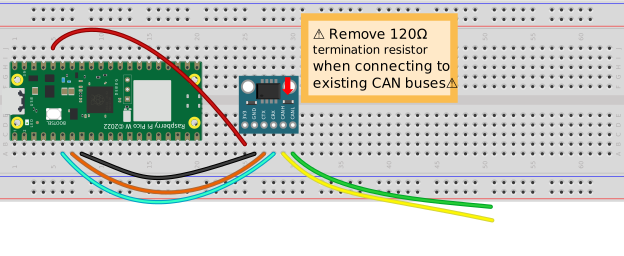
PiCCANTE is designed to be modular and can be built with just a few components.
The simplest version just uses a Pico board and a CAN transceiver.
If you want more features, you can add an SD card slot, a buck converter, and other things.
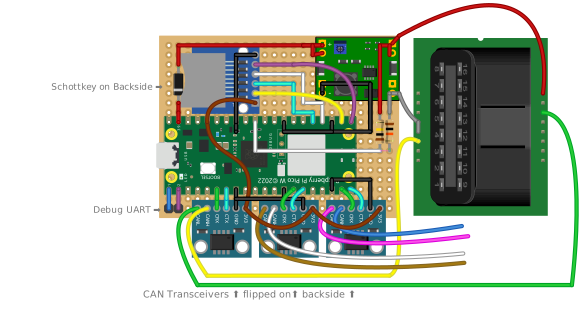
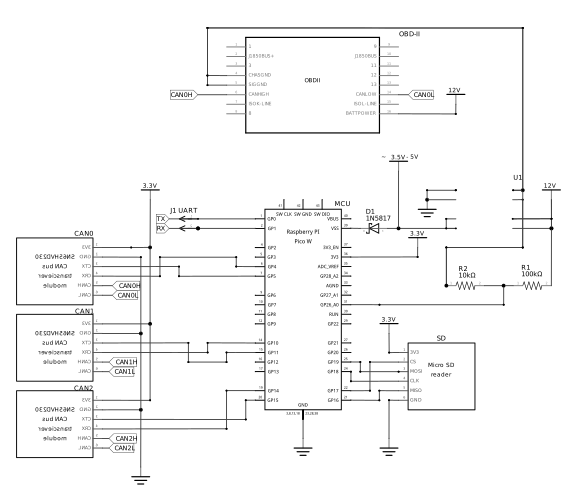
A full PiCCANTE based OBD-II dongle is simple enough to be soldered onto double-sided perfboard.
A perfboard version fits on a 60mm x 50mm board and the 3D printable case measures just 97mm x 56mm including the OBD-II connector.
It cam be built with the following components (but you can omit anything you don't need):


A proper PCB with better CAN transceivers can be found in the hardware directory.
It is made with KiCAD and can be manufactured by any PCB manufacturer.


Pre-compiled binaries for all official Raspberry Pi Pico boards are available as CI action artifacts in the GitHub repository.
When connected via USB, PiCCANTE exposes up to 4× USB-CDC interfaces:
# Set up SLCAN interface
sudo slcand -o -s6 -t hw -S 3000000 /dev/ttyACM1 can0
sudo ip link set up can0

# Monitor CAN traffic
candump can0atz - Enable ELM mode (if ELM327-Emulator is on USB)
binary - Toggle GVRET binary mode (binary <on|off>)
can_bitrate - Change CAN bus bitrate (can_bitrate <bus> <bitrate>)
can_disable - Disable CAN bus (can_disable <bus>)
can_enable - Enable CAN bus with specified bitrate (can_enable <bus> <bitrate>)
can_status - Show status of CAN buses
echo - Toggle command echo (echo <on|off>)
elm - Configure ELM327 interface and mode (elm <usb|bt PIN|wifi> <can0|can1|can2>)
help - Display this help message
idle_timeout - Set idle timeout in minutes (idle_timeout disable|<minutes>)
led_mode - Set LED mode (led_mode <0-3>) 0=OFF, 1=Power, 2=CAN Activity
log_level - Set log level (log_level <0-3>). 0=DEBUG, 1=INFO, 2=WARNING, 3=ERROR
reset - Reset the system (reset)
save - Save current settings to flash
set_num_busses - Set number of CAN buses (can_num_busses [number])
settings - Show current system settings
sleep - Enter deep sleep mode (sleep)
sys_stats - Display system information and resource usage (sys_stats [cpu|heap|fs|tasks|uptime|adc|wifi])
telnet - Enable or disable Telnet and set port (telnet enable|disable | telnet <port
version - Display version information (version)
wifi - Manage WiFi settings (wifi info | wifi connect <ssid> <password> | wifi ap <ssid> <password> <channel> | wifi disable)The Raspberry Pi Pico has no native CAN support. The PIO can2040 implementation we're using only supports CAN 2.0B (due to licensing issues).
However, if you need CAN FD or other bus types, feel free to open a PR supporting a CAN controller (like MCP2518FD).
Yes! PiCCANTE is designed to be cross-platform. It works with any operating system as a standard USB device with no special drivers required.
For SLCAN interfaces, Linux users can use can-utils to provide a SocketCAN interface, while all platforms support the GVRET/SLCAN interface through tools like SavvyCAN.
Up to 3 CAN buses on the RP2350 (Pico 2/2W) and up to 2 CAN buses on the RP2040 (original Pico/Pico W).
Each bus has a dedicated USB-CDC SLCAN interface.
PiCCANTE gives you a fully open-source solution at a fraction of the cost of commercial tools.
You get complete control over the hardware and software, the ability to customize for specific needs, and valuable learning experience about CAN networks and embedded systems.
Issue: CAN bus not receiving data
Solutions:
can_status commandIssue: LED not lighting up / blinking
Solutions:
PiCCANTE is built using the Raspberry Pi Pico SDK and follows standard Pico development practices. This section covers how to set up your development environment, build the project, and extend its functionality.
Install the Pico SDK:
Follow the instructions in the Pico SDK documentation to install the SDK
Clone PiCCANTE:
git clone git@github.com:Alia5/PiCCANTE.git
cd PiCCANTE
git submodule update --init --recursiveConfigure with CMake:
cmake -B build -G Ninja -DCMAKE_BUILD_TYPE=ReleaseBuild the project:
cmake --build build --config ReleaseContributions to PiCCANTE are welcome! Whether it's bug reports, feature requests, documentation improvements, or code contributions, your help makes this project better.
PiCCANTE is designed to be extensible. Here are some key areas where you might want to extend functionality:
PiCCANTE - PiCCANTE Car Controller Area Network Tool for Exploration
Copyright (C) 2025 Peter Repukat

This program is free software: you can redistribute it and/or modify
it under the terms of the GNU General Public License as published by
the Free Software Foundation, either version 3 of the License, or
(at your option) any later version.

This program is distributed in the hope that it will be useful,
but WITHOUT ANY WARRANTY; without even the implied warranty of
MERCHANTABILITY or FITNESS FOR A PARTICULAR PURPOSE.  See the
GNU General Public License for more details.

You should have received a copy of the GNU General Public License
along with this program. If not, see <https://www.gnu.org/licenses/>.| Qty | Value | Footprint | References |
|---|---|---|---|
| 7 | ~ | Connector_PinHeader_2.54mm:PinHeader_1x02_P2.54mm_Vertical | JCAN0, JCAN1, JCAN2, JCAN2Term0, JCAN2Term1, JCAN2Term2, JUART1 |
| 5 | 10K | Resistor_SMD:R_0603_1608Metric | R7, R8, R9, R10, R11 |
| 3 | 120 | Resistor_SMD:R_0603_1608Metric | R1, R2, R5 |
| 3 | TCAN3413DR | EasyEDA:SOP-8_L4.9-W3.9-P1.27-LS6.0-BL-1 | U1, U2, U5 |
| 2 | 10k | Resistor_SMD:R_0603_1608Metric | R12, R14 |
| 2 | B340A | EasyEDA:SMA_L4.4-W2.6-LS5.0-RD | D1, D2 |
| 2 | LOGO | LOGO | G***, G*** |
| 1 | 0.01µF | Capacitor_SMD:C_0603_1608Metric | C2 |
| 1 | 100k | Resistor_SMD:R_0603_1608Metric | R15 |
| 1 | 10µF | Capacitor_SMD:C_1206_3216Metric | C3 |
| 1 | 10µF | Capacitor_SMD:C_0603_1608Metric | C1 |
| 1 | 15µH | EasyEDA:IND-SMD_L4.0-W4.0 | L1 |
| 1 | 220uF | Capacitor_SMD:C_1206_3216Metric | C4 |
| 1 | 4k | Resistor_SMD:R_0603_1608Metric | R13 |
| 1 | Micro_SD_Card | EasyEDA:TF-SMD_503398-1892 | J1 |
| 1 | RaspberryPi_Pico_W | PiCO_CUSTOM_KEEPOUT:RaspberryPi_Pico_W_SMD_THT_COMBO_CUSTOM_KEEPOUT | A1 |
| 1 | TPS5430DDA | Package_SO:TI_SO-PowerPAD-8_ThermalVias | U4 |
| 1 | ~ | Connector_PinHeader_2.54mm:PinHeader_1x02_P2.54mm_Horizontal | JPWR1 |
It measures 50 × 60 mm and has 4 copper layers, 1.6 mm thick.
35 parts, built around the TCAN3413DRB, TPS5430DDA and B340A. The full list of its parts is on this page, with links to each part's symbol and footprint where PCBKit's library has them.
From the Alia5/PiCCANTE repository on GitHub, at the commit this page was made from: the board is hardware/PiCCANTE-OBD-Dongle/PCB/PiCCANTE-OBD-Dongle.kicad_pcb and its schematic hardware/PiCCANTE-OBD-Dongle/PCB/PiCCANTE-OBD-Dongle.kicad_sch. PCBKit opens the board in the browser, with nothing to install.
Its repository publishes it under the GPL-3.0 licence: you may reuse it on that licence's terms (keep the author's notice, and for a copyleft licence share your changes alike).
CuriousMotor/Onyx-Stepper-Motherboard
The successor of the iconic Arduino-CNC-shield

JohnDecebal/UNDR
UNDR AUTO is a fully automatic WDT (Weiss Distribution Technique) tool designed for espresso enthusiasts. This open-source DIY project combines 3D printed parts with electronic and mechanical components to create a…

jeji/orange_juice
A orange pi zero shield board for 3D printer with klipper features

jeji/orange_juice_2
For Orange Pi zero 2 with klipper and more advance feature


durveshpathak1989/kicad-local-agent
Free local Ollama agent for generating and validating KiCad project files
