


2 layers80 × 60 mm
EnvMonitor
kennySzhucheng/EnvMonitor
🌡️ 智能环境监测站 | STM32F103C8T6 + FreeRTOS + ESP8266 | 温湿度/光照/测距/OLED菜单/ThingSpeak上云 | 从裸机到RTOS到KiCad PCB全流程
27 parts10

Networked rotating ultrasonic radar system built on the Deneyap Kart 1A (ESP32-S3), with a real-time web dashboard served directly from the board.
Aegis is an open-source printed circuit board by YousefAliAicha, from the YousefAliAicha/aegis-embedded-system repository on GitHub, published under the MIT licence. It is a 2-layer board with 9 parts on 39 nets, routed with 100 tracks and 0 vias.
It is built around the HC-SR04. Its parts include 4 connectors, 1 resistor and 1 IC. It belongs with the home automation and IoT boards and the ESP32 boards of this library.



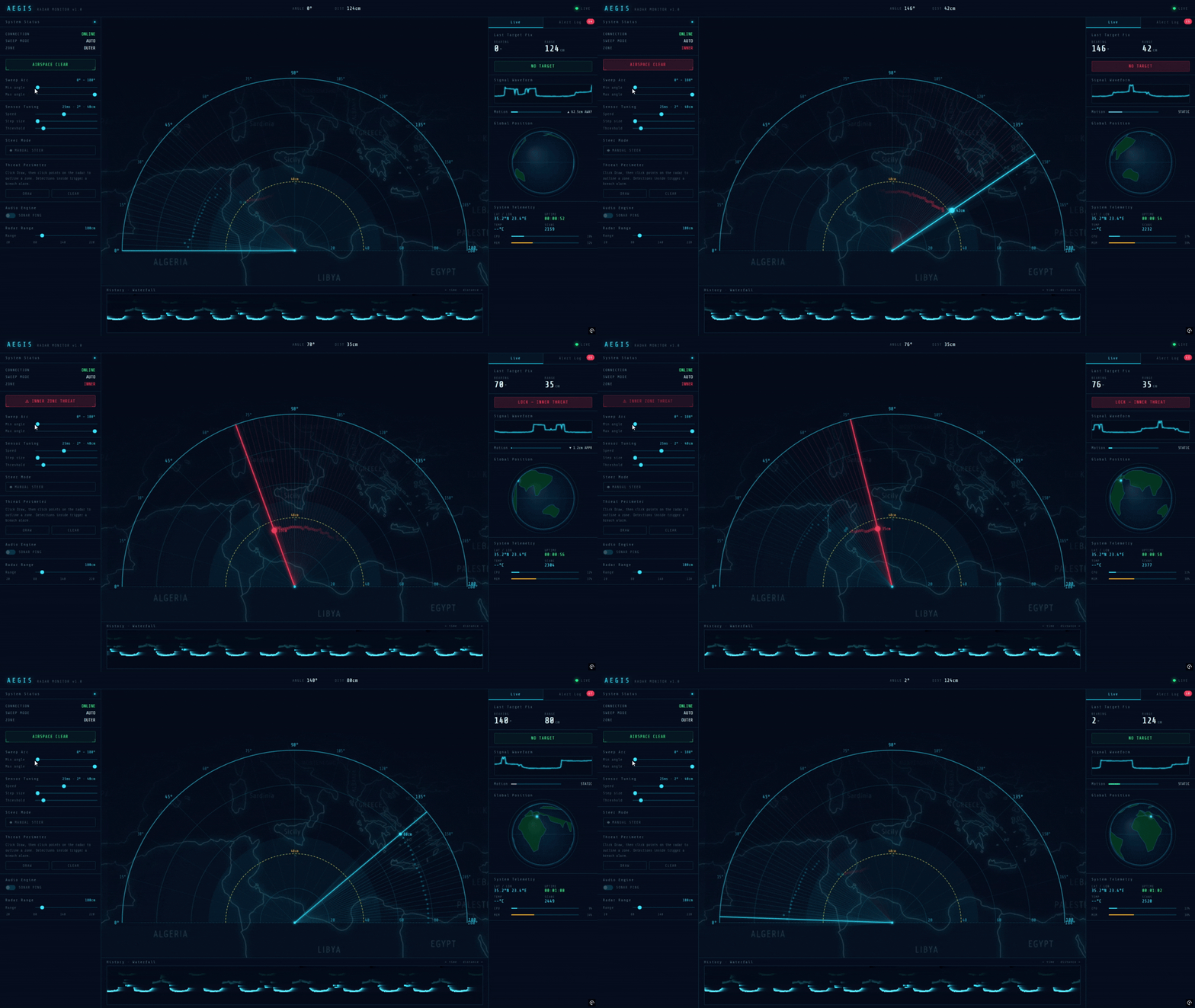
A radar system on the Deneyap Kart 1A (ESP32-S3). A servo sweeps an HC-SR04 ultrasonic sensor across a 180° arc; the board streams range telemetry over WebSocket and serves a full dashboard from its own flash — no external server, no app.
Sweep and sensing run in a non-blocking loop: each step is gated by a
millisecond timer, not delay(), so the WebSocket and HTTP stacks stay
responsive between steps.
[Servo position] → [HC-SR04 pulse] → [distance measurement]
       ↓                                        ↓
  [LCD update]                     [WebSocket broadcast]
                                            ↓
                                   [Browser radar canvas]
Inbound commands from the dashboard arrive as JSON over WebSocket port 81 and apply to the live sweep parameters immediately — no reflash.
Offline behavior: if Wi-Fi association fails after 30 attempts
(~12 seconds), the LCD shows OFFLINE MODE and the sweep loop keeps
running locally. The dashboard is unreachable in that state, but ranging,
detection, and the LCD readout are unaffected — the radar doesn't depend on
the network being up to function.
Hardware
clear()
in the loop, so no flickerDashboard (served at http://<device-ip>)
Firmware controls (all runtime-adjustable, no reflash)
| Command | Effect |
|---|---|
SET_SWEEP_MIN | Left boundary of sweep arc (0–180°) |
SET_SWEEP_MAX | Right boundary of sweep arc (0–180°) |
SET_STEP_DEG | Angular resolution per step (1–10°) |
SET_STEP_DELAY | Milliseconds between steps (5–200ms) |
SET_THRESHOLD | Detection distance in cm (1–300cm) |
MANUAL_STEER | Point servo to a specific angle |
AUTO_RESUME | Return to automatic sweep |
One frame broadcast per sweep step on port 81.
Outbound (board → browser):
{ "a": 90, "d": 34.2, "det": true }a — servo angle (0–180°)d — distance in cm, or -1 if out of rangedet — true if within detection thresholdInbound (browser → board): see the firmware controls table above.
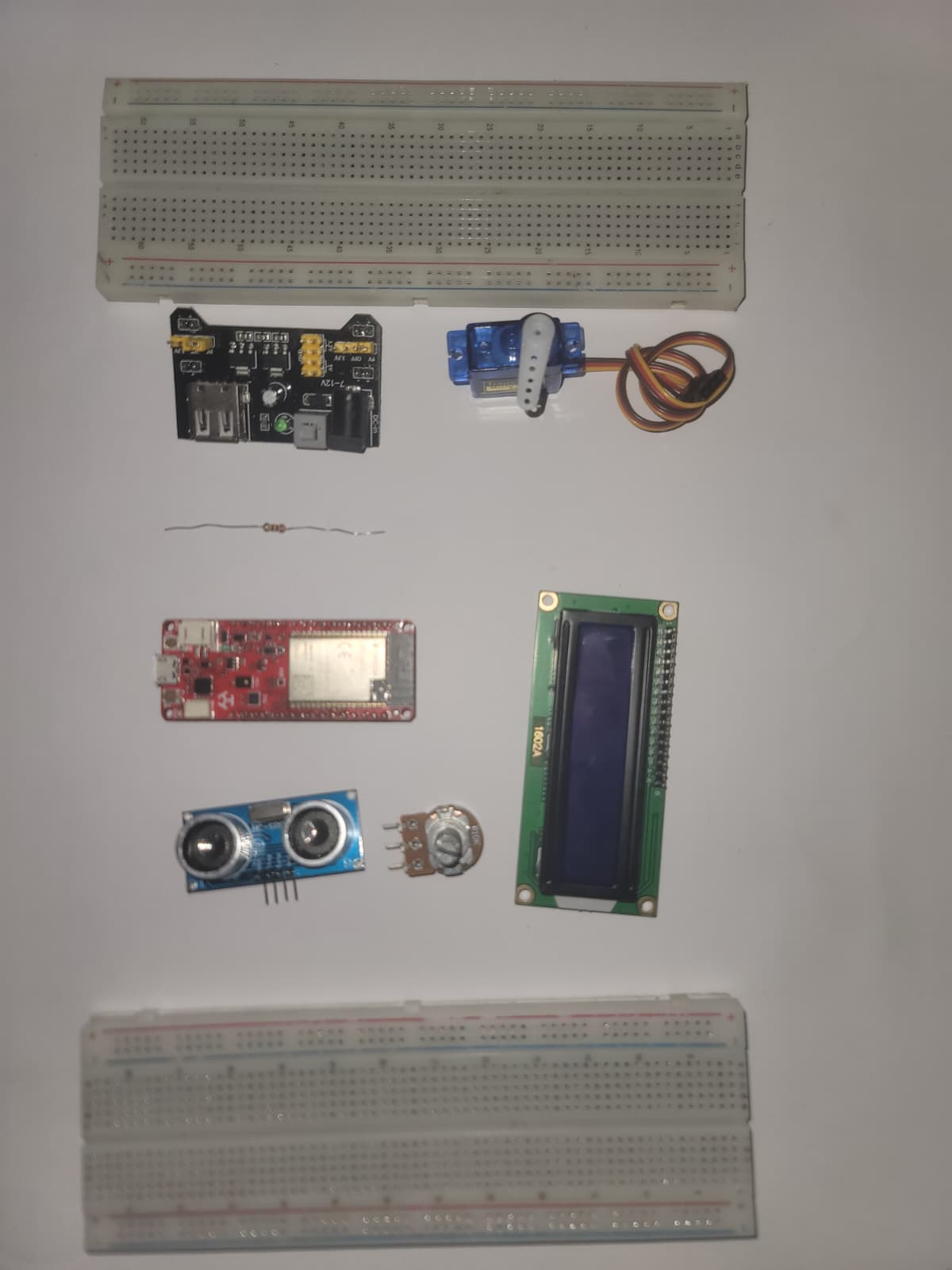
| Component | Qty | Notes |
|---|---|---|
| Deneyap Kart 1A | 1 | ESP32-S3 based; other ESP32 boards need pin remapping |
| HC-SR04 | 1 | 5V supply required |
| SG90 servo | 1 | 5V supply required; never power from board 3.3V |
| 1602A LCD (HD44780-compatible) | 1 | 16-pin, 4-bit parallel |
| MB102 breadboard power module | 1 | Supplies 5V to servo, sensor, LCD |
| 9V DC wall adapter | 1 | Centre-positive, ≥1A. Not a PP3 battery |
| 10kΩ potentiometer | 1 | LCD contrast |
| 220Ω resistor | 1 | LCD backlight current limiting |
Full pin map: WIRING.md.
| Deneyap pin | Connected to |
|---|---|
| D0 | SG90 PWM signal |
| D1 | HC-SR04 TRIG |
| D11 | HC-SR04 ECHO |
| D4 | LCD Enable |
| D5–D7 | LCD D4–D6 |
| D10 | LCD RS |
| D12 | LCD D7 |
| GND | MB102 GND rail (mandatory common ground) |
The MB102 GND rail must be wired to the Deneyap Kart GND pin — without a shared ground reference, signal levels are undefined.
https://raw.githubusercontent.com/deneyapkart/deneyapkart-arduino-core/master/package_deneyapkart_index.jsonInstall via Tools → Manage Libraries:
| Library | Author |
|---|---|
| WebSockets | Markus Sattler |
| ESP32Servo | Kevin Harrington |
| ArduinoJson | Benoit Blanchon |
LiquidCrystal and WiFi ship with the board package.
cp firmware/aegis-deneyap/secrets.h.example firmware/aegis-deneyap/secrets.hEdit secrets.h:
#define WIFI_SSID     "your_network_name"
#define WIFI_PASSWORD "your_password"
secrets.h is gitignored and never committed.
firmware/aegis-deneyap/aegis-deneyap.inoTools → Board → Deneyap Kart 1AOn boot, the LCD shows AEGIS v1.0, then Connecting WiFi, then the
board's IP address for ~3 seconds before the radar loop starts.
On the same Wi-Fi network:
http://<ip from LCD or serial monitor 115200>Served directly from flash — no internet needed after first font load (or
remove the Google Fonts import in dashboard.h for fully offline use).
aegis-embedded-system/
├── assets/
├── firmware/
│   └── aegis-deneyap/
│       ├── aegis-deneyap.ino   # Main firmware — radar loop, Wi-Fi, WebSocket
│       ├── dashboard.h         # Self-contained dashboard, stored in flash
│       ├── secrets.h           # Not committed
│       └── secrets.h.example
├── hardware/
│   ├── aegis.kicad_sch
│   ├── aegis.kicad_pcb
│   ├── aegis.kicad_pro
│   └── HC-SR04/
├── .gitignore
├── README.md
└── WIRING.mdMIT — see LICENSE.
| Qty | Value | Footprint | References |
|---|---|---|---|
| 1 | 10kΩ | Potentiometer_THT:Potentiometer_Bourns_3296W_Vertical | RV1 |
| 1 | 220Ω | Resistor_SMD:R_0201_0603Metric | R1 |
| 1 | DENEYAP_LEFT | Connector_PinHeader_2.54mm:PinHeader_1x16_P2.54mm_Vertical | J1 |
| 1 | DENEYAP_RIGHT | Connector_PinHeader_2.54mm:PinHeader_1x16_P2.54mm_Vertical | J2 |
| 1 | HC-SR04 | HC-SR04:XCVR_HC-SR04 | U1 |
| 1 | MB102_BOT_RAIL | Connector_PinHeader_2.54mm:PinHeader_1x02_P2.54mm_Vertical | J4 |
| 1 | MB102_TOP_RAIL | Connector_PinHeader_2.54mm:PinHeader_1x02_P2.54mm_Vertical | J3 |
| 1 | Motor_Servo | Connector_Harwin:Harwin_M20-89003xx_1x03_P2.54mm_Horizontal | M1 |
| 1 | WC1602A | Display:WC1602A | DS1 |
kennySzhucheng/EnvMonitor
🌡️ 智能环境监测站 | STM32F103C8T6 + FreeRTOS + ESP8266 | 温湿度/光照/测距/OLED菜单/ThingSpeak上云 | 从裸机到RTOS到KiCad PCB全流程


NikolaiRadke/Noko_2
The do-it-yourself Arduino-based Noko monster. Version 2 with PCB and 3D printed casing.

billtsol/Maze
This project demonstrates how to use an Arduino board, IR sensors, and a motor driver shield to create a maze-solving robot.

c-lydia/ESP-ROS2
A tiny robot with IMU (MPU5060) and an ultrasonic sensor (HC-SR04), running on micro-ROS, communicating over UDP.

dbrgn/crazyflie2-hcsr04
Ultrasonic sensor (HC-SR04) extension board for the Crazyflie 2.0

YousefAliAicha/sentinel-arduino-firmware
Adaptive traffic-light FSM on the Arduino UNO R3 — pedestrian preemption, LDR-gated night mode with HC-SR04 vehicle detection, and a multiplexed 7-segment countdown. Fully non-blocking.

1708018656-ship-it/-manbo-robot-dog
精简版底板(70 × 54 mm,13 个元件)。完整版底板见 hardware/
9 parts, built around the HC-SR04. The full list of its parts is on this page, with links to each part's symbol and footprint where PCBKit's library has them.
From the YousefAliAicha/aegis-embedded-system repository on GitHub, at the commit this page was made from: the board is hardware/aegis.kicad_pcb and its schematic hardware/aegis.kicad_sch. PCBKit opens the board in the browser, with nothing to install.
Its repository publishes it under the MIT licence: you may reuse it on that licence's terms (keep the author's notice, and for a copyleft licence share your changes alike).