
4 layers50 × 50 mm
HSCanT
cherry-embedded/HSCanT-hardware
HSCanT is a USB to 4-channel CAN FD tool designed based on the HPM5321 chip.
130 parts52Apache-2.0

 X1L3F/ESP32-CAN-Shield2
Can Shield for the ESP32-S3
CAN Shield is an open-source printed circuit board by X1L3F, from the X1L3F/ESP32-CAN-Shield repository on GitHub. It is a 2-layer board of 29 × 26.5 mm with 15 parts on 34 nets, routed with 58 tracks and 2 vias.
It is built around the PESD2CAN. Its parts include 4 connectors, 3 resistors, 2 ICs and 1 capacitor.
This ESP32-CAN-Shield is a custom-designed shield for the ESP32-S3, primarily used as a CAN (Controller Area Network) to WiFi bridge. It enables seamless integration and communication between CAN network systems and WiFi networks, making it ideal for automotive and industrial applications where remote monitoring and control are necessary. The developed ESP32-CAN Shieled can be deployed in two different use cases:
One ESP32-CAN Shield is linked to a CAN device, such as an OBD2 unit in an automotive vehicle. The ESP32 generates its own WiFi network, to which the Connector is subsequently tethered.
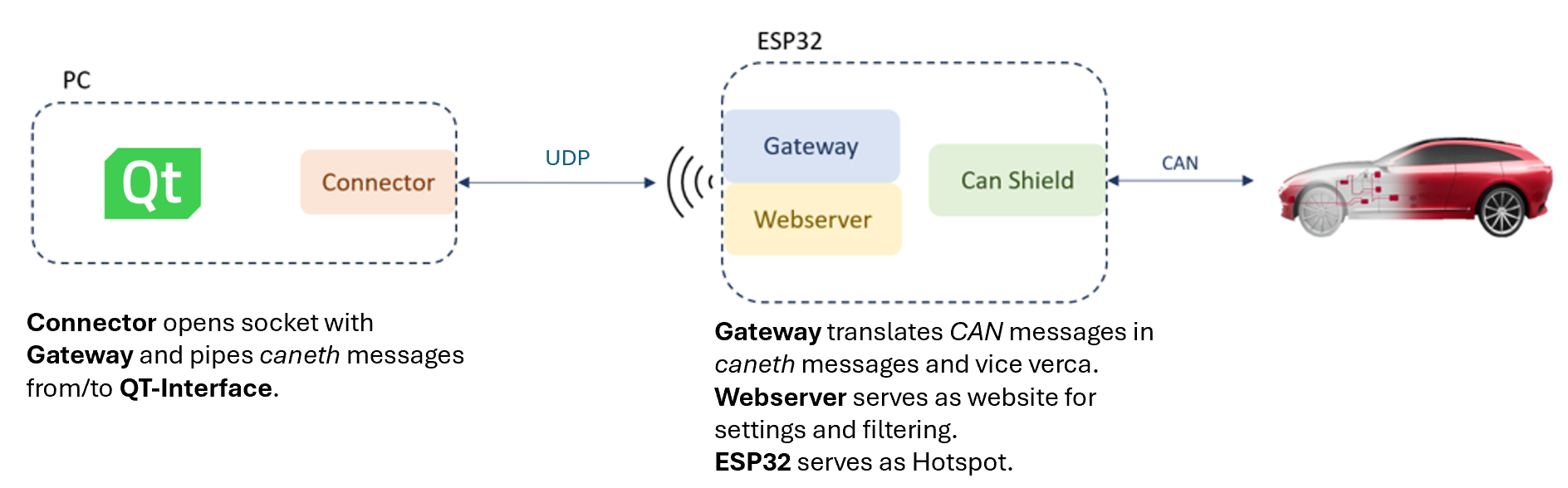
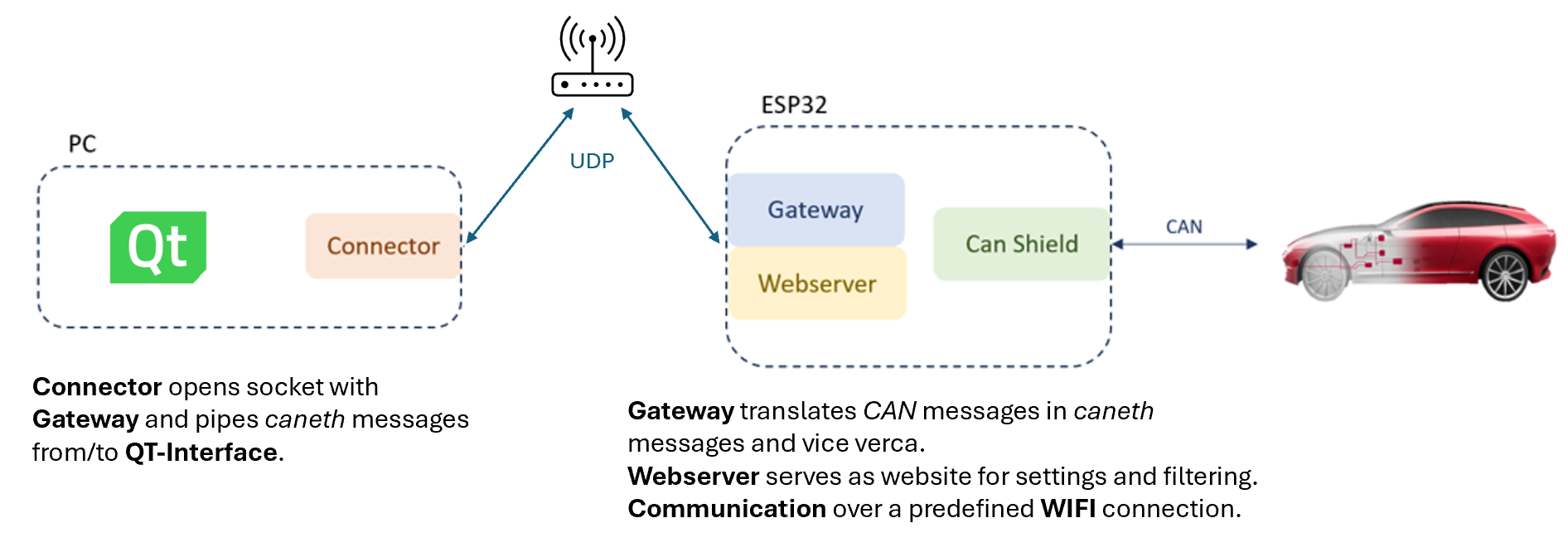
Multiple ESP32-CAN Shields are each linked to their respective CAN devices, while all ESP32 devices are connected to an established WiFi network. The Connector actively monitors all CANeth messages transmitted over the WiFi network and directed towards it. This use case is also used for development and testing.
Note: ESP32 development boards come in various widths. Ensure to adjust the header width of this shield to match your specific ESP32 board model.
The shield features a robust CAN transceiver schematic, including an optional termination resistor for network integrity.
The software is structured into two components:
The Gateway is developed with PlatformIO it can be installed as VScode extension. When the Gateway folder is opened in VScode, PlatformIO is automatically initalized and the project can be compiled and uploaded to the ESP. Make sure to add a Gateway/include/Secrets.h file with the desired WIFI configuration.
#ifndef SECRETS_H
#define SECRETS_H

//Put in the SSID and Password of the WIFI
#define WIFI_SSID "own-WIFI-SSID"
#define WIFI_PASSWORD "own-WIFI-Password"

//Define the SSID and Password for the hotspot of the ESP32
#define Hotspot_SSID "own-ESP32-SSID"
#define Hotspot_PASSWORD "own-ESP32-Password"

#endif
In the main.cpp of the gateway, the network setting can be modified via the mode variable.
...
// WiFi and Hotspot settings
//Make sure you adjust the ssid and password in your Secrets.h to your WIFI
//mode = 1: connection with a predefined WIFI
//mode = 2: ESP32 as a WLAN-Access-Point
int mode = 1;
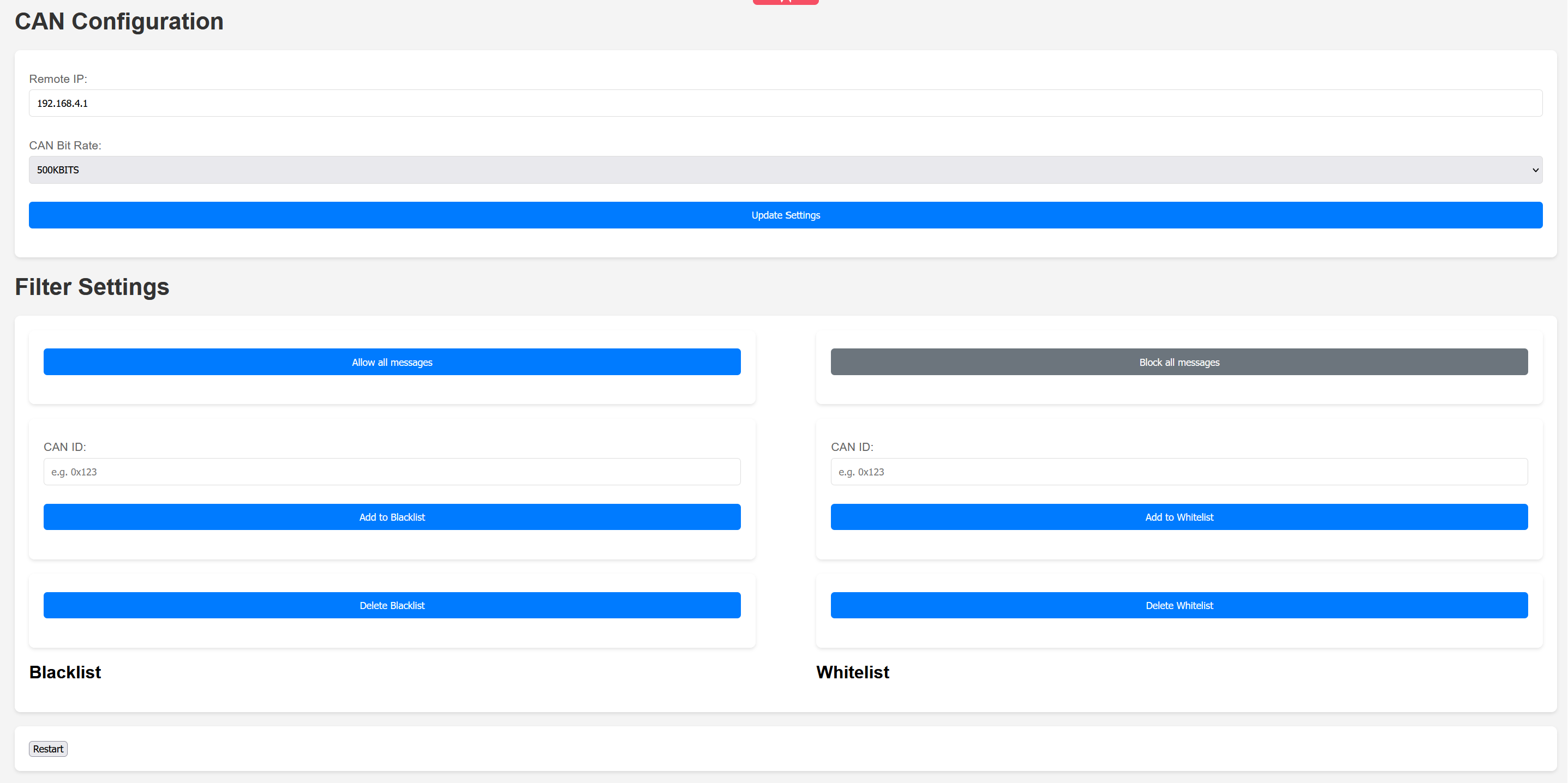
...On the Webserver there are several options to configure the communications and apply filter.
CAN Configuration:
Filter Option:
Restart: Restarts the ESP32. It can take a moment to reconnet to the WIFI or you have to connect to the Hotspot from the ESP32 again.
The backend of the Connector application Connector/qt_application_backend.py is a Python script with no external dependencies, besides the default Python 3.9 libraries. The programmed functions, classes, and their methods provide a comprehensive toolset to send, receive, and log CANeth messages. By default, the Connector is listening on all UDP IP channels for CANeth messages. Filters can be applied to restrict IPv4 addresses via a blacklist and whitelist. In addition to that, the CANeth messages can also be filtered by CAN ID via a blacklist and whitelist. The IPv4 address filter and the CAN ID filter are initially set to an empty blacklist, allowing all CANeth messages to be received. For ease of use, a graphical user interface (GUI) was implemented for the frontend of the Connector application Connector/qt_application_frontend.py using PyQt5.
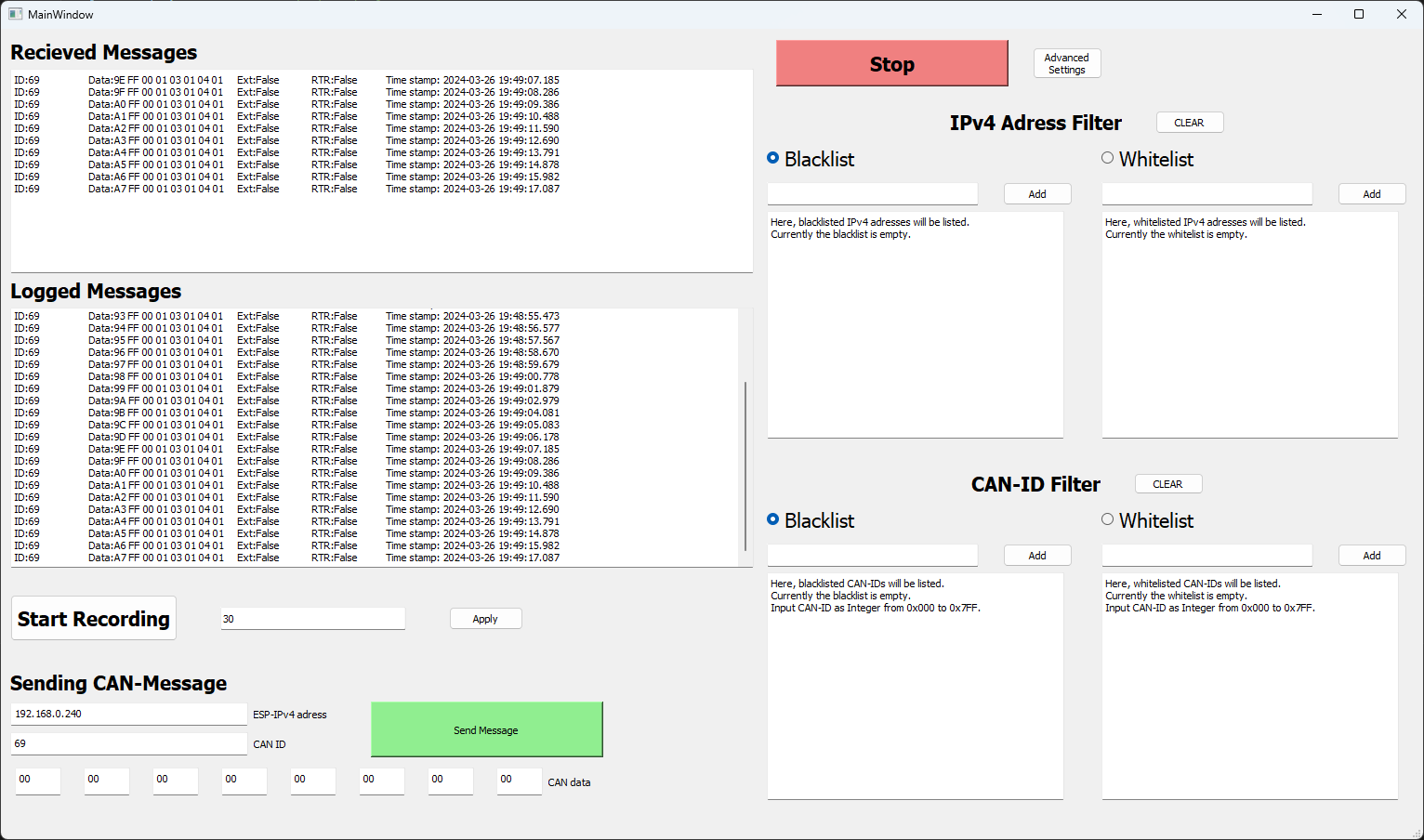
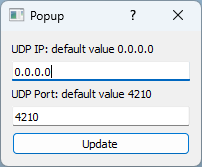
As depicted in the screenshot of the Connector application, the aforementioned features can be accessed through the GUI. In the popup of the advanced settings window, the UDP IP and the UDP port of the socket can be adjusted.
For independent usage of the Connector application outside of a Python interpreter, it was compiled with PyInstaller into a ConnectorApp.exe for Windows 23H2. The .exe file is designed to support 1080p and 2k screen resolutions. A detailed guide for compiling an .exe-file with PyInstaller from a .py-PyQt5 file and .ui-PyQt5 file is provide under dist/PyInstallerGuide.
To simulate a device that sends/receives CAN-messages to the Bus either CANoe or a python script found in Tools/canDevice.py is used with a Vector VN1610. To use it follow this steps:
pip install python-can packagevxlapi64.dll into the working directory (If the driver doesn't show up, you have to manually add the vxlapi64.dll file path to XL Driver Library)Gateway/main.cpp.Connector/qt_application_frontend.py or the dist/ConnectorApp.exe, the UDP traffic can also be analyzed with Wireshark by filtering for CANethTools/canDevice.pyIn the linked YouTube video a quick, visual introduction for the Multi-Device CAN-WiFi Network use case and how to use the Connector application is provided. The video summarizes the aforementioned steps for practical work with the code.
| Qty | Value | Footprint | References |
|---|---|---|---|
| 3 | Fiducial | Misc:Fiducial | FID1, FID2, FID3 |
| 2 | 390 | Resistor_SMD:R_0603_1608Metric | R1, R2 |
| 2 | Conn_01x10_Socket | Connector_PinSocket_2.54mm:PinSocket_1x10_P2.54mm_Vertical | J1, J2 |
| 1 | 100nF | Capacitor_SMD:C_0603_1608Metric | C1 |
| 1 | 120 | Resistor_SMD:R_0603_1608Metric | R3 |
| 1 | Conn_01x02_Pin | Connector_PinHeader_2.54mm:PinHeader_1x02_P2.54mm_Vertical | J3 |
| 1 | Conn_02x05_Odd_Even | Connector_IDC:IDC-Header_2x05_P2.54mm_Horizontal | J6 |
| 1 | PESD2CAN | Semiconductor:PESD2CAN | U2 |
| 1 | TCAN332GDCNT | IC:TCAN332GDCNT | U1 |
| 1 | blue | LED_SMD:LED_0603_1608Metric | TXCAN1 |
| 1 | orange | LED_SMD:LED_0603_1608Metric | RXCAN1 |
cherry-embedded/HSCanT-hardware
HSCanT is a USB to 4-channel CAN FD tool designed based on the HPM5321 chip.

ucandevices/CFDC_embedded
Embedded code and PCB for CAN FD to USB converter


Blizzard26/OAM-KNX2HovalGateway
OpenKNX Application to connect KNX Bus to Hoval TopTronic Bus

darshp848/bldc-controller-60v
60 V, 20 A / 80 A peak BLDC motor controller that fits the MD80 v3.0 mounting. KiCad 10, 6 layers.
It measures 29 × 26.5 mm and has 2 copper layers, 1.6 mm thick.
15 parts, built around the PESD2CAN. The full list of its parts is on this page, with links to each part's symbol and footprint where PCBKit's library has them.
From the X1L3F/ESP32-CAN-Shield repository on GitHub, at the commit this page was made from: the board is CAN-Shield/CAN-Shield.kicad_pcb and its schematic CAN-Shield/CAN-Shield.kicad_sch. PCBKit opens the board in the browser, with nothing to install.
Its repository states no licence, so its author keeps all rights: ask X1L3F before reusing the design.