
2 layers244.2 × 112 mm

 SlightHeadache/choctopus4499
Choctopus44 is a custom low profile keyboard
Choctopus44 is an open-source printed circuit board by SlightHeadache, from the SlightHeadache/choctopus44 repository on GitHub. It is a 2-layer board of 247.1 × 121.4 mm with 113 parts on 71 nets, routed with 1,144 tracks and 103 vias.
It is built around the 1N4148W. Its parts include 45 diodes, 45 switches, 4 resistors, 2 capacitors and 1 IC. It belongs with the keyboards and input boards and the AVR (ATmega, ATtiny) and nRF52 and nRF5x boards of this library.
Current version: 2.0
Choctopus44 is low profile, Choc spaced, optionally hotswappaple 44-key column staggered keyboard with a rotary encoder. It is loosely based on gtips's REVIUNG project, specifically REVIUNG41, but has deviated from it significantly during its development.
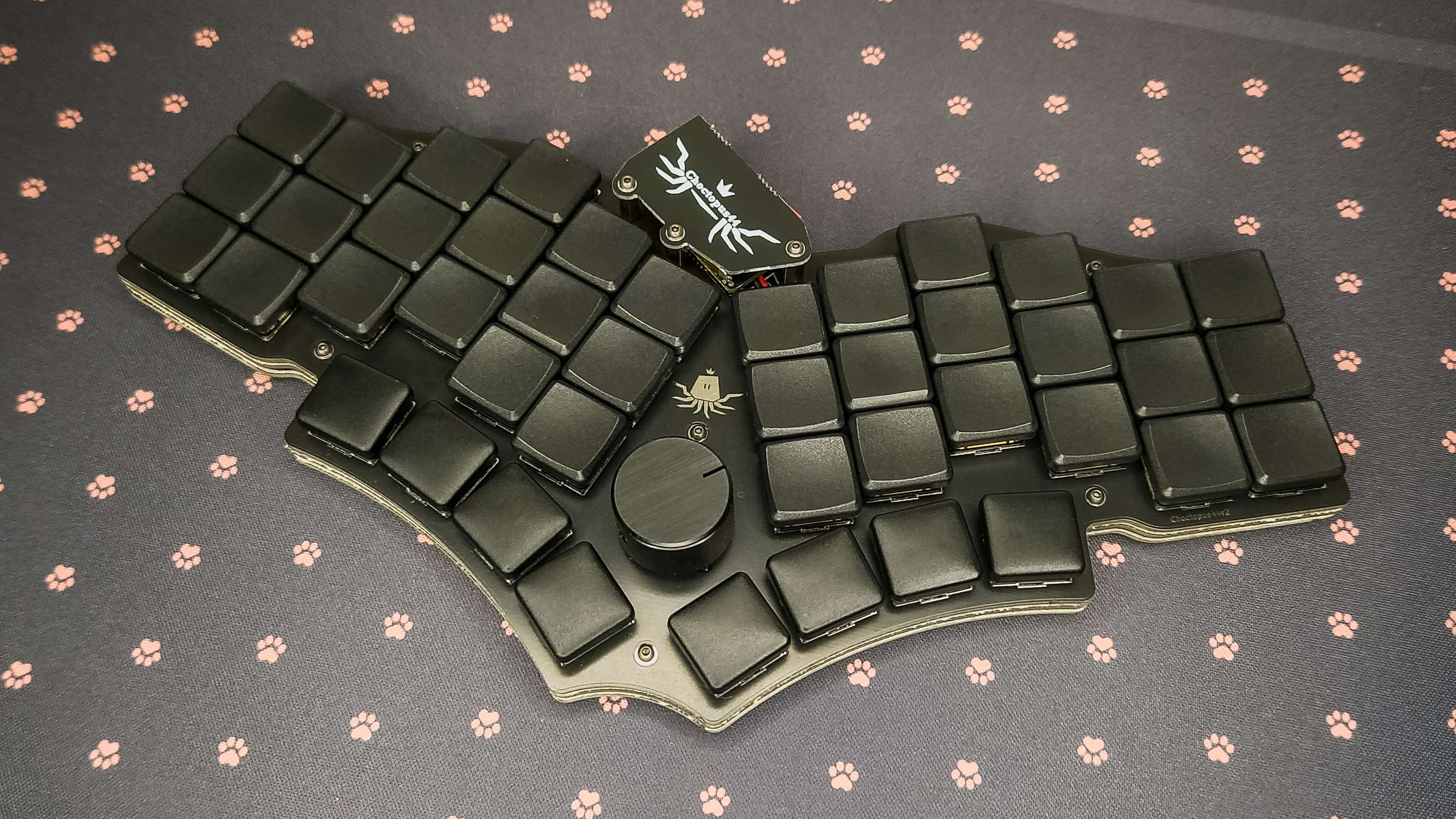
While all the main issues of the original Choctopus44 prototypes were addressed during the development of v2, some new minor arose during it's development.
| Part | Count | Optional | Notes |
|---|---|---|---|
| PCB | 1 | ||
| Diode [1N4148 SMD or THD] | 45 | ||
| Kailh Choc sockets | 44 | x | |
| Tactile switch TL3342 or compatible | 1 | Stem height of 1.54mm used in tested builds | |
| Slide switch PCM12 or compatible | 1 | x | Only useful if a wireless microcontroller is used in conjunction with a battery |
| EC11 encoder or compatible | 1 | x | See detailed encoder documentation; Can also be replaced with a Choc or an MX switch |
| ProMicro/Nice!Nano or compatible | 1 | ||
| MCU socket (or header rows) | 1 (2) | x | |
| Kailh Choc key switch | 44 (45) | ||
| 3.7 Volt battery | 1 | x | Only useful if a wireless microcontroller is used |
| 100 nF capacitors (axial or 1206 SMD) | 2 | x | Used in the optional encoder filter circuit |
| 10 kOhm resistors (axial or 1206 SMD) | 4 | x | Not adviced! Can be used in the encoder filter circuit, but can cause issues at least with Nice!Nanos |
| Part | Count | Optional | Notes |
|---|---|---|---|
| Top plate [PCB] | 1 | ||
| Bottom plate [PCB] | 1 | ||
| M2 stand off 5mm | 9 | ||
| M2 screw 3mm | 15 (18) | 18 needed if MCU cover is not used | |
| Rubber bump ons | ~11 | Depending on your bump ons you might need to use more, or get away with using fewer |
Note: The length of the required MCU cover stand-offs is highly dependant on the used battery and its orientation (assuming one is used at all), and the used MCU socket. With the listed screws and stand offs, a 5mm thick battery can fit between the MCU and the MCU cover without much issue as long as the the MCU socket is slim enough.
| Part | Count | Optional | Notes |
|---|---|---|---|
| M2 stand off 10mm | 3 | ||
| M2 screw 10mm | 3 | Used for the bottom plate stand offs; 3mm screws used on the MCU cover |
| Part | Count | Optional | Notes |
|---|---|---|---|
| Choc spacing compatible keycaps (e.g. MBK) | 44 (45) |
Please note! Should you utilize a pre-existing QMK/Vial/ZMK set up, you may need to do additional steps not defined here before you can succesfully build the firmware. Whether or not that's required is highly dependant on the version and the state of your pre-existing set up!
Pre-built binaries TBA
choctopus_project
bash command to fetch and switch to the WIP branch.
If you are using git via PowerShell or Windows CMD, remember to switch the &&s to semicolons.
Remember to switch to your preferred local branch if you wish to meddle with other keyboards.
git remote add choctopus_project git@github.com:SlightHeadache/qmk_firmware.git && git fetch choctopus_project && git checkout --track -b choctopus_project choctopus_project/choctopus_projectchoctopus44-vial
bash command to fetch and switch to the WIP branch.
If you are using git via PowerShell or Windows CMD, remember to switch the &&s to semicolons.
Remember to switch to your preferred local branch if you wish to meddle with other keyboards.
git remote add choctopus44-vial git@github.com:SlightHeadache/vial-qmk.git && git fetch choctopus44-vial && git checkout --track -b choctopus44-vial choctopus44-vial/choctopus44-vialchoctopus44
config/boards/shields/choctopus44/choctopus44.keymap in the cloned repo. The firmware should now build automagically when you push your keymap changes to GitHub.
The built firmware can be found from under the GitHub Actions run's summary (e.g. https://github.com/SlightHeadache/zmk-config/actions/runs/6002979887), not under either of the build steps.bash command to fetch and switch to the WIP branch.
If you are using git via PowerShell or Windows CMD, remember to switch the &&s to semicolons.
Remember to switch to your preferred local branch if you wish to meddle with other keyboards.
git remote add choctopus44 git@github.com:SlightHeadache/zmk.git && git fetch choctopus44 && git checkout --track -b choctopus44 choctopus44/choctopus44See build guide.
| Qty | Value | Footprint | References |
|---|---|---|---|
| 45 | 1N4148W | Keebio-Parts:Diode-Hybrid-Back | D1, D2, D10, D11, D12, D13, D14, D15, D16, D17, D18, D19, D20, D21, D22, D23 +29 |
| 44 | SW_PUSH | keyswitches:Kailh_socket_PG1350_optional | SW1, SW2, SW10, SW11, SW12, SW13, SW14, SW15, SW16, SW17, SW18, SW19, SW20, SW21, SW22, SW23 +28 |
| 5 | H6 | _reviung-kbd:HOLE | H6, H6, H6, H6, H6 |
| 4 | R | custom-electronics:1206_hybrid | R1, R2, R3, R4 |
| 2 | C | custom-electronics:1206_hybrid | C1, C2 |
| 2 | H8 | _reviung-kbd:HOLE | H8, H8 |
| 2 | SolderJumper_2_Open | Jumper:SolderJumper-2_P1.3mm_Open_TrianglePad1.0x1.5mm | JP1, JP2 |
| 1 | Battery_Cell | Connector_PinHeader_2.00mm:PinHeader_1x02_P2.00mm_Vertical | BT1 |
| 1 | H1 | _reviung-kbd:HOLE | H1 |
| 1 | H11 | _reviung-kbd:HOLE | H11 |
| 1 | LOGO | keyboard stuff:routa-logo-new-4-11mm | G*** |
| 1 | LOGO | keyboard stuff:lonkerot-6-155mm | G*** |
| 1 | ProMicro/Nice!Nano | Keebio-Parts:ArduinoProMicro | U1 |
| 1 | Rotary_Encoder_Switch | custom-encoders:EC11_THD_SMD_Choc_MX | SW45 |
| 1 | SW_DPST | Button_Switch_SMD:SW_SPDT_PCM12 | SW_PWR1 |
| 1 | SW_PUSH | Button_Switch_SMD:SW_SPST_TL3342 | RESET1 |

fossasia/pslab-hardware
PSLab Hardware Design and Schematics https://pslab.io

pierrechevalier83/ferris
A low profile split keyboard designed to satisfy one single use case elegantly


MickiusMousius/Rolio46Keyboard
A split wireless keyboard based on the Corne and Sofle


sadekbaroudi/bgkeeb
This is a reversible 100mm x 100mm pcb with support for mx or choc switches (no hotswap), per key led, rotary encoders, and exposes the SDA/SCL/GND/VCC lines in the form of the pimoroni trackball pins (meaning you can…

It measures 247.1 × 121.4 mm and has 2 copper layers, 1.6 mm thick.
113 parts, built around the 1N4148W. The full list of its parts is on this page, with links to each part's symbol and footprint where PCBKit's library has them.
From the SlightHeadache/choctopus44 repository on GitHub, at the commit this page was made from: the board is kicad/ver2.0/pcb/choctopus44.kicad_pcb and its schematic kicad/old/ver1.0/pcb/choctopus44.kicad_sch. PCBKit opens the board in the browser, with nothing to install.
Its repository states no licence, so its author keeps all rights: ask SlightHeadache before reusing the design.