2 layers47.2 × 35 mm
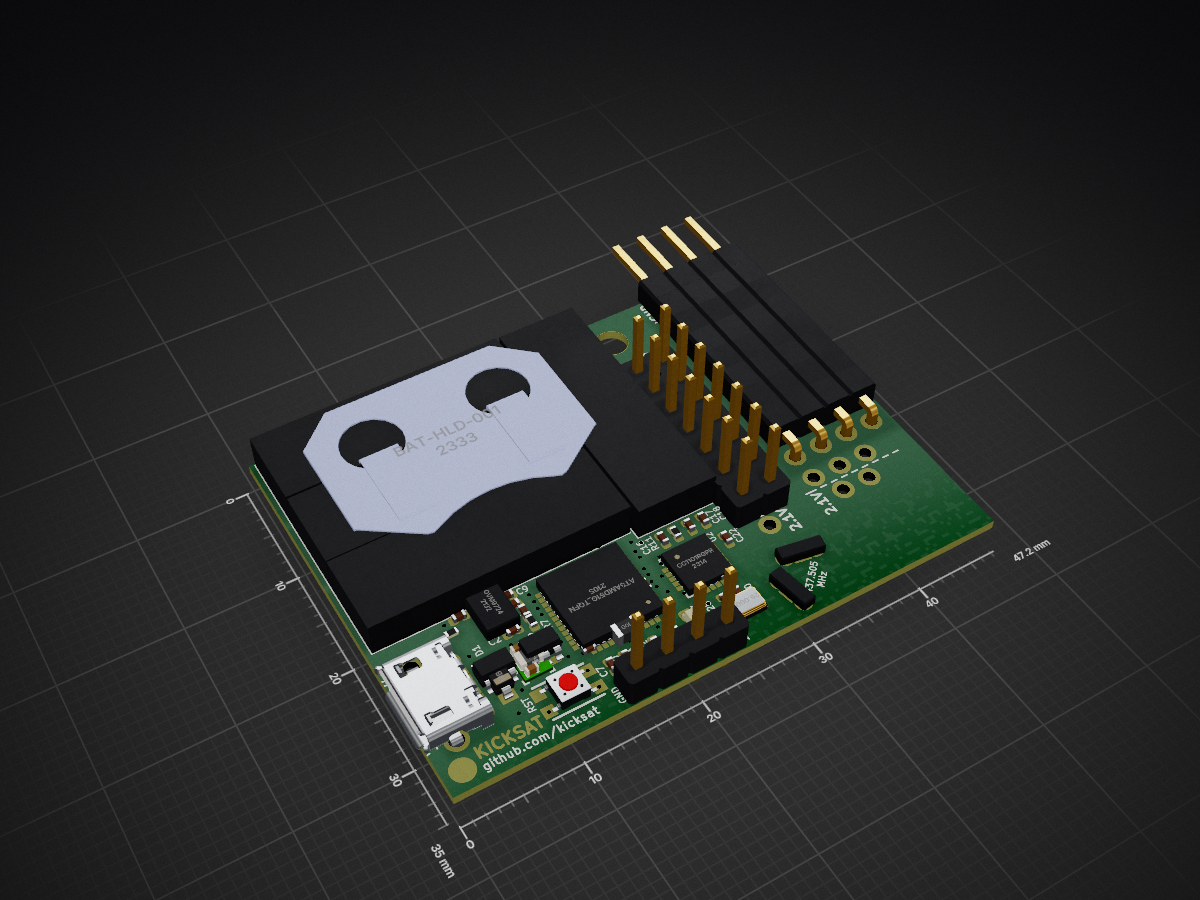
 RoboticExplorationLab/sprite8
KickSat Sprite (2019) running Circuitpython
SpriteSAMD is an open-source printed circuit board by RoboticExplorationLab, from the RoboticExplorationLab/sprite repository on GitHub. It is a 2-layer board of 47.2 × 35 mm with 84 parts on 113 nets, routed with 563 tracks and 117 vias.
It is built around the CC1101RGPR, TPS82740ASIPR and BAT-HLD-001, with the LSM9DS1, 10118194-0001LF and MBR120 among its other parts. Its parts include 27 connectors, 24 capacitors, 8 ICs, 6 resistors and 5 switches. It belongs with the SAM D and SAM boards of this library.


hardware: KiCad PCB files and bill of materials. Assembling a sprite? Check out https://roboticexplorationlab.github.io/sprite/ for an interactive BOM!
firmware: pre-built circuitpython bootloader.bin and firmware.uf2 (and the files to build it yourself)
software: circuitpython scripts and libraries working on the sprite

Put all the files located in /software/ on to the sprite and start the serial console (as described above). After pressing Ctrl+C to halt the sprite, press any key to enter the REPL, then type
import NAMEOFFILEand press enter to execute the example. For example, it we wanted to run blink.py, it would be...
import blink| Qty | Value | Footprint | References |
|---|---|---|---|
| 10 | Conn_01x01 | custom-footprints:PinHeader_CUSTOM2 | J2, J4, J5, J6, J7, J8, J9, J10, J11, J12 |
| 8 | 0.1uF | Capacitor_SMD:C_0402_1005Metric | C2, C3, C4, C6, C8, C9, C10, C32 |
| 8 | Conn_01x04 | custom-footprints:PinHeader_CUSTOM | J13, J14, J15, J16, J17, J18, J19, J20 |
| 7 | Conn_01x02 | custom-footprints:PinHeader_CUSTOM3 | J21, J22, J23, J24, J25, J26, J27 |
| 4 | 10K | Resistor_SMD:R_0402_1005Metric | R7, R8, R9, R13 |
| 4 | 1uF | Capacitor_SMD:C_0402_1005Metric | C7, C29, C31, C33 |
| 4 | KXOB22-04X3F | custom-footprints:KXOB22-12X1F | S1, S2, S3, S5 |
| 3 | 10nF | Capacitor_SMD:C_0402_1005Metric | C5, C18, C20 |
| 3 | 10uF | Capacitor_SMD:C_0402_1005Metric | C1, C30, C34 |
| 3 | 220pF | Capacitor_SMD:C_0402_1005Metric | C16, C17, C19 |
| 2 | 100nF | Capacitor_SMD:C_0402_1005Metric | C21, C22 |
| 2 | ANTENNA | Sprite:ANTENNA | ANT-N1, ANT-P1 |
| 2 | DS90LV012ATMFX_NOPB | custom-footprints:DS90 | U8, U9 |
| 1 | @HOLE0 | ||
| 1 | 10118194-0001LF | custom-footprints:10118194-0001LF | J1 |
| 1 | 10uH | Inductor_SMD:L_0805_2012Metric | L1 |
| 1 | 26.000 | custom-footprints:TXCO_2.5x2 | X1 |
| 1 | 27pF | Capacitor_SMD:C_0402_1005Metric | C25 |
| 1 | 330 | Resistor_SMD:R_0402_1005Metric | R6 |
| 1 | 56K | Resistor_SMD:R_0402_1005Metric | R11 |
| 1 | ATSAMD51G_TQFN48 | ATSAMD51G19A-MU:QFN50P700X700X90-49N-D | U6 |
| 1 | BAT-HLD-001 | custom-footprints:BAT-HLD-001 | U1 |
| 1 | CC1101RGPR | custom-footprints:CC1101_RGP_20 | U2 |
| 1 | Conn_01x04 | Connector_PinHeader_2.54mm:PinHeader_1x04_P2.54mm_Vertical | J3 |
| 1 | GREEN LED | LED_SMD:LED_0603_1608Metric | D3 |
| 1 | KMR231NG LFS | Adafruit Feather M4 Express:BTN_KMR2_4.6X2.8 | SW2 |
| 1 | LSM9DS1 | Sprite:LGA24-8X4 | U3 |
| 1 | MBR120 | Diode_SMD:D_SOD-123 | D1 |
| 1 | OVM9724 | custom-footprints:OVM9724b | U7 |
| 1 | SolderJumper_3_Bridged12 | custom-footprints:Jumper3_Small | JP1 |
| 1 | TPS82740ASIP | custom-footprints:TPS82740ASIPR | U4 |
The 78 most common of 84 parts.

SlimeVR/SlimeVR-Tracker-nRF-PCB
SlimeNRF PCBs and 3D model files for cases and dock


maholli/featherM0_SD
Modified version of Adafruit Feather 'Adalogger' for soldering and microcontroller workshops.

krikzz/open-ed
Open-ED is a very simple and cheap open source Genesis/Megadrive cartridge. The cartridge does not have its own processor or FPGA, it is built in the old school style using only memory and discrete logic.

HomeSmartMesh/nrf52_thread_sensortag
nRF52840 small sensor Tag, Low power design, battery operated

RedBulletTooling/NRF9160-Tracker
This is hardware project concept of a CR2032 Operated small size LTE-M/NB-Iot GPS tracker

saewoonam/ble_adv_covid
Repo to implement the advertise and scanner portion for bluetooth to enable encounter/exposure tracing (e.g. Apple/Google / TCN / etc...) on a nRF52840 based battery powered dongle/device

bahildebrand/soil-moisture-pcb
Capacitive soil moisture sensor routed in KiCad
It measures 47.2 × 35 mm and has 2 copper layers, 0.8 mm thick.
84 parts, built around the CC1101RGPR, TPS82740ASIPR, BAT-HLD-001 and LSM9DS1. The full list of its parts is on this page, with links to each part's symbol and footprint where PCBKit's library has them.
From the RoboticExplorationLab/sprite repository on GitHub, at the commit this page was made from: the board is hardware/sprite_v2/spriteSAMD.kicad_pcb. PCBKit opens the board in the browser, with nothing to install.
Its repository states no licence, so its author keeps all rights: ask RoboticExplorationLab before reusing the design.