AutoSense is a prototype vehicle-monitoring system built as an undergraduate final-year project at NED University of Engineering & Technology, Karachi.
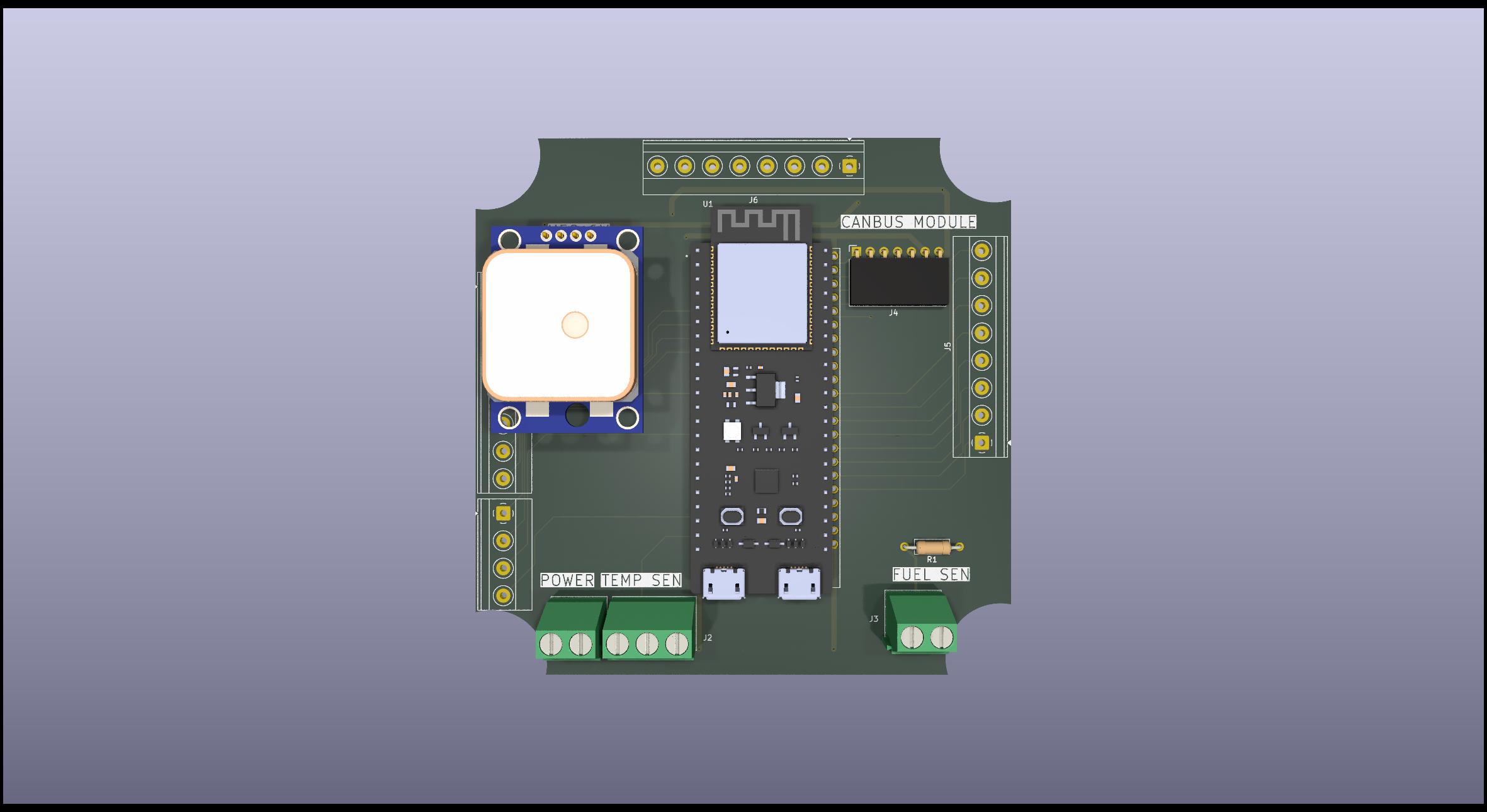
AUTO SENSE is an open-source printed circuit board by Muzammillcoste, from the Muzammillcoste/AutoSense--Smart-Asset-Monitoring-Maintenance repository on GitHub. It is a 2-layer board of 99.4 × 99.4 mm with 21 parts on 46 nets, routed with 331 tracks and 16 vias.
It is built around the ESP32-S3-DEVKITC-1-N8R2 and DS18B20. Its parts include 9 connectors, 1 resistor and 1 IC. It belongs with the ESP32 boards of this library.
AutoSense is a prototype vehicle-monitoring system built as an undergraduate final-year project at NED University of Engineering & Technology, Karachi. The project report calls it Smart Asset Tracking and Predictive Maintenance System for Flight Catering. It connects a custom ESP32-S3 sensor unit, a cloud monitoring dashboard, 24-hour sensor-reading forecasts, and Salesforce alert records into a single maintenance workflow.
This repository holds the prototype source (firmware, PCB, simulators, dashboard widgets, inference script, Salesforce Apex). It also holds a later re-evaluation of the forecasting models, published as a preprint on Zenodo (DOI 10.5281/zenodo.22665260).
Scope in one sentence: AutoSense forecasts future sensor readings (engine temperature, tyre pressure, tyre temperature) and compares readings and forecasts against fixed thresholds. It does not predict component failures or estimate remaining useful life, and it has not been evaluated on recorded fleet data.
Prototype scope at a glance
What it covers
Evidence
Physically built
ESP32-S3 unit with NEO-6M GPS, one DS18B20 temperature probe and four BLE tyre-pressure (TPMS) sensors, mounted on one test vehicle. Custom PCB designed in KiCad.
Firmware, KiCad project, BOM; mounting reported by the team (Real Sensors.txt)
Simulated
Additional vehicles (random-walk readings for 4–5 vehicles) and all ML training data (synthetic 2024 time series)
Sensor unit → Swift platform (Ephlux) → dashboard; threshold alerts → Salesforce Vehicle_Alert__c records; Salesforce status change → Swift via Apex trigger; batch forecasts → Swift
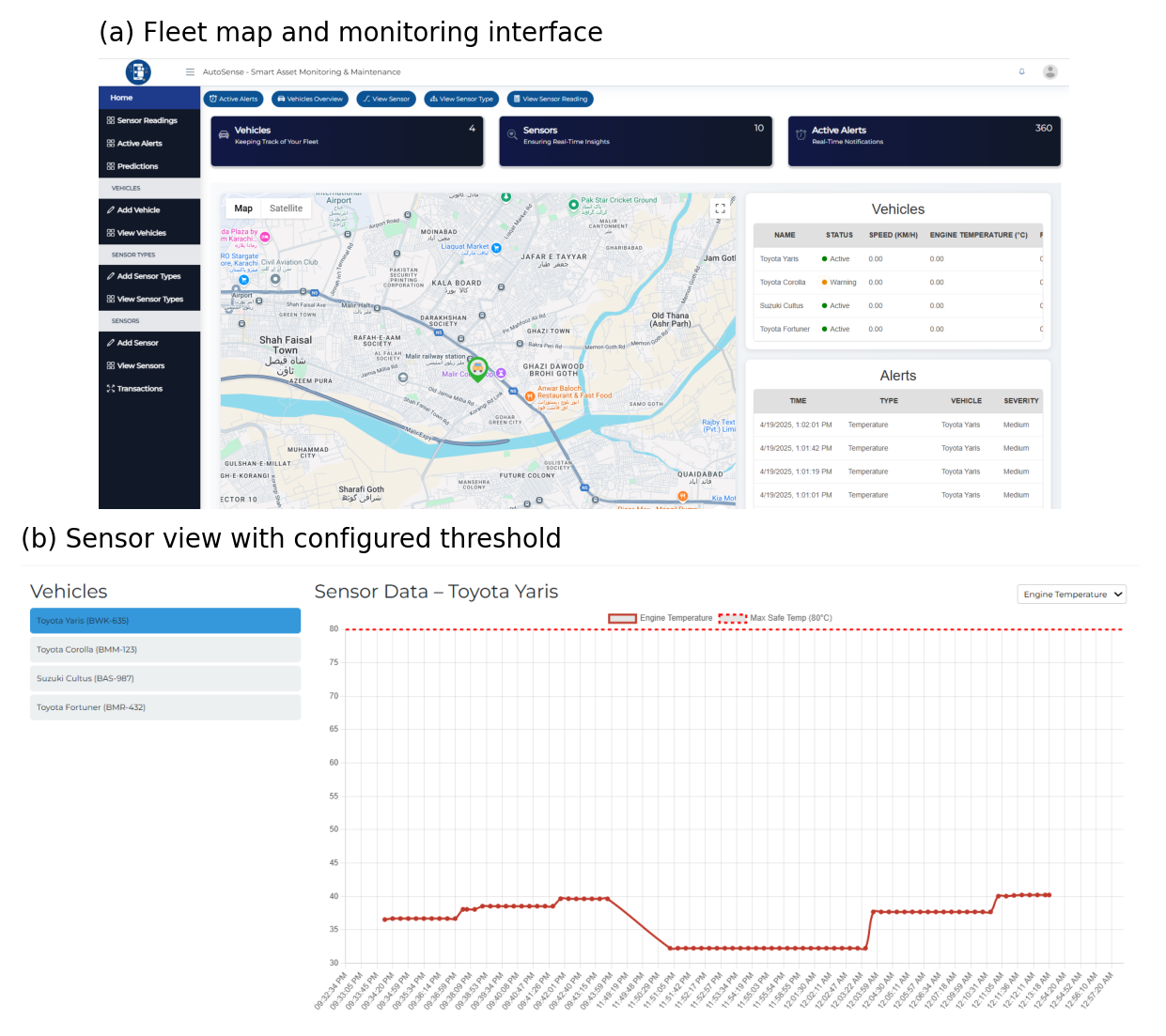
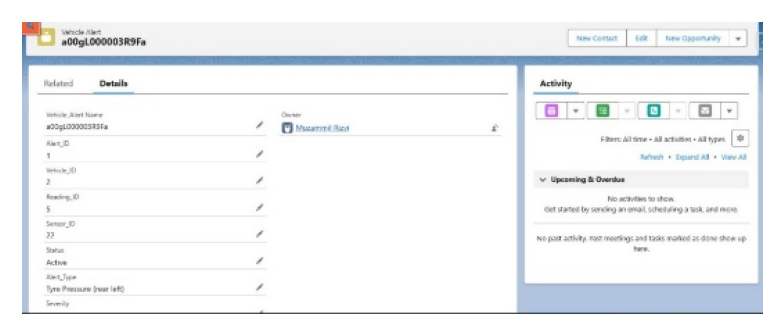
Source code and interface screenshots below
Evaluated
Offline forecast accuracy on synthetic data and on the public NASA C-MAPSS FD001 simulator benchmark. No evaluation of maintenance outcomes.
AutoSense was designed for maintenance and fleet teams managing ground-support vehicles in flight-catering operations. The project explored how live condition monitoring and forecast-based alerts could supplement reactive or fixed-schedule maintenance. The project set out to give them live location and condition data, early warnings from forecasts, and a ticket-like record in Salesforce for each alert.
The project was reviewed with the team's industry advisor at Ephlux. The main feedback recorded was that the dashboard should be more intuitive. Claims in the project report about reduced downtime or maintenance cost were stated goals. They were never measured.
Team and contributions
Final-year project, Department of Computer & Information Systems Engineering, NED University of Engineering & Technology (batch 2021–2025). Supervised by Dr. Shahab Tehzeeb, with industry advisor Nadeem Ali (Ephlux).
The table follows the signed Statement of Contributions in the final report.
Member
Contributions (from the final report)
Muzammil Rizvi
Sensor-data integration into the database; webhooks for real-time updates; Salesforce integration and Swift ↔ Salesforce sync; ticket and alert generation logic; ML model R&D, training and deployment
Wahaj Raza
Real-time dashboard graphs; alerts and notification system in Swift; ML model R&D and training; deployment-ready model pipeline; database schema; middleware–DB–frontend integration
Huzaifa Naseer Khan
ESP32 firmware; sensor integration and hardware assembly; Google Maps integration; readings and alerts tables; mock sensor-data simulation
Farrukh Niaz
Sensor and ML research; alerts widget; data-forwarding checks; view and entry forms; input validation; flow diagrams; documentation
Post-project re-evaluation (2026). Muzammil Rizvi audited the original ML results and rebuilt the evaluation protocol in research_v2/. This covered the corrected benchmark, multi-seed and ablation runs, C-MAPSS external evaluation, and preparation of the manuscript. All four team members are co-authors of the resulting preprint.
flowchart LR
    S["Sensors<br/>GPS · DS18B20 · 4× BLE TPMS"] --> E["ESP32-S3 firmware<br/>JSON over HTTPS"]
    SIM["Simulators<br/>(Node.js / ESP32)"] --> SW
    E -->|readings every 5 s<br/>GPS every 2 s| SW["Swift platform (Ephlux)<br/>storage · workflows · dashboard"]
    E -->|fixed-threshold alerts| SW
    SW -->|sensor history| P["Batch forecaster<br/>main.py · 3 Keras models"]
    P -->|24 h forecasts| SW
    SW -->|alerts, vehicles| SF["Salesforce<br/>Vehicle__c · Vehicle_Alert__c"]
    SF -->|status change<br/>Apex trigger| SW
There are two separate alert paths:
Reading-based alerts run on the device. The firmware compares each reading with fixed limits: tyre pressure > 32 or ≤ 25 PSI, probe temperature ≥ 80 °C.
Forecast-based alerts run in the dashboard widget PredictedVehicleAlerts.js. It applies a different set of fixed limits (engine > 95 °C, tyre temperature > 70 °C, pressure < 28 PSI) to the model forecasts.
In both paths the alert itself comes from a threshold rule. The ML models only produce the forecast values that the second rule checks.
main.py batch pipeline: fetch readings from Swift → feature engineering → three Keras models → post forecasts to Swift. Includes the deployed models and scalers.
Proposal, final report, original paper draft, presentations
Some ML figures in these documents are superseded (see below)
Data sources and simulation
Training data is synthetic. The three training series (Karachi engine temperature, hourly; tyre pressure and tyre temperature, 3-hourly; calendar year 2024) come from generator notebooks in this repository. research_v2/verify_generators.py reproduces every timestamp and value of the committed CSVs. The files in Dataset/ are also generated.
Live readings came from the prototype unit and the simulators through Swift. They weren't kept as a dataset, so no model was trained or tested on recorded vehicle data.
External benchmark: NASA C-MAPSS FD001, a public, simulator-generated turbofan-degradation dataset. It is used only to test the same forecasting setup on independent data. It is not vehicle data.
ML methods and evaluation
Task. Multi-step forecasting of a single sensor's future values from its own history. Engine temperature uses 168 hourly inputs to forecast 24 hourly outputs; the tyre series use 56 three-hourly inputs to forecast 8 outputs. Both cover seven days of history and a 24-hour horizon. Models compared: persistence (last value), seasonal naive (same time yesterday), Random Forest, and a stacked Bi-LSTM (128/64/32 units).
Chronological split of raw rows: 68% train, 12% validation, 20% test.
A window is kept only if its whole target horizon lies inside one partition.
Min-max scaling is fitted on training rows only.
Training runs without shuffling, with early stopping on validation loss.
Hyperparameters were not selected on test scores.
Benchmark versus deployed prototype. The results below describe the corrected offline evaluation in research_v2/. The integrated prototype uses the original 11-feature models stored in Models and scripts/model_scaler/; those deployed models are not the re-trained benchmark models. These results therefore do not measure the forecasting performance of the deployed prototype.
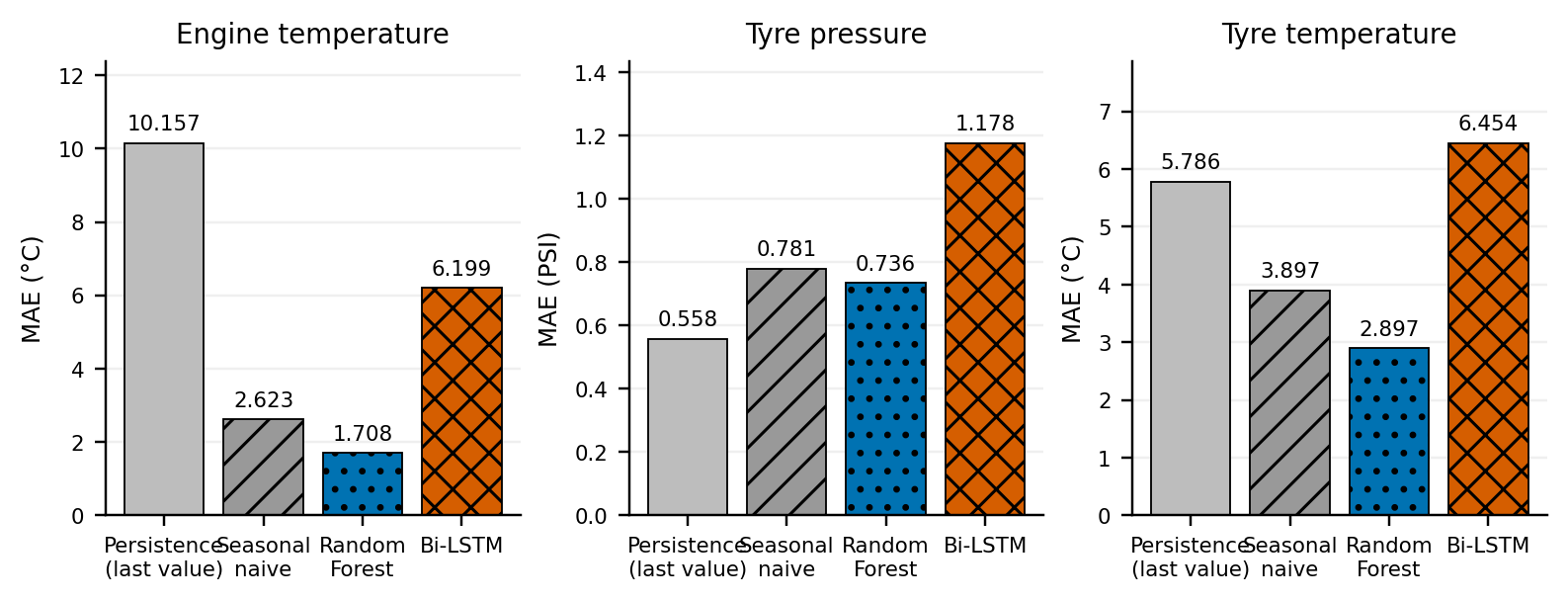
Main finding. In this setting, simple baselines outperform the Bi-LSTM on all three targets. Across five training seeds, the Bi-LSTM test MAE was:
Target
Mean test MAE ± standard deviation across seeds
Engine temperature
5.18 ± 0.66 °C
Tyre pressure
1.26 ± 0.22 PSI
Tyre temperature
5.73 ± 0.89 °C
These statistics describe variation across training seeds, not confidence intervals for real-world performance. See the multi-seed summary.
The Bi-LSTM also failed in the threshold-event test. Forecasts were scored against training-derived proxy thresholds, not real fault labels:
On engine temperature and tyre pressure, it never predicted a threshold crossing (F1 = 0).
On tyre temperature, it predicted a crossing for every window (false-positive rate 1.0).
Further experiments (architecture and feature ablations, block-bootstrap intervals, C-MAPSS forecasting and stage analysis) are documented in research_v2/EXTENDED_EXPERIMENTS.md. The C-MAPSS work forecasts sensor readings only and does not estimate remaining useful life.
Evaluation update. The original project report and paper draft contain metrics that were superseded by the 2026 audit. Use the corrected benchmark results above when citing this work. The evaluation audit documents the original reporting issues, their reconstruction and the revised protocol.
Important caveats.
All AutoSense metrics come from synthetic series, and the test windows overlap, so their errors are not independent.
Setup and demonstration
This is a collection of components, not a single application you can run with one command. Running the full pipeline needs access to the team's Swift workspace (an Ephlux platform), which isn't public. The code references the team's Swift workspace. To reproduce the integration, configure endpoints and credentials for a workspace you control.
python -m unittest discover -s research_v2 -p test_protocol.py -v   # protocol tests
python research_v2/verify_generators.py                              # regenerate synthetic data and compare
python research_v2/bilstm_evaluation.py                              # full retrain; overwrites research_v2/results/
Full retraining runs on the CPU and takes a long time. The saved outputs in research_v2/results/ and research_v2/ieee_results/ can be inspected without rerunning anything.
Citation
M. Rizvi, W. Raza, H. Naseer, and F. Niaz, “Benchmarking Multi-Step Sensor Forecasting for Threshold-Based Predictive Maintenance: An Integrated IoT-to-Enterprise Framework,” preprint, Zenodo, 2026. doi:10.5281/zenodo.22665260
Acknowledgements
Dr. Shahab Tehzeeb (project supervisor, NED University).
Nadeem Ali and the team at Ephlux, for industry guidance and access to the Swift platform.
A custom ESP32-S3-based PCB designed in KiCad for automated soil sample analysis, featuring drivers and interfaces for environmental sensors, peristaltic pumps, and auger drilling actuators.
1) Along with using with TMC2209 motor drivers, I have removed R8, R15, R16, R17, R18, R19 because the R value was accidentally too high. I have shorted R8, R16, R17, and left open R15, R18, R19.
Utilization of Electrochemical Impedance Spectroscopy for the Detection of Drugs
51 parts1MIT
Questions
How big is the AUTO SENSE PCB?
It measures 99.4 × 99.4 mm and has 2 copper layers, 1.6 mm thick.
What parts does the AUTO SENSE use?
21 parts, built around the ESP32-S3-DEVKITC-1-N8R2 and DS18B20. The full list of its parts is on this page, with links to each part's symbol and footprint where PCBKit's library has them.
Where can I download the AUTO SENSE KiCad files?
From the Muzammillcoste/AutoSense--Smart-Asset-Monitoring-Maintenance repository on GitHub, at the commit this page was made from: the board is IoT/PCB/AUTO SENSE.kicad_pcb and its schematic IoT/PCB/AUTO SENSE.kicad_sch. PCBKit opens the board in the browser, with nothing to install.
Can I use the AUTO SENSE design in my own project?
Its repository states no licence, so its author keeps all rights: ask Muzammillcoste before reusing the design.