

2 layers336.8 × 150 mm

 riezky-gitH/SIMPAS-BOILER2
> 📖 Guidebook proyek — tautan guidebook baru akan ditambahkan di sini.
Esp32s3 wmlta is an open-source printed circuit board by riezky-gitH, from the riezky-gitH/SIMPAS-BOILER repository on GitHub, published under the MIT licence. It is a 2-layer board of 200 × 130 mm with 129 parts on 103 nets, routed with 1,017 tracks and 0 vias.
It is built around the ESP32-S3-DEVKITC-1-N8R2 and 1N4148WT. Its parts include 13 connectors, 13 switches, 8 resistors, 4 diodes and 2 capacitors. It belongs with the ESP32 and AVR (ATmega, ATtiny) boards of this library.
📖 Guidebook proyek — tautan guidebook baru akan ditambahkan di sini.
Sistem Monitoring & Proteksi Automatis Solenoid Boiler
Proyek Mikrokontroler Lanjut · Politeknik Elektronika Negeri Surabaya
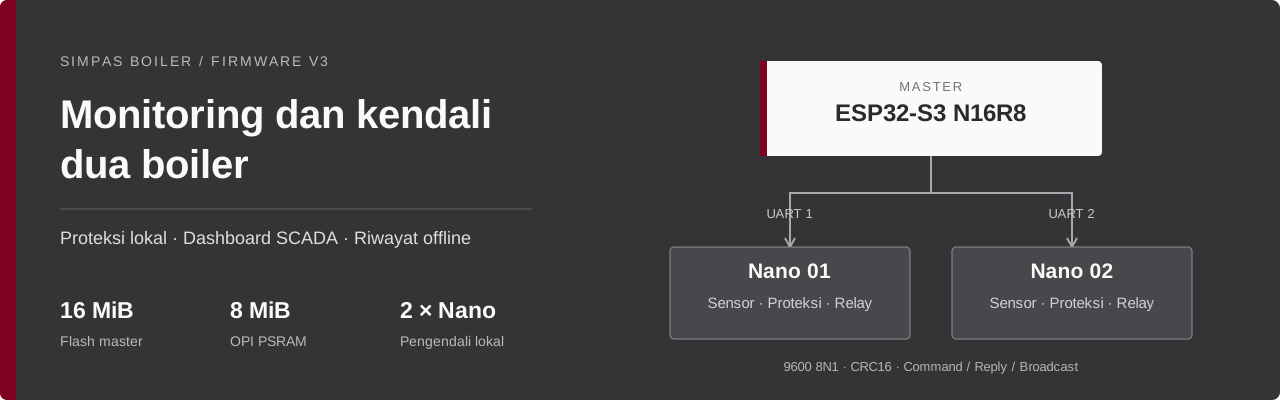




SIMPAS mengawasi tekanan dan suhu pada dua boiler melalui ESP32-S3 sebagai master dan dua Arduino Nano sebagai pengendali lokal. Masing-masing slave membaca sensor dan menjalankan proteksi; master menyediakan dashboard SCADA, TFT, pengiriman perintah, serta riwayat yang dapat diakses tanpa internet.
Panduan pengguna · Pinout · Build & konfigurasi · Implementasi
Tautan guidebook baru menyusul dari pemilik proyek. Tempat tautannya sudah disiapkan di bagian paling atas README.
Sambil menunggu, gunakan panduan pengguna singkat untuk mengoperasikan board dan dokumentasi teknis untuk konfigurasi, protokol, build, dan troubleshooting.
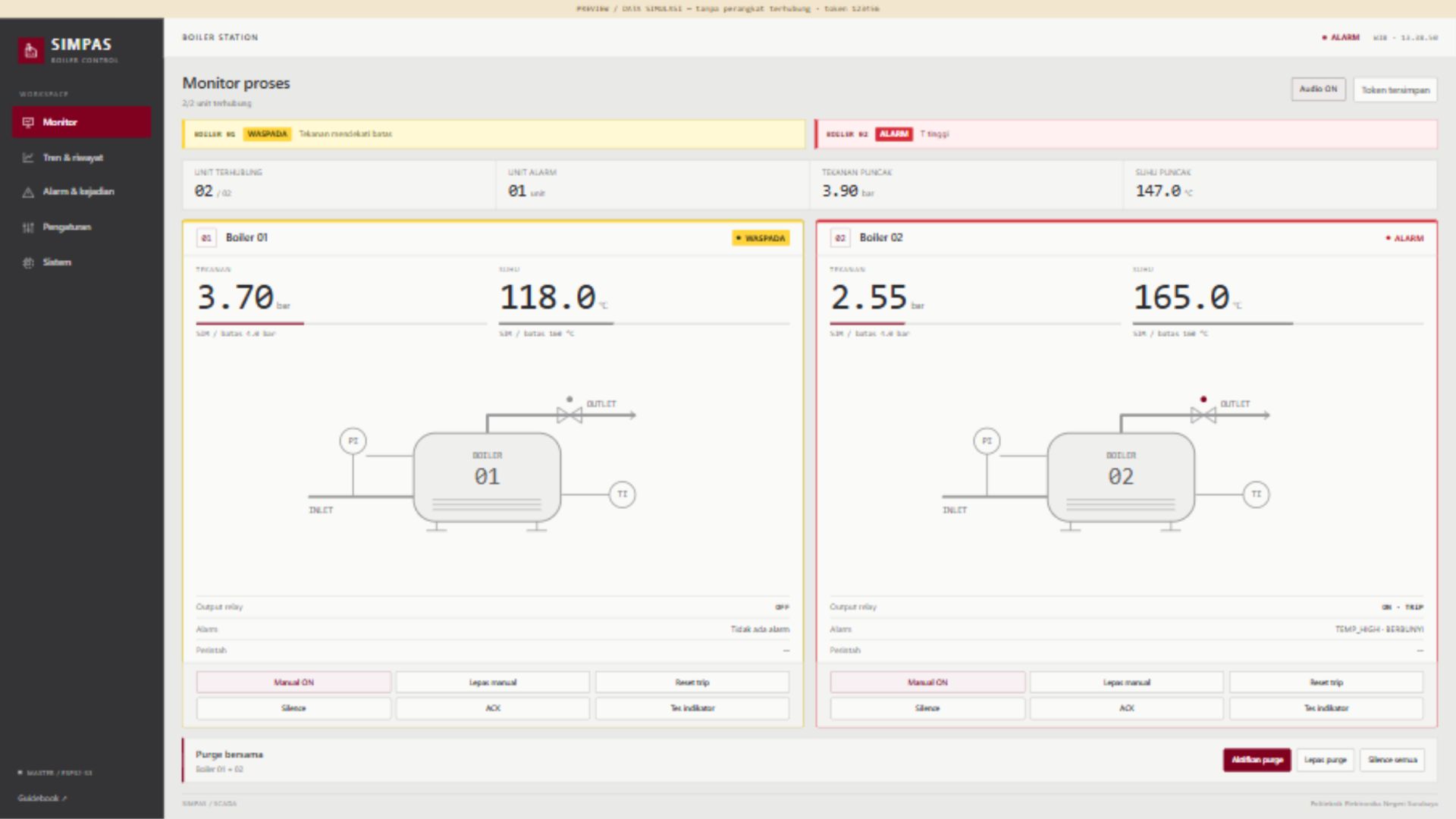
Preview menggunakan data simulasi. Tampilan ini bukan bukti pengukuran atau koneksi perangkat fisik.
Audio aktif setelah interaksi awal atau tombol Audio AKTIFKAN, mengikuti kebijakan browser. Silence, kondisi pulih, data terputus, atau Audio OFF menghentikan suara.
| Bagian | Implementasi |
|---|---|
| Proteksi lokal | Evaluasi di Nano, histeresis, alarm per penyebab, silence/ACK, trip latch, dan reset setelah aman |
| Kendali aktuator | Purge lokal, remote, dan global; keluaran relay D9 aktif LOW, LED mengikuti keluaran |
| Komunikasi | Dua UART point to point, 9600 8N1, CRC16, sesi/sequence, retry, dan deduplikasi |
| Broadcast demo | Dummy P/T bertahap yang dikirim otomatis sekitar setiap 1 detik, tanpa menunggu polling |
| Layar lokal | TFT master lima halaman, border status, peak/insiden, informasi WiFi, dan QR repository |
| Riwayat | Ring PSRAM, journal LittleFS, logging 5 detik + kejadian threshold/alarm/relay |
| Akses offline | TFT, USB snapshot baca-saja, dan Serial DUMP |
| Integrasi PC | Proxy HTTP dan logger CSV/SQLite; MQTT bersifat opsional |
flowchart TB
    Web["Dashboard browser"] <-->|"WiFi · HTTP / JSON"| Master["ESP32-S3 N16R8<br/>Master · TFT · Historian"]
    Master <-->|"UART 1 · C / T / B"| S1["Nano slave 1<br/>Sensor P/T · Proteksi · Relay"]
    Master <-->|"UART 2 · C / T / B"| S2["Nano slave 2<br/>Sensor P/T · Proteksi · Relay"]
    Master -->|"USB snapshot / CDC"| PC["Laptop · history_boiler.csv"]
Frame C membawa command master, T membalas transaksi tertentu, dan B membawa telemetri otomatis dengan sequence 0. Frame B tidak dianggap sebagai konfirmasi command. Kontrol lokal slave tetap berjalan saat dashboard tidak tersedia.
| Akses | Nilai |
|---|---|
| WiFi master | SCADA_BOILER_PLTU |
| Password WiFi | 00000000 |
| Dashboard board | http://192.168.4.1 |
| Kode kontrol | 123456 — masukkan pada Akses operator |
| USB Serial master | 115200 baud, Newline |
Hanya mengubah dashboard? Jalankan generator aset, build, lalu upload master ESP32 saja dan refresh browser. Perubahan kode slave memerlukan upload Nano yang terkait. Preview 127.0.0.1:8765 di laptop menggunakan data simulasi, bukan API board.
Pilih SIM pada kedua selector sensor, nonaktifkan LIVE, lalu tahan PB2 + PB3 slave bersamaan selama 2 detik. LCD menampilkan DEMO AUTO ON; nilai bergerak bertahap dan dikirim otomatis. Ulangi kombinasi untuk berhenti.
Profil presentasi dipercepat agar alarm mudah didemokan. Pada uji native dari nol dengan ambang default, alarm pertama tercapai paling lambat 18 detik untuk 80 kombinasi node/seed. Itu hasil simulasi, bukan jaminan waktu fisik. Mematikan demo tidak menghapus trip atau purge. Detail mode broadcast →
Ring PSRAM menyimpan data live setiap 1 detik. Flash mencatat rutin setiap 5 detik, ditambah catatan segera saat threshold dilintasi, penyebab alarm baru muncul, atau relay mulai aktif. Flush dilakukan sekitar 4 KiB / 60 detik.
Ekspor history_boiler.csv berisi waktu WIB, tekanan/suhu kedua slave, dan status masing-masing slave. Gunakan dashboard, USB native, atau Serial DUMP. Setelah menyalin dari drive USB, lakukan Eject. Panduan USB & history →
Master menggunakan ESP32-S3 N16R8, flash 16 MiB QIO, PSRAM 8 MiB OPI, CDC aktif, dan partisi LittleFS 10 MiB. Kedua Nano memakai ATmega328P dengan profil old bootloader pada build yang diverifikasi. Versi core/library dan pengaturan lengkap ada di panduan build.
Jalankan dari root repository:
python Tools/sync_assets.py
python Tools/build_firmware.py --target all

node Tests/dashboard.test.cjs
python -m unittest discover -s Tests -p "test_*.py" -v
Build helper tidak melakukan upload. Header Arduino lokal dan HTML embedded dihasilkan dari sumber bersama agar sketch dapat dibuka langsung dalam Arduino IDE.
| Verifikasi lokal | Hasil |
|---|---|
| JavaScript dashboard | 31 kasus lulus |
| Python tools dan layanan lokal | 8 kasus lulus |
| C++ portable | 7 suite lulus |
| Kompilasi | Master dan kedua Nano berhasil |
GitHub Actions menjalankan regresi portable. Snapshot verifikasi build mencatat profil dan cakupan pemeriksaan lokal. Hasil software/build tidak menggantikan uji wiring, kalibrasi, power loss, atau aktuator fisik.
| Kebutuhan | Baca |
|---|---|
| Mengoperasikan board | Panduan pengguna singkat |
| Build, konfigurasi, protokol | Dokumentasi teknis |
| Wiring | Pinout hardware |
| Alarm web, audio, dan rasio layar | Dashboard alarm & layout |
| Dummy otomatis | Demo broadcast |
| Menyalin history | USB history |
| Modul relay dua channel | Pemeriksaan relay |
| Penjelasan implementasi | Implementasi dan verifikasi v3 |
Firmware/
  Master_ESP32S3/    Master, TFT, historian, USB, dan dashboard embedded
  Slave1_Nano/      Sketch node 1 dengan header hasil generate
  Slave2_Nano/      Sketch node 2 dengan header hasil generate
  Shared/           Kontrol, protokol, UI, broadcast, dan utilitas bersama
  SlaveCommon/      Implementasi slave untuk kedua ID
  WebDashboard/     Sumber HTML dashboard
Docs/               Panduan, diagram, dan verifikasi
Hardware/           KiCad, PDF fabrikasi, dan preview 3D
Tools/              Generator, build, logger, dan validator
Tests/              Regresi portable dan fixture preview
Ubah logika bersama di Firmware/Shared atau Firmware/SlaveCommon, lalu jalankan Tools/sync_assets.py. Konfigurasi router/broker pribadi dapat memakai Secrets.h yang diabaikan Git; gunakan template kosong sebagai acuan.
Ini prototipe pendidikan. Status relay menunjukkan perintah keluaran, belum feedback posisi katup. CAD awal tetap perlu dicocokkan dengan wiring firmware; file hardware tidak otomatis membuktikan kesesuaian perakitan.
Data RAM yang belum di-flush dapat hilang saat daya terputus. Retensi flash bergantung ukuran baris dan jumlah event; budget 9 MiB dengan baris 100 byte pada interval 5 detik memberi estimasi sekitar 5,5 hari. Inisialisasi filesystem baru harus dilakukan secara eksplisit; jangan memformat arsip yang ingin dipertahankan.
Lisensi MIT.
| Qty | Value | Footprint | References |
|---|---|---|---|
| 47 | , , , , , , , , , , , , , , , +31 | ||
| 24 | R_1206_3216Metric_Pad1.30x1.75mm_HandSolder | Resistor_SMD:R_1206_3216Metric_Pad1.30x1.75mm_HandSolder | 0, 0, 0, 0, 0, 0, 0, 0, 0, 0, 0, 0, 0, 0, 0, 0 +8 |
| 9 | SW_Push | Button_Switch_THT:SW_PUSH-12mm | SW1, SW2, SW3, SW8, SW9, SW10, SW11, SW12, SW13 |
| 5 | R_Potentiometer | Potentiometer_THT:Potentiometer_Alps_RK09K_Single_Vertical | RV1, RV2, RV3, RV4, RV5 |
| 4 | 1K | Resistor_SMD:R_0805_2012Metric_Pad1.20x1.40mm_HandSolder | R2, R3, R5, R7 |
| 4 | Conn_01x02_Pin | Connector_PinHeader_2.54mm:PinHeader_1x02_P2.54mm_Vertical | J27, J28, J29, J30 |
| 4 | SW_SPDT | Button_Switch_THT:SW_Slide-03_Wuerth-WS-SLTV_10x2.5x6.4_P2.54mm | SW4, SW5, SW6, SW7 |
| 2 | 1000uF | Capacitor_SMD:C_0805_2012Metric_Pad1.18x1.45mm_HandSolder | C1, C2 |
| 2 | 1N4148WT | Diode_SMD:D_SOD-123 | D2, D3 |
| 2 | 2.2K | Resistor_SMD:R_0805_2012Metric_Pad1.20x1.40mm_HandSolder | R6, R8 |
| 2 | 220 | Resistor_SMD:R_0805_2012Metric_Pad1.20x1.40mm_HandSolder | R1, R4 |
| 2 | Arduino_Nano_v3.x | Module:Arduino_Nano | A1, A3 |
| 2 | Buzzer | Buzzer_Beeper:Buzzer_12x9.5RM7.6 | BZ1, BZ2 |
| 2 | LCD_I2C | Connector_PinHeader_2.54mm:PinHeader_1x04_P2.54mm_Vertical | J1, J6 |
| 2 | LED | LED_THT:LED_D5.0mm | D1, D4 |
| 2 | Modul MAX6675 | Connector_PinHeader_2.54mm:PinHeader_1x05_P2.54mm_Vertical | J4, J7 |
| 2 | Pressure Transmitter | Connector_PinHeader_2.54mm:PinHeader_1x03_P2.54mm_Vertical | J3, J8 |
| 2 | Servo SG90 | Connector_PinHeader_2.54mm:PinHeader_1x03_P2.54mm_Vertical | J2, J5 |
| 1 | ESP32-S3-DEVKITC-1-N8R2 | ESP32-S3-DEVKITC-1-N8R2:XCVR_ESP32-S3-DEVKITC-1-N8R2 | U1 |
| 1 | LCD_SPI | Connector_PinHeader_2.54mm:PinHeader_1x08_P2.54mm_Vertical | J10 |
| 1 | PinHeader_1x22_P2.54mm_Vertical | Connector_PinHeader_2.54mm:PinHeader_1x22_P2.54mm_Vertical | ESP32S3 |
The 122 most common of 129 parts.

JasonHEngineering/DIY-Robot-Arm-V3
1) Along with using with TMC2209 motor drivers, I have removed R8, R15, R16, R17, R18, R19 because the R value was accidentally too high. I have shorted R8, R16, R17, and left open R15, R18, R19.

arkadasgupta07/ProjectKratos
Arka Dasgupta BITS Pilani, K. K. Birla Goa Campus Aspiring to develop rovers by engineering their electronics, controls and automation subsystems.


dennowiggle/ESP32_Interface
Facilitate learning the Z80 Retro! hardware and software.


Sidbit08/ABEX_PCB_v1
A custom ESP32-S3-based PCB designed in KiCad for automated soil sample analysis, featuring drivers and interfaces for environmental sensors, peristaltic pumps, and auger drilling actuators.

stevfu/eis_capstone
Utilization of Electrochemical Impedance Spectroscopy for the Detection of Drugs
It measures 200 × 130 mm and has 2 copper layers, 1.6 mm thick.
129 parts, built around the ESP32-S3-DEVKITC-1-N8R2 and 1N4148WT. The full list of its parts is on this page, with links to each part's symbol and footprint where PCBKit's library has them.
From the riezky-gitH/SIMPAS-BOILER repository on GitHub, at the commit this page was made from: the board is Hardware/PCB_KiCad/esp32s3 wmlta.kicad_pcb and its schematic Hardware/PCB_KiCad/esp32s3 wmlta.kicad_sch. PCBKit opens the board in the browser, with nothing to install.
Its repository publishes it under the MIT licence: you may reuse it on that licence's terms (keep the author's notice, and for a copyleft licence share your changes alike).