

2 layers48 × 33.5 mm
Arduino nano
ElectronicsClub-IITK/Swarm-Robotics
This Repo Contains all the Assignments, Submissions and Weekly Progress of the Summer Project - Swarm Robotics
11 parts1MIT
This Repo Contains all the Assignments, Submissions and Weekly Progress of the Summer Project - Swarm Robotics
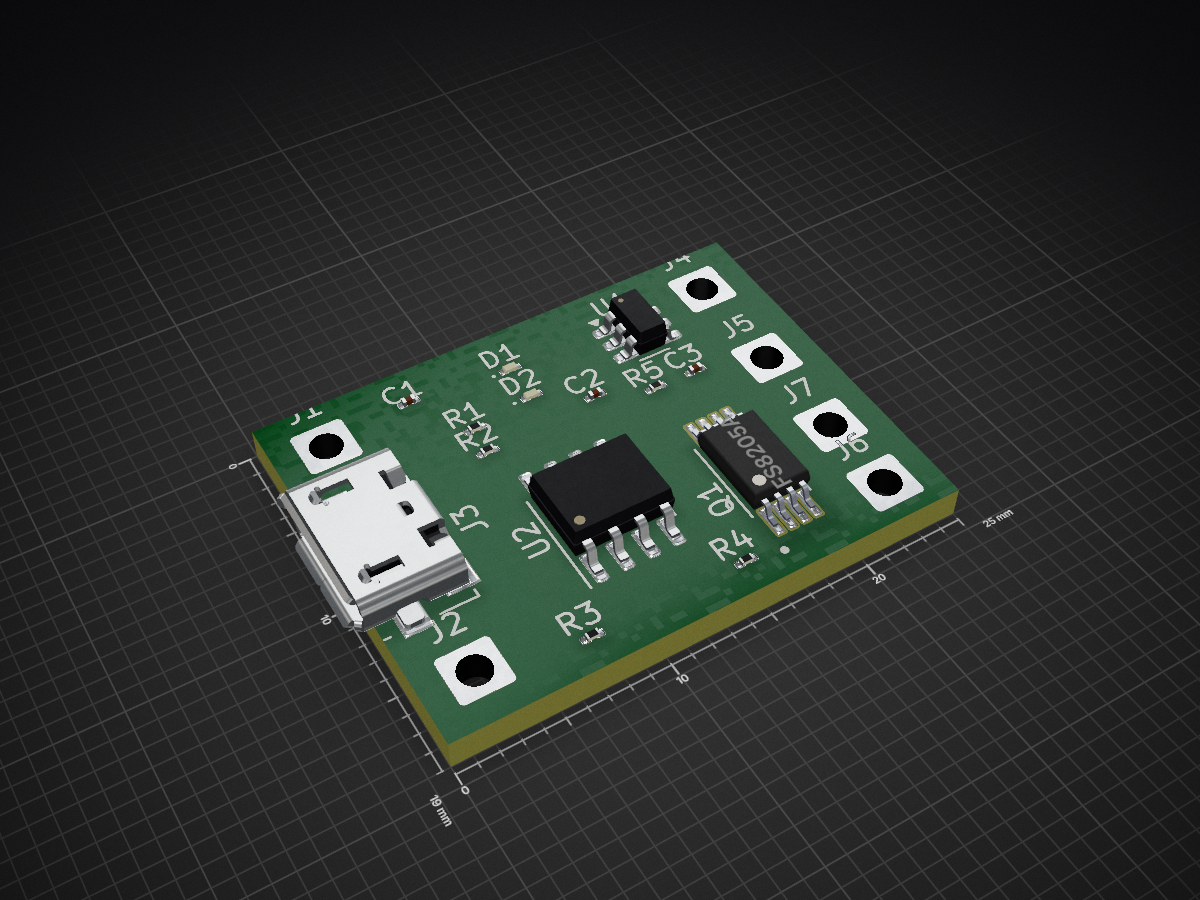
TP 4056 is an open-source printed circuit board by ElectronicsClub-IITK, from the ElectronicsClub-IITK/Swarm-Robotics repository on GitHub, published under the MIT licence. It is a 2-layer board of 25 × 19 mm with 20 parts on 19 nets.
It is built around the FS8205A. Its parts include 7 connectors, 5 resistors, 3 capacitors, 2 ICs and 2 diodes. It belongs with the robots and motor control boards of this library.
This is the Code base of the Project Swarm Robotics of Electronics club. This is a Summer Project that has been undertaken in the Summer of 2024.
The Project involved developing an infrastructure of Swarm Robots that can be used in several use cases with minimal modifications in their Design and Circuitry. We are designing a Multi-Terrain Robot that can maneuver in any terrain and gather critical information.
In week 0, basics of python and python assignment is done. Also, git and github is covered. We’re using Git and GitHub as tools for version control, collaboration and project management, thus ensuring everyone can work together efficiently.
In week 1, we started with the microcap. Micro-Cap is used for the analysis and simulation of various circuits. Multiple circuits are analyzed for familiarity with Micro-Cap. Simulation of the circuit where the transistor works as a switch was done on Micro-Cap for verification and to ensure proper working.
SolidWorks is instrumental in building the Swarm Robot by enabling detailed 3D modeling and design of mechanical components, ensuring precise fits and functionality. It allows for comprehensive simulation and analysis of movement, stress, and performance, helping to identify and resolve potential issues early.
KiCad is a powerful and open-source EDA software, used for designing circuit schematics and PCBs. It is used to create detailed schematics that include all components, such as micro-controllers, sensors, actuators, and communication modules.
SolidWorks is being used for the rough designing of the 3D model of our car. It assists in analysing weight and design of the swram robotics model efficiently. This reduces errors and optimizes the design before actual prototyping and manufacturing, saving time and resources.
Kalman filtering (KF) is an optimal estimation algorithm that provides estimates of some unknown variables given the measurements observed over time. The gyroscope provides the angular velocity and accelerometers provide linear acceleration . We then combine these two data to improve accuracy by implementing KF.
GNSS-INS-SIM is an GNSS/INS simulation project, which generates reference trajectories, IMU sensor output, GPS output, odometer output and magnetometer output. It allows users to model and test their algorithms in different scenarios, providing a flexible platform for developing and validating navigation solutions without needing extensive field tests.
In our project, we use KiCad to design PCBs that integrate motor driver ICs (e.g., L298) with microcontrollers and other components. In robotics we require microcontrollers to process data and control actuators. Using KiCad, we can design custom microcontroller boards (Arduino nano 33 IoT) that meet specific requirements. We can make our own symbols and can add appropriate footprints to them.
ROS (Robot Operating System) is an open-source, flexible framework for writing robot software. The project involves the coordination of multiple robots to perform tasks in a decentralized manner. A robot in the swarm operates based on local information and interactions with its neighbors.
Resources : ETH Zurich’s Programming for Robotics - ROS Robotics Back End - ROS Noetic For Beginners
Motors generally require more current than the Arduino can safely provide. So we are going to use an external power source for motors. We will be using BMS for providing required power to arduino as well as motors and use transistor (NMOS) as a switch.
| Qty | Value | Footprint | References |
|---|---|---|---|
| 3 | 1K | Resistor_SMD:R_0201_0603Metric | R1, R2, R4 |
| 3 | C | Capacitor_SMD:C_0201_0603Metric | C1, C2, C3 |
| 1 | 1.2K | Resistor_SMD:R_0201_0603Metric | R3 |
| 1 | 100ohms | Resistor_SMD:R_0201_0603Metric | R5 |
| 1 | B+ | Connector_Wire:SolderWire-0.75sqmm_1x01_D1.25mm_OD2.3mm | J5 |
| 1 | B- | Connector_Wire:SolderWire-0.75sqmm_1x01_D1.25mm_OD2.3mm | J6 |
| 1 | FS8205A | my_custom_library:SOP65P640X120-8N | Q1 |
| 1 | GREEN LED | LED_SMD:LED_0201_0603Metric | D1 |
| 1 | IN+ | Connector_Wire:SolderWire-0.75sqmm_1x01_D1.25mm_OD2.3mm | J1 |
| 1 | IN- | Connector_Wire:SolderWire-0.75sqmm_1x01_D1.25mm_OD2.3mm | J2 |
| 1 | OUT+ | Connector_Wire:SolderWire-0.75sqmm_1x01_D1.25mm_OD2.3mm | J4 |
| 1 | OUT- | Connector_Wire:SolderWire-0.75sqmm_1x01_D1.25mm_OD2.3mm | J7 |
| 1 | RED LED | LED_SMD:LED_0201_0603Metric | D2 |
| 1 | USB_B_Micro | Connector_USB:USB_Micro-B_Molex_47346-0001 | J3 |
| 1 | ~ | Package_TO_SOT_SMD:SOT-23-6 | U1 |
| 1 | ~ | my_custom_library:SOP-8_3.9x4.9mm_P1.27mm | U2 |
ElectronicsClub-IITK/Swarm-Robotics
This Repo Contains all the Assignments, Submissions and Weekly Progress of the Summer Project - Swarm Robotics

iandchasse/silkscreen-pcb
Silkscreen: open-hardware ESP32-S3 e-paper reader mainboard (KiCad 9). Formerly the de-link hub.


CrashOverride85/zc95
4 channel EStim box inspired by the mk312bt, with Lua scripting support

Xii-Labs/Xii-Boy-Ultra
The world's first wire-free Wii portable, now in the palm of your hands. Better than ever, optimized to delight, built for fun. The next generation of Wii portables starts now.


fishPointer/Joule-Thief
I teach myself new skills by designing projects that require to develop the skills I want in order to complete them.

OpenSourceNeuro/Spikeling
A hardware implementation of spiking neurons for neuroscience teaching and outreach
It measures 25 × 19 mm and has 2 copper layers, 1.6 mm thick.
20 parts, built around the FS8205A. The full list of its parts is on this page, with links to each part's symbol and footprint where PCBKit's library has them.
From the ElectronicsClub-IITK/Swarm-Robotics repository on GitHub, at the commit this page was made from: the board is Week 4/BMS PCB/TP_4056.kicad_pcb and its schematic Week 2/KiCAD Assignment/Assignment.kicad_sch. PCBKit opens the board in the browser, with nothing to install.
Its repository publishes it under the MIT licence: you may reuse it on that licence's terms (keep the author's notice, and for a copyleft licence share your changes alike).