2 layers40 × 40 mm
Block Party Bottom Board
Block-Party-VR/Block-Party-Firmware
Stack blocks in real life. See them stack in VR. Play with blocks in VR. See them change in real life. If you’re feeling brave, enter the doll house.
12 partsMIT
 Block-Party-VR/Block-Party-Firmware
Stack blocks in real life. See them stack in VR. Play with blocks in VR. See them change in real life. If you’re feeling brave, enter the doll house.
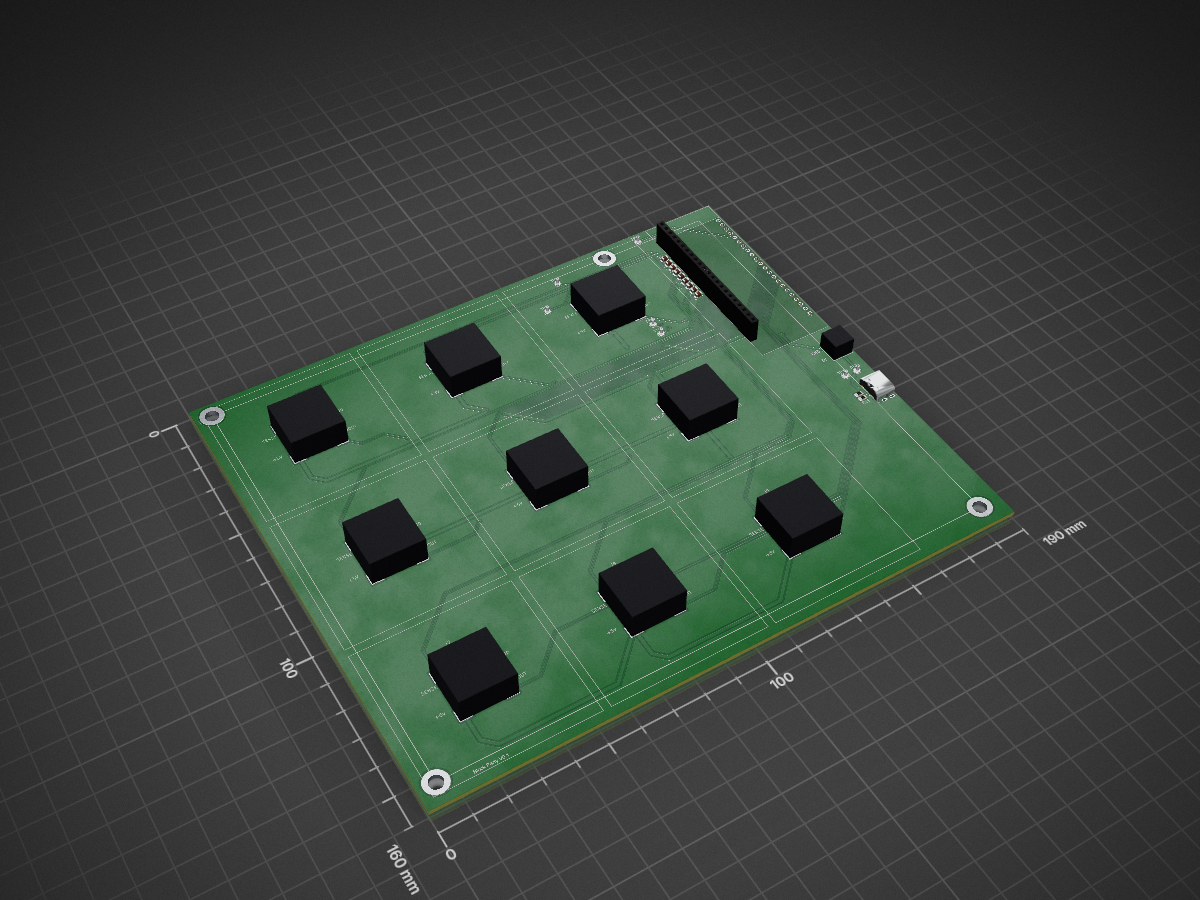
Block Party Main Board is an open-source printed circuit board by Block-Party-VR, from the Block-Party-VR/Block-Party-Firmware repository on GitHub, published under the MIT licence. It is a 2-layer board of 190 × 160 mm with 43 parts on 42 nets, routed with 266 tracks and 27 vias.
It is built around the ESP32-S3-DEVKITC-1-N8R2, 691214110002S and USBC-0015IPX6-00. Its parts include 11 resistors, 11 connectors, 9 capacitors and 1 IC. It belongs with the ESP32 boards of this library.


Stack blocks in real life. See them stack in VR. Play with blocks in VR. See them change in real life. If you’re feeling brave, enter the doll house.
Virtual reality can be a powerful tool to connect the physical world and the digital world and connect people in different locations. However, many VR experiences today are limited to the digital world. Many multi-user VR experiences place all users into the same digital world and people in the VR headset are cut off from the physical world.
Block Party uses an asymmetric experience to connect a person using a VR headset with a person without a headset. The person without a headset interacts with physical blocks on a physical board while the person in the VR headset interacts with digital blocks on a digital board. When the physical user places a physical block on the physical board, the VR user sees a block in the corresponding location on the digital board. When the physical user removes a block from the board, the corresponding digital block disappears for the VR user. When the VR user hovers over or picks up a digital cube, the corresponding physical cube changes color to show the physical user what the VR user is doing.
When the repository is first cloned you will need to initialize all of its submodules.
In the terminal type: git submodule update --init --recursive which will initalize all of the submodules.
documentation directory.documentation directory.the SingularityOn v0.1 of the board, a seperate bluetooth module (HC-05) is being used for bluetooth. This module needs to be programmed when first plugged in. To program the module, disconnect it from power and hold the "EN" button on the module. (The button should be the only button on the HC-05 module). While still holding down the button, reconnect the module to the ESP32. Let go of the button and then press the ESP32's reset button. Wait 5 seconds while still holding down the "EN" button on the module, then release the button, power cycle the module, and you're done.
the Singularity.Once the cube has been placed on the board a cube in VR will appear. The VR user can poke and pickup the digital blocks which will be indicated in real life by changing the colors of the blocks. Poking will change the block color to blue and picking it up will change it to red.
The user can activate passthrough mode inside the app to see the physical board and the digital board at the same time.
When the dollhouse mode is activated, the digital blocks are increased in size and the VR user is moved to the center square of the board. Note that a physical cube on the center square of the board will not appear in the digital world.
The board contains an ESP32 that uses bluetooth serial to send the state of the board and receive commands.
BoardStateCommand Number: 0
Format Example: !0,X1,X2,X3,X4,X5,X6,X7,X8,X9;
Description: This command is sent when the board state changes and describes how the board is populated.
| X1 X2 X3 |
| X4 X5 X6 |
| X7 X8 X9 |
0 corresponds with the command type. The command number for BoardState is 0. X1 corresponds with board spot X1, and so on. The value in each of the spots indicates how many cubes are in that spot. IE: If X1 where 3, then there would be 3 cubes in the top left spot.
If you would like to get the board state, you can send !0; to the ESP32 and it will respond with the current board state. Otherwise, the ESP32 will send the board state whenever it changes.
PingCommand Number: 1
Format Example: !1;
Description: This command is sent to the ESP32 to check if it is still connected. The ESP32 will respond with !1; if it is still connected.
SetStackColorCommand Number: 2
Format Example: !2,StackNumber,Red1,Green1,Blue1,Red2,Green2,Blue2,...REDX,GREENX,BLUEX;
Description Set the colors for one of the stacks.
BoardState description for stack numbers.GoToIdleCommand Number: 3
Format Example !3;
Description: This command will tell the ESP32 to re-enable its idle animation. It will respond with a !3; when it recieves this command.
the Singularity which allowed us to connect the board to Quest headsets.| Qty | Value | Footprint | References |
|---|---|---|---|
| 9 | 10k | Resistor_SMD:R_0805_2012Metric | R1, R2, R3, R4, R5, R6, R7, R8, R9 |
| 9 | 3.3uF | Capacitor_SMD:C_0805_2012Metric | C1, C2, C3, C4, C5, C6, C7, C8, C9 |
| 9 | ~ | Quinn_lib:Top Block Connector | J1, J2, J3, J4, J5, J6, J7, J8, J9 |
| 7 | TestPoint | TestPoint:TestPoint_Pad_D2.0mm | TP1, TP2, TP3, TP4, TP5, TP6, TP7 |
| 2 | 5.1k | Resistor_SMD:R_0805_2012Metric | R11, R12 |
| 1 | 691214110002S | 2p 3:691214110002S | J11 |
| 1 | ESP32-S3-DEVKITC-1-N8R2 | ESP32-S3-DEVKITC-1-N8R2:XCVR_ESP32-S3-DEVKITC-1-N8R2 | U1 |
| 1 | USBC-0015IPX6-00 | Quinn_lib:USB_C-0015IPX6-00 | J10 |
The 39 most common of 43 parts.
Block-Party-VR/Block-Party-Firmware
Stack blocks in real life. See them stack in VR. Play with blocks in VR. See them change in real life. If you’re feeling brave, enter the doll house.

Block-Party-VR/Block-Party-Firmware
Stack blocks in real life. See them stack in VR. Play with blocks in VR. See them change in real life. If you’re feeling brave, enter the doll house.

vortexntnu/vortex-nautilus-PCBs
A collection of all the PCB project files for the Nautilus AUV

JasonHEngineering/DIY-Robot-Arm-V3
1) Along with using with TMC2209 motor drivers, I have removed R8, R15, R16, R17, R18, R19 because the R value was accidentally too high. I have shorted R8, R16, R17, and left open R15, R18, R19.

riezky-gitH/SIMPAS-BOILER
> 📖 Guidebook proyek — tautan guidebook baru akan ditambahkan di sini.

arkadasgupta07/ProjectKratos
Arka Dasgupta BITS Pilani, K. K. Birla Goa Campus Aspiring to develop rovers by engineering their electronics, controls and automation subsystems.


dennowiggle/ESP32_Interface
Facilitate learning the Z80 Retro! hardware and software.


Sidbit08/ABEX_PCB_v1
A custom ESP32-S3-based PCB designed in KiCad for automated soil sample analysis, featuring drivers and interfaces for environmental sensors, peristaltic pumps, and auger drilling actuators.
It measures 190 × 160 mm and has 2 copper layers, 1.6 mm thick.
43 parts, built around the ESP32-S3-DEVKITC-1-N8R2, 691214110002S and USBC-0015IPX6-00. The full list of its parts is on this page, with links to each part's symbol and footprint where PCBKit's library has them.
From the Block-Party-VR/Block-Party-Firmware repository on GitHub, at the commit this page was made from: the board is Schematics/Block-Party/Block-Party-Main-Board/Block-Party-Main-Board.kicad_pcb and its schematic Schematics/Block-Party/Block-Party-Cube-Bottom-Board/Block-Party-Bottom-Board.kicad_sch. PCBKit opens the board in the browser, with nothing to install.
Its repository publishes it under the MIT licence: you may reuse it on that licence's terms (keep the author's notice, and for a copyleft licence share your changes alike).