
2 layers96.6 × 82.8 mm

 TomaszTlusty/kittyterm
a terminal but kitty styled?!
Kittyterm is an open-source printed circuit board by TomaszTlusty, from the TomaszTlusty/kittyterm repository on GitHub. It is a 2-layer board of 80 × 79.9 mm with 8 parts on 24 nets, routed with 60 tracks and 0 vias.
It is built around the DHT11. Its parts include 3 switches, 2 ICs, 2 connectors and 1 resistor. It belongs with the ESP32 and RISC-V boards of this library.
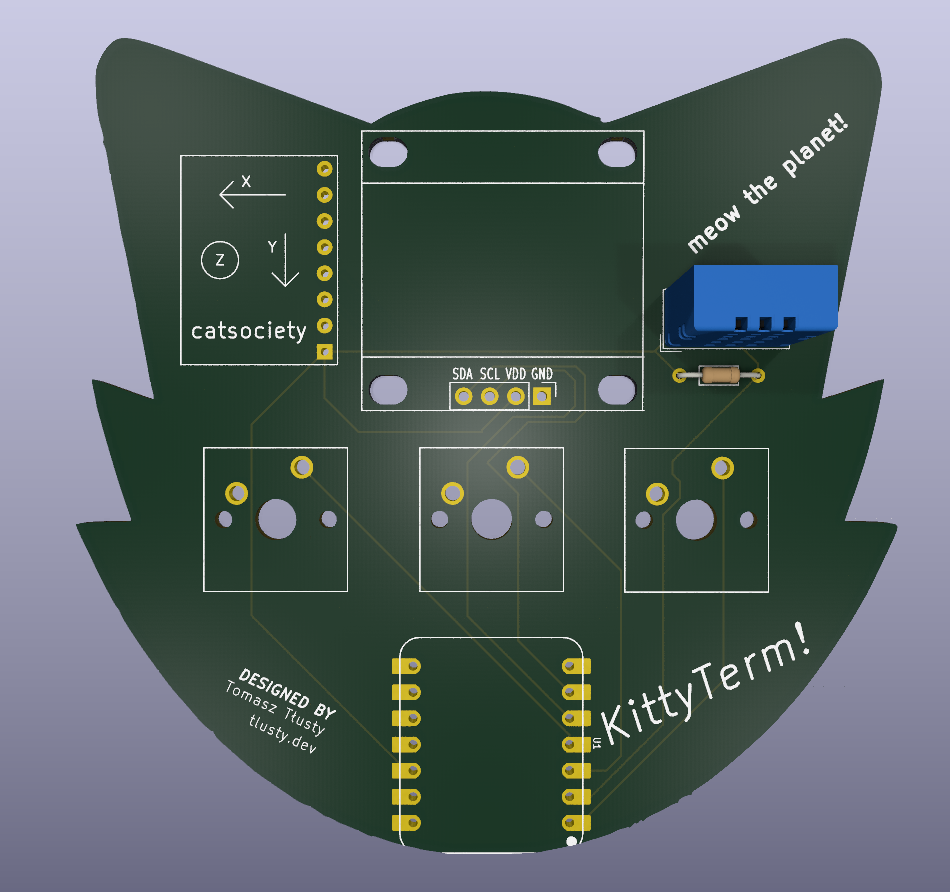
KittyTerm is a tiny motion-controlled digital pet: basically a desktop Tamagotchi with a 3-button control scheme and motion sensing. You can interact with it both by physically moving the board and by using the onboard push buttons.
KittyTerm is designed to sit on your desk, show its personality on a small OLED display, and react to how you handle it. Tilting, shaking, and checking in on your pet are all part of the experience.
The board includes a Seeed XIAO ESP32-C3 microcontroller, an SSD1306 OLED display, an MPU6050 motion sensor, a DHT11 environmental sensor, and three push buttons in a compact, USB-powered PCB design built around beginner-friendly through-hole soldering.
This project was created for the week 1 beginner tutorial for halflife!
The PCB design, renders, and starter firmware are included here. The program features an animated pet with a tilt- and button-controlled radial menu, live environmental stats, persistent memory, and shake reactions.
Firmware/ contains a single-file, non-blocking (millis()-based) sketch for the Seeed XIAO ESP32-C3, compatible with both Arduino IDE and PlatformIO.
View State Machine):
PET_VIEW: Renders a custom 32x32 1-bit PROGMEM sprite on a 128x64 SSD1306 OLED (0x3C). The pet wanders across the screen and plays procedural animations for jumping, running laps, sleeping (with floating zs), and emitting hearts.MENU_VIEW: A 4-sector radial menu (NAP, PLAY, FEED, PET). Opening the menu records the board's current tilt angle as a zero-point calibration, turning the MPU6050 (0x68) into a smoothed air-mouse cursor with a configurable center deadzone.STATS_VIEW: Displays 0–100 stat bars for JOY, ENERGY, and FULL, alongside live ambient temperature and humidity readings polled from the DHT11 sensor.GPIO 4 / D2): Opens the radial menu, confirms the highlighted action, or cancels if pressed while in the center deadzone.GPIO 5 / D3): Toggles between the main pet screen and the stats screen.GPIO 2 / D0): Cycles through the 4 radial menu options when the menu is open (allowing full navigation even without tilting), triggers a quick PET reaction on the main screen, or exits the stats screen.JOY.Preferences.h):
joy, energy, and fullness values to the ESP32-C3's Non-Volatile Storage (NVS) after every action or shake so your pet's progress is kept across power cycles.SWAP_MPU_AXES), and sprite bitmaps are grouped in the BEGINNER SETTINGS section at the top of the file.Adafruit GFX LibraryAdafruit SSD1306Adafruit MPU6050 (with Adafruit Unified Sensor and Adafruit BusIO)DHT sensor libraryPCB/ - KiCad source files and fabrication exportsImages/ - front and back PCB rendersWeek 1 Guide.md - project guide materialFirmware/ - Arduino IDE / PlatformIO starter sketch| Qty | Value | Footprint | References |
|---|---|---|---|
| 3 | SW_Push | Button_Switch_Keyboard:SW_Cherry_MX_1.00u_PCB | SW1, SW2, SW3 |
| 1 | Conn_01x04 | Imported Parts:Display_128x64_096_I2C | J1 |
| 1 | Conn_01x08 | Imported Parts:MPU6050_Module | J2 |
| 1 | DHT11 | Sensor:Aosong_DHT11_5.5x12.0_P2.54mm | U2 |
| 1 | R | Resistor_THT:R_Axial_DIN0204_L3.6mm_D1.6mm_P7.62mm_Horizontal | R1 |
| 1 | XIAO-ESP32-C3-DIP | Imported Parts:XIAO-ESP32-C6-DIP | U1 |
It measures 80 × 79.9 mm and has 2 copper layers, 1.6 mm thick.
8 parts, built around the DHT11. The full list of its parts is on this page, with links to each part's symbol and footprint where PCBKit's library has them.
From the TomaszTlusty/kittyterm repository on GitHub, at the commit this page was made from: the board is PCB/kittyterm.kicad_pcb. PCBKit opens the board in the browser, with nothing to install.
Its repository states no licence, so its author keeps all rights: ask TomaszTlusty before reusing the design.

lansidev/conveyor-belt
Miniature 3D printed conveyor belt for simulation and fun working with sensors, all controllable with Raspberry Pi


ebrithiljonas/OMG_PCB
All in One PCB for the OpenMQTTGateway Project

GeorgK/SniffingTrinket
A room climate monitor using the Adafruit Trinket Pro

bhaskar9980/Guardian
Guardian is an advanced, fully automated hydroponics system designed to optimize plant growth and maximize yield.

Twistx77/Firefly
Open WIFI-enabled RGB lamp with temperature, humidity, suspended air particles and eCO2 sensors.

unla-investigacion-desarrollo/ecosistema-iot
Antes de desarrollar el sistema final, realizamos una etapa de exploración donde investigamos y experimentamos con las siguientes tecnologías: