
2 layers181 × 97 mm
OpenDeck r3.1.2
shanteacontrols/OpenDeck
A platform for building interactive control and sensing devices using MIDI and OSC built with Zephyr RTOS.
262 parts960Apache-2.0

 tikinson/tknbrd0
my first custom mechanical keyboard
Tknbrd is an open-source printed circuit board by tikinson, from the tikinson/tknbrd0 repository on GitHub. It is a 2-layer board of 304 × 135.4 mm with 139 parts on 119 nets, routed with 1,348 tracks and 139 vias.
It is built around the 1N4148WT. Its parts include 42 diodes, 42 switches, 1 IC and 1 connector. It belongs with the keyboards and input boards and the RP2040 boards of this library.
After a couple of sleepless nights, I decided to get my hands dirty with this sweet and diverse world of mechanical keyboards. As i understood on my way to my current daily driver it's quite interesting challenge. My main idea was to make a cheap keyboard, that can guide me forward in this hobby.
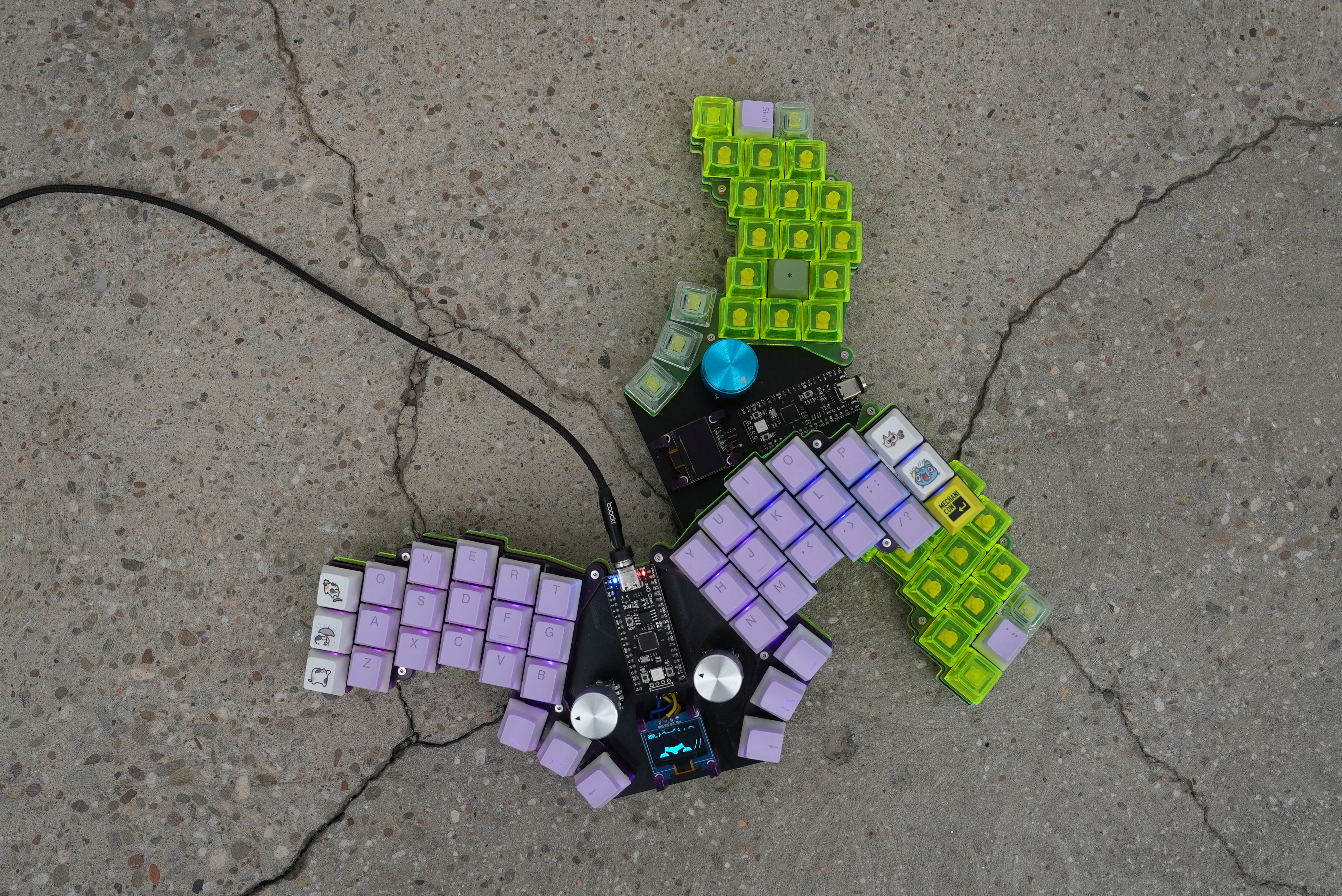
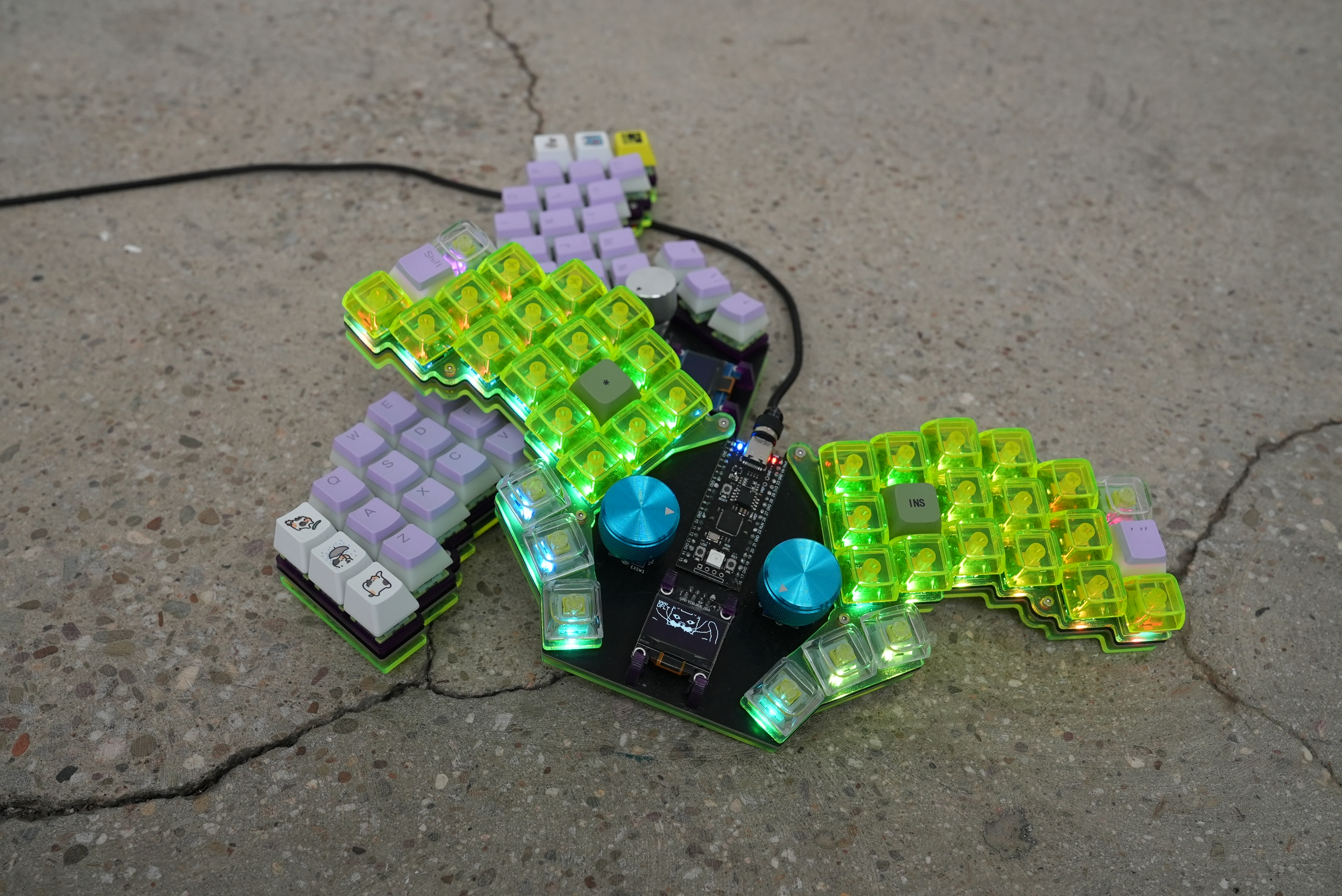
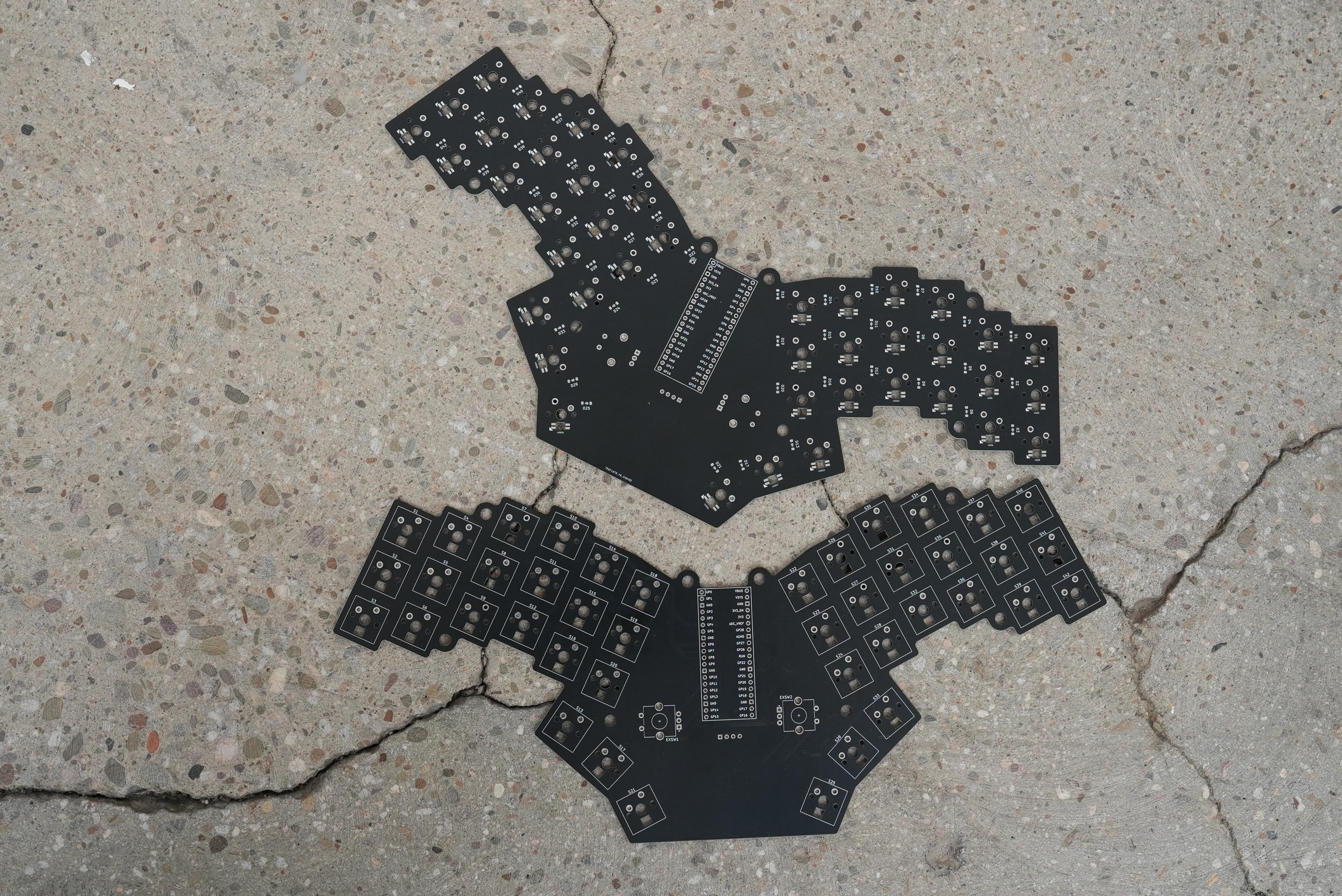
So, i made a rough sketch of the location of my fingers to understand how far i must go with ergogen and then use spacing of switches in KiCad to make a PCB. Also this isn't a bad idea to play around with encoders and small OLED display in my project. As it usually almost everytime happens with first try, i made some mistakes ( learned some lessons :D ) and realize this after i got PCBs from manufacturer. It's not critical, but in some points it could be just unexpectable for those, who would repeat my project.
By the way here is PCBs appearance:
WPM and remix of bongo cat animation is showing on my OLED (of course with picture of my cat instead of original one!). With encoders i can scroll my feed, and also fast forward/backward the YouTube videos by 5 seconds. Encoders is very interesting feature in keyboards and detailed explanation of this you can check in QMK Docs.
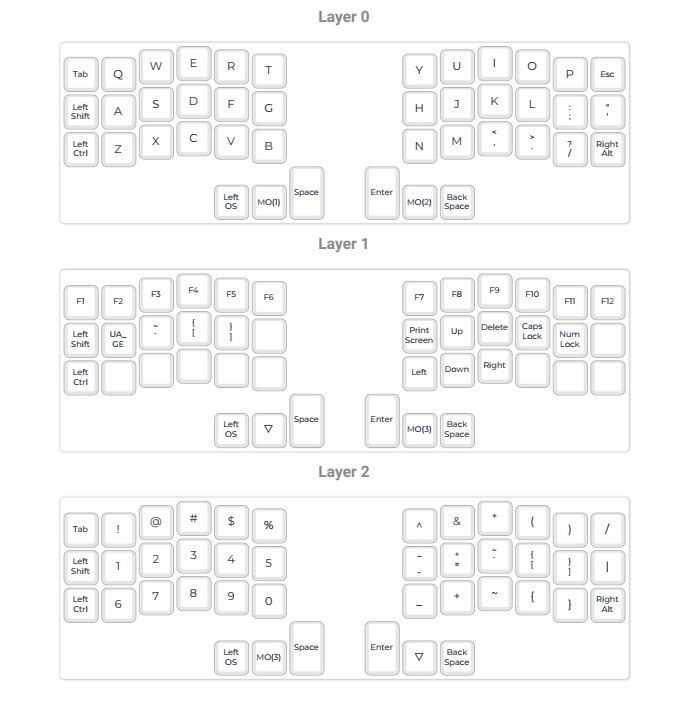
My keyboard has a 42 keys, and it planned to use with QWERTY layout. For me is also iportant to have access to ukrainian letter Ґ, Ї, and some umlaut letters Ä, Ö, Ü. I have now a laptop with QWERTZ layout, so have a keyboard with comfortable QWERTY is must have for me. So here is the keymap:
In file 'path_for400x300.svg' in this repo you can find a complete graphical outline for lasercutted case. I used a 3 mm acrylic sheet and laser in local FabLab.
I created a fork of QMK firmware here and here is tknbrd0 is located inside of QMK fork.
So you can compile firmware from fork or you can find binaries in 'FW' directory of this repo.
Interactive BOM could be handy in assembling process and you can find it here
| Designator | Footprint | Quantity | Value | LCSC Part # |
|---|---|---|---|---|
| D1 - D42 | Diode_SOD-123 | 42 | Diode | C83528 |
| EXSW1, EXSW2 | RotaryEncoder_Alps_EC11E-Switch_Vertical_H20mm_CircularMountingHoles | 2 | RotaryEncoder_Switch | C1322543 |
| J1 | OLED_128x64 (I2C version) | 1 | Conn_01x04 | |
| S1 - S42 | MX_PCB_1.00u | 42 | Keyswitch | |
| U1 | Raspberry_Pi_Pico | 1 | Raspberry_Pi_Pico | |
| rD1 | D_SOD-523 | 1 | 1N4148WT | C232841 |
| rLED1 - rLED42 | YS-SK6812MINI-E-withCUTOUT | 42 | YS-SK6812MINI-E | C5149201 |
| aluminum spacer M2(standoff) | MountingHole_4.3mm_M4_ISO14580 | 8 | standoff |
Lasercutting, Knob, Switches all this you can easily find on market on your personal preferences. All that included in BOM is recommended, only LED is optional.
| Qty | Value | Footprint | References |
|---|---|---|---|
| 42 | Diode | ScottoKeebs_Components:Diode_SOD-123 | D1, D2, D10, D11, D12, D13, D14, D15, D16, D17, D18, D19, D20, D21, D22, D23 +26 |
| 42 | Keyswitch | ScottoKeebs_MX:MX_PCB_1.00u | S1, S2, S10, S11, S12, S13, S14, S15, S16, S17, S18, S19, S20, S21, S22, S23 +26 |
| 42 | YS-SK6812MINI-E | cutsky:YS-SK6812MINI-E-withCUTOUT | rLED1, rLED2, rLED10, rLED11, rLED12, rLED13, rLED14, rLED15, rLED16, rLED17, rLED18, rLED19, rLED20, rLED21, rLED22, rLED23 +26 |
| 2 | RotaryEncoder_Switch | Rotary_Encoder:RotaryEncoder_Alps_EC11E-Switch_Vertical_H20mm_CircularMountingHoles | EXSW1, EXSW2 |
| 1 | 1N4148WT | Diode_SMD:D_SOD-523 | rD1 |
| 1 | Conn_01x04 | ScottoKeebs_Components:OLED_128x64 | J1 |
| 1 | Raspberry_Pi_Pico | ScottoKeebs_MCU:Raspberry_Pi_Pico | U1 |
The 131 most common of 139 parts.
shanteacontrols/OpenDeck
A platform for building interactive control and sensing devices using MIDI and OSC built with Zephyr RTOS.

beekeeb/zerosprey42
Zerosprey42 Keyboard is a wired, beginner friendly, choc hotswap, MonoBlockSplit (Unibody), column-staggered, DIY mechanical keyboard.


todbot/macropadsynthplug
Turn StemmaQT port by into Audio Out + MIDI In

acha666/RP2040_ToolheadPCB_SB
A Toolhead PCB for VORON StealthBurner based on RP2040


floookay/olice
The olice is 40% alice-like ortho keyboard. It features two board extension modules that can be magnetically attached on the sides.

drpykachu/Sonar-Watch
A self-designed, home-made watch intended to tell time in a funky and unique way!
It measures 304 × 135.4 mm and has 2 copper layers, 1.6 mm thick.
139 parts, built around the 1N4148WT. The full list of its parts is on this page, with links to each part's symbol and footprint where PCBKit's library has them.
From the tikinson/tknbrd0 repository on GitHub, at the commit this page was made from: the board is tknbrd.kicad_pcb and its schematic tknbrd.kicad_sch. PCBKit opens the board in the browser, with nothing to install.
Its repository states no licence, so its author keeps all rights: ask tikinson before reusing the design.