Skip to the content
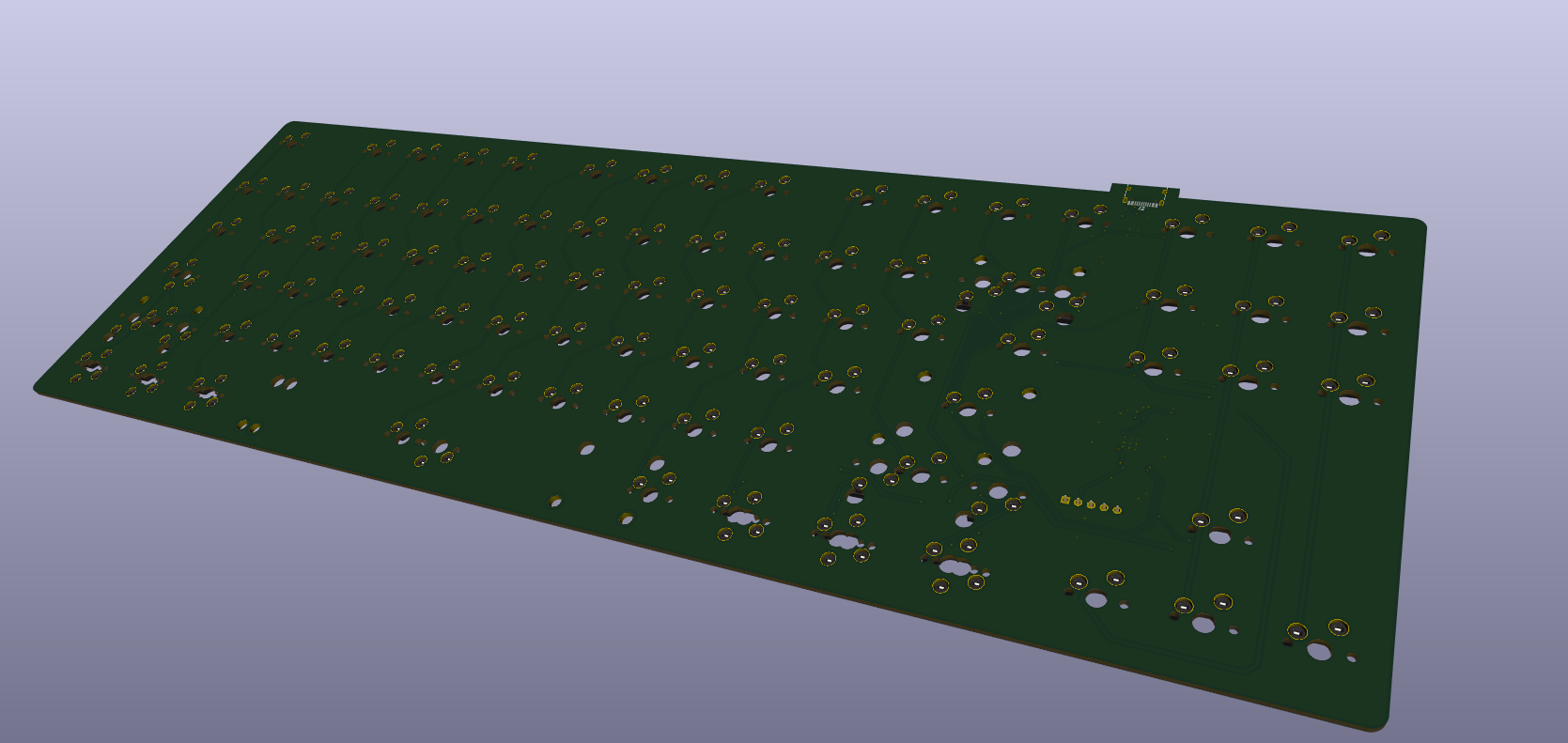
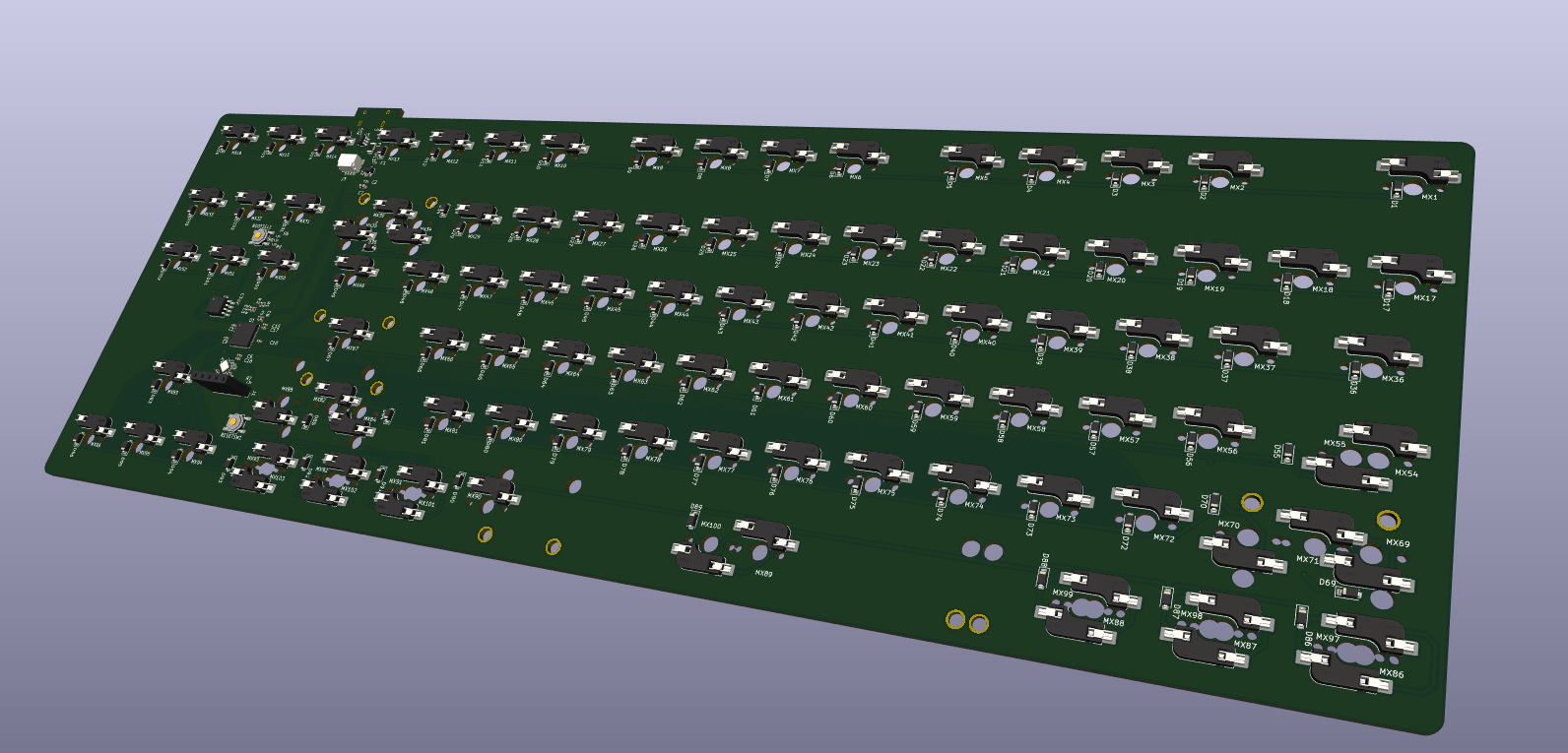
2 layers350.8 × 127.1 mmTKL, the printed circuit board in 3D
Size
350.8 × 127.1 mm
Copper layers
2
Thickness
1.6 mm
Parts
234
Nets
149
Pads
1,290
Tracks, vias
1,103, 82
Pours
3
Routed
Yes
KiCad
KiCad 10.0 (file 20260206)
Created
4 Jul 2026
Updated
2 Aug 2026

Overview

TKL is an open-source printed circuit board by tg257225-oss, from the tg257225-oss/TKL-Keyboard repository on GitHub. It is a 2-layer board of 350.8 × 127.1 mm with 234 parts on 149 nets, routed with 1,103 tracks and 82 vias.

It is built around the RP2040, W25Q128JVSIQ and SRV05-4. Its parts include 90 diodes, 17 capacitors, 9 resistors, 6 switches and 4 ICs. It belongs with the RP2040 boards of this library.

Main components

3

README

README.md

TKL Keyboard

An F12 TKL Multi-Layout Hotswap keyboard, designed in KiCad10 and Fusion360. Everything in the 'Production' folder of this repository should be everything you need for the physical parts of this keyboard. Gerbers file can be provided to JLCPCB (or others) for them to manufacture the PCB. The STP files are used to 3D print the top case, bottom case, and plate.

KiCad Renders:

PCB Front

PCB Back

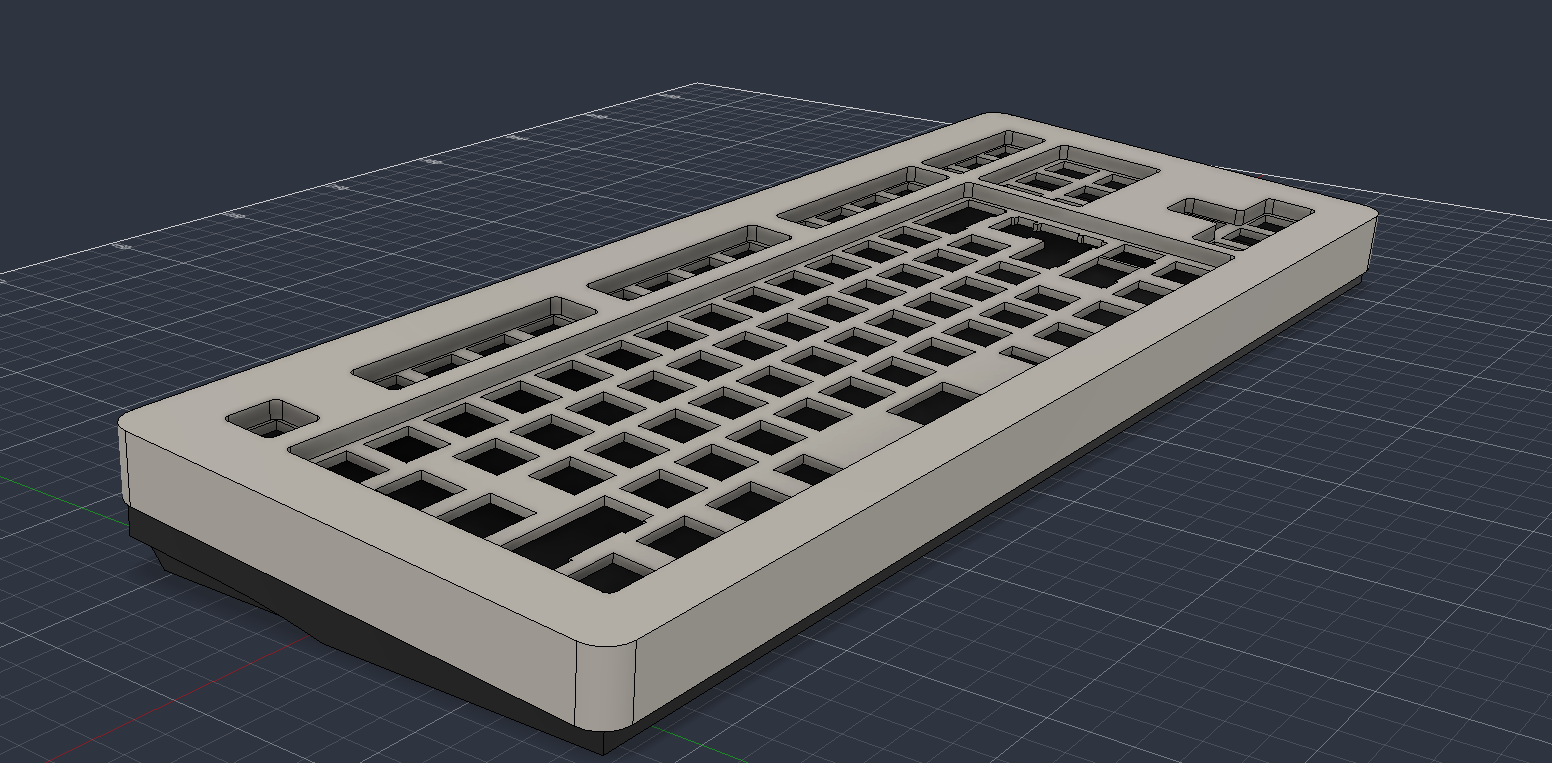
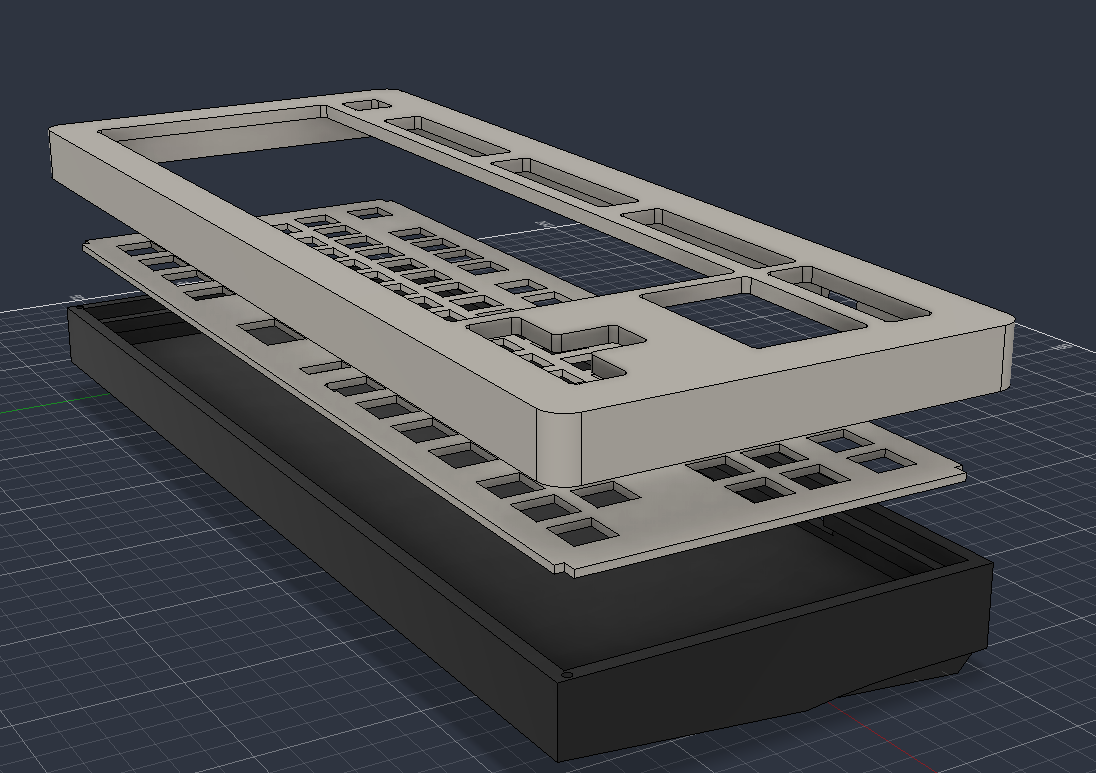
Keyboard Case:

Entire Case

Exploded Case

Features

  • RESET Switch - allows you to reboot the keyboard's processor
  • BOOTSEL Switch - Allows you to load custom firmware onto the keyboard
  • Uses the RP2040 MCU
  • Uses Kailh Hotswap Sockets
  • 16Mib Flash Memory
  • 12MHz Crystal
  • USB-C Port
  • ESD Chip to prevent damage from electrostatic discharge
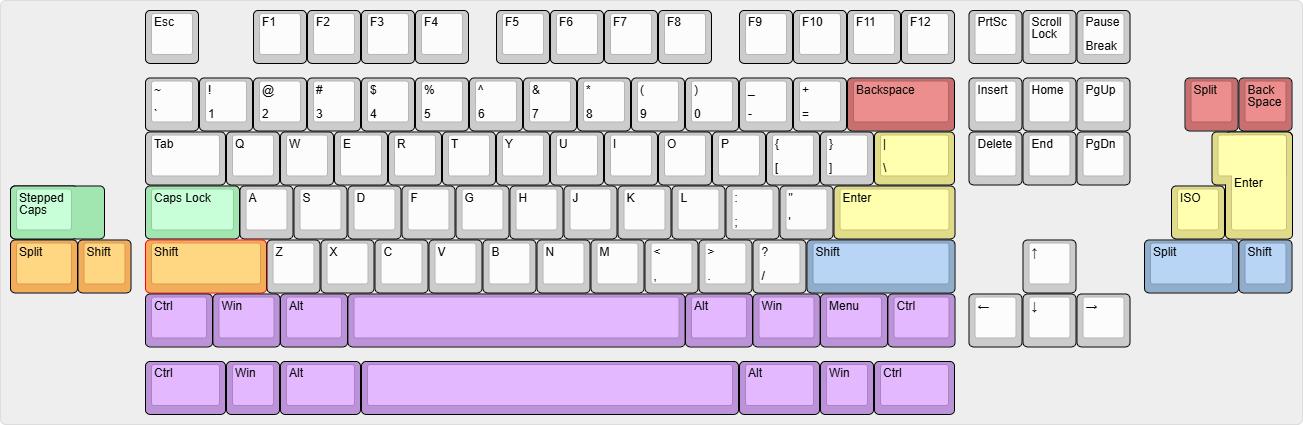
  • Supports ANSI/ISO

Multi-Layout Support

Multi-Layout

Firmware

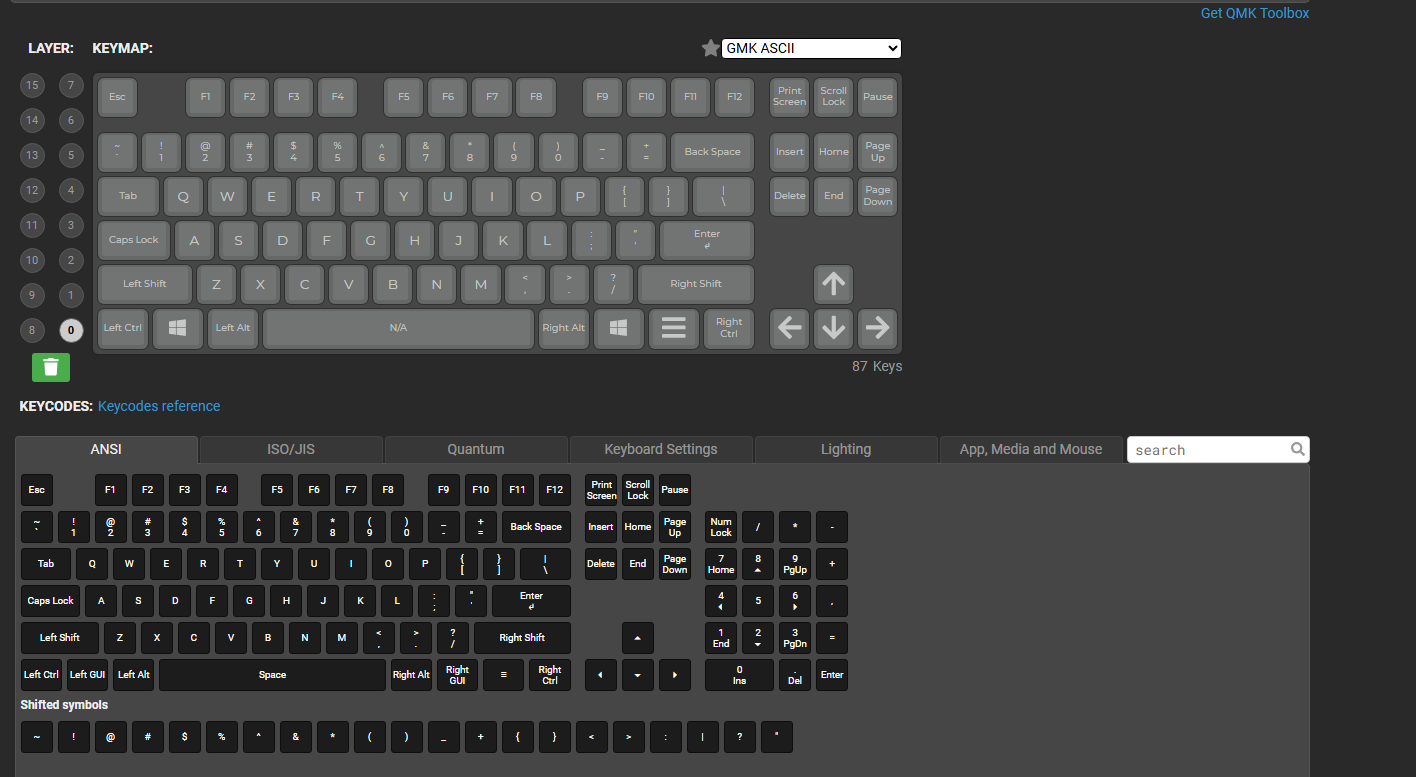
Here's the basic keyboard layout (the one included in the 'Firmware' folder):

Keyboard Layout

You can edit it by uploading the JSON file in the 'Firmware' folder into QMK and making the necessary changes for the layout you want to use.

Flashing Instructions

  1. Hold the BOOTSEL switch while plugging the board into the computer. Your computer will recognize the keyboard as a new USB flash drive.
  2. Drag the .uf2 firmware file onto the drive which will flash and reconnect as your keyboard.

BOM for everything but the PCB

These are just items I found online, obviously not everyone will have to buy everything or may find things cheaper.

ItemPrice
PORON Foam 3mm (https://kineticlabs.com/misc/kinetic/keyboard-case-foam)$11.99
PORON Switch Pads 120pcs (https://www.thockking.com/products/120-pcs-poron-switch-pcb-pads-keyboard?srsltid=AfmBOoo6HK_r0ljKCA8shWPgEShMNSKvCRTplPMlUFCUZeMBYEVjpXQe)$5.95
PORON Gasket Pack (https://sneakbox.com/products/poron-gasket-pack-for-ava)$2.50
Rubber Feet for Grip 16pcs (https://www.amazon.com/Non-Slip-Replacement-Compatible-Keyboard-Appliance/dp/B0D4YMSKB4/ref=sr_1_11?dib=eyJ2IjoiMSJ9.XoUMk7-UOlTtPtFYWQZpOQQ0YV07qMV2vTZ3kSxIkSIlizGofOPVbTpGYzwRQw88zKSM_KaKzUI6qV4OeunmTbTU3q4nR0jaM8CfstdL5DCAXgpC3ANQ_niT6N3AHx2a1g9P4uldjTluwpxN1PMmYOOq9HpF6IvnZPEHAniQHR3mgzZNr9sqDr-lmo_pEqo7xObI15IINl3HmPJ3EgNBM4ETJDI--IO8IAdWWZ-Z_FE.Q2DZ8wJYTM9evpEy83jlTd3WV4KQYcCodQErPj6XfDI&dib_tag=se&keywords=computer+bottom+grips&qid=1783888312&sr=8-11)$5.99
PLA Jade White Filament - Refills (https://us.store.bambulab.com/products/pla-basic-filament?id=40475106640008&skr=yes&srsltid=AfmBOopkMxBwVVOAUPB-eUb1OnMVHz0YslsCtdrWvmvNn3WDPF1wTifkfaI)$19.99
PLA Dark Gray Filament - Refills (https://us.store.bambulab.com/products/pla-basic-filament?id=42844629008520&skr=yes&srsltid=AfmBOopkMxBwVVOAUPB-eUb1OnMVHz0YslsCtdrWvmvNn3WDPF1wTifkfaI)$19.99
Kailh Box White Mechanical Switches 108pcs (https://www.amazon.com/Zjmehty-Mechanical-Keyboard-Switches-Waterproof/dp/B0CBPQGBSF/ref=sr_1_3?dib=eyJ2IjoiMSJ9.E0cY7EpgxNWIGrjiUDijL2yX7QuJ4sSXQ3ni0V0YHDAgaGYgADZFwBu84mjhf-QysIyrwlpTxvjmzL0KDfYxlYY83vHiW4xgVClPXeF4Ib92ppCQysXUy_H-mAxLtrBvZS-ZL3z2GxEdb6f2pQ4qCblsv-kbjjwNlKHZ9bSdp37dGywsIBQwMoVVzmxqHsSfLnByHLKTMRRTwjsypfUzWYkZ373k-XDaxMY0TNUJ_mk.5vlHIp12Un8F6nijEipLgdprO-QfBAuDYCqbvLERydk&dib_tag=se&keywords=kailh%2Bswitches&qid=1783899117&sr=8-3&th=1)$32.99
Black on White Double Shot ABS Keycap Set 150pcs (https://mechanicalkeyboards.com/products/tai-hao-150-key-abs-double-shot-cubic-keycap-set-black-on-white)$23.99
M3x25mm + M3x35mm Screws (https://www.amazon.com/VGBUY-443Pcs-Assortment-Printer-Washers/dp/B0D14BC8QS/ref=sr_1_29?dib=eyJ2IjoiMSJ9.cJlzu8DHjxsBzA9lFsc42RrAUiLpBy2F3tkct2TerB3jPoWxLy1FFqgPkZL65Hm6hQ30CzHtc9XbV1b-KKiqKPhDFOW3YmMjd30Ejia8Nu6dS_fYUZJw2OaXmPkm66xulz6iDtLy41kDzPSHcQoN8hYNtvkRf0d3jzQRr0kr6lgkEKZoX19UdRjpKiqxOx5Y.NBmS5v4xF-mHcY9zdglMfK5eDmRY_j0mqYXsMdjWDFA&dib_tag=se&keywords=metric%2Bscrews%2Bm3&qid=1783871590&sr=8-29&xpid=46NRh2P79qy-c&th=1)$9.99
Stabilizers (https://minokeys.com/products/aeboards-staebies)$20.00
Total:$147.39

Assembly (a little unconventional but I plan on making things easier in the future)

  1. Case Dampening - Cut the 3mm PORON case FOAM to fit and lay it fly inside the 3D-printed bottom case. There should be a 1.5 mm air gap between the foat and the hotswap sockets to allow for gasket flex. Extra foam can be placed but they shouldn't be overpacked.
  2. PCB + Plate - Apply the PORON switch pads to the the PCB, install the stabilizers, and snap your chosen switches into the plate to secure them. Align the switch pins with the Kailh hotswap sockets and press the plate and PCB together.
  3. Gasket Mounting - Apply the PORON Gaskets to all four margins on the plate, one on the top of the plate and the other on the bottom, creating a sandwich. These gaskets should rest on the shelf located in the bottom case.
  4. Case Fastening - Place the top case over the assembly and secure it by driving screws through the matching holes on the bottom case. This current case design calls for M3 x 23mm screws on the front end of the keyboard and M3 x 34mm screws on the back end, which are not standard screw sizes and are hard to source. Trim M3 x 25mmm and M3 x 35mm screws accordingly if the custom sizes cannot be found. Future changes to the design will utilize standard screw sizes. On the front end, the rubber feet should be placed over the screws due to how the hole is, the rest can go wherever you'd like.
  5. Keycaps - Add your desired keycaps according to the chosen layout and plug in the keyboard.

Parts

234
QtyValueFootprintReferences
90DDiode_SMD:D_SOD-123D1, D2, D10, D11, D12, D13, D14, D15, D16, D17, D18, D19, D20, D21, D22, D23 +74
84MX_SW_HSPCM_marbastlib-mx:SW_MX_HS_CPG151101S11_1uMX1, MX2, MX10, MX11, MX12, MX13, MX14, MX15, MX16, MX17, MX18, MX19, MX20, MX21, MX100, MX102 +68
10100nCapacitor_SMD:C_0402_1005MetricC3, C6, C9, C10, C11, C13, C14, C15, C16, C17
8MX_SW_HSPCM_marbastlib-mx:SW_MX_HS_CPG151101S11_1.25uMX69, MX86, MX87, MX88, MX90, MX91, MX92, MX93
6MX_SW_HSPCM_marbastlib-mx:SW_MX_HS_CPG151101S11_1.5uMX36, MX49, MX97, MX99, MX101, MX103
55k1Resistor_SMD:R_0402_1005MetricR3, R4, R5, R6, R7
41uCapacitor_SMD:C_0402_1005MetricC1, C2, C5, C8
21kResistor_SMD:R_0402_1005MetricR8, R9
222pCapacitor_SMD:C_0402_1005MetricC4, C12
227Resistor_SMD:R_0402_1005MetricR1, R2
2MX_SW_HSPCM_marbastlib-mx:SW_MX_HS_CPG151101S11_1.75uMX55, MX84
2MX_stabPCM_marbastlib-mx:STAB_MX_P_2.25uS1, S5
2SW_PushButton_Switch_SMD:SW_SPST_TL3342BOOTSEL1, RESETSW1
110uCapacitor_SMD:C_0603_1608MetricC7
1Conn_01x04Connector_JST:JST_SH_SM04B-SRSS-TB_1x04-1MP_P1.00mm_HorizontalJ3
1Conn_01x05Connector_PinSocket_2.54mm:PinSocket_1x05_P2.54mm_VerticalJ1
1Crystal_GND24Crystal:Crystal_SMD_3225-4Pin_3.2x2.5mmY1
1Fuse_SmallFuse:Fuse_1206_3216MetricF1
1MX_SW_HSPCM_marbastlib-mx:SW_MX_HS_CPG151101S11_1.75u_STP_1.25MX54
1MX_stabPCM_marbastlib-mx:STAB_MX_P_2uS6
1MX_stabPCM_marbastlib-mx:STAB_MX_P_2.75uS4
1MX_stabPCM_marbastlib-mx:STAB_MX_P_7uS3
1MX_stabPCM_marbastlib-mx:STAB_MX_P_6.25uS2
1RP2040Package_DFN_QFN:QFN-56-1EP_7x7mm_P0.4mm_EP3.2x3.2mmU1
1SRV05-4PCM_marbastlib-various:SOT-23-6-routableU3
1USB_C_Receptacle_USB2.0_16PConnector_USB:USB_C_Receptacle_HRO_TYPE-C-31-M-12J2
1W25Q128JVSPackage_SO:SOIC-8_5.3x5.3mm_P1.27mmU4
1XC6206PxxxMRPackage_TO_SOT_SMD:SOT-23-3U2

Similar boards

  • 2 layers63.5 × 58 mmLatest, the printed circuit board in 3D

    Latest

    minipadKB/minipad

    The PCB and case files for the minipad, an RP2040-based 2-3-key keypad for the rhythm game osu!.

    39 parts52GPL-3.0
  • 2 layers224.4 × 97.8 mmKnobdeavour, the printed circuit board in 3D

    Knobdeavour

    ScatteredDrifter/Buran-Ortho

    A 39-key orthogonal keyboard with support for two knobs, based on a rp2040

    105 parts46
  • 2 layers253.3 × 113.3 mmCut slope, the printed circuit board in 3D

    Cut slope

    hazels-garage/cut-slope

    119 parts29
  • 2 layers344.7 × 123.6 mmSlime88, the printed circuit board in 3D

    Slime88

    zykrah/slime88

    A F13 TKL Multi-Layout Hotswap H88-Compat Type-C PCB

    243 parts29
  • 2 layers346.1 × 118.3 mmTKL VIDEO, the printed circuit board in 3D

    TKL VIDEO

    NCKiser/TKL_VIDEO

    233 parts17
  • 2 layers236.9 × 86.8 mmRaii020, the printed circuit board in 3D

    Raii020

    unspecworks/raii

    splay sweep with ferris

    233 parts17
  • 2 layers346.1 × 93.7 mmSifrl main pcb, the printed circuit board in 3D

    Sifrl main pcb

    ramonimbao/SpaceInvadersFRL

    An F-rowless TKL keyboard case, plate, and PCB that uses the HiTek Series 725 switches.

    177 parts15
  • 2 layers309.6 × 76.2 mmQ9-Chimera, the printed circuit board in 3D

    Q9-Chimera

    xommmmmmmm/QueueNineChimera

    A drop-in, multi-layout (ortho/row/alpha stagger) PCB with numpad for Keychron Q9

    201 parts15

Questions

How big is the TKL PCB?

It measures 350.8 × 127.1 mm and has 2 copper layers, 1.6 mm thick.

What parts does the TKL use?

234 parts, built around the RP2040, W25Q128JVSIQ and SRV05-4. The full list of its parts is on this page, with links to each part's symbol and footprint where PCBKit's library has them.

Where can I download the TKL KiCad files?

From the tg257225-oss/TKL-Keyboard repository on GitHub, at the commit this page was made from: the board is PCB/TKL.kicad_pcb and its schematic PCB/TKL.kicad_sch. PCBKit opens the board in the browser, with nothing to install.

Can I use the TKL design in my own project?

Its repository states no licence, so its author keeps all rights: ask tg257225-oss before reusing the design.