
4 layers234 × 84 mm
Main panel
google/mozc-devices
Circuit diagrams and firmware source code for Gboard DIY keyboards
234 parts3kApache-2.0

 Tei-Pancake/Keyboardinator
The Keyboardinator is a small 3-key macropad I made because apparently having a normal keyboard wasn't enough. It's built around a XIAO RP2040, three mechanical switches, and a tiny OLED screen.
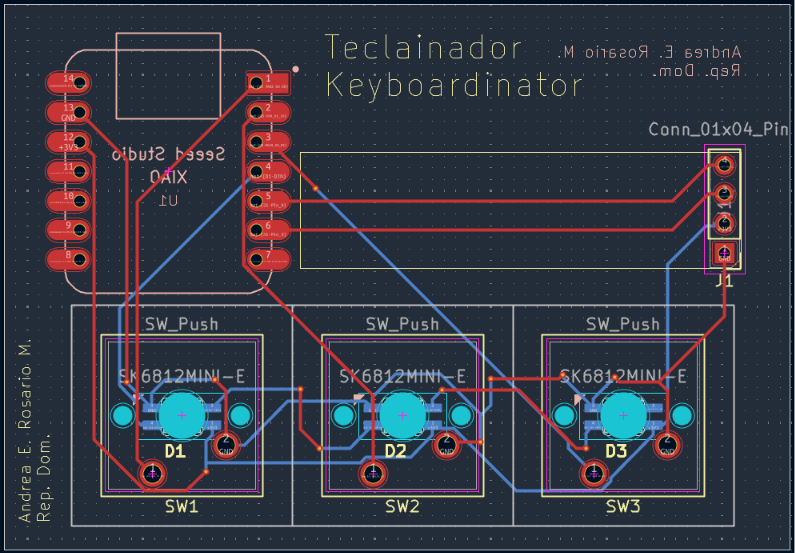
Teclado3Teclas is an open-source printed circuit board by Tei-Pancake, from the Tei-Pancake/Keyboardinator repository on GitHub. It is a 2-layer board of 67.9 × 47.1 mm with 8 parts on 17 nets, routed with 94 tracks and 6 vias.
It is built around the SK6812MINI-E. Its parts include 3 diodes, 3 switches, 1 IC and 1 connector. It belongs with the keyboards and input boards of this library.
Welcome to the Keyboardinator repository.
The Keyboardinator is a small 3-key macropad I made because apparently having a normal keyboard wasn't enough. It's built around a XIAO RP2040, three mechanical switches, and a tiny OLED screen.
The idea is pretty simple: three keys, three shortcuts, and hopefully a little less clicking around.
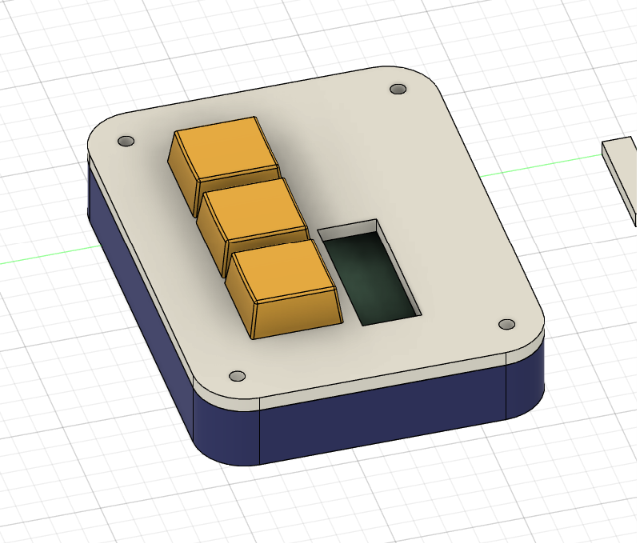
3D Model
PCB
Sexy Schema
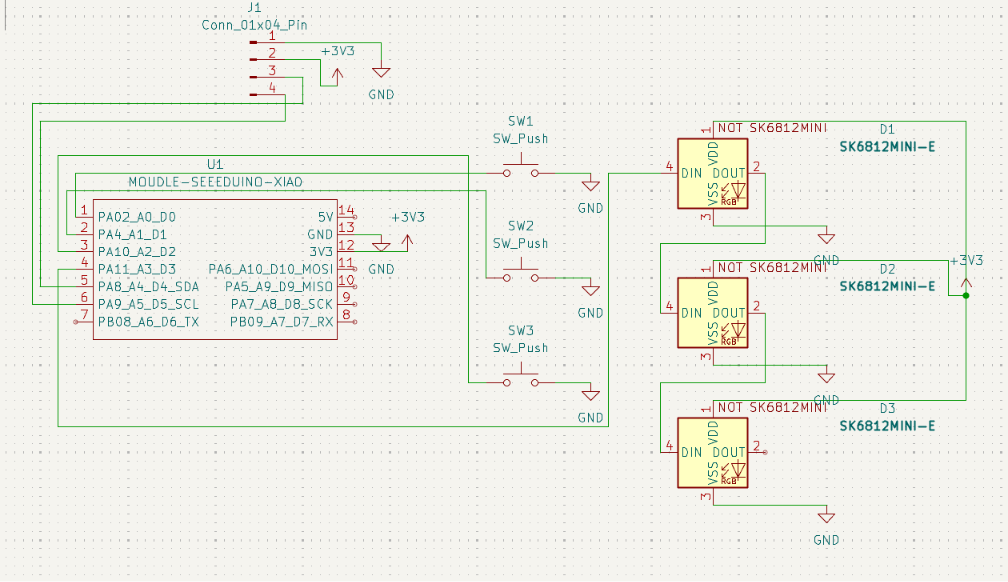
3 mechanical switches for the actual button pressing stuff. 0.91" OLED display connected through I2C (GND, VCC, SCL, SDA). Seeed Studio XIAO RP2040 as the brain of the whole thing. KMK + CircuitPython for the firmware, because I wanted something I could mess around with without making my life unnecessarily difficult.
Nothing too complicated:
Key 1 — Work Simulator: Win + D Makes the desktop appear. Very useful. Definitely not suspicious. Key 2 — History Cleaner: Ctrl + W Closes the current browser tab. Key 3 — Security Lock: Win + L Locks the computer.
The OLED is there to show the current status/layer and also because a macropad with a tiny screen is cooler than one without it.
You can find the full list of components required for this project in the BOM.md file.
/CAD 3D files for the case.
/PCB KiCad project files.
/Firmware main.py and the KMK/CircuitPython stuff.
/production Final files for actually making the thing: Gerbers, STL files and a copy of main.py.
Mostly because I wanted to learn how the whole process works.
This project involves a bit of everything: designing the case, making the PCB, routing it, figuring out the electronics, writing the firmware, and then trying to make all of it work together without something exploding.
It's a tiny project, but that's kind of the point. I wanted something I could actually finish and hold in my hands instead of another project that lives forever in a folder called final_final_v3.
Anyway, that's the Keyboardinator.
| Qty | Value | Footprint | References |
|---|---|---|---|
| 3 | SK6812MINI-E | teclas:SK6812MINI-E_fixed | D1, D2, D3 |
| 3 | SW_Push | Button_Switch_Keyboard:SW_Cherry_MX_1.00u_PCB | SW1, SW2, SW3 |
| 1 | Conn_01x04_Pin | Connector_PinHeader_2.54mm:PinHeader_1x04_P2.54mm_Vertical | J1 |
| 1 | MOUDLE-SEEEDUINO-XIAO | teclas:XIAO-Generic-Hybrid-14P-2.54-21X17.8MM | U1 |
It measures 67.9 × 47.1 mm and has 2 copper layers, 1.6 mm thick.
8 parts, built around the SK6812MINI-E. The full list of its parts is on this page, with links to each part's symbol and footprint where PCBKit's library has them.
From the Tei-Pancake/Keyboardinator repository on GitHub, at the commit this page was made from: the board is PCB/Teclado3Teclas.kicad_pcb and its schematic PCB/Teclado3Teclas.kicad_sch. PCBKit opens the board in the browser, with nothing to install.
Its repository states no licence, so its author keeps all rights: ask Tei-Pancake before reusing the design.
google/mozc-devices
Circuit diagrams and firmware source code for Gboard DIY keyboards

Bastardkb/Dilemma
The Dilemma is a vertical stagger low-profile keyboard with mods.

Pwnsat/FlatSat
Flatsat v1.0 is a hardware based platform for aerospace cybersecurity research

adamws/kicad-kbplacer
KiCad plugin for automatic keyboard's key placement and routing

imchipwood/dumbpad
Simple 4x4 numpad with rotary encoder. Powered by QMK via ATmega32u4 Pro Micro

makerforgetech/modular-biped
An open source framework for creating a bipedal modular companion robot.

