
2 layers96.6 × 82.8 mm

 Techameenjnr/starbie
A tiny motion-controlled digital pet built around the Seeed Studio XIAO ESP32-C3. Starbie uses a small OLED face, two buttons, an MPU6050 motion sensor, and an optional DHT11 environment sensor.
Starbie is an open-source printed circuit board by Techameenjnr, from the Techameenjnr/starbie repository on GitHub. It is a 2-layer board of 68.5 × 59 mm with 6 parts on 26 nets, routed with 112 tracks and 5 vias.
It is built around the DHT11. Its parts include 2 ICs, 2 connectors and 2 switches. It belongs with the ESP32 and RISC-V boards of this library.
A tiny motion-controlled digital pet built around the Seeed Studio XIAO ESP32-C3. Starbie uses a small OLED face, two buttons, an MPU6050 motion sensor, and an optional DHT11 environment sensor.
| Function | XIAO pin | ESP32-C3 GPIO |
|---|---|---|
| OLED + MPU6050 SDA | D5 | 7 |
| OLED + MPU6050 SCL | D4 | 6 |
| DHT11 data | D1 | 3 |
| Button 1 | D2 | 4 |
| Button 2 | D3 | 5 |
The OLED and MPU6050 share the I²C bus. Confirm module pin order and the final schematic before powering hardware.
The Arduino sketch is in Firmware/Starbie/Starbie.ino.
Install the ESP32 board package and these Arduino libraries:
Select XIAO_ESP32C3 as the board in Arduino IDE.
The KiCad schematic and PCB source files are included in this repository:
The board is routed. The latest KiCad DRC reports zero unconnected items and zero schematic parity issues, with one U1 local footprint library mismatch warning. The board is not confirmed fabrication-ready, so manufacturing outputs are not included.
The Week 2 parametric Starbie Shell model is in cad/starbie_shell.scad, with assumptions and verification notes in cad/README.md. The final OpenSCAD exports are cad/exports/starbie_shell_base.stl (73.5 × 64 × 18 mm) and cad/exports/starbie_shell_lid.stl (77.8 × 68.3 × 8 mm). OpenSCAD export and mesh inspection found each STL to be one connected, closed mesh. These checks do not verify component clearance, physical fit, strength, or printability; connector and control openings also remain unverified.
A genuine KiCad PCB Editor screenshot should be added here after capturing the board in PCB Editor. No PCB screenshot is included yet.
See JOURNAL.md for the project planning entry and BOM.md for the parts-funding record.
Starbie is based on the Week 1 guide and starter firmware from SharKingStudios/Starbie. This repository records my own build progress and future hardware changes.
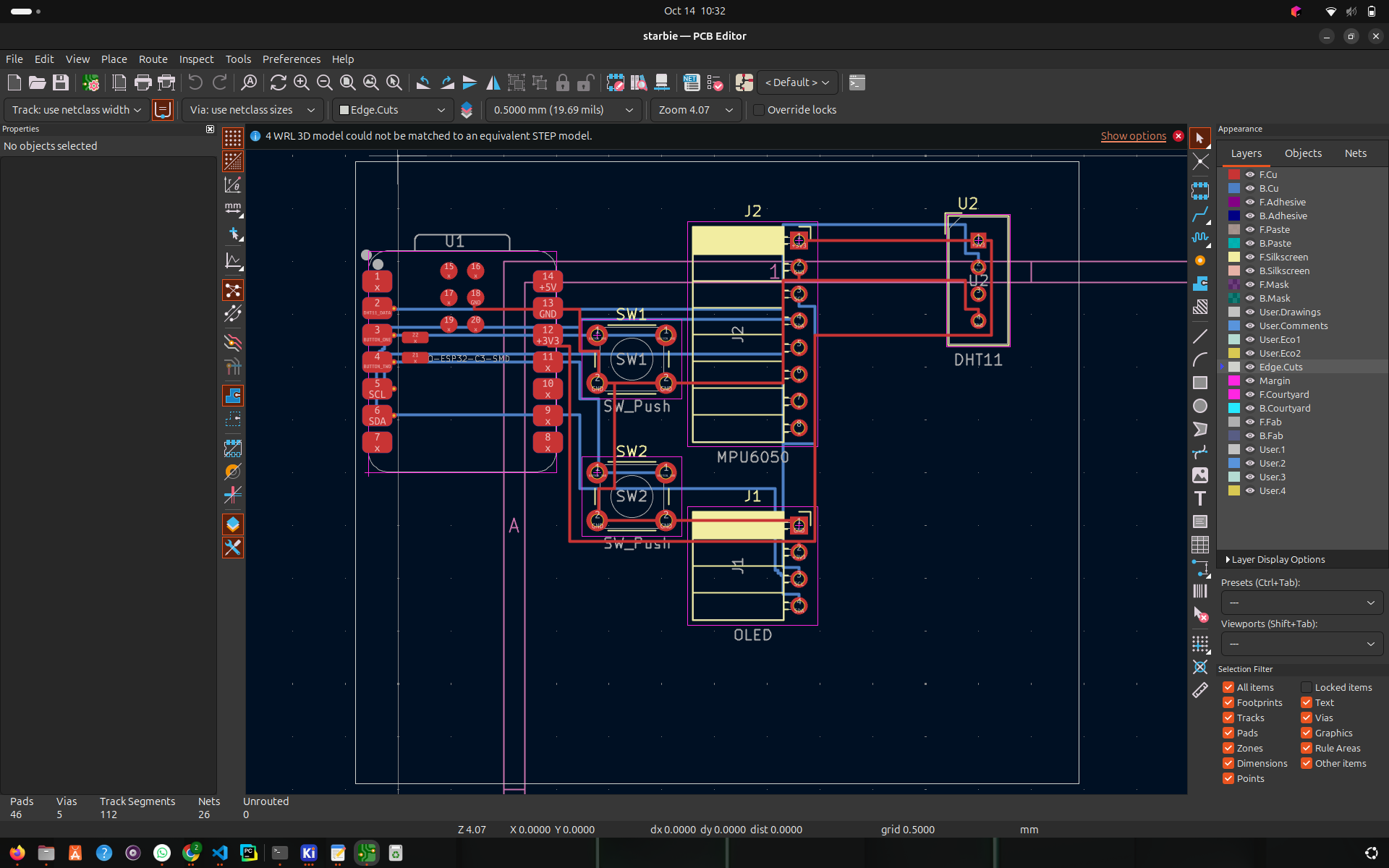
| Qty | Value | Footprint | References |
|---|---|---|---|
| 2 | SW_Push | Button_Switch_THT:SW_PUSH_6mm | SW1, SW2 |
| 1 | DHT11 | Sensor:Aosong_DHT11_5.5x12.0_P2.54mm | U2 |
| 1 | MPU6050 | Connector_PinSocket_2.54mm:PinSocket_1x08_P2.54mm_Horizontal | J2 |
| 1 | OLED | Connector_PinSocket_2.54mm:PinSocket_1x04_P2.54mm_Horizontal | J1 |
| 1 | XIAO-ESP32-C3-SMD | Seeed_Studio_XIAO_Series:XIAO-ESP32-C3-SMD | U1 |
It measures 68.5 × 59 mm and has 2 copper layers, 1.6 mm thick.
6 parts, built around the DHT11. The full list of its parts is on this page, with links to each part's symbol and footprint where PCBKit's library has them.
From the Techameenjnr/starbie repository on GitHub, at the commit this page was made from: the board is starbie.kicad_pcb and its schematic starbie.kicad_sch. PCBKit opens the board in the browser, with nothing to install.
Its repository states no licence, so its author keeps all rights: ask Techameenjnr before reusing the design.

lansidev/conveyor-belt
Miniature 3D printed conveyor belt for simulation and fun working with sensors, all controllable with Raspberry Pi


ebrithiljonas/OMG_PCB
All in One PCB for the OpenMQTTGateway Project

GeorgK/SniffingTrinket
A room climate monitor using the Adafruit Trinket Pro

bhaskar9980/Guardian
Guardian is an advanced, fully automated hydroponics system designed to optimize plant growth and maximize yield.

Twistx77/Firefly
Open WIFI-enabled RGB lamp with temperature, humidity, suspended air particles and eCO2 sensors.

unla-investigacion-desarrollo/ecosistema-iot
Antes de desarrollar el sistema final, realizamos una etapa de exploración donde investigamos y experimentamos con las siguientes tecnologías: